


Summer is coming!
Diana and I prepared a guide on how to use AI on vacation trips. She has more travel experience than I do, but I’ve also added my own experience to complement her ideas.
Imagine this: you’re in Barcelona, it’s 9 pm, every restaurant around you just closed, and you’re starving. You’ve spent the last 30 minutes scrolling Google Maps trying to find one place that’s still open AND serves what you actually want.
No luck.
This used to be me. But in about 20 seconds, AI pointed me to a place 10 minutes away that was still open and served exactly that.
That wasn't the only time AI saved my trip.
After that, I started using AI for almost everything on my last two trips: one across the US West Coast (I’m not from the USA), the other through Portugal. I used ChatGPT, Claude, and Gemini for almost everything: translating to shopkeepers in Cascais, planning a 12-day road trip, finding scenic routes, and even figuring out the location of a beach I saw on Instagram.
Some of these saved me hours. One of them saved an entire day. A few I would never have even thought of without AI.
In this guide, you’ll learn:
The exact prompt I used to plan a trip in minutes (copy-paste ready)
How AI helps me save money on my trips
How to overcome the language barrier using AI
How to find a place you saw on Instagram (even when nobody says where it is)
The rules to follow to use AI safely in your trips
and more!
Here’s how to upgrade your next trip with AI
This guide is exclusive for paid subscribers :)
Support us by becoming a paid susbcriber today 👇
1. AI saved me hours planning my whole trip
AI replaced my travel agent and saved me a huge amount of time, and even rescued a few visits to parks.
For my US trip, I told AI exactly what I had:
12 days
About $3,000 budget
Must-visit list: LA, San Diego, Las Vegas, Antelope Canyon, Monument Valley, Zion, and San Francisco.
I wanted scenic roads and to avoid paid highways
I planned to rent an RV
ChatGPT built me a day-by-day plan: LA 2 days → San Diego 1 day. With hotel zones, restaurant types, transportation tips, everything.
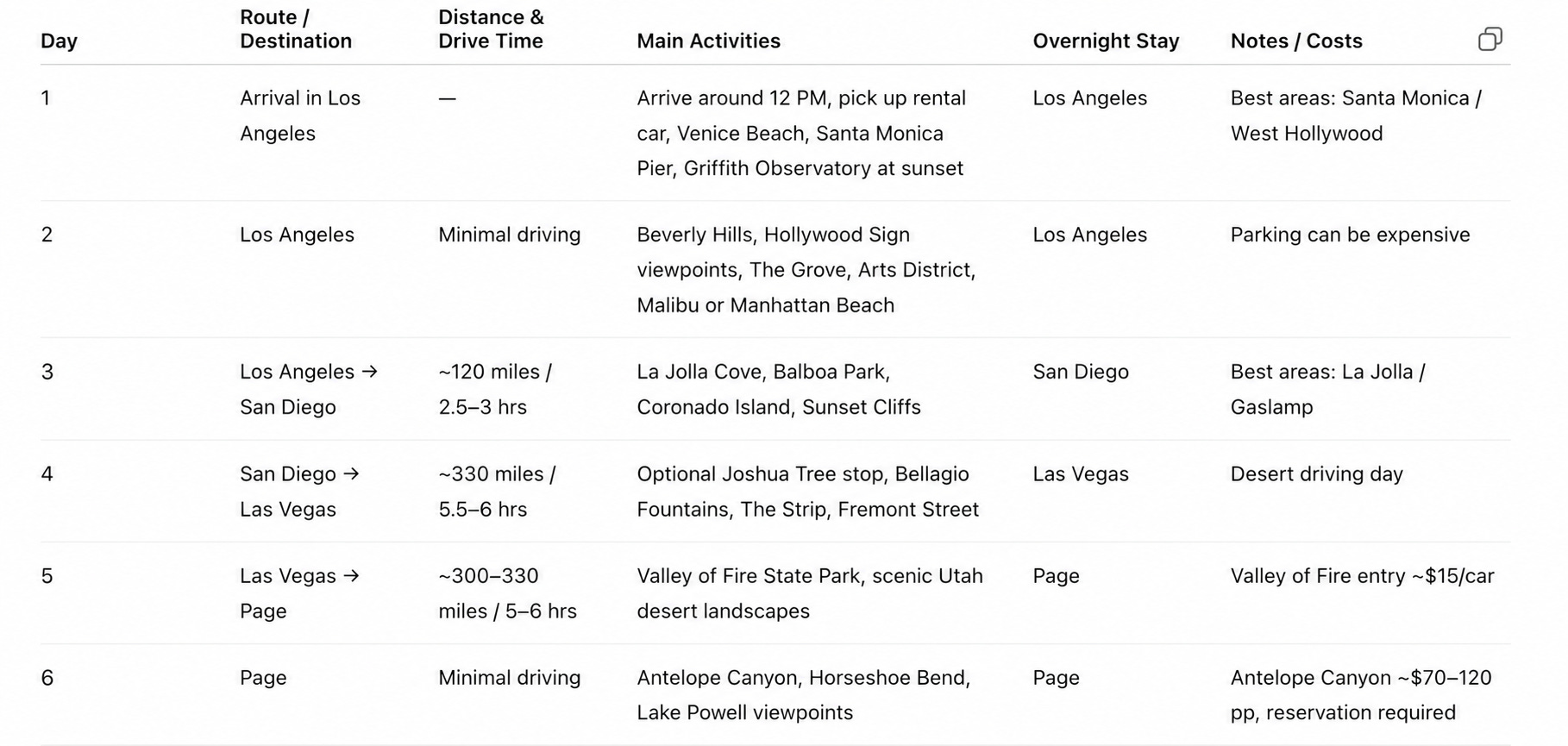
A few things that surprised me:
→ It told me not to stay in downtown LA. Santa Monica area costs more, but downtown burns hours commuting to anything fun.
→ It recommended a $1.50 LA transit card instead of taxis.
→ It told me about the $80 America the Beautiful Pass for national parks (one card - all parks - no paying per gate).
→ It warned me some national parks need permits booked in advance. Something I didn’t know existed and would have shown up without.
Some of these I could have found by Googling. But I would have spent hours, and I literally didn’t know how to ask about the permits.
But the moment that sold me on AI for trip planning was when Highway 101 (the scenic Pacific coast road) was partially closed during my trip. ChatGPT knew. It suggested an alternative: drive the open part and then stop overnight in Cambria. Without that, I would have wasted a full day or skipped that coastline entirely.
It also handled the boring stuff well: avoiding paid roads, picking scenic routes between parks, even working around the Arizona/Utah time zone difference (Antelope Canyon in the morning → Monument Valley in the evening).
The prompt I used:
Act as an elite travel planner and local expert.
Plan a complete personalized trip for me based on the information below.
Trip details:
- Destination(s): [DESTINATION]
- Travel dates: [DATES]
- Trip duration: [NUMBER OF DAYS]
- Departure location: [YOUR CITY/COUNTRY]
- Budget: [APPROXIMATE AMOUNT]
- Interests: [museums, beaches, hiking, architecture, shopping, hidden gems, etc.]
- Who is traveling: [solo / couple / family / friends]
- Accommodation preferences: [hotel / Airbnb / hostel / resort]
- Transportation preferences: [public transport / rental car / walking / trains]
- Things I want to avoid: [OPTIONAL]
Please provide:
1. A day-by-day itinerary with morning, afternoon, and evening plans.
2. Recommended neighborhoods to stay in.
3. Hotel recommendations for different budgets.
4. Best local restaurants.
5. Hidden gems, non-touristy experiences, and any required permits.
6. Estimated daily costs.
7. Transportation tips between locations.
8. Safety tips and common tourist mistakes.
9. Weather expectations and packing suggestions.
10. The best apps and websites for this destination.
Frank’s note: ChatGPT can hallucinate road closures or pretend to know things it doesn’t. Always cross-check critical info with Google Maps or the official park site.
2. AI provided better translations than Google Translate
In Portugal, almost no one I met spoke English.
Google Translate was my first thought, but the translations weren’t accurate enough for real conversations.
So I switched to ChatGPT. Here are 3 ways I used it:
You type “how to say [phrase] in [language]” → read/play the translation out loud
You use voice dictation and say, “how to say [phrase] in [language]” → same as before. You can also show the translation to the other person
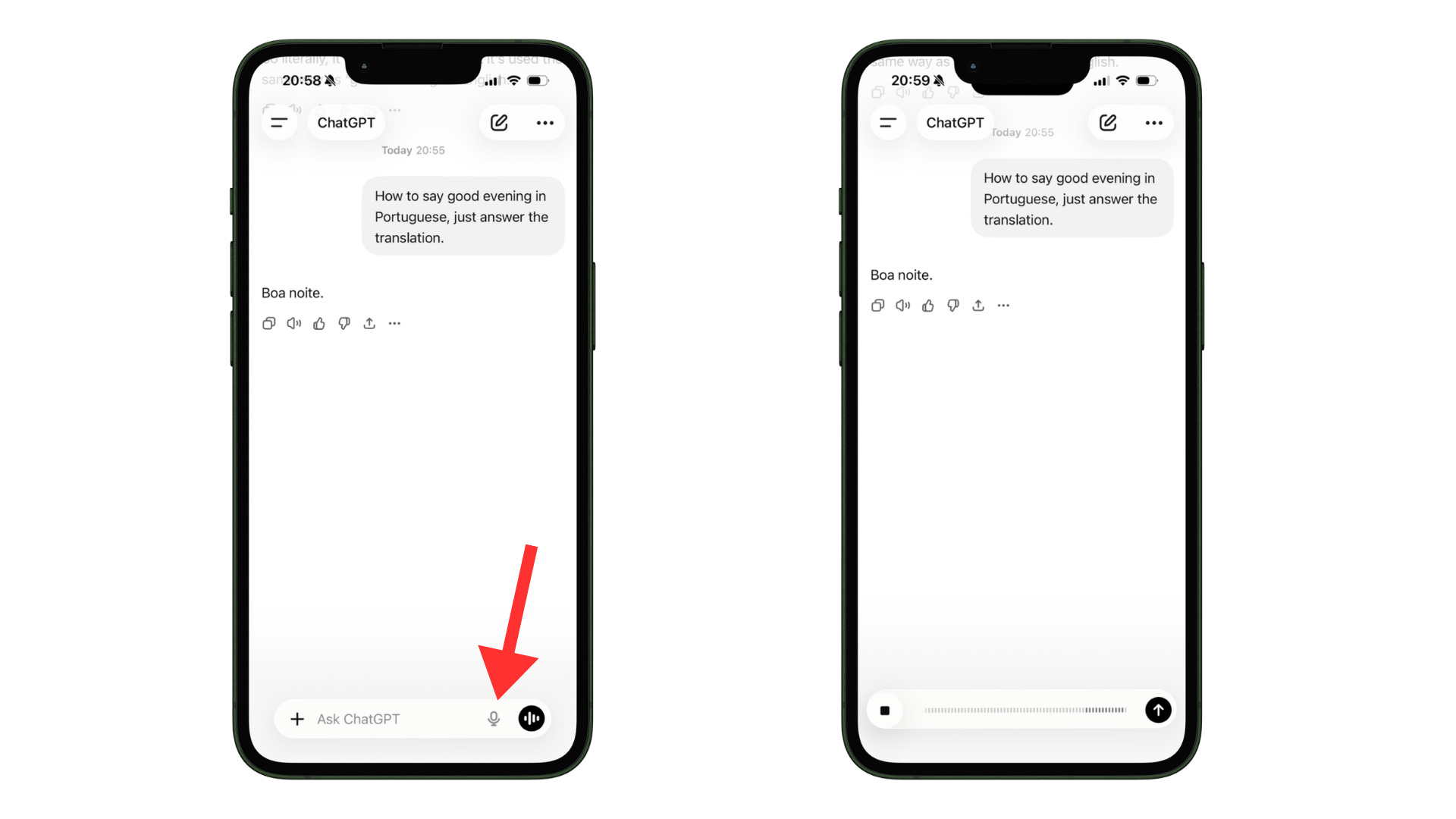
You use Voice mode → ask “how do I say [phrase] in [language]?” → let the audio play out loud
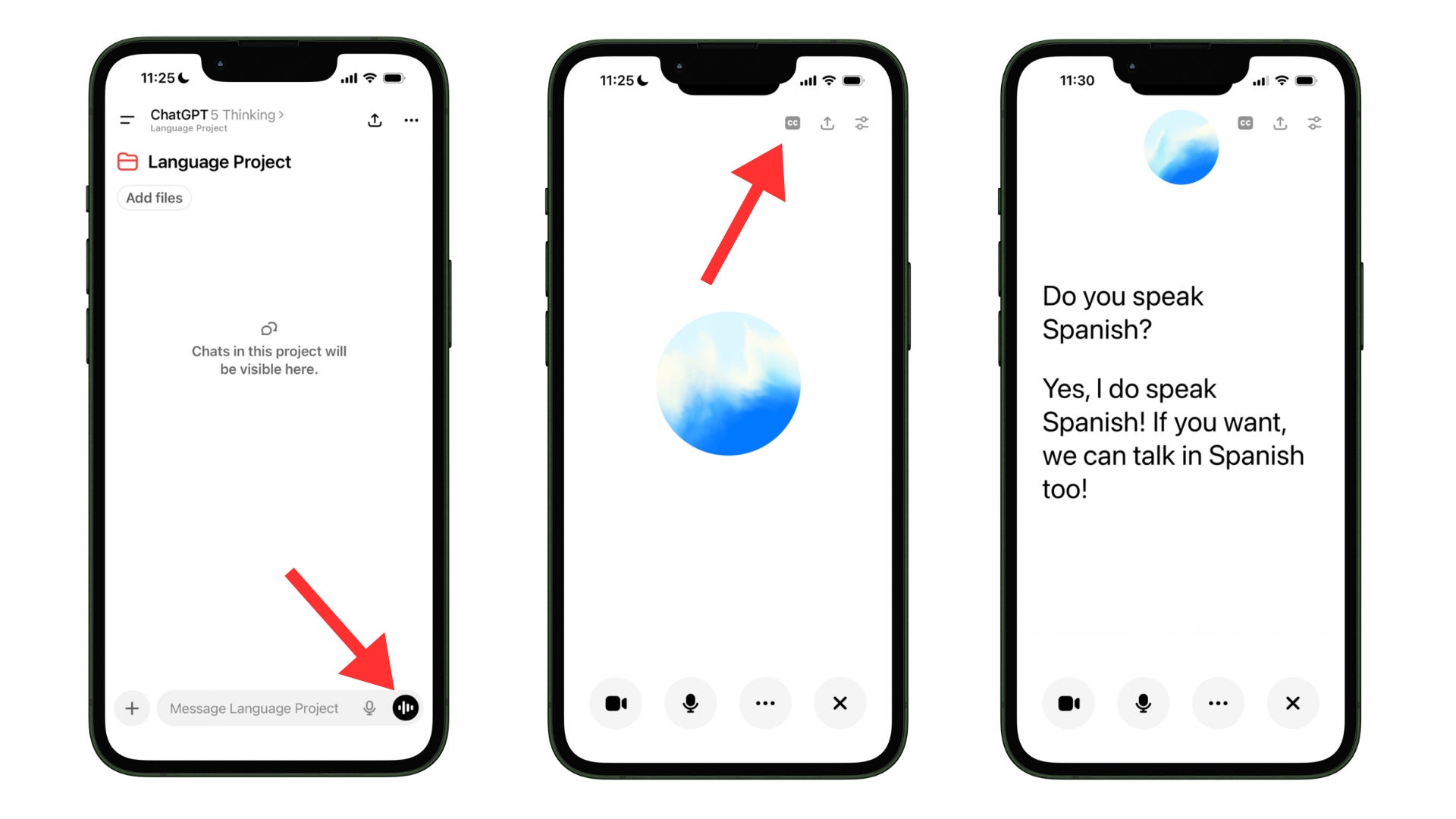
I used it almost always and everywhere in Portugal, from asking about prices in shops or clarifying pickup and drop-off points with taxi drivers, to everyday conversations, even about things like a wetsuit for surfing.
I tried Google Translate too, but it was just not as accurate (especially with longer or weirder phrases). ChatGPT keeps the meaning instead of doing a word-for-word swap that ends up sounding strange.
The ChatGPT mode you pick really depends on the vibe of the situation.
Voice mode if it’s quick and casual
Voice dictation if you don’t want to make the other person feel weird about your phone talking to them 😅
3. I turned AI into my personal museum audio guide
Most museums charge €5–€10 for an audio guide. Sometimes they don’t even have one in your language.
Here’s the trick:
Pop in your AirPods
Open ChatGPT in voice mode
Say the name of the museum
Ask “tell me the main things about this place: the history, who lived here, who visited.”
ChatGPT will talk you through it like a real audio guide.
For me, this is even better than an audio guide, because you can also ask additional questions.
Quick example: at one castle (Palácio e Parque Biester) I visited, ChatGPT casually mentioned that Johnny Depp had filmed a movie there. That’s the kind of detail you’d normally pay for on the official audio guide - except now it’s free and on demand.

You can also do this without voice mode if you don't want to walk around talking to your phone. Just chat, scroll, and read.
A small upgrade I want to try next time: walk up to a specific painting, use video mode, point the camera, and ask, “what’s the story of this painting?” Hope security won't mind or think I'm taking a photo.
4. AI helped me find places that match what I actually wanted
Here’s what I learned in my trip to San Francisco.
Restaurants close early. Like, 9pm early. And if you specifically want a lobster roll (my case), Google Maps turns into a one-by-one click hell.
When I wanted that lobster roll late at night, I gave ChatGPT three things:
My location (the hotel name)
The food I wanted
The time I’d arrive (around 10 PM)
ChatGPT recommended a good place.
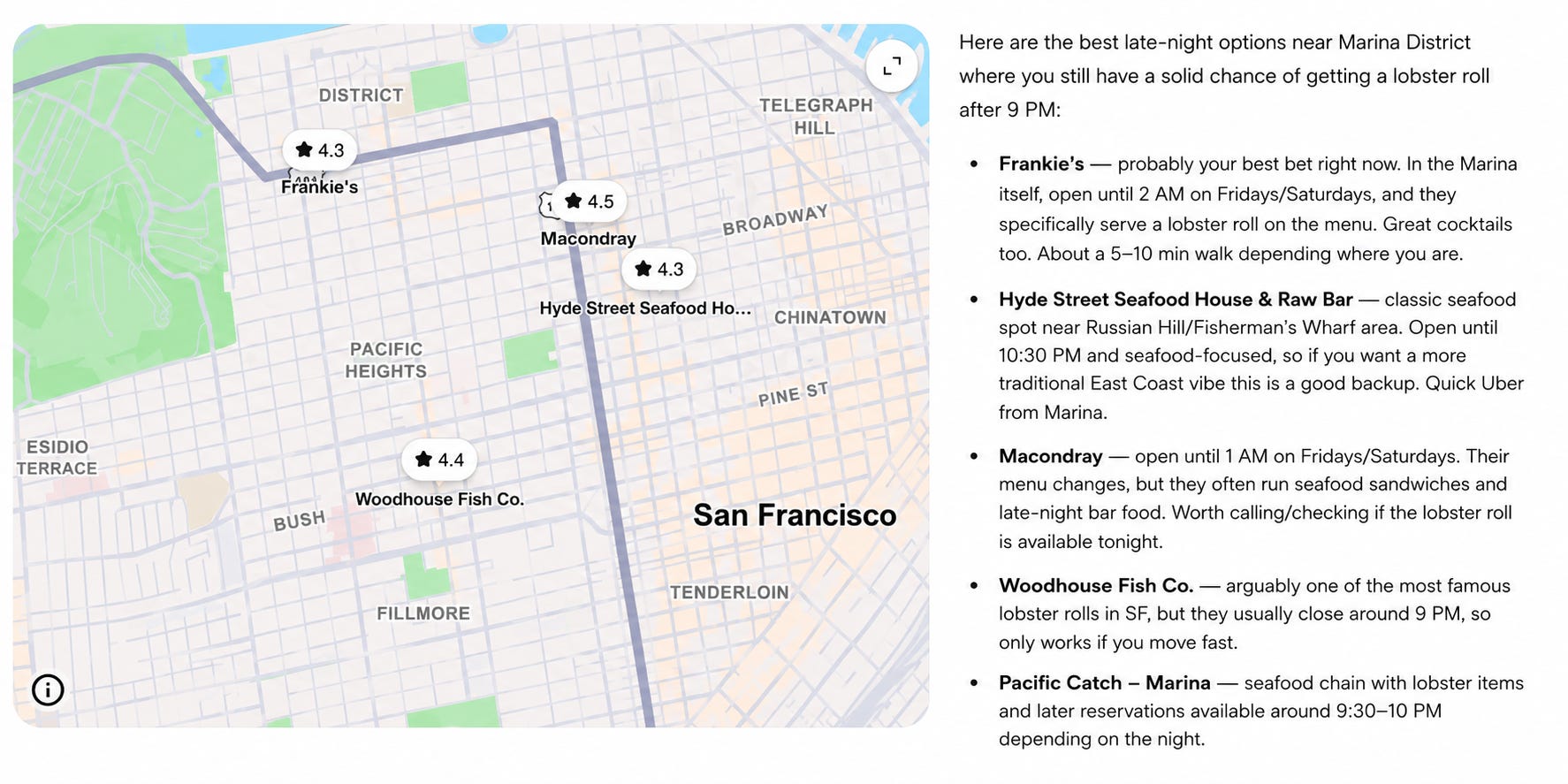
The restaurant was open. 10-minute walk. The lobster roll was amazing.
I did the same trick in a tiny town in Arizona (Page) after a late drive from Monument Valley, everything looked closed, but ChatGPT found me one place still serving food.
Frank’s note: This works great in big cities. In small towns, AI doesn’t always have current info on hours. Sanity-check with Google Maps before you walk 20 minutes for nothing (it happened to me in Granada, Spain!)
5. AI helped me find a place from just a photo
This one feels almost like magic.
You see a beautiful beach on Instagram or a viewpoint on Pinterest, but the post doesn’t say where it is (annoyingly common).
Here’s what I did:
Save the photo
Upload it to ChatGPT
Ask “where is this place?”
I tried it on a photo taken in Arizona National Park and a random beach in Portugal. Got the exact spot both times.
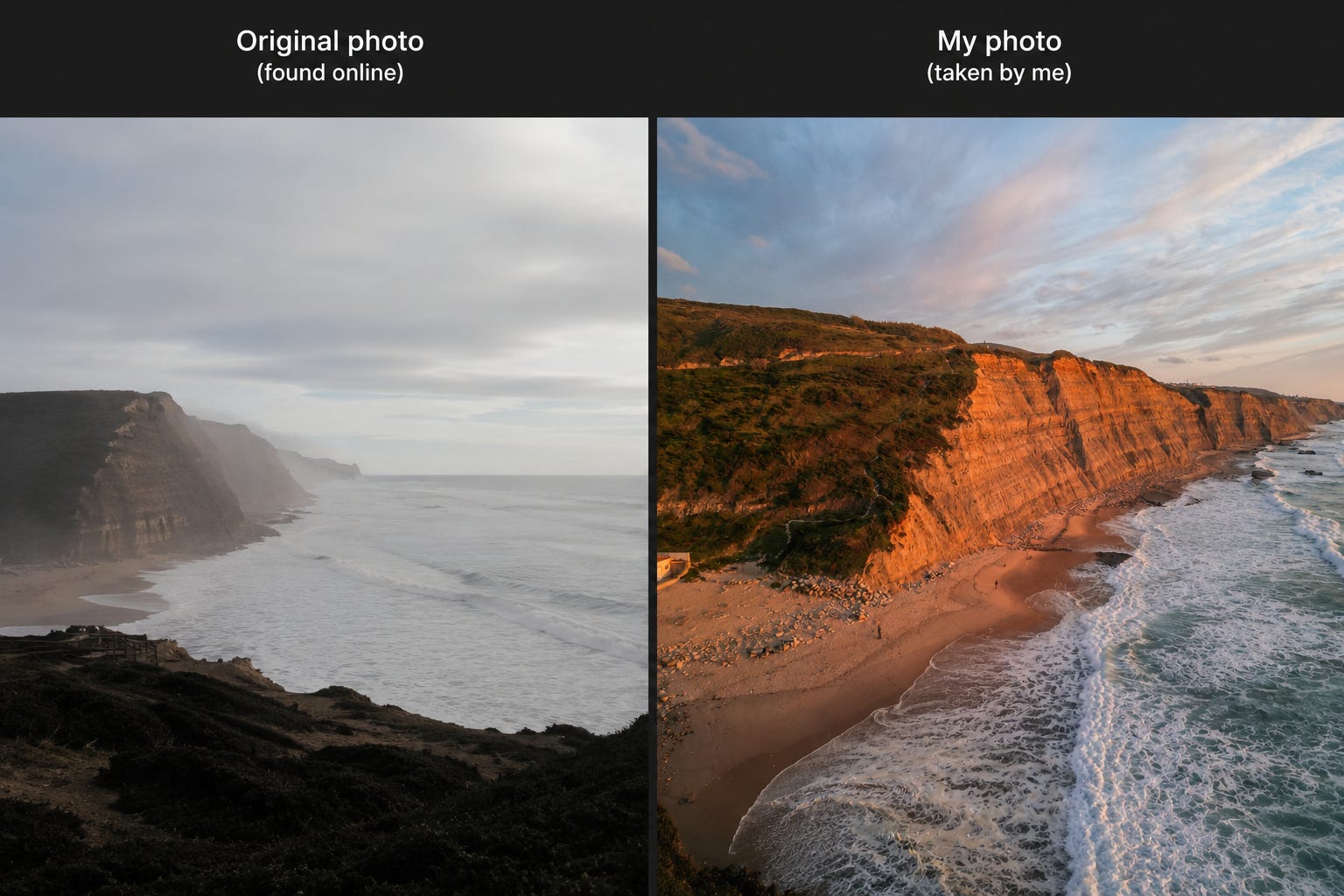
It actually found many of the places I wanted to visit and even suggested the best times to take photos there. Can you imagine? Your own all-knowing tour guide.
Frank’s note: AI can hallucinate locations, especially when the photo is unusual or low quality. There are cases of people being sent to a random place that didn’t match the uploaded photo.
So the rule: Always cross-check on Google Maps Street View before showing up.
Drop the location → switch to Street View → see if it actually looks like the photo.
Takes 30 seconds. Saves you a wasted afternoon.