


Using AI is no longer an advantage
A couple of years ago, using AI felt like a superpower. Something that could put you ahead of almost everyone in any room.
Today, it’s starting to feel more like knowing how to use Word or Excel.
Useful, yes. But no longer impressive.
AI is becoming part of the modern work toolkit, not just for tech people.
Writers use it to draft
Marketers test ideas with it
Students use it for assignments
Entrepreneurs use it to move faster
Everyone “uses” AI. Few get anything real out of it.
That’s exactly why just using it won’t protect your job anymore.
The edge now comes from how you use it and what you can actually produce with it: executing faster, communicating better, thinking more clearly, making smarter decisions, etc.

The gap between basic AI use and real advantage looks small. The results aren’t.
One person asks AI for a quick, generic draft.
Another gets it to write in their own voice, matching the company’s style.
One person saves 5 minutes on emails.
Another has systems running while they sleep.
In 2-3 years, “I use AI” won’t mean anything. Everyone will say it.
What will actually matter is what you can do with it that the next person can’t.
This guide gives you exactly that:
The 3 modes that tell you what to delegate to AI and what to never hand over
Why a workflow beats a pile of prompts (and the 5 questions I use to build one)
How to turn AI’s instant answers into real judgment, the skill that doesn’t go obsolete
The simple formula behind a real professional advantage
The free part showed you the problem. The rest shows you the fix.
This guide is exclusive to paid subscribers. Support us by becoming a paid subscriber today :)
1) Know what to delegate and what to keep human
Some people try to automate everything. Others avoid AI completely because they don’t trust it.
Both extremes miss the point. They treat AI as an all-or-nothing answer.
The goal is knowing what you can delegate and what you should keep for yourself.
A simple way to think about it: divide your work into three modes:
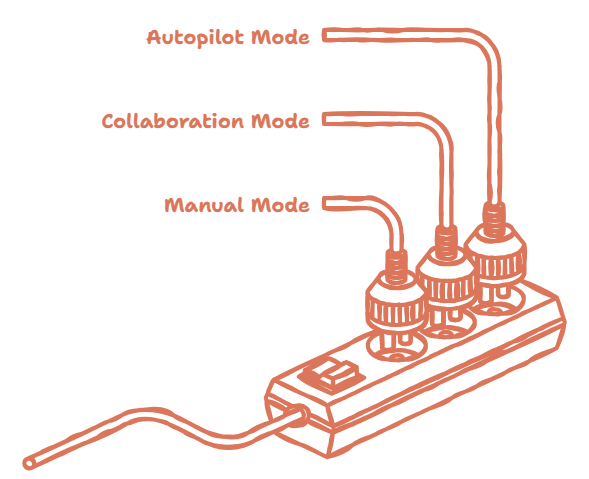
1. Autopilot Mode
Use autopilot when the task is clear, repetitive, low-risk, and easy to review.
Things I usually delegate here:
cleaning an Excel table
summarizing meeting notes
organizing messy information
changing the format of a text
brainstorming ideas
turning notes into an initial structure
So the equation looks something like this:
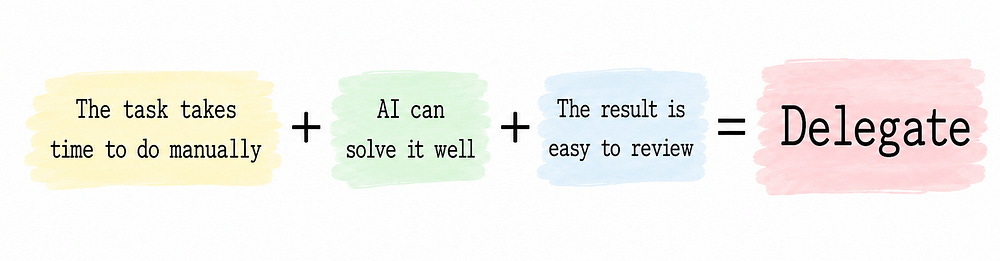
But the keyword is review.
Delegating doesn't mean blindly trusting the output. AI handles the mechanics. You stay responsible for the final result.
2. Collaboration Mode
Use collaboration mode when the task needs context, iteration, or judgment.
Things like:
preparing a presentation
structuring an article
researching a topic
comparing alternatives
improving a proposal
exploring angles for an idea
organizing arguments before making a decision
The goal here is to speed up your work, not replace your thinking.

AI gives you variations, first drafts, rough versions. You bring the direction, the standards, and the ability to connect information to your actual context.
3. Manual Mode
Some things should stay human.
The risk of getting it wrong is too high, or the context matters too much.
Use manual mode for things like:
sensitive decisions
personal or work relationships
delicate communication
conflict
negotiation
strategy
ethical judgment
direct responsibility
Here’s an example: say you need to reply to a tense message from your boss, a client, or someone important. AI doesn't know the full story. It doesn't know the tone of the relationship, the background, the internal tensions, or what a poorly chosen phrase could cost you.
In that case, you’d probably spend more time explaining the context to AI than just writing the reply yourself.
When a task is sensitive, ambiguous, risky, or heavily dependent on judgment, keep it manual.
2) Build workflows, not prompt collections
Most people still treat AI like a collection of prompts.
One prompt for emails, another for summarizing documents, one more for generating ideas or proofreading. That helps. But it has a ceiling.
A prompt solves one task. A workflow can improve an entire way of working.
Here’s a simple example. Say you put together a weekly report. You could design it like this:
Gather information
Summarize the important changes
Spot patterns
Flag risks
Draft conclusions
Review with your own judgment
The real advantage is in designing a process where each step has a clear role. This also helps avoid a common mistake: asking AI to research, analyze, write, review, edit, and decide all at once.
When you do that, the result usually comes out generic.
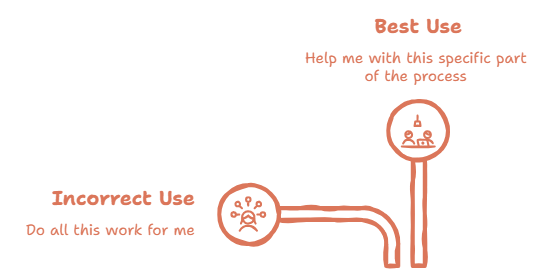
Break the work into steps, and you control the quality at each one.
So when a task repeats, think bigger than the next prompt. Map out the full process.
Some questions I use to build these:
What part repeats?
What part takes the most time?
What part can AI handle well?
What part needs my judgment?
What result do I always want to get?
The best part: this works in any context, whether you’re a student or leading a team.
3) Turn information into judgment
AI can produce information very quickly. Summaries, ideas, comparisons, drafts, explanations, all in seconds.
But raw information, on its own, isn’t the same as judgment.
In a world where anyone can generate answers, lists, reports, or basic analysis, the real value moves somewhere else:
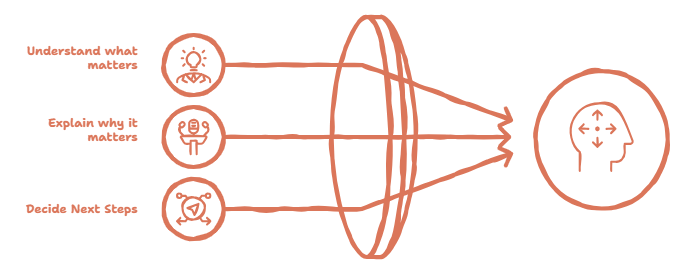
That’s where humans still have a real edge.
A better way to use AI is to ask it to help you think.
For example:
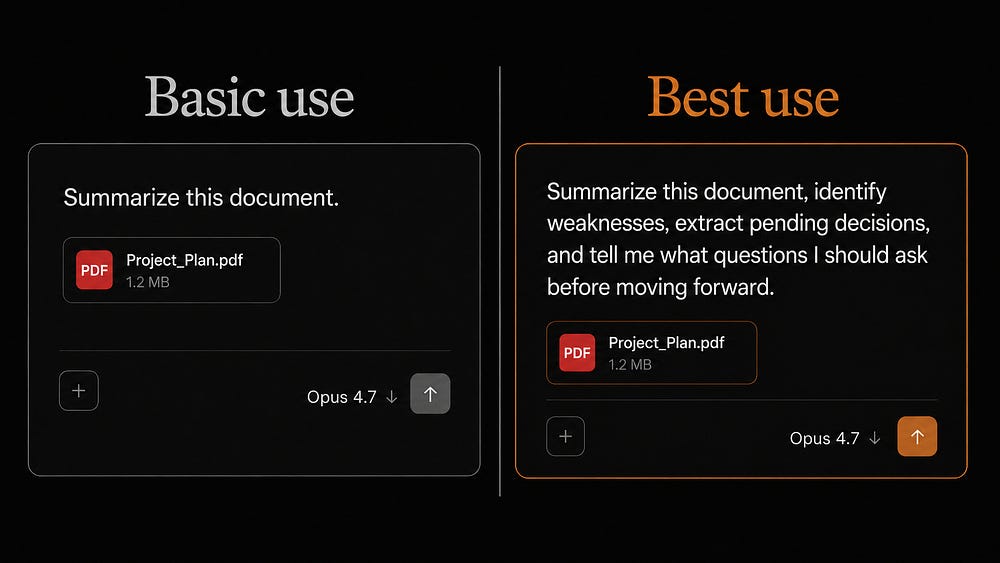
Or :
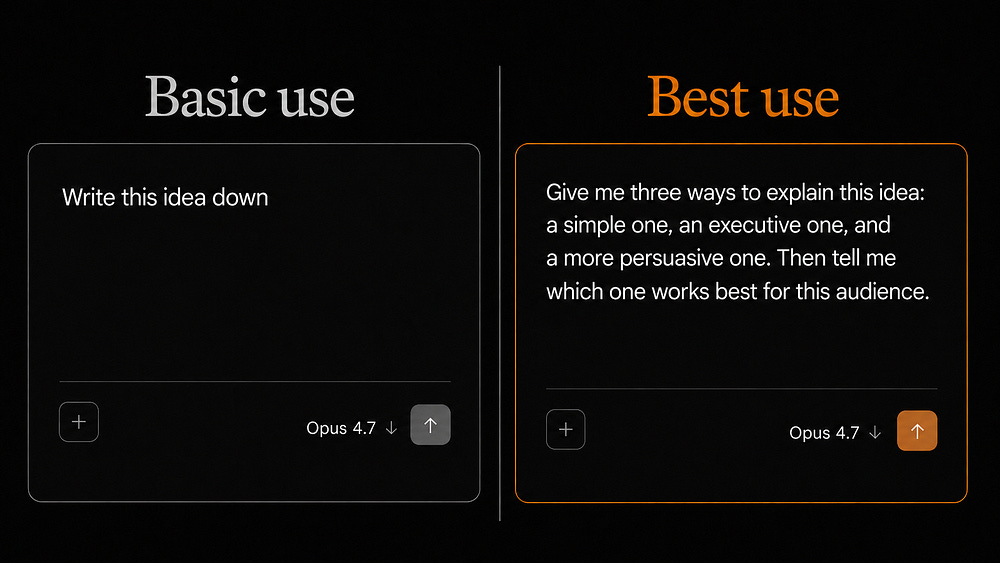
In both cases, you’re using AI to sharpen your thinking.
The same applies to data, decisions, strategy, and communication: compare options, detect risks, question assumptions, improve arguments, adapt messages, make better decisions.
Before asking for an answer, define your own point of view first. Then use AI to challenge it, improve it, or help you spot what you’re missing.
That way, you avoid becoming someone who just copies answers.
4) Closing formula
Anyone can use AI. That part is already settled.
The real advantage is in using it with intention.
Because in the AI economy, producing more content, more answers, or more versions won’t be enough to stand out.
The edge goes to whoever can turn these tools into better outcomes.

AI exposes the difference between those getting better because of it, and those who are just producing more.
The question worth asking: is AI improving the way you think, work, and decide?
That’s where the real advantage is.
5) Develop skills AI lacks & diversify your skills
An excellent way to AI-proof your career is by developing skills that become even more valuable in an AI-first world.
Forget about memorizing formulas and equations and focus on developing your critical thinking. This means challenging assumptions, asking better questions, developing your curiosity, finding creative solutions, and more.
The skills you learn shouldn’t be limited to your professional field, though.
It fascinates me how Steve Jobs drew value from his calligraphy class during his college days. He didn’t take those lessons because he knew he’d need them one day for the Mac computers, but because he liked it.

We never know when something we learned in the past will be useful in the future, so instead of learning random stuff or picking something everyone likes, choose something you love.
It doesn’t matter if what you learn has little to do with your career. Mastering different skills will make you unique. Arts and technology seem like very distant fields, but the combination of them was key to making Apple so successful.
I didn’t learn English as a second language because I knew in the future I’d write articles or make videos in English. I just did it because I liked it.
Learning different skills will open new doors and make you unique in the job market.
Start doing it and never stop.