


Hi!
I prepared two tutorials to help you get started with Beautiful Soup and Selenium. In these tutorials, we’ll scrape a simple website from scratch so that you see with your own eyes what are the differences between these two libraries.
In this article, we’ll extract football data from all the FIFA World Cups played between 1930 to 2022. That’s around one thousand games.
Here are six of these games (we’ll extract some of this data).

To extract this data, we’ll scrape Wikipedia using Python and Beautiful Soup. The data we want to extract is split into multiple Wikipedia pages, so we’ll start by extracting data from one page and then we’ll create a for loop to extract data from all the pages.
Let’s install the libraries.
Installing the libraries
In this tutorial, we’ll use bs4 to scrape websites, lxml to parse HTML documents, and requests to send requests to the target website.
Here’s the command you need to run in the terminal to install these libraries.
pip install bs4
pip install lxml
pip install requests
In addition to the previous libraries, we’ll install pandas to better manage the data we’re going to extract.
pip install pandasNow let’s start coding!
Part 1: Scraping data from one World Cup
In this tutorial, we’re going to scrape data from all the world cups played so far. That said, to make this guide friendly, we’ll start by scraping data from one World Cup — Brazil 2014. In part 2, we’ll use the code written in part 1 to extract data from all the world cups.
Importing the libraries
Let’s start by importing the libraries we installed before.
import pandas as pd
from bs4 import BeautifulSoup
import requests
Note that we don’t need to import lxml since it’s only a dependency that bs4 needs to work properly.
Creating a soup
To extract data with Beautiful Soup we need to create a soup. This soup uses the lxml parser we installed before and also the HTML content that will be parsed.
To get the HTML content of a website we need to send a request to the website and then get the text of the response.
web = 'https://en.wikipedia.org/wiki/2014_FIFA_World_Cup'
response = requests.get(web)
content = response.text
soup = BeautifulSoup(content, 'lxml')
Extracting all the matches from the World Cup
Now it’s time to web scrape football matches. To do so, we have to identify a pattern that allows us to scrape not only one but all the matches of the competition.
To easily find one pattern, first, we have to inspect the website by right-clicking and selecting “Inspect.” After this, developer tools will pop up. You can navigate through the HTML using the button below.

Here’s one pattern I found after exploring the website.
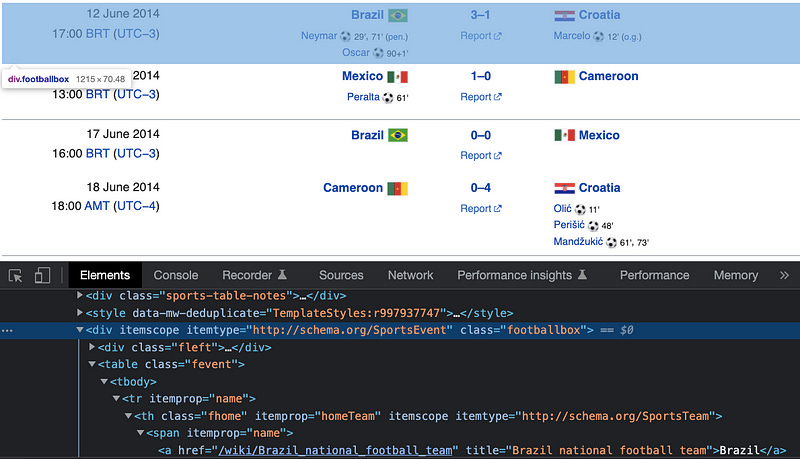
As you can see every match played is inside a row that is represented by the HTML node highlighted in blue above.
Now to extract all the matches with our soup we have to use the .find_all method. This method needs 2 inputs: the tag name and the class name.
matches = soup.find_all('div', class_='footballbox')I’ve stored all the rows inside a list I called matches.
Extracting the home/away teams and score data of every match
Now that we have all the matches inside our matches list, we have to loop through it to extract specific information.
In this case, we’ll extract the home/away team and score data. Then we’ll store them inside empty lists, so we can later put them in a table.
To get the home team data, we need to inspect it first, then we have to copy the tag name and class name. The same goes for the score and away team.
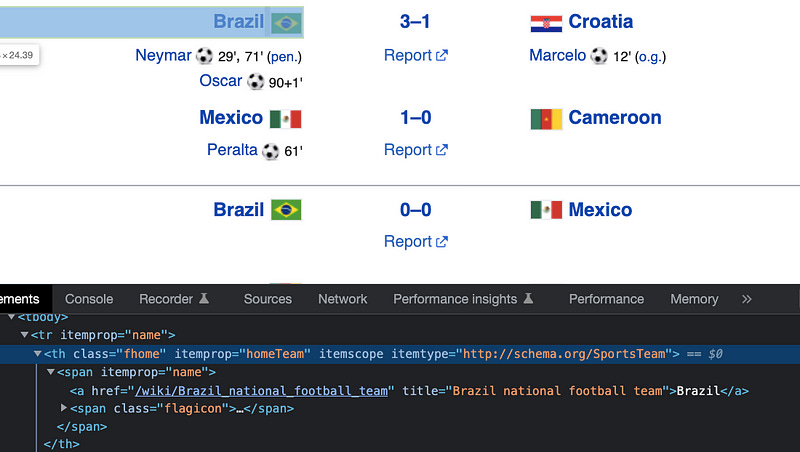
Finally, we get the text of an element by using .get_text .
home = []
score = []
away = []

for match in matches:
    home.append(match.find('th', class_='fhome').get_text())
    score.append(match.find('th', class_='fscore').get_text())
    away.append(match.find('th', class_='faway').get_text())
Storing our data in a dataframe and exporting data to a CSV file
Dataframes are good for managing data in Python. We’ll create a dataframe from the home, score, and away lists. In addition to that, we’ll create a column named “year” that will contain the year of the World Cup (2014 for this particular case)
dict_football = {'home': home, 'score': score, 'away': away}
df_football = pd.DataFrame(dict_football)
df_football['year'] = 2014
Finally, we export the dataframe to a CSV file.
df_football.to_csv("fifa_worldcup_historical_data.csv", index=False)Great! Now you should have a CSV file with the data of the World Cup 2014.
Part 2: Scraping data from ALL the World Cups
Now that we know how to scrape one World Cup is time to scrape them all! To do so, first, we need to find a pattern in the links.
Let’s have a look a the links of the World Cups 2014, 2018, and 2022
https://en.wikipedia.org/wiki/2014_FIFA_World_Cup
https://en.wikipedia.org/wiki/2018_FIFA_World_Cup
https://en.wikipedia.org/wiki/2022_FIFA_World_Cup
Have you noticed the pattern? The links are identical except for the year when a World Cup took place.
We can re-write our web variable to consider this pattern:
web = f'https://en.wikipedia.org/wiki/{year}_FIFA_World_Cup'And now we can put our code inside a function that takes as input the year.
import pandas as pd
from bs4 import BeautifulSoup
import requests


def get_matches(year):
    web = f'https://en.wikipedia.org/wiki/{year}_FIFA_World_Cup'
    response = requests.get(web)
    content = response.text
    soup = BeautifulSoup(content, 'lxml')
    matches = soup.find_all('div', class_='footballbox')

    home = []
    score = []
    away = []

    for match in matches:
        home.append(match.find('th', class_='fhome').get_text())
        score.append(match.find('th', class_='fscore').get_text())
        away.append(match.find('th', class_='faway').get_text())

    dict_football = {'home': home, 'score': score, 'away': away}
    df_football = pd.DataFrame(dict_football)
    df_football['year'] = year
    return df_football
Now it’s time to get historical data from 1930 to 2022 using our get_matches function.
years = [1930, 1934, 1938, 1950, 1954, 1958, 1962, 1966, 1970, 1974,
         1978, 1982, 1986, 1990, 1994, 1998, 2002, 2006, 2010, 2014,
         2018, 2022]

# results: historical data
fifa = [get_matches(year) for year in years]
df_fifa = pd.concat(fifa, ignore_index=True)
df_fifa.to_csv("fifa_worldcup_historical_data.csv", index=False)
That’s it! Now you should have a CSV file on your computer that contains data from World Cup 1930 to 2022.
This first final file has some missing data because of some inconsistencies in the Wikipedia website (this tends to happen in real-world projects). In the following tutorial, we’ll scrape the missing data using Selenium.
Thank you, nice
But there is an error in your script. In Part 1: df_fifa.to_csv must be replaced by df_football.to_csv