

In previous posts, I wrote about the best Claude and Cowork skills.
So why do you need skills for Claude Code?
If you’ve been using Cowork a lot (like me), you’ve probably hit a wall already. Cowork has limits that keep it safe for non-technical folks. That’s a good thing most of the time. But every now and then, you want to do more than it allows.
That’s when you need Claude Code.
And no, you don’t need to be an expert programmer to use it. Especially if you have the right skills installed.
When you build something with code, half the job isn't writing it. It's making sure it actually works: catching bugs, testing it, not shipping something that breaks the second someone uses it.
That's the part that scares people off (and what takes real experience).
These skills do that part for you! Claude plans it, tests it, and reviews its own work. You just steer.
In this guide, you’ll get:
How to quickly install a Claude Code skill
The best 6 Claude Code skills
The exact command to install each one
Every week, I publish new Claude guides: some free, some paid.
Click here to get my FREE Claude course (20+ lessons)
How to Install a Claude Code Skill
This part scares people off for no reason.
Installing a skill is usually one command pasted into your terminal.
Most skills live in something called a "marketplace" (think of it like an app store for Claude). The official ones are already connected, so you just install.
Here’s how to install one:
Open Claude Code in your terminal.
Paste the install command for the skill you want (I list each one below).
If a skill lives in its own “marketplace,” add the marketplace first, then install it.
Restart Claude Code, so it picks up the new skill.
Here’s an example:
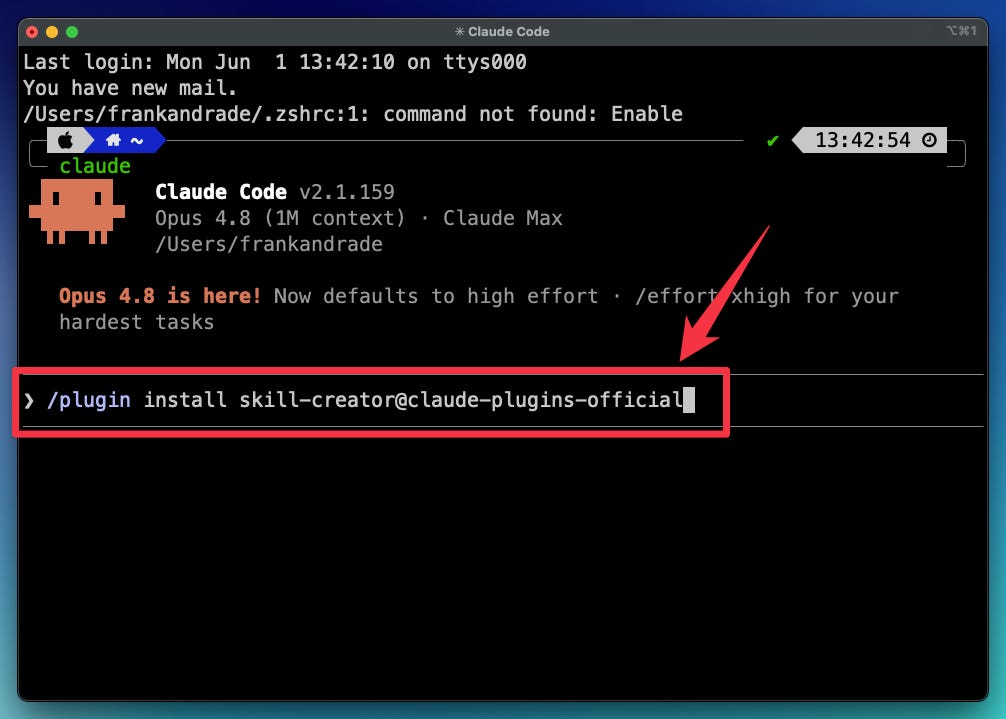
That’s it. Most skills install in under a minute.
Pro tip: install the ones you’ll use everywhere (like Skill Creator below) “globally,” so they work in every project without you having to think about it.
The best 6 Claude Code skills
1) Skill Creator
Problem:
Most people who try to build their own skill hit a wall fast. They don’t know the structure, the formatting, or what makes a skill reliable. So they either give up or build something that breaks the second a client touches it.
The skill:
skill-creator is the official Anthropic skill that builds other skills. You describe what you want in plain English, like you’re explaining a task to a coworker. Claude drafts the skill, tests it, fixes it, and packages it into something you can reuse forever.
Why it works:
Every custom skill you make later comes out of this one. It compresses the whole learning curve from "I have no idea how skills work" to "I just made one in five minutes"
This is the first one I'd install. Here’s the command to install it:
/plugin install skill-creator@claude-plugins-official
2) Grill Me
Problem:
Claude loves to jump straight to a plan. You give it a half-formed idea and it spits out a full document before it actually understands what you want. Then you spend the next hour correcting it.
The skill:
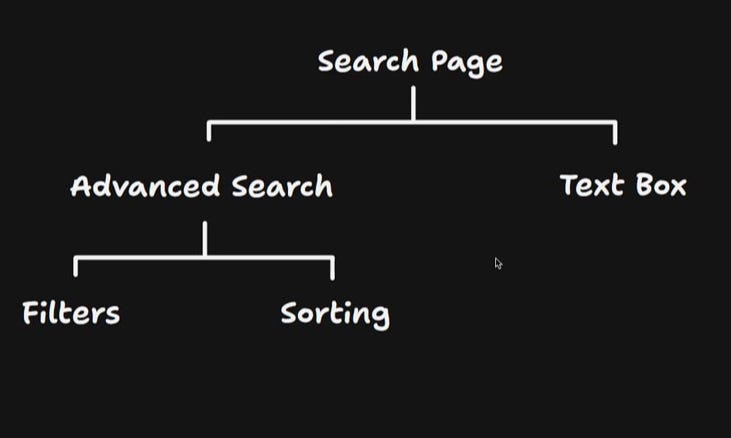
This one comes from Matt Pocock and it’s one my favorite skills. It tells Claude to interview you relentlessly about your plan until you both actually understand it, working down every branch of the decision before writing a single line of code. In one session, it asked Matt 16 questions. On bigger features, he’s had it ask 30 to 50.
Why it works:
Most mistakes come from Claude guessing what you meant. Grilling kills the guessing.
Here’s the command to install it:
npx skills@latest add mattpocock/skills -s grill-me -g
3) Superpowers
Problem:
You ask Claude Code to build something. It sprints out of the gate, writes the whole thing in one shot, and on the surface it looks great. Then you actually run it. Or worse, your client runs it. And it falls apart. Why? Claude doesn’t plan. It doesn’t test. It doesn’t double-check its own work. It just writes.
The Skill:
It forces Claude to work like a senior developer. Step back and plan the whole thing first. Work in an isolated environment so nothing breaks your main project. Write tests before writing code. Then review its own work twice. Once for “does this match what I asked for” and once for code quality.
Why it works:
Most failures with Claude Code aren’t from Claude being dumb. They’re from Claude rushing. Slowing it down just enough to actually think gets your first pass to 80% instead of 60%. That means fewer debugging cycles, lower token costs, and code that doesn’t fall apart the second a real person uses it.
Here’s the command to install it:
/plugin install superpowers@claude-plugins-official
4) Frontend Design
Problem: When Claude builds a website or a slide deck on its own, it often looks AI-generated. Generic, a little off, the kind of thing you’d want to redo before showing it to anyone.
The skill: Frontend Design is the official Anthropic skill for making the things Claude builds actually look good. Install it, and whenever you’re designing something in Claude Code, the output comes out looking a lot less “an AI made this.”
Here’s the command to install it:
/plugin install frontend-design@claude-plugins-official
5) Context Mode
Problem:
Use Claude Code for a while and you’ll notice this: Things get sluggish, it forgets what file you were editing, it asks what you wanted to do (again). What’s happening is every command Claude runs dumps a pile of raw output into its memory. After about 30 minutes, most of that memory is junk. Claude has to reset to keep going. And when it does, it forgets where you were.
The Skill:
It does two things. First, it filters the junk before it ever reaches Claude’s memory. Only the useful part of each command makes it through. Second, it keeps a running log of your session (files edited, tasks in progress, your last prompt). When Claude resets, it pulls that log back in and picks up exactly where you left off.
Why it works:
Most “long sessions” with Claude Code aren’t really long. They’re a bunch of short ones glued together with you re-explaining yourself. This kills both problems at once: less garbage going in, full memory of what you’ve done. Sessions that used to die at the 30-minute mark now run for hours.
Here’s the command to install it:
/plugin marketplace add mksglu/context-mode
/plugin install context-mode@context-mode
6) Claude Mem
Problem:
Claude Code starts every new session from scratch. So you end up explaining the same project over and over again, wasting time and thousands of tokens just catching Claude up.
The skill:
This skill carries your knowledge across all your future sessions. It hooks into Claude’s session and automatically captures what happened: the file edits, the decisions, the bug fixes. It compresses all of that into summaries and stores them locally. When you open a new session, the relevant parts get pulled back in automatically. It even writes and updates your project notes for you while you work.
Here’s the command to install it:
/plugin marketplace add thedotmack/claude-mem
/plugin install claude-mem
Bonus: /review and /ultra-review
Problem:
Even careful work has bugs Claude misses on its own. You need a second set of eyes before you ship something that actually matters.
The skills:
This one isn’t an install. It’s already built into Claude Code, and most people just aren’t using it. When you finish writing code, type:
/review: Claude does a structured review of what you just built, hunting for bugs, edge cases, and design issues
/ultra-review: sends your work to the cloud and spins up a whole team of reviewer agents that each attack from a different angle (logic, security, performance)
Use /review for fast, free feedback on everything. Save /ultra-review for the big stuff: a major change, or anything touching payments or a database.
One more thing
Don’t install all the skills at once.
That’s the fastest way to get overwhelmed and use none of them. Pick one, learn it, build a few things with it, then add the next.
If you found this useful, share this and consider becoming a paid subscriber to get full access to all my guides.