


Many of us start using ChatGPT without taking the time to set it up properly. Most of the time, we just jump in and start writing prompts, whether it's for daily work or a specific task.
The result? Often, it's far from what we expected.
The good news is that the gap between getting generic answers and achieving results that go beyond our goals often comes down to just a few setup steps.
Let’s start!
First Things First —Enable Some Hidden Gems
ChatGPT has some nice features that we have to enable manually to get better responses and a more personalized experience.
Here’s how to do it.
Settings → Personalization → Turn on “Custom Instructions” and “Memory”

Later, we’ll see how these two help us improve ChatGPT.
Optional: Also turn on either “Push” or “Email” notifications for Tasks.

Why? We’ll see that in our first step of my ChatGPT setup.
#1 Automate some chats with Tasks
Stop manually triggering actions on ChatGPT. Automate them with Tasks.
The Tasks feature lets you schedule daily reminders or plan ahead for specific dates. It goes beyond what a basic calendar app can do. These may seem like small actions at first, but over the course of a week or a month, the time you save really adds up.
So instead of saying every morning, “Give me the weather and top 5 news headlines”, you could set up a Task that does this daily at 8 a.m.
Here’s how to do it.
Click on your profile icon → Tasks
Here’s a prompt that you can adapt for your work:
Stay up to date on the latest advancements in artificial intelligence and how they’re impacting the [insert your industry here] sector. Look for summaries of new product launches, emerging trends, key research findings, how competitors are adopting AI, and any current limitations
After that, you can set this task to run on a regular schedule

If you turned on push or email notifications in the previous step, you’ll get a notification every time ChatGPT runs the task. Very useful if you don’t want to lose track of the tasks you automated.
#2 Custom Instructions: Get better and personalized responses in all your chats
One of the features that has helped me the most since it was introduced in ChatGPT is the ability to tell it who I am, what I do, and what I need.
Instead of repeating your requirements in every conversation, you can use Custom Instructions to set your preferences upfront. This feature gives ChatGPT the context and guidelines to tailor its responses to your style and goals.
To open Custom Instructions, click on your profile photo and then select Customize ChatGPT
The question “What traits should ChatGPT have?” is the most important to answer. Here’s a formula that worked for me. Feel free to use it as a starting point or template:

a) Brief personal description: This helps ChatGPT understand your professional background.
I’m a Data Scientist with over five years of experience in predictive modeling and statistical analysis. I focus on using data to solve real-world problems. Even though I have a technical background, I work closely with cross-functional teams, so I prefer responses that are accurate but also accessible to a wide audience.
b) What do you do outside of work?: This gives ChatGPT a sense of your personality and interests beyond your job.
Outside of work, I write about AI and machine learning, aiming to simplify complex topics for broader audiences through articles and teaching. I’m especially interested in how technology can improve productivity and education.
c) How do you like to work?: This tells ChatGPT how to communicate with you more effectively.
I value clarity, simplicity, and efficiency. I like responses that are well-structured, concise, and easy to apply. Whether it’s solving a technical problem or explaining a concept, I prefer answers that are practical and strike a good balance between depth and clarity.
3. Projects: Organize your chats and get responses tailored to your project needs
Whenever a new project comes up around a specific topic, along with deadlines and deliverables, I create a dedicated project space in ChatGPT. This feature works well not only for personal workflows but can also scale effectively in a corporate environment.
Here’s how to work with it:
Go to the Projects tab → Create New Project.
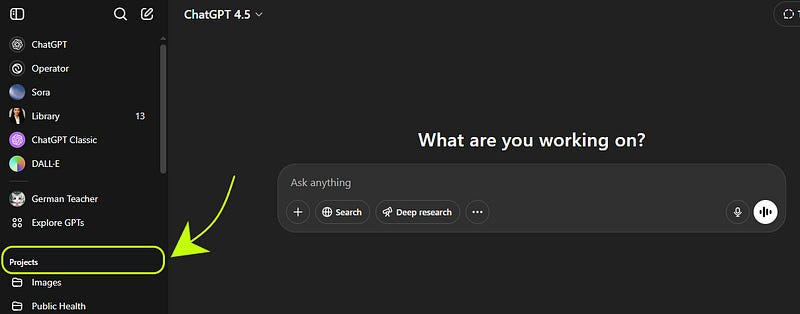
Give your project a name
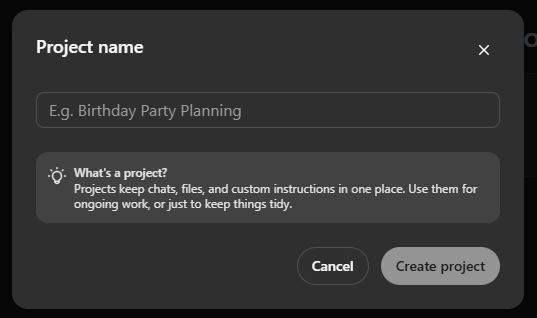
Once it's created, you'll have the option to upload files and add specific instructions related to the project. You can also add chats you created in the past.

The real value of this feature comes from the instructions you provide. Here you have the chance to give specific instructions for this project.
I recommend being as clear and detailed as possible about your goals and the type of responses you're looking for. This helps guide the project in the right direction and reduces the chances of getting off-topic or misaligned answers.
I was excited to follow your instructions, but I can't find the settings on my page. I have ChatGPT 4.o. I even asked the app to help me find it, and that didn't work. Any suggestions?
Awesome 🔥🔥