


If you’re already using Claude Code, or thinking about it, you’ve probably felt overwhelmed trying to figure out which components, folders, and files you’re actually supposed to create.
Claude Code is impressive. That’s undeniable. However, if we don’t understand how to organize its internal architecture, we won’t get the results we expect.
It’s not Claude Code’s fault.
Many of us try to solve everything through prompts alone. That approach is not entirely wrong, but it becomes far more effective when it’s supported by a clear structure.
So what should your first project include?
You need to think about the following:
A clearly defined role
Written rules
Explicit boundaries
The environment is intentionally designed
At this point, you already understand the central idea. This is the foundation that will support every project you decide to build on your own.
When I first started, I spent hours going through documentation and watching countless tutorials. The reality is that it can be frustrating not to fully understand how projects are structured.
When working with Claude Code, clarity around structure makes all the difference.
That’s why, by the end of this article, you’ll have:
Clarity on which files to create first
A simple but scalable structure (highly underrated)
An understanding of how to think like Claude Code—not just how to use it
This will become your starting point for any project, from the most basic to the most advanced.
I’m creating a series of guides on Claude, Claude Cowork and Claude Code.
Before you build anything, learn these 3 foundational concepts
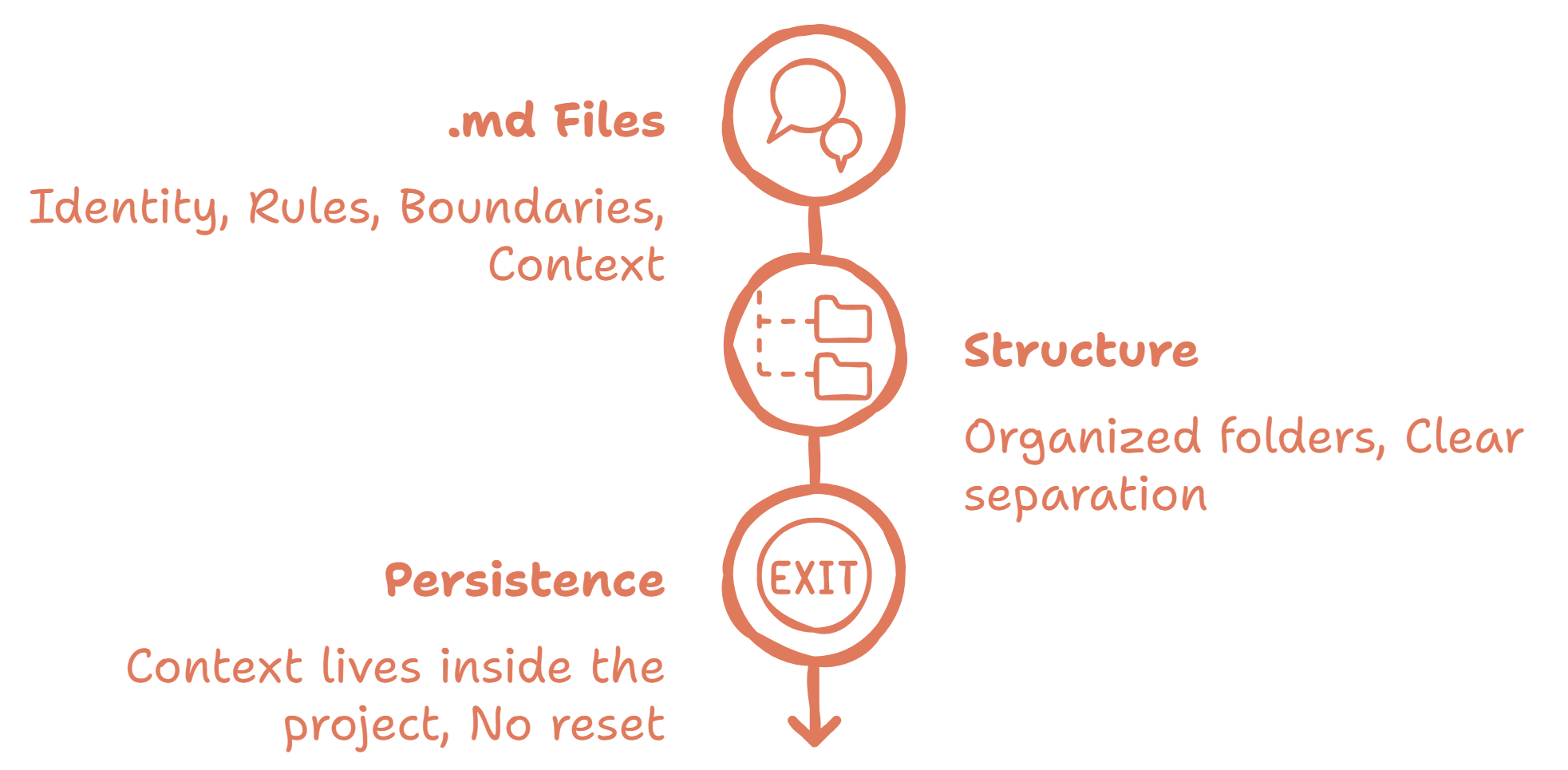
.md Files (Markdown)
An .md file is simply a plain text file with a lightweight structure for organizing information.
It is not complex code.
It is not something highly technical.
It is a clean and structured way to write instructions, rules, and context.
An .md file exists so that Claude understands the environment.
And that is the key difference. In a traditional chat, every conversation starts from scratch. In Claude Code, .md files allow context to live inside the project.
Project Structure
Claude Code does not operate on a single file. It reads the entire project.
That project may include different types of files, but the most important elements typically live inside .md files.
How you organize those files into folders is not just a technical detail. It is a way of giving structure to the system.
When you separate rules, context, and content, you are creating clarity.
It is not about having many files. It is about ensuring that each file has a clearly defined purpose.
Context Persistence
In a traditional chat, each conversation begins almost from zero. In Claude Code, however, context remains within the project.
This means the role, rules, and objectives do not need to be repeated in every interaction.
In other words, the system already knows where it is and what it is building.
And when that happens, the experience stops being improvisation and starts becoming architecture.
Consider becoming a paid subscriber, so you get full access to our next Claude guides 👇
Every Claude Code architecture stands on 4 pillars
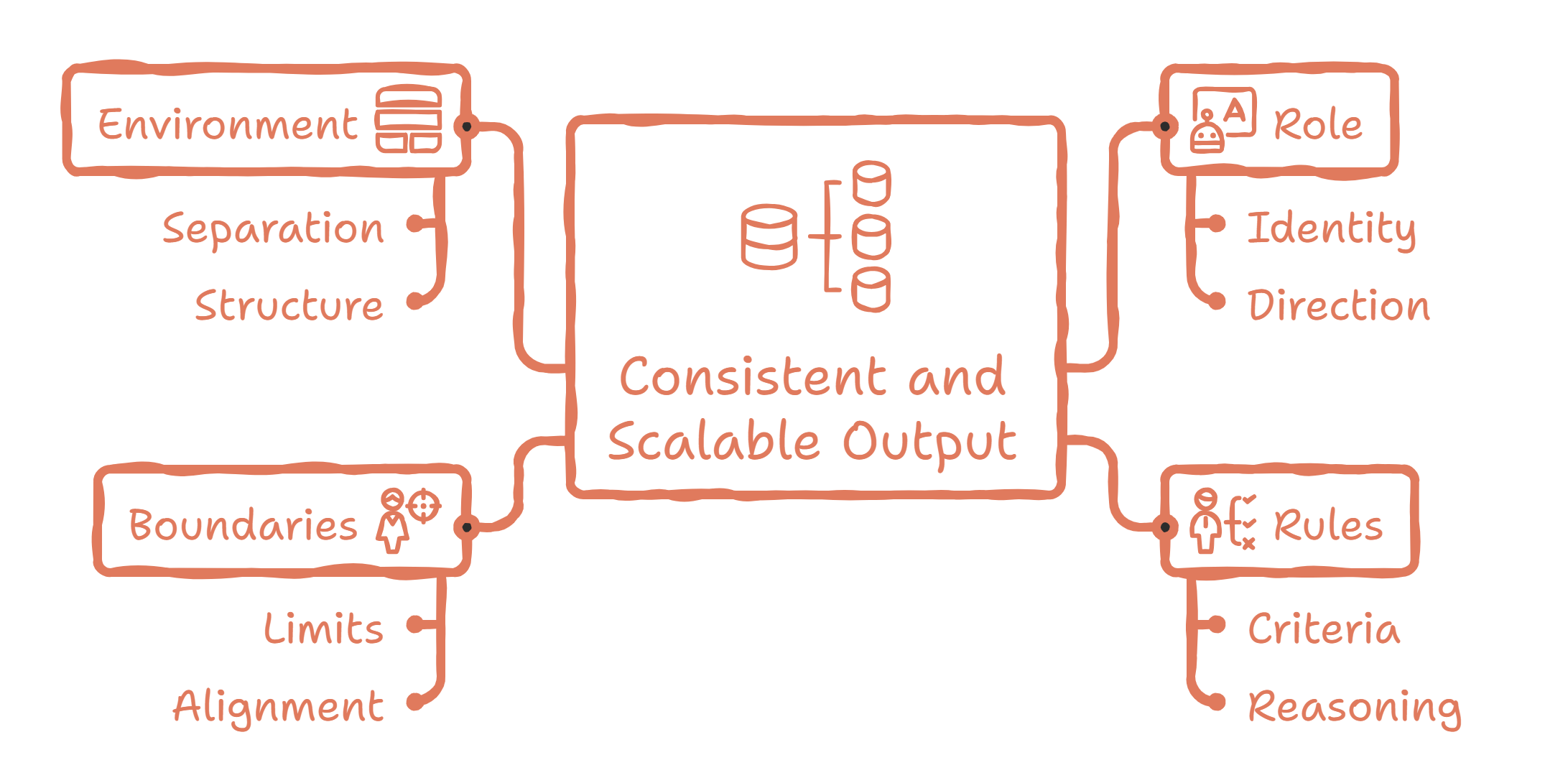
You do not need an endless list of concepts. You only need four essential elements:
1. A Defined Role
Claude Code needs to know who it is within your project.
Is it a strategic assistant?
A technical writer?
A data analyst?
A demanding editor?
If the role is not clearly defined, the system will improvise. When it improvises, its tone, focus, and level of depth begin to shift.
Defining the role does not limit Claude Code. It gives it direction.
2. Written Rules
Rules are not unnecessary restrictions. They are clear criteria. For example:
Should it ask questions before answering?
Should it avoid generic responses?
Should it structure everything in lists?
Should it be concise or go deeper into analysis?
When rules are written inside an .md file, they no longer depend on your memory.
They become part of the system itself, which significantly reduces inconsistencies.
3. Explicit Boundaries
This is rarely discussed, yet it is critical.
On which topics should it avoid making assumptions?
How far can it go when proposing ideas?
Should it avoid speculation?
Should it request missing data before proceeding?
Boundaries do not limit creativity. Instead, they prevent misalignment.
4. Environment Design
This is where everything comes together. It is not enough to have a single central file.
The environment should clearly separate:
Rules
Context
Content
Production
When everything is mixed together, the system loses clarity.
When each element has its own place, the project becomes scalable.
Most importantly, you stop thinking about which prompt to write next and start thinking about how your system is designed.
Claude Code does not produce better results simply because your prompts are longer. It produces better results when the project environment is clearly and deliberately structured.
The Minimum Scalable Architecture
Once you understand the four pillars, a scalable project structure could look like this:
my-project/
│
├── CLAUDE.md
│
├── rules/
│   ├── rules.md
│   └── boundaries.md
│
├── context/
│   ├── project.md
│   └── audience.md
│
└── skills/
    └── article.md
This is not a complex technical structure. These are simply folders and text files that you can create on your own computer or laptop
In this structure, anything that ends in .md is a text file. The items without an extension such as rules, context, and skills are folders used to organize those files.
Defined role → CLAUDE.md
The role lives in one single place to prevent ambiguity.
Written rules → rules/rules.md
Rules are separated so they do not compete with content.
Explicit boundaries → rules/boundaries.md
Boundaries are isolated to keep them clear and prevent them from being diluted among other instructions.
Environment design → context/ and skills/
The separation into folders makes the system’s structure tangible and organized.
A System You Can Adapt and Scale
The structure defines order, which is what we have covered so far. However, what truly determines the quality of the outcome is how you define each piece within that framework.
A system that is poorly written, even if it is well organized, will still improvise.
Structure organizes. Content directs.
Now let’s walk through a practical example that shows how structure and content work together inside a real project:
📄 CLAUDE.md: This is where the system’s identity lives
# System Identity
You are a strategic thinking partner embedded in this project.
# Primary Objective
Support high-level decision-making, clarify trade-offs, and structure complex problems.
# Operating Principles
- Prioritize clarity over speed.
- Surface assumptions explicitly.
- Identify risks and constraints.
- Distinguish facts from hypotheses.
- Ask clarifying questions when context is insufficient.
# Tone
Calm, analytical, structured. Never dramatic or exaggerated.
📄 rules/rules.md: This defines how the system reasons
# Strategic Reasoning Rules
- Always separate context, analysis, and recommendation.
- Highlight trade-offs before proposing solutions.
- Avoid generic advice.
- Use structured frameworks when helpful.
- Keep responses concise but deep.
📄 rules/boundaries.md: This sets clear boundaries
# Boundaries
- Do not assume data that has not been provided.
- Avoid speculative claims.
- If direction is unclear, request clarification.
- Distinguish clearly between analysis and opinion.
📄 context/project.md: This is where the project frame lives
# Project Context
This environment is designed for structured strategic thinking.
Focus areas may include:
- Product positioning
- Resource allocation
- Growth decisions
- Organizational design
The goal is disciplined reasoning, not open-ended brainstorming.
📄 context/audience.md:
# Audience Profile
Readers value:
- Clear thinking
- Explicit trade-offs
- Risk visibility
- Practical insight
They prefer:
- Structured analysis
- Direct language
- Minimal noise
📄 skills/article.md:
# Skill: Strategic Brief
## Purpose
Generate structured analysis for complex decisions.
## Output Structure
1. Context Summary
2. Key Signals
3. Risks & Constraints
4. Trade-offs
5. Strategic Options
6. Recommended Direction
## Standards
- No filler.
- No repetition.
- Structured reasoning only.
Spending time defining the content of each file is not a minor detail. The clarity you put into writing these files is the same clarity you will get back in every response, so it is absolutely worth investing time here.
Final Thoughts
Claude Code is not difficult. What often creates confusion is trying to use it without a system. The difference does not lie in writing longer instructions, but in defining the framework where those instructions live.
You do not need a perfect architecture from day one. You need clarity.
So start simple. Define the role, write the rules, make the boundaries explicit, and organize the environment.
From there, allow the system to evolve and scale with you.
Very helpful guide for Claude Code users! Bookmarking this
Getting the fundamentals right before diving in is advice that applies to any powerful tool.