


Picture this: it’s the night before your interview. You have twenty tabs open. You’ve read the company’s About page twice, and you still have no idea what they’ll ask you.
That’s how most of us prepare. We read about the company, and we hope the questions are about what we read.
Diana Dovgopol, my student from the Claude beginner series, was about to do the same. She had found her jobs with Claude, in three different fields, and one of them was a field she had never studied.
Instead of reading about the companies, she gave Claude her CV and the job links. Claude read each posting next to her CV, opened NotebookLM in her browser, and built a study notebook for every job. NotebookLM is Google’s free study tool: you add sources, and it answers only from them and turns them into study materials, like a briefing doc, flashcards, a quiz and a podcast-style audio.
I turned what Claude did into a skill, so you can do the same before your next interview.
In this guide, you’ll learn:
What Claude & NotebookLM do that googling the company can’t
What you give Claude, and what you get back
How to let Claude build your first notebook (try this prompt)
The interview-prep skill
How to run the skill for every job you applied to
How to practice with the skill as your mock interviewer
Two things before we start:
1. Save this guide, and build one notebook this week, even if your next interview isn’t scheduled yet.
2. Send it to a friend who prepares for interviews by reading the company’s About page the night before.
PS: This newsletter grows mostly from people like you sharing it. Every share helps me keep writing guides like this one.
What Claude & NotebookLM do that googling the company can’t
Googling the company tells you about the company, but it tells you nothing about you: where you fit the job, where you don’t, and what they’ll ask you because of it.
Here’s what Claude does for Diana (and you):
It reads each job posting next to your CV
Before it opens NotebookLM, Claude compares your CV with every posting. For each job, you get your strengths, the gaps to prepare for, and one sentence to build your answers around.
It also tells you which job is your safest fit, which one is a reach worth trying, and which application deadline is closest.
It teaches you the field that isn’t on your CV
When a job needs a field you’ve never studied, Claude tells NotebookLM to find sources on it. Then it turns them into flashcards with the terms you’ll hear in the room.
The field Diana had never studied was health economics. NotebookLM came back with about 30 sources on the project she’d work on, the basics of the field, and what that department had published, so she didn’t have to read them herself.
It tells you what they’ll ask, and how to answer
For each job, NotebookLM writes the 10 questions you’re most likely to get, each with an answer outline built from your own CV.
Say you work in marketing and you have an interview at a bank. Your notebook would hold the posting, your CV and the bank’s last year of news.
Your flashcards would cover the banking terms you’d be embarrassed to ask about. Your briefing would tell you which of your campaigns to talk about, and what to say when they ask why someone from outside banking should get the job.
What you give Claude, and what you get back
Here’s what you give it:
The job posting: a link, or the text (no jobs yet? find them with Claude)
Your CV or resume: a PDF or Word file.
The interview date: if you know it. If you don’t, Claude looks for it in the job posting.
Then Claude does the part that would take you hours:
Reads the job posting next to your CV, and shows you where you fit and where the gaps are
Opens NotebookLM in your browser and creates a notebook for the job
Adds the posting, your CV and the employer’s own pages
Asks NotebookLM to research the employer and anything you’re new to
Turns all of it into study materials
You get back one NotebookLM notebook for each job. On the right side, in the Studio panel, there are four study materials:
Briefing Doc: your cheat sheet. It explains the role, the topics you need to know in simple words, where your CV fits, the likely questions with an outline of your answer, and questions you can ask them.
Audio Overview: two voices discuss your interview like a podcast. You can listen to it on the go.
Flashcards: the terms you need to remember under pressure.
Quiz: checks whether you really understood the material.
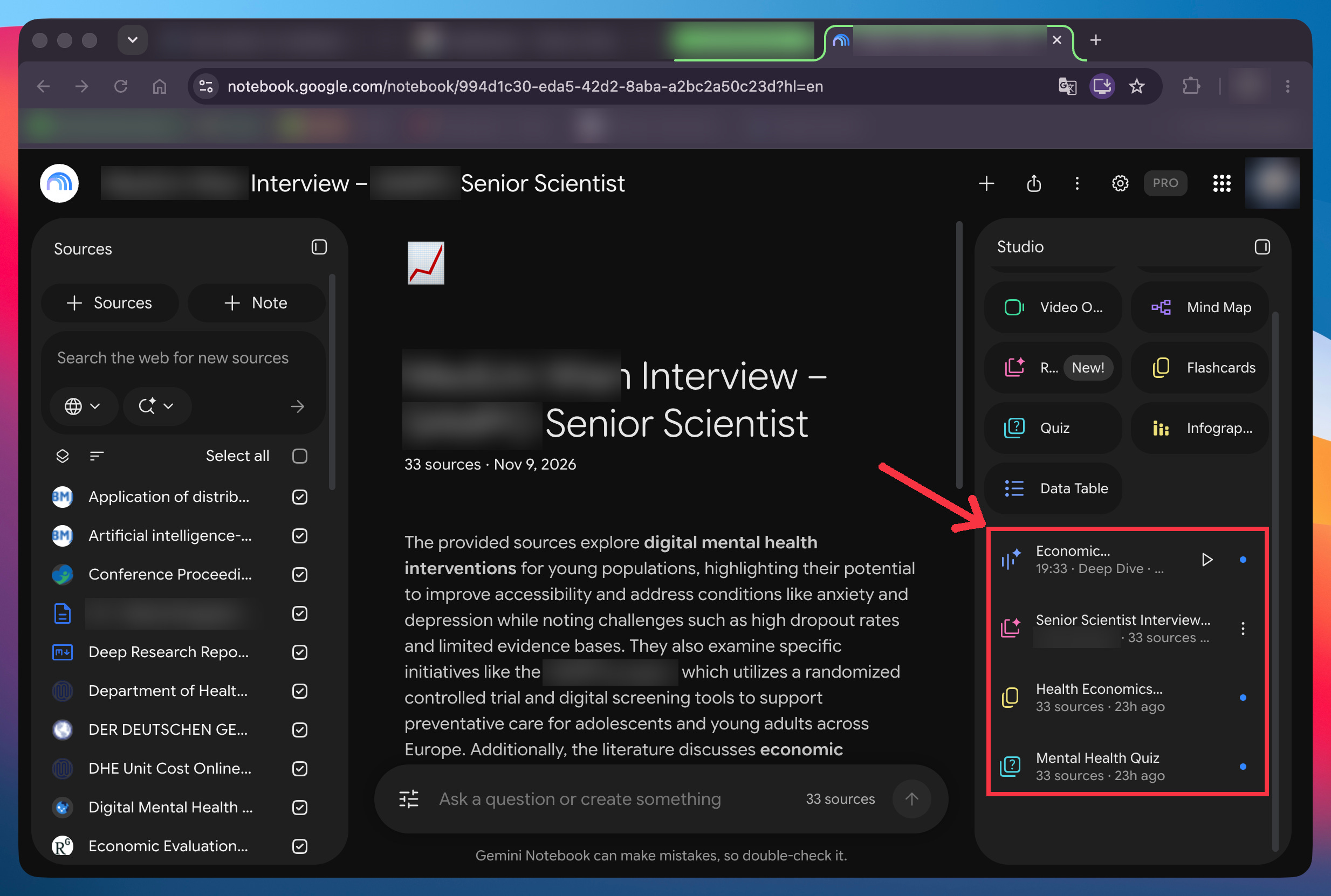
You can also ask the notebook anything, like “Explain budget impact analysis with an example.” It answers only from those sources, and shows you where each answer comes from.
Let Claude build your first notebook (try this prompt)
You could build this notebook by hand, clicking through four menus for every job.
Claude does it in your own Chrome instead. It opens NotebookLM in a tab where you’re already signed in and clicks through it like you would.
Here’s what you need first:
Open notebooklm.google.com in Chrome and sign in (your account might call it Gemini Notebook now, and it’s the same tool).
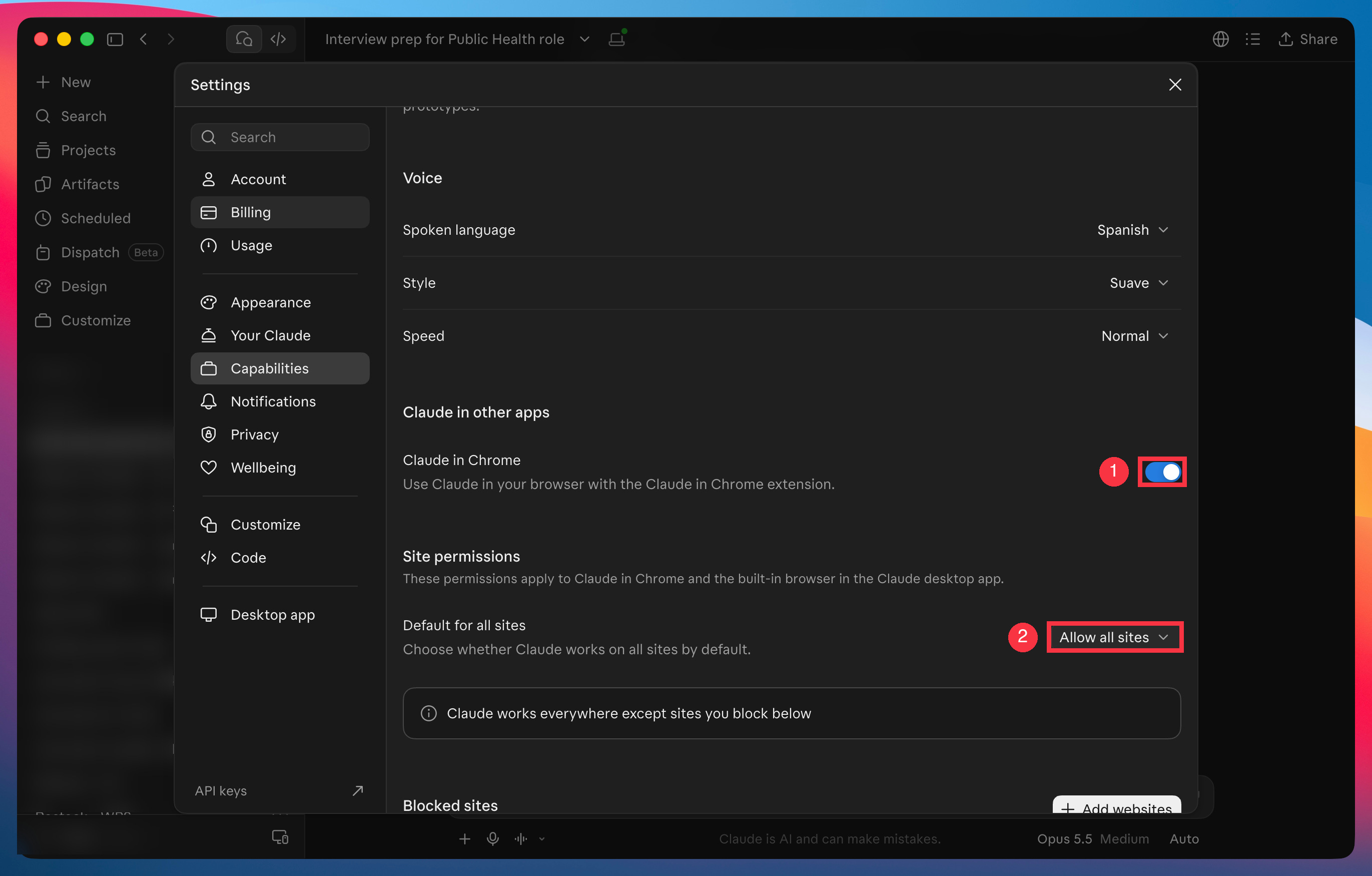
Claude in Chrome, which lets Claude use your browser like you would. In the Claude app, go to Settings → Capabilities. Check that Claude in Chrome is switched on, and that the default under Site permissions says Allow all sites (or just add
notebook.google.comto your allowed sites).
If neither is set, Claude stops at the first click:
Then open a new chat in Claude and attach your CV. Here’s a template you can fill in:
I have a job interview. My CV is attached, and this is the job: [link to the job posting].

Use Claude in Chrome to build a NotebookLM notebook for it. Do all the steps without stopping.

1. Tell me in five lines where my CV fits this job and where the gaps are.
2. Create a notebook named "[employer] Interview". Add the job posting, the employer's About page, and my CV as a pasted-text source.
3. Run Deep Research on the employer's last 12 months, the team or project in the posting, and the basics of any field in my gaps. Import the sources.
4. In the Studio panel, generate a Briefing Doc with 10 likely interview questions and answer outlines from my experience, a Quiz, Flashcards and an Audio Overview.

Don't open or change any other notebook. If Chrome isn't connected, stop and tell me.
Claude shows you what it’s doing in Chrome at every step. If you already have a notebook with a similar name, it leaves it alone and creates a new one.
This prompt is enough to walk into one interview knowing the employer, the field and your gaps. But it gets you one notebook for one job. For the next job, you’d open a new chat, paste the prompt again, and change the job link and the employer’s name by hand. It also stops where the interview starts. A notebook can teach you the employer and the field. It can’t sit across from you, ask a question, and tell you your answer was vague.
The interview-prep skill fixes both.
The interview-prep skill
The skill is the full prep, packed into one file you add to Claude once.
I built it from Diana’s real interview prep, turned into steps Claude follows every time.
It works in two parts. First, it builds a NotebookLM study notebook for every job you applied to, in one run. Then Claude plays your interviewer, so you can practice your answers before the real one.
The rest of this guide is for paid subscribers. It’s the exact skill, so you can prepare for your next interview tonight instead of building it from scratch.
Below the line:
The interview-prep skill, with a copy-paste template: Paste your job links, attach your CV, and one run builds a notebook for every job, soonest interview first. Plus the one check it makes with you before it builds anything.
How to study for each interview in one evening: Reading everything about a company at once doesn’t stick. Two steps are a must, and the rest is up to you.
Claude as your interviewer: It asks one question at a time, pushes back when your answer is vague, and shows you a stronger version built from your own experience.
Past this line, the skill is waiting:
Until Friday, you can get this skill, plus all my Claude guides, skills and video courses, for $150 a year, and keep that price for as long as you stay. On Saturday, the price goes up to $250.
Click here for the discount: https://artificialcorner.com/bf26