



The people getting the most out of Claude Code aren’t better at prompting.
They build systems.
If you use AI today the way most people do, you probably follow the same loop:
Open a chat → write a prompt → fix the output.
Then the next day, you start from scratch.
You’re not building an assistant. You’re improvising. Over time, that has a real cost:
Results become inconsistent
The tone shifts from one request to the next
You keep re-explaining things you thought were already settled
Claude Code is different.
Instead of a chatbot that just replies, it works as an environment that can read files, run tools, generate documents, and improve outputs — all inside a single project.
That shift from chat to project is what stops everything from restarting at zero every time you open it. This is also why building a CLAUDE.md file matters (think of it as the project’s memory)
You design it once, and it shapes every interaction with Claude from that point on. You get consistent judgment, the same response structure, and clear boundaries.
By the end of this guide, you'll have:
A practical definition of what CLAUDE.md is and what it actually changes
A simple checklist for what to write so Claude stops improvising
CLAUDE.md templates you can copy-paste (and adapt)
A plug-and-play, interview-style prompt that generates your own CLAUDE.md
Our Claude Code series grows every week with a new guide.
Click here to read our best Claude guides
And consider becoming a paid subscriber if you like my Claude guides 👇
What is CLAUDE.md and why it matters
A CLAUDE.md file is, quite literally, a Markdown file.
Plain text. Simple structure. Designed for writing instructions that are readable and easy to organize.
It is not code. You don’t need to know how to code to use it.
In Claude Code, CLAUDE.md acts as the project’s memory. It’s a special file that Claude reads at the start of every conversation to:
Load your rules
Follow established conventions
Keep context consistent across sessions
The goal isn’t documentation. The goal is to operate.
Claude gets a stable framework — so it stops improvising every time you open a new chat.
Think about the difference between these two scenarios:
A chat with no memory: each session depends on what you remember to ask for, and how clearly you phrase it that day
A project with memory: your “way of working” lives in files, not in your head
In Claude Code, that memory isn’t just one file. It’s a hierarchy, and it loads automatically when you start. That hierarchy also determines which rules carry more weight.
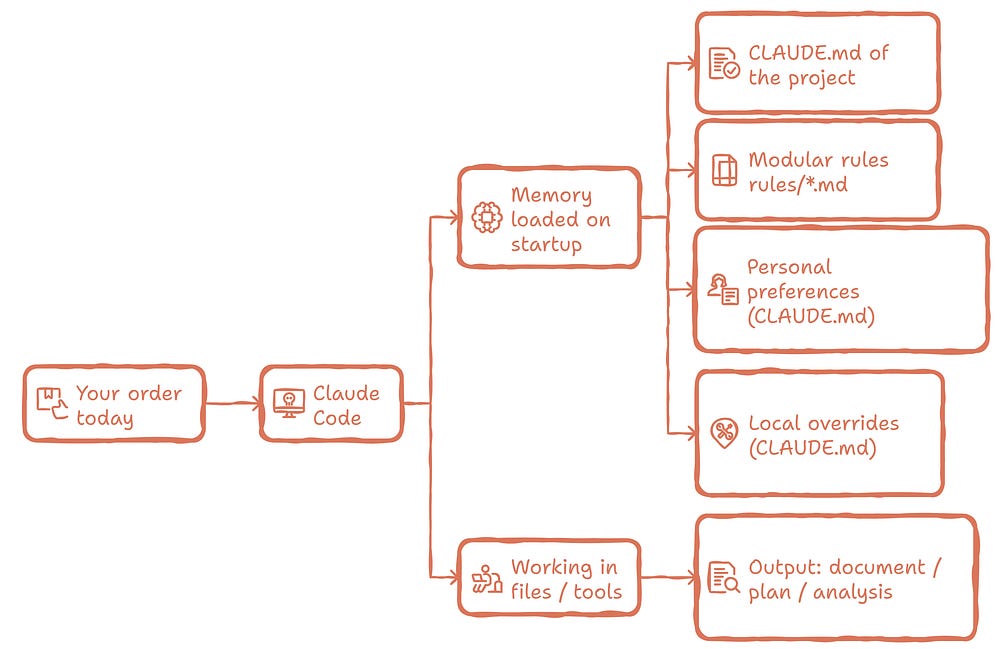
One thing worth knowing: CLAUDE.md doesn’t replace Claude Code’s default system prompt. It gets added as consistent content inside the conversation — on top of the base prompt, not instead of it.
That might sound like a small detail. It’s not.
It means CLAUDE.md is one of the most stable levers you have because:
It’s present in every session of your project
It’s written as rules your whole team can read and scale
What to put in your CLAUDE.md so Claude stops improvising
My recommendation is to keep it:
As human as possible
Compact, so it can scale over time
Focused
This content loads in every session. Every word counts.
Here’s the simple version:
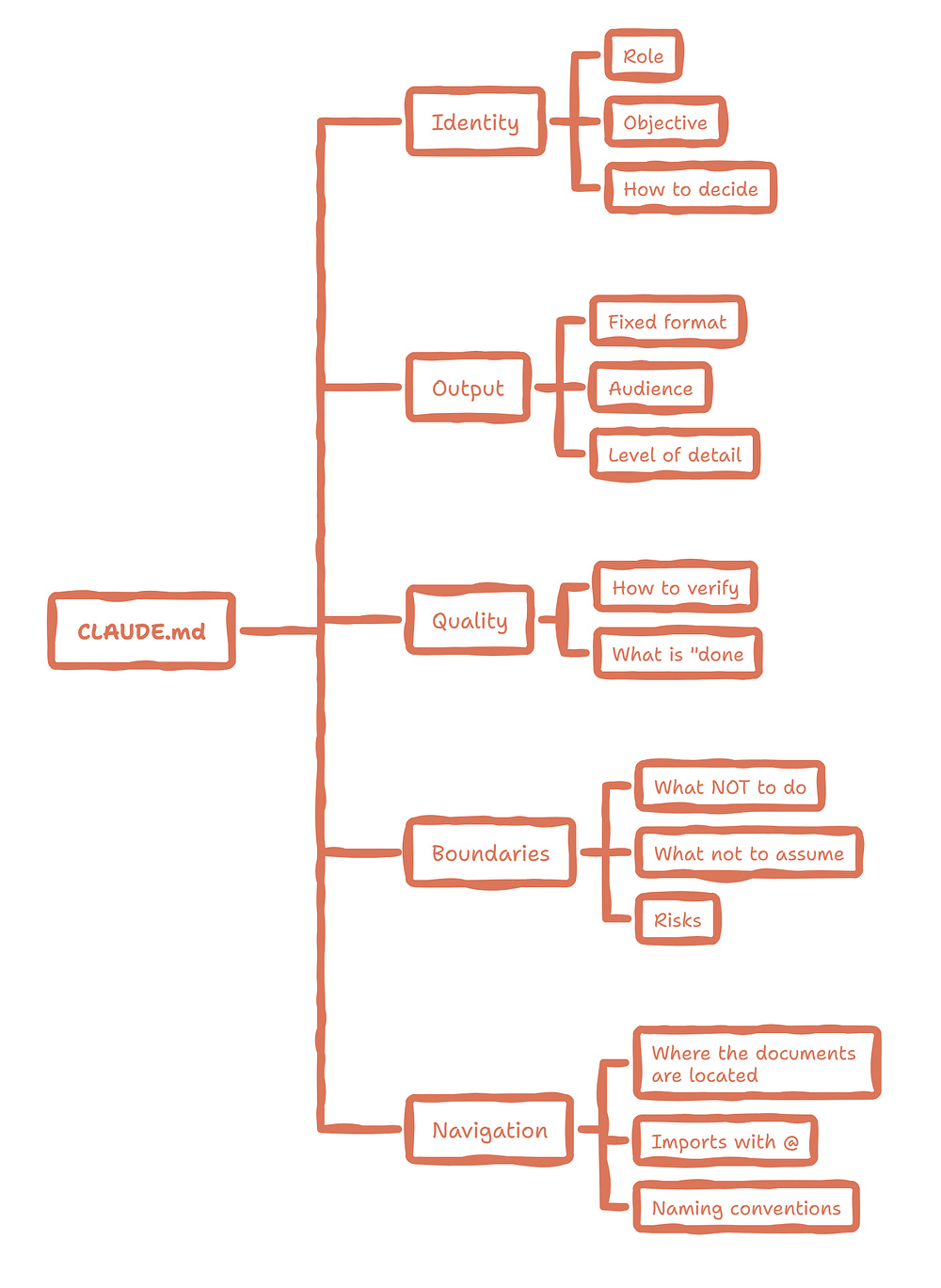
Identity: who you are here and what you are here to do
Defining the role is not a small detail. It’s how you control behavior.
Your identity section should answer three things:
Role: editor, PMO, manager, writer
Goal: the outcome you want consistently
Operating principles: how you prioritize and how you handle uncertainty
The more specific you are here, the less Claude improvises.
Output: a delivery contract that stays stable
Instead of asking “write me a report” every time, define the structure once in CLAUDE.md. For example:
Summary in at most X lines
Risks and constraints
Compared options
Next steps
In practice, this cuts down revisions. Claude stops picking a new format every time it responds.
Quality: how the work is checked
Claude performs much better when it knows what “correct” means. Give it criteria, expected outputs, or examples. Lines like:
Include an introduction that previews the value
Use concrete examples
Do not invent data — ask for it instead
Avoid claims you cannot verify
Boundaries: what Claude should not do, even if it sounds reasonable
Claude Code already has a permission system. But your CLAUDE.md should set its own boundaries too — it reduces risk and prevents drift.
Some non-technical boundaries that work really well:
Do not assume numbers, dates, or policies if they are not in the files
If critical information is missing, ask before proposing a final plan
Separate facts from hypotheses
Avoid recommendations with material impact unless you clearly present risks and trade-offs
Navigation: where the truth lives inside the project
This one surprises people who don’t code.
AI does not guess your context. It reads it.
Claude Code lets you pull in files from CLAUDE.md using @route syntax. This keeps CLAUDE.md from turning into an endless file — and tells Claude exactly where to look.
Instead of pasting three pages of brand guidance in CLAUDE.md, keep a separate file and reference it:
Brand guide: @docs/brand-voice.md
Glossary: @docs/glossary.md
Article template: @docs/article-template.md
This keeps the whole design modular (much easier to maintain long-term)
Example structure:
my-skills/
├─ CLAUDE.md
├─ rules/
│  ├─ rules.md
│  └─ boundaries.md
└─ skills/
   └─ weekly-decision-brief/
      └─ SKILL.md
Here’s a practical rule to keep CLAUDE.md minimal, while still making it scalable:
a) Identity
Keep in CLAUDE.md: the “who you are here” that should always be present
Move to context/: long project history, quarterly goals, detailed audience definitions
b) Output
Keep in CLAUDE.md: the default format you expect most of the time
Move to skills/: repeatable procedures, or anything you want to trigger by intent instead of running on every request
c) Quality
Keep in CLAUDE.md: 3 to 7 universal rules that apply across the project
Move to rules/quality.md: longer checklists, anything you want to version and maintain in parts
d) Boundaries
Keep in CLAUDE.md: simple, universal project boundaries (usually 2 to 6 bullets)
Move to rules/boundaries.md: specific policies, or when you want boundaries isolated so they don’t get diluted
e) Navigation
Keep in CLAUDE.md: high-level pointers about where things live
Move to context/: glossaries, sources of truth, templates, examples, assets
How to keep CLAUDE.md current without letting it degrade
If you write CLAUDE.md once and never touch it again, you will miss most of its value.
A better approach:
Review it on a regular basis
Keep “memory” specific, structured, and easy to maintain
A simple and realistic cycle looks like this:
Start with
/initto generate an initial CLAUDE.md based on your project. Then edit it so it reflects what the project actually needs.When you notice the same mistake happening again, don’t fix it only inside a one-off prompt. Turn it into a rule or import a reference file Claude can reuse.
If the file grows, move rules into a
rules/folder and split them by topic.For anything that doesn’t apply every time, use skills. Skills load only when needed, so they don’t consume context in every session (I rely on this a lot)
One more thing: keep security in mind. Design your CLAUDE.md with clear boundaries, and avoid placing sensitive information inside it.
CLAUDE.md templates you can copy-paste (and adapt)
CLAUDE.md should be short, readable, and practical. Anything too specific or too heavy belongs in imported files or separate rule files.
Here are three templates you can use:
📄 CLAUDE.md template for decisions and briefs
my-skills/
├─ CLAUDE.md
├─ rules/
│ ├─ rules.md
│ └─ boundaries.md
└─ skills/
 └─ weekly-decision-brief/
 └─ SKILL.md
# Identity
You are my thinking partner for executive decisions.
Prioritize clarity, trade-offs, and risk. Do not fill space with empty opinions.
# How to work
- If critical information is missing to make a decision, ask questions first.
- Separate facts (given) from hypotheses (inferences).
- Do not invent numbers, dates, or policies.
# Output standard: Decision brief
ALWAYS deliver using this structure:
1) Context (5 to 7 lines)
2) Key signals (max 7)
3) Risks and constraints (max 7)
4) Options (min 2, max 4) with pros and cons
5) Open questions (always)
6) Next steps (concrete actions)
# Navigation
- Reasoning rules live in: rules/rules.md
- Boundaries live in: rules/boundaries.md
- Decision outputs live in: skills/weekly-decision-brief/SKILL.md
Why it works:
It uses specific rules, a clear structure, and imports for heavier context — no bloat in the main file
CLAUDE.md is read at the start of every conversation, so the restart cost drops to almost zero
📄 CLAUDE.md template for writing articles in your voice
claude-md-article/
├─ CLAUDE.md
├─ context/
│  ├─ audience.md
│  └─ article-goal.md
├─ rules/
│  ├─ output.md
│  ├─ quality.md
│  └─ boundaries.md
└─ skills/
   └─ article-outline/
      └─ SKILL.md
# Identity
You are my editor and content strategist.
Your job is not only to write, but also to shape an article that is useful and actionable.
# Editorial rules
- Avoid generic lines. Use concrete, verifiable examples.
- If something is not supported by a source or a project file, say so explicitly.
- Keep the logic clear: problem, framework, example, application.
# Required structure
- Introduction: sell the article (the promise plus what the reader will achieve).
- Maximum of 4 main sections (not counting the intro).
- Must include at least:
- 1 diagram
- 1 mind map
- 2 applied examples based on real scenarios
# Navigation
- Audience: context/audience.md
- Goal and angle: context/article-goal.md
- Output contract: rules/output.md
- Quality checks: rules/quality.md
- Boundaries: rules/boundaries.md
- Article Outline Skill: skills/article-outline/SKILL.md
rules/output.md:
# Output Contract
- Strong intro: the promise plus what the reader will get
- Max 4 main sections (excluding intro)
- Must include:
- 1 diagram
- 1 mind map
- 2 concrete examples (include "Why it works")
rules/quality.md
# Quality Checklist
- No generic filler
- Every concept has a concrete example
- Separate facts from assumptions
- If something is missing, ask or state the gap
Why it works:
CLAUDE.md stays lightweight — identity and pointers only, nothing competing with the actual content
Output and Quality live in
rules/, so they’re easy to version and update independentlyThe Skill is called only when needed (outline and structure), so it doesn’t eat up context on every request
📄 CLAUDE.md template that turns meeting notes into a plan
Good starting point if the project is new and there isn't much complexity yet.
# Identity
You are my operations assistant.
Your priority is to turn ambiguous information into clear actions.
# Information discipline
- Separate confirmed decisions from open items and risks.
- If an owner or a date is missing, ask for it. Do not invent it.
# Required output: Action plan
1) Meeting summary (max 10 lines)
2) Confirmed decisions
3) Actions (mental table: what / who / when / definition of done)
4) Dependencies and blockers
5) Questions to close gaps
# Boundaries
- Do not assume missing data
- Avoid speculation
# Navigation
If this grows, split it into rules/ and skills/
Why it works:
It reduces friction at the start. No over-engineering before you need it
As the system grows, you can migrate cleanly into the same architecture (
rules/,context/,skills/)
Generate your own CLAUDE.md with this prompt
There’s a faster and more effective way to create a CLAUDE.md: let Claude Code run an interview with you. At the end of the interview, it’ll generate a CLAUDE.md and every file your project needs.
By answering simple interview questions, you’ll define:
who Claude is in your project
how it should respond
the quality bar it must meet
the boundaries it must respect
how it should navigate the rest of your files
Think of it as guided onboarding. You answer once, and those answers give Claude Code enough structure to build your full system.
After that, you never have to explain it again.
Using it is straightforward:
Open a Claude Code chat
Paste the interview prompt below
Answer one question at a time. Take your time (it’s worth it!)
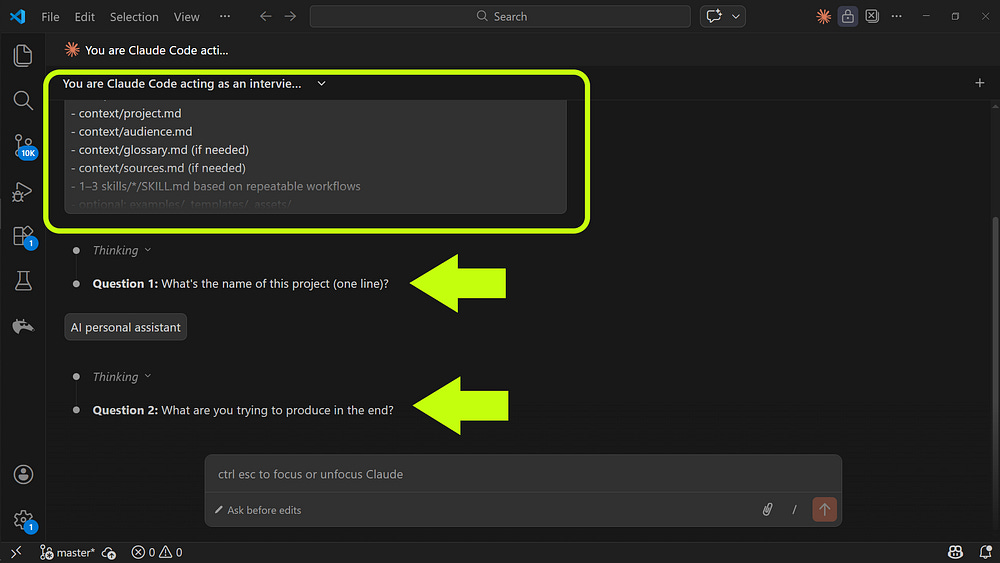
When the interview is done, type:
Now generate my folder structure and all files
Claude returns each file’s content, ready to copy-paste into your project or generate directly in your workspace.
Paste this prompt into Claude Code (67 interview questions)
If you want more guides like this, support us by becoming a paid subscriber today and get full access to our best guides and other perks.
You are Claude Code acting as an interviewer.
Goal: run a structured interview to generate my project system:
- CLAUDE.md
- rules/output.md
- rules/quality.md
- rules/boundaries.md
- context/project.md
- context/audience.md
- context/glossary.md (if needed)
- context/sources.md (if needed)
- 1–3 skills/*/SKILL.md based on repeatable workflows
- optional: examples/, templates/, assets/
Interview rules:
- Ask ONE question at a time.
- Wait for my answer before continuing.
- If my answer is vague, ask a short follow-up (max 1 follow-up).
- Accept “N/A” and “Not decided yet” without pushing.
- Do not write the files until the interview is complete.
After the interview:
1) Summarize what you learned in 8–12 bullets.
2) Propose a folder structure.
3) Output each file in a separate block labeled with its path, like:
[CLAUDE.md]
…content…
[rules/output.md]
…content…
Then start the interview with Question 1.
Here are the interview questions (do not show them all at once; ask one by one):
A) Identity and purpose
1) What’s the name of this project (one line)?
2) What are you trying to produce in the end?
3) What’s the main outcome you want, in one sentence?
4) What role should Claude play in this project?
5) What are the top 3 responsibilities Claude must handle every time?
6) What are 3 things you never want Claude to do in this project?
7) What should the default tone feel like? Pick 3 adjectives.
8) What tone or style should Claude avoid completely?
B) Quality bar
9) What does a “perfect” response look like here? Name 3 concrete traits.
10) What makes a response bad or unusable? List red flags.
11) What 5 criteria will you use to judge quality?
12) When tradeoffs happen, what should Claude prioritize? Put in order.
13) How rigorous do you want this by default (practical / medium / high)?
C) Output defaults
14) What output format do you want by default?
15) What sections must show up every time?
16) What sections should appear only sometimes?
17) What should the default length be, and when should it switch?
18) What types of examples should Claude include?
19) What kind of ending do you prefer (next steps / checklist / open questions / decisions)?
D) Uncertainty
20) If key info is missing, what should Claude do first?
21) What is Claude allowed to assume without asking?
22) What should Claude never assume?
23) How should Claude label uncertainty?
E) Boundaries
24) What topics are out of scope or off-limits?
25) Any confidentiality/compliance constraints?
26) What decisions should Claude not make for you?
27) Any style boundaries?
28) Any operational limits (tools/links/workflows allowed)?
F) Project context
29) Describe the project context in 8 bullets.
30) What parts of context change often?
31) What parts are stable truths?
G) Audience
32) Who is the end reader/user?
33) Biggest pain points?
34) What are they trying to do quickly?
35) What confuses them?
36) What examples would feel instantly relevant?
H) Vocabulary and sources
37) Mini glossary: 10 key terms + one-line meanings.
38) Trustworthy sources?
39) Sources to avoid?
40) What claims must be backed up or clearly qualified?
I) Navigation
41) Where should rules/context/templates/examples/assets live?
42) What’s the read-first order of files?
43) Which files are required vs optional?
J) Skills (repeat 1–3 times)
44) What’s one repeated task that drains time/energy?
45) Typical input?
46) Ideal output?
47) Common failure modes and prevention?
48) Trigger: when to use / when not to use?
49) 3 success criteria?
50) Want a second Skill? (repeat 44–49)
51) Want a third Skill? (repeat 44–49)
K) Examples/templates
52) Provide 2 real input samples.
53) Provide 2 ideal output samples.
54) What reusable template do you want?
55) Best before/after transformation?
L) Diagrams/mind maps
56) 2 ideas that need a diagram?
57) 2 ideas that need a mind map?
58) Preferred visual style?
59) What should never show up in visuals?
M) What stays in CLAUDE.md vs moves out
60) 5 rules that always apply, no exceptions?
61) Which rules are situational, and what do they depend on?
N) Defaults
62) Default format if user doesn’t specify?
63) Default depth if user doesn’t specify?
64) Default behavior if critical context is missing?
O) Source-of-truth hierarchy
65) If files disagree, what’s the hierarchy?
66) Which files are source-of-truth vs reference-only?
P) Skill triggers
67) What repeated work deserves a Skill, and how will you recognize it?
Start simple. With this interview, you can build a clean, functional CLAUDE.md in minutes.
Then, as your project grows, you can keep moving specific details into rules/, context/, and skills/ without breaking anything.