

Click here to get my FREE Claude course (20+ lessons)
I’ve been getting a lot of new subscribers lately, so if you’re one of them, welcome! I’m Frank.
I write Artificial Corner, where I share how I use AI, mostly Claude, to get real work done. You get the exact prompts, skills and setups I use, ready to copy.
You’re joining 93,000 people who read it every week.
Today, I’ll show you how I taught Claude MIT’s framework for presentations 👇
Picture this: you have a presentation at work on Thursday. You prepare it the way most of us do. You open PowerPoint and write everything you know onto the slides.
And you end up with the same three habits almost everyone has:
You never say what people will get out of it.
You fill the slides with sentences and read them out loud.
You say the main point once, near the end.
Patrick Winston, who taught MIT students how to speak, warned against all three. Each one costs you part of the room.
Winston had a fix for all three, and about ten more rules for everything else in a talk.
I turned his fixes into three prompts you can run on any deck, and a Claude skill that prepares the whole talk for you.
In this guide, you’ll learn:
The rules Patrick Winston taught at MIT for 40 years, in plain English
Three prompts that check your deck and fix its start, middle and end
The Claude skill that writes your slides and speaker notes with all of Winston’s rules
How to get your slides as a PowerPoint you can edit, in your company’s colors
Two things before we start:
1. Save this guide, and run the check prompt on the next deck you present.
2. Send it to a colleague with a presentation coming up this week.
PS: This newsletter grows mostly from people like you sharing it. Every share helps me keep writing guides like this one.
Winston’s rules in plain English
Patrick Winston taught at MIT for over 40 years, and his one-hour lecture How to Speak became one of the best-known talks on presenting. His starting point: how well you present depends on how much you know and how much you practice. Talent is only a small part of it.
That’s where Claude comes in. It knows the rules, so you only need the practice.
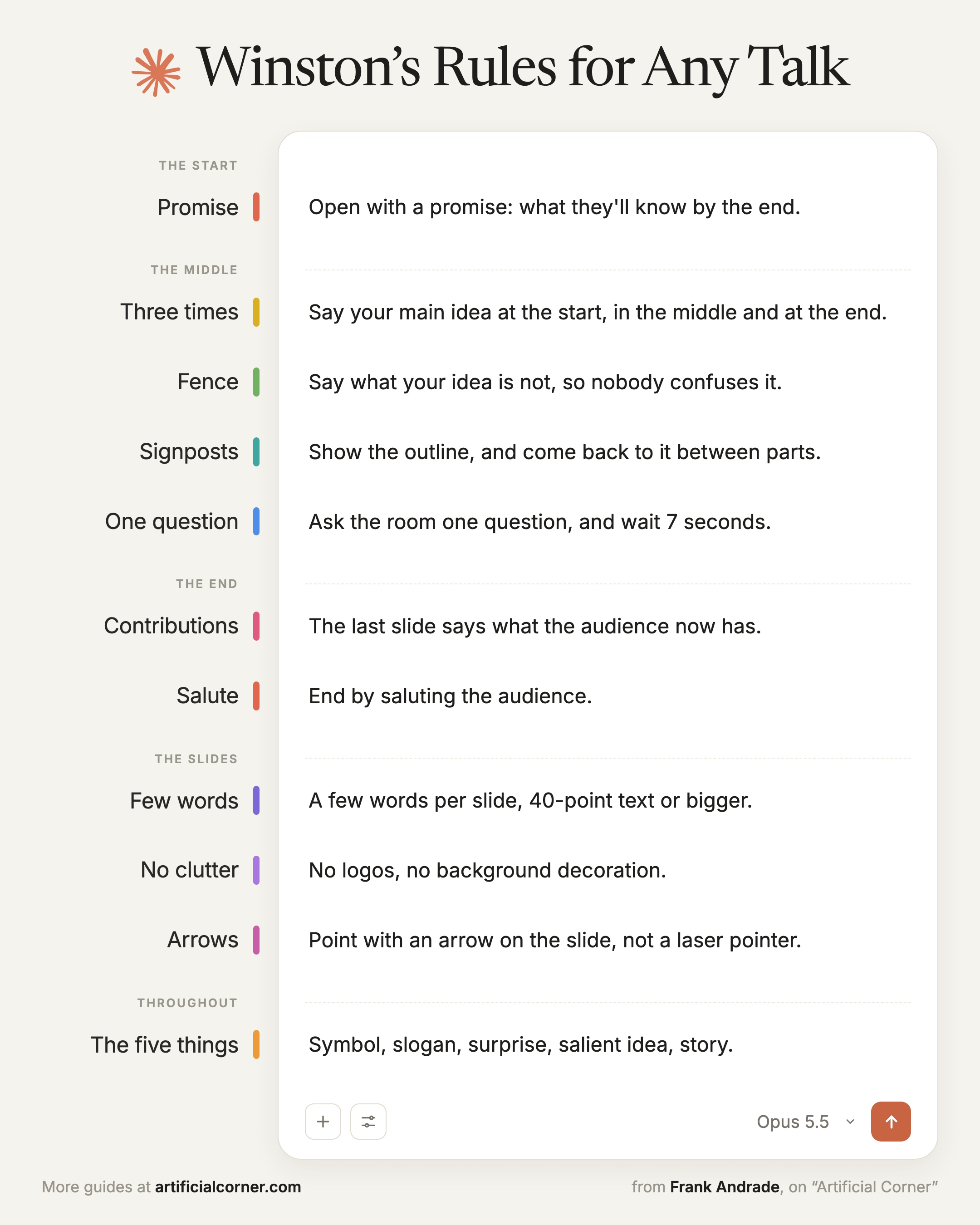
Here are his rules, from the first minute to the last, then what goes on the slides:
The start
Open with a promise: what the audience will know at the end that they don’t know now. Save jokes for the end, when people have settled in.
The middle
Winston built the middle of a talk around one fact: at any moment, about 20% of the room has drifted off, however good the talk is. Someone checks a message, someone thinks about their next meeting.
Here’s how he kept the whole room with him:
Say your main idea three times: at the start, in the middle and at the end, so whoever missed it the first time catches it the second or third.
Build a fence around it: say what your idea is not, so nobody confuses it with something they already know.
Use signposts: show the outline at the start, and come back to it between parts (”That was the first thing. Now the second…”), so anyone who drifted off can get back on.
Ask the room one question, and wait: Winston counted 7 seconds. It feels like forever, but that’s how long people need to answer.
The end
The last slide is “Contributions”: a few short lines on what your talk gave the audience. It stays on screen during the questions, so the room keeps seeing your point.
A “thank you” is fine once the applause starts, Winston said, but it shouldn’t be the last thing you say. End by saluting the audience: say something true about what you valued in being there.
The slides
Slides are there to support what you say. Here’s how Winston kept them that way:
A few words per slide: slides full of sentences are like subtitles on a movie in your own language. People read them and stop listening to you.
Big text: big enough to read from the back of the room (he suggested 40 points or more).
No clutter: no logos, no background decoration.
Arrows to point: when you want to point at something, put an arrow on the slide. Turning your back to the room with a laser pointer loses them.
Through the whole talk
Winston wanted every talk to have five things that make it remembered:
Symbol: one picture the audience can hold on to.
Slogan: a short phrase that gives the idea a handle.
Surprise: something the audience believes that turns out to be wrong.
Salient idea: the one idea that sticks out. It doesn’t have to be the most important one.
Story: how it happened, how it works, or why it matters.
Here are all the rules on one page, if you want to save them:
Try it on your next talk
Here’s how to apply Winston’s rules to your own talk with Claude. Paste these prompts in one chat, in this order.
Check the deck you have
Start with a deck you already made, like the one for your next meeting. Claude can only check what you give it:
Slides only: it checks what’s on the slides. Anything you only say out loud gets a ❓.
Slides with speaker notes, or a script: it can also check what you plan to say.
Attach it and paste this prompt:
Check this [deck / deck with speaker notes / deck and script] against Patrick Winston’s “How to Speak” rules before I present it to [who’s in the room] in [how many] minutes.
Go rule by rule, with ✅ or ❌ and one line on why:
It opens with a promise of what they’ll know at the end
The main idea is said three times
It says what the idea is not
An outline is shown and revisited between parts
There’s one question to the room
Each slide has few words
There’s one dense slide at most
It ends on a contributions slide instead of “Thank you”
If a rule depends on what I’ll say out loud and it isn’t in what I attached, mark it ❓ and tell me what to put in my speaker notes so I don’t skip it.
Then name the three fixes that matter most.
[attach your files]
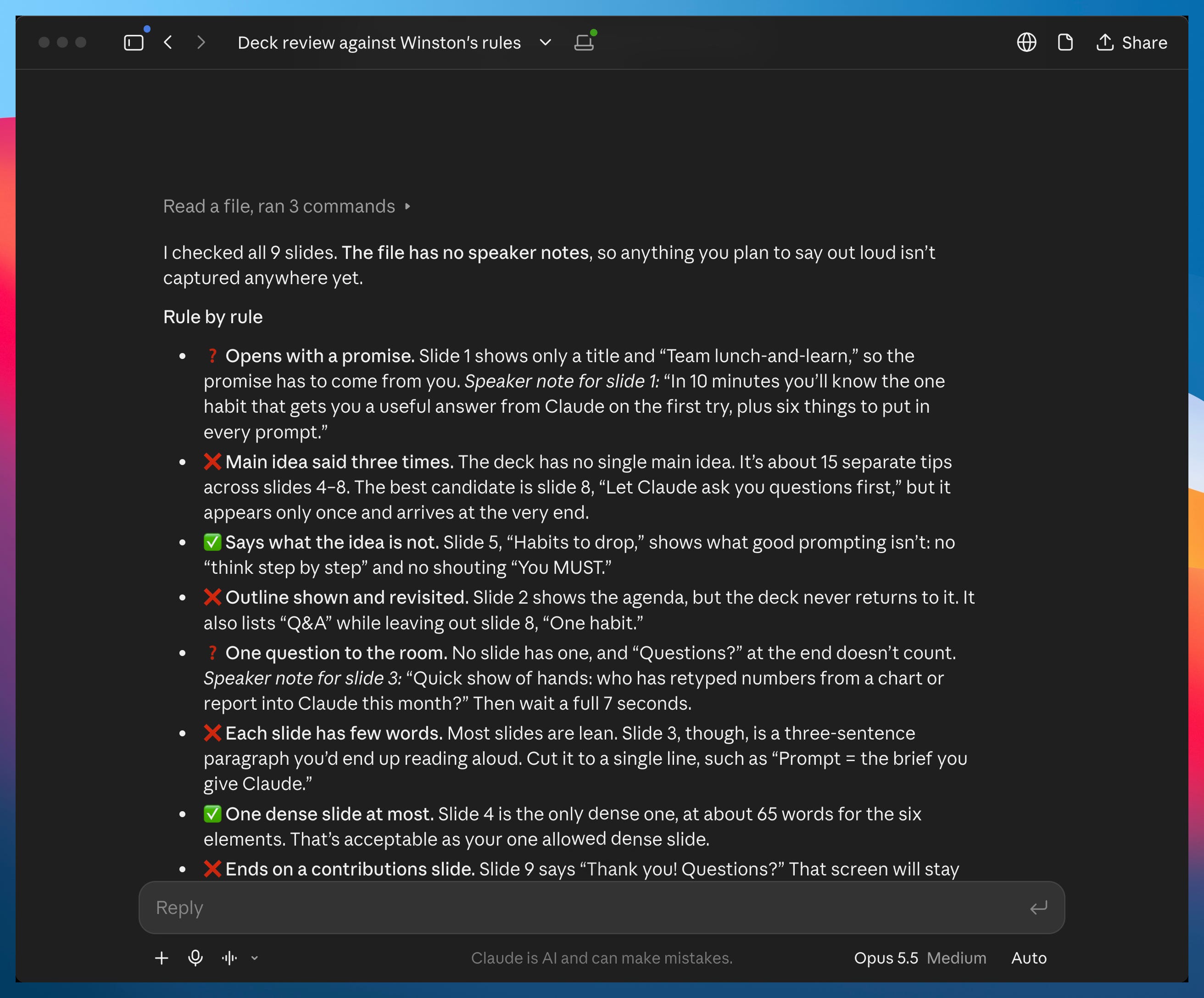
I tried it on a 10-minute “How I use Claude” talk for my team. Here’s what Claude found:
Find the idea that sticks
A talk with five good ideas and none that stands out is forgotten by the next day. In the same chat, ask Claude to pick one and place it at the start, the middle and the end:
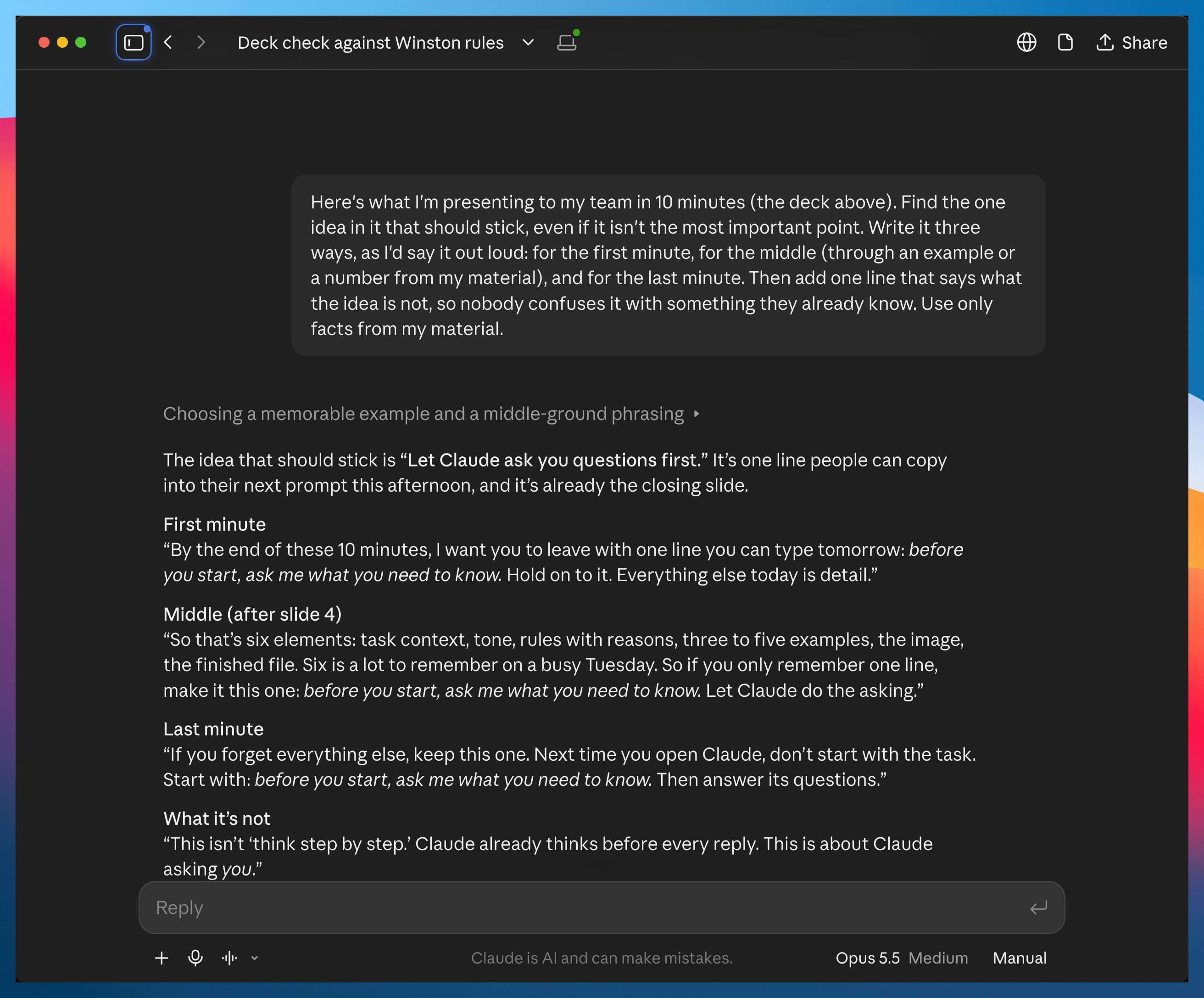
This is what I’m presenting to [who’s in the room] in [how many] minutes. Find the one idea in it that should stick, even if it isn’t the most important point. Write it three ways, as I’d say it out loud: for the first minute, for the middle (through an example or a number from my material), and for the last minute. Then add one line that says what the idea is not, so nobody confuses it with something they already know. Use only facts from my material.
On my deck, it picked the line buried on slide 8 and wrote it three ways, plus what it is not:
Fix the start and the end
The first minute decides whether people listen, and the last slide is what they stare at during questions. Here’s the prompt for both:
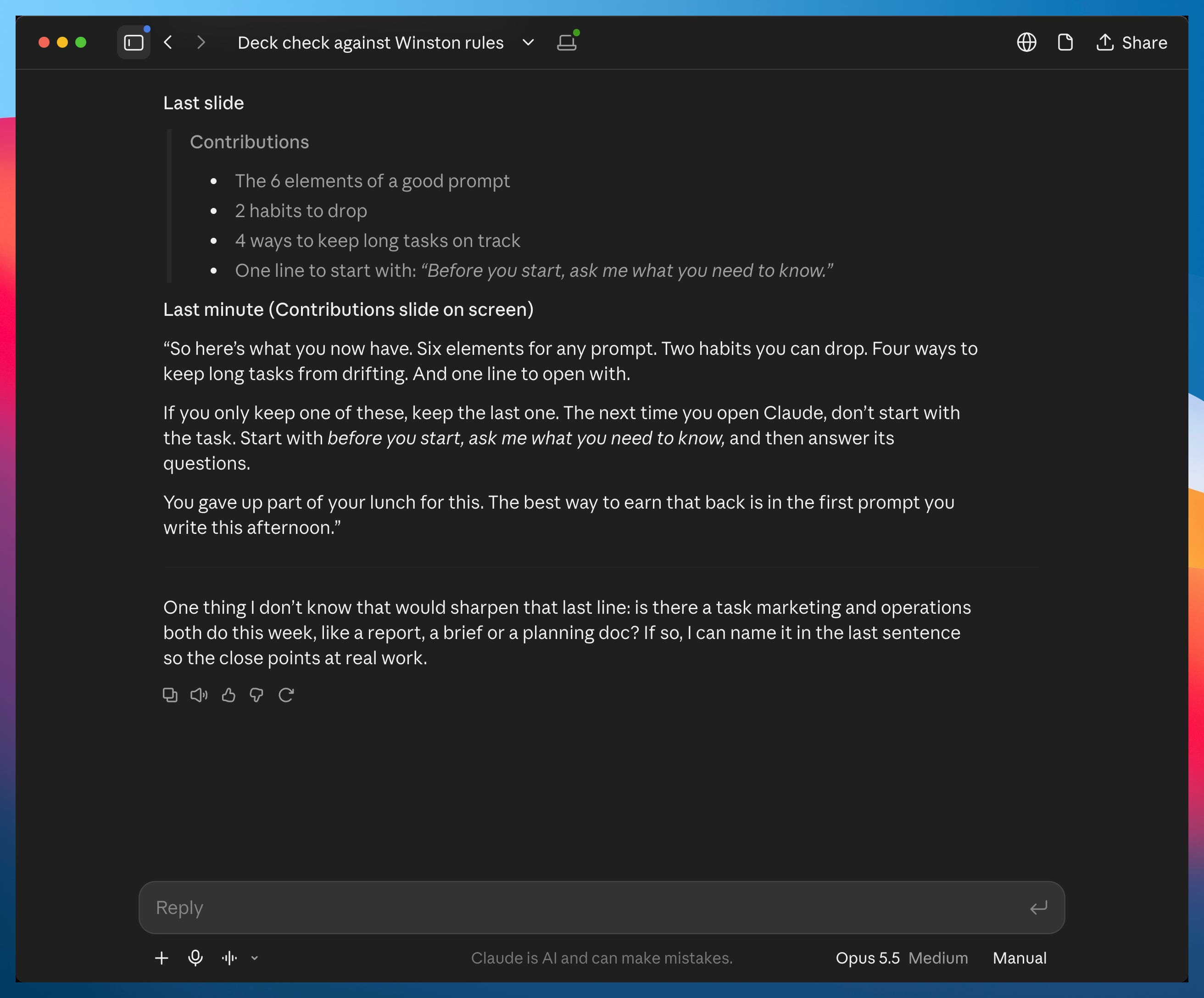
Rewrite the first and last minute of this talk with Patrick Winston’s rules. The first minute: a promise of what [who’s in the room] will know at the end that they don’t know now, before any agenda slide. The last slide: “Contributions”, three to five short lines on what they now have, never “Thank you” or “Questions?”. The last words: something true about this audience or this occasion, never “Thank you”. Write the first minute and the last words as I’ll say them, for my speaker notes, and the Contributions slide as the text on screen. If you need something you don’t know, ask me instead of making it up.
It wrote a promise for the first minute, a Contributions slide, and a last line about the team giving up part of their lunch. Then it asked me one question instead of making up the answer:
These prompts tell you what to change. Rewriting every slide, writing the notes, and keeping the main idea in all three places is still on you.
That’s the part a Claude skill can take over.
The Claude skill that prepares every talk this way
The night before a presentation, you don’t want a to-do list. You want the finished talk.
With prompts alone, you’d paste them again for every talk and rebuild the deck from the answers each time. Instead, I use a Claude skill that does it all in one go. I tested it with real talks, and it turned them into finished talks.
The rest of this guide is for paid subscribers. It’s the exact skill I built and tested, so you can copy it instead of building it from scratch.
Below the line:
The Winston skill: I used to run prompts like the ones above and rewrite the deck myself. Now Claude writes the whole talk with the rules already in it.
The rules the prompts leave out: the free prompts cover a few of Winston’s rules. Turning all of them into prompts would take dozens. The skill has all of them built in.
From a long report to slides you can edit: hand the skill a long report, and get back a PowerPoint that fits the time you have. Plus how to get it in your company’s colors, fonts and logo.
Speaker notes that carry the delivery: the slides stay at a few words. What you say goes in the notes, including where to stop and wait for an answer.
Past this line, the full skill is waiting: