


Hi!
I wrote today’s post in collaboration with Gencay. Gencay writes LearnAIWithMe, a newsletter focused on practical AI tutorials for people who’d rather replace than be replaced by AI.
If you’re interested in building real projects with AI, I highly recommend checking out LearnAIWithMe
One of my favorite Claude Cowork tasks is web scraping.
Picture this: a bot visits a website for you, reads the page, and pulls out exactly what you need: prices, names, job listings, you name it (so you don't have to copy-paste anything manually).
That’s what web scraping is.
Data is everywhere. Heck, without internet data, tools like ChatGPT and Claude wouldn't even exist. The thing is, web scraping used to be a programmers-only thing.
Not anymore.
Cowork lets you scrape websites by just describing what you want in plain English. In this guide, you'll learn two ways to web scrape:
Scrape with Cowork alone: Best for grabbing data from simple pages, but it’s limited to what a single browser session can do and it can struggle with JavaScript-heavy sites
Scrape with Cowork + the Apify connector: Best for robust, scalable scraping across complex sites. The only con is that you need monthly credits. That said, Apify's free plan gives you $5 in monthly credits, which is enough for casual use.
By the way, I'm not associated with Apify. I just think it's a solid option worth knowing about. That said, if you're new to web scraping, don't worry about it. Option 1 is a great place to start.
Fun fact: 16,401 people took my web scraping video course back when coding was the only option. I’ll keeping making guides like this even if they make my own old content obsolete. Why? I believe powerful skills should be available to everyone.
Click here to get my FREE Claude course (20+ lessons)
1. Web scraping with Cowork
For this section, I’ll use a problem I often have as a writer. You might not have the same issue, but this example will give you a good idea of how to web scrape with Cowork.
Every day, I publish Substack Notes, which are short-form posts that help me share bite-sized AI knowledge. Substack doesn’t offer Notes stats or an API to help writers keep track of notes.
Here’s when Claude Cowork comes in.
I had Cowork scrape Substack, build a dataset, and run a monthly analysis.
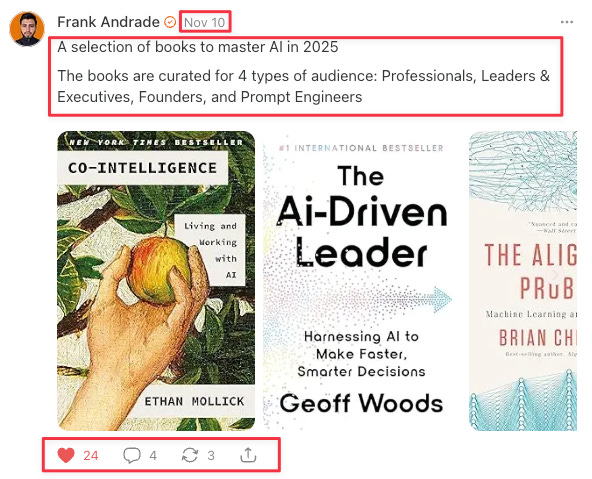
Here’s what a Note looks like (the data to extract is inside red boxes):
Here are the steps I follow to web scrape with Cowork:
Find your target page: Locate the website that has the data you need. In my case, it was the page where Substack archives all my published notes: artificialcorner.com/notes
Define the fields you want to extract: Decide exactly what data points matter. I wanted to extract six fields per note: date, post text, number of likes (hearts), number of comments, number of restacks, and post link.
Spell out the edge cases: Think about the details that aren’t obvious at first glance — this is what separates clean data from messy data. For example, my notes archive also includes notes I restacked from other writers, which I didn't want. So I told Claude to only extract notes authored by "Frank Andrade" and to limit the pull to a single specific month.
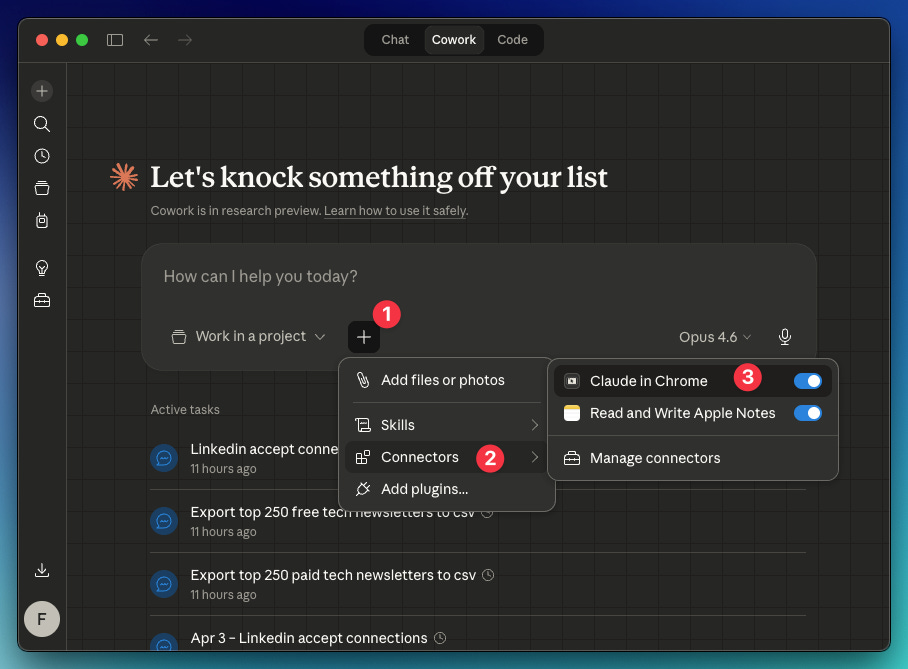
By the way, you will need the Claude in Chrome connector enabled in Cowork: Click “+” → Connectors → Toggle on “Claude in Chrome.” Also, you need the Claude extension active in Chrome (go here and install it).
Here’s the prompt I created from steps 1, 2, and 3:
Use Claude in Chrome for this task.
Start from: https://artificialcorner.com/notes
Author name: Frank Andrade
Month: February 2026Extract this data from the site keeping in mind the author and month I wrote before: Date, Text of Post, Number of Likes (Hearts), Number of Comments, Number of Restacks, Link of Post
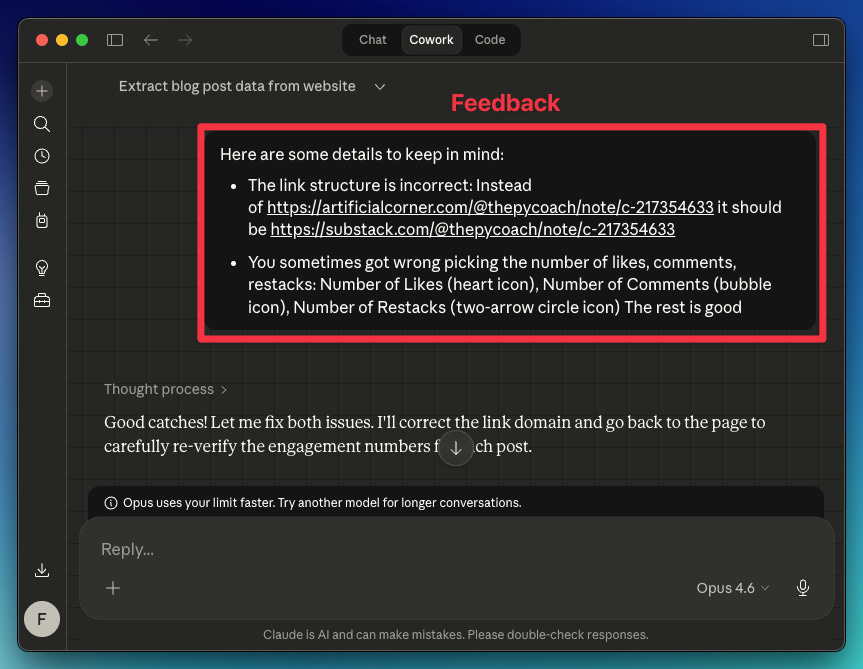
Your first test probably won't be perfect. Review the data Claude collected, and if something looks off, tell it what to adjust for the next run. In my case, the extracted links and a few other data points were wrong.
Here's the feedback I gave Claude
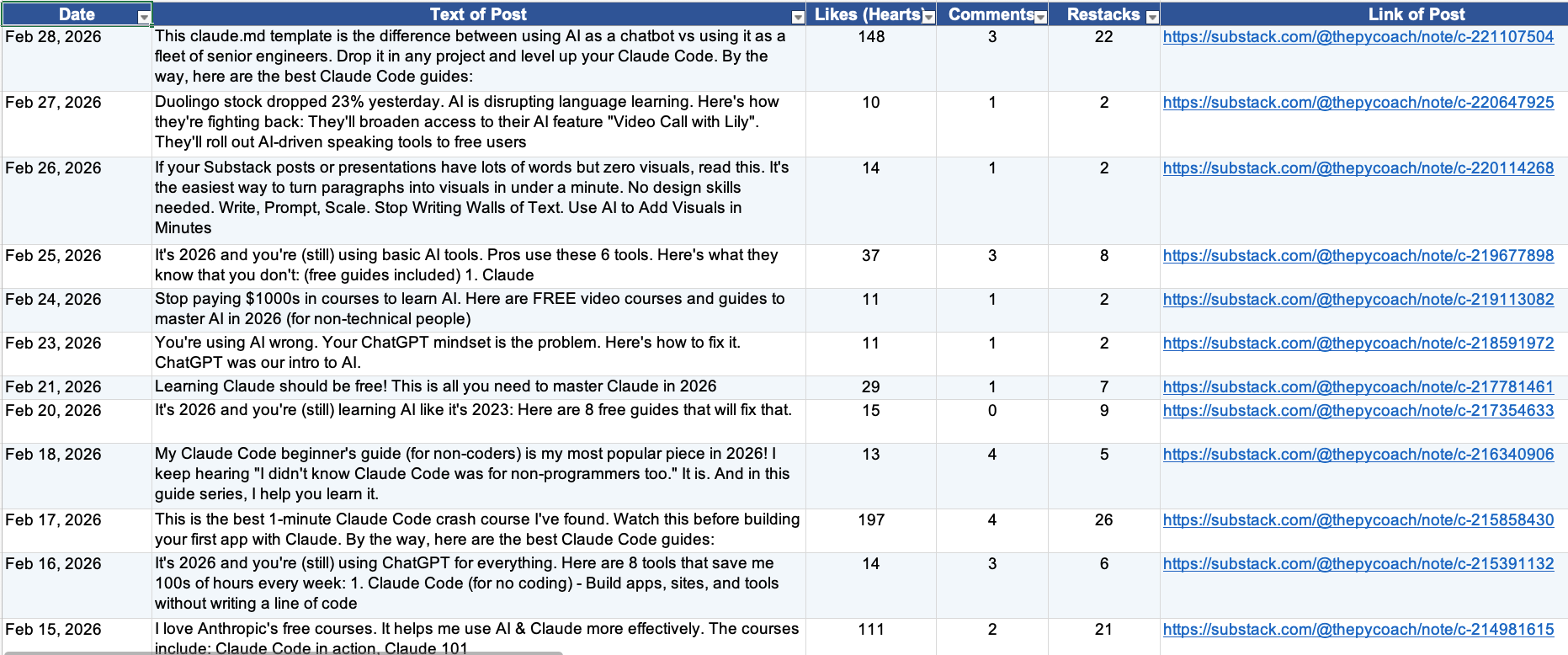
Claude understood everything and returned the right data.
How to automate your web scraper in Cowork
Once Claude learns the best way to scrape the site, there are two ways to automate this process (so you don’t repeat the prompt and feedback again):
Turn the chat into a skill: Save your chat as a reusable skill that you can run anytime. In this case, the skill will help me scrape data from any Substack writer’s URL (not only mine)
Schedule the task: Automate the task for a specific writer on a recurring schedule (e.g., scrape “Frank Andrade“ notes every month on the 14th).
To easily turn a chat into a skill, do this: In the chat, click the dropdown arrow and select “Turn into skill.“ Claude will do the rest.
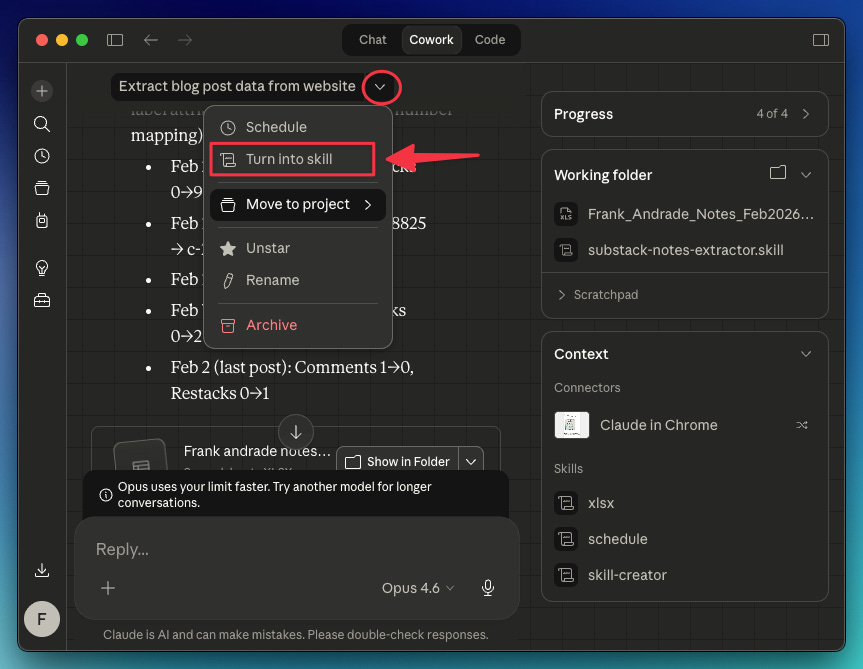
For this particular case, I used a prompt to guide Claude on how to turn my chat into a skill:
Turn this task into a skill. Keep in mind the fixes we made and that the inputs needed for this skill to work are:
Start from: [link]
Author name: [name]
Period: [month/dates]
Thanks to this, Claude can now scrape not only my notes, but the notes of any Substack writer. I just need to provide their link.
As for scheduling tasks, you can click the dropdown arrow and select “Schedule,” or use the /schedule command. The /schedule command gives you more flexibility — the dropdown only offers daily, weekly, or weekday options, while /schedule lets you set any custom recurring schedule.
In my case, I opened a new chat and used /schedule to have Claude automatically scrape my notes for the previous month on the 14th of each month.
/schedule run this task monthly on the 14th
Start from: http://artificialcorner.com/notes
Author name: Frank Andrade
Period: Previous month

Click here to get my FREE Claude course (20+ lessons)
2. Web scraping with Cowork + Apify connector
When you feel Cowork isn’t enough to scrape a site, use the Apify connector to supercharge your web scraping.
Apify is a web scraping and automation platform with over 23,000 ready-made actors. Each actor is a pre-built scraper for a specific website or data source. Reddit, Google Maps, Meta Ad Library, LinkedIn, Amazon, they are all there, ready to run with no code.
Apify is great for robust, scalable scraping across complex sites. With the Apify connector, Cowork can tap into thousands of specialized scrapers with built-in proxy rotation and anti-bot handling that Cowork alone can't do.
You just pick the actor, set your inputs, and get structured data back in minutes.
Apify Use Cases
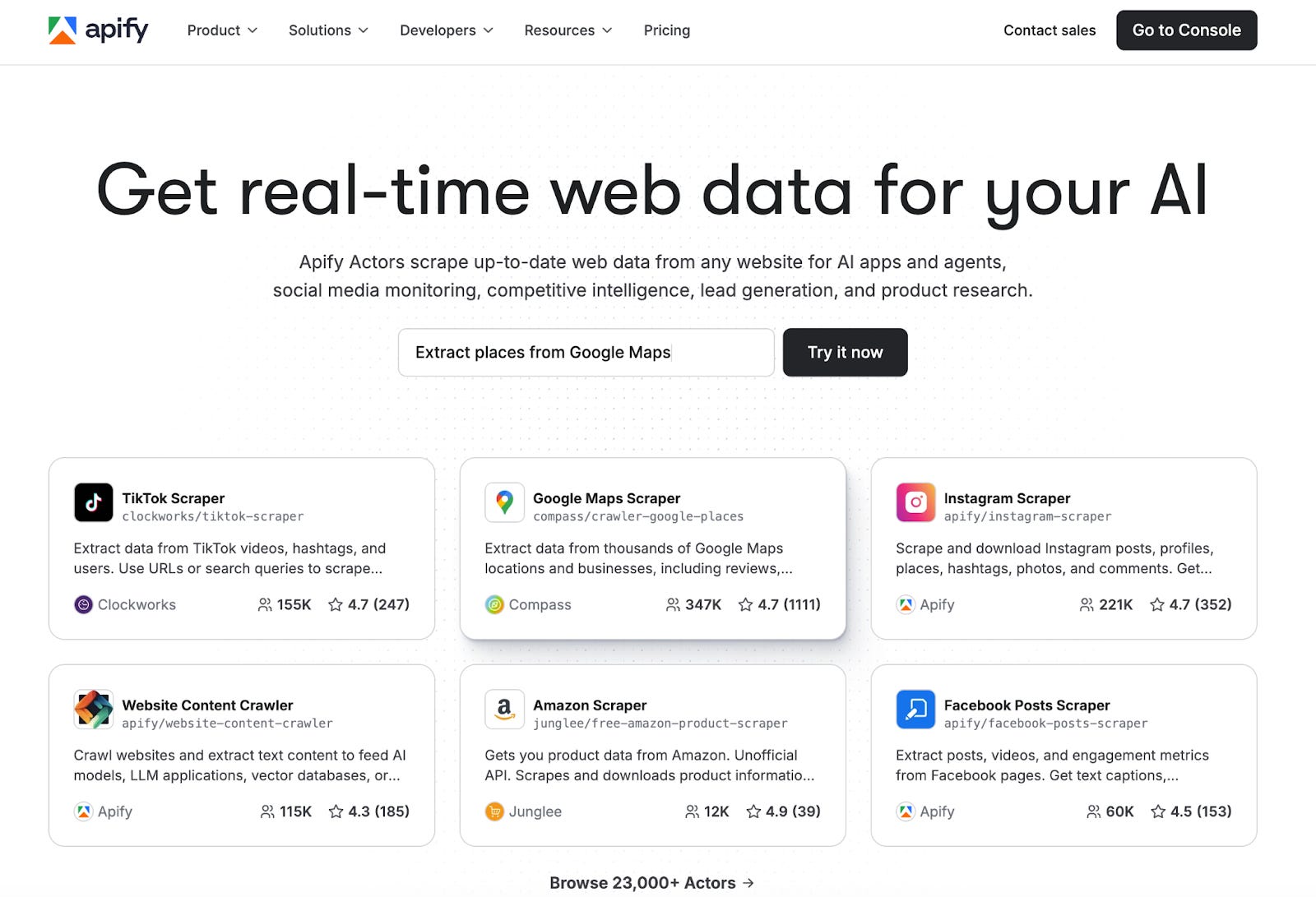
This section was written by Gencay who writes LearnAIWithMe. It covers how to connect Apify with Cowork and 3 use cases I found very useful:
Use Case 1: Reddit Trend Tracker
Use Case 2: Google Maps Business Scraper
Use Case 3: Meta Ad Library Spy

How to Connect Apify with Cowork
You can do it in 5 steps, for free.
Step 1: Go to Apify and create a free account.
Step 2: Go to https://console.apify.com/settings/integrations and copy your Personal API token. (Free)
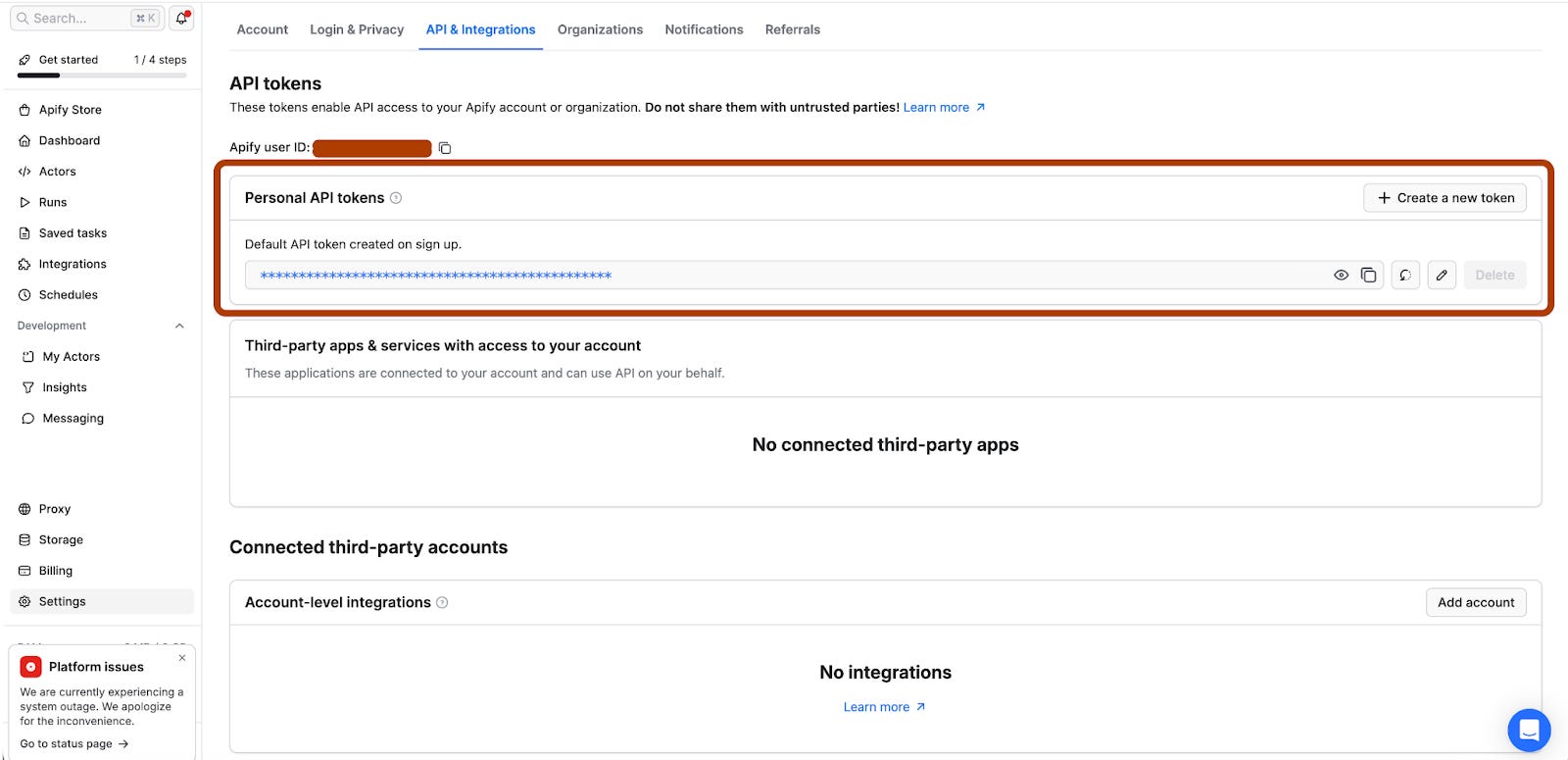
Step 3: Go to your Claude desktop app.
Step 4: Go to Settings/Connectors/Apify and click on “Configure”
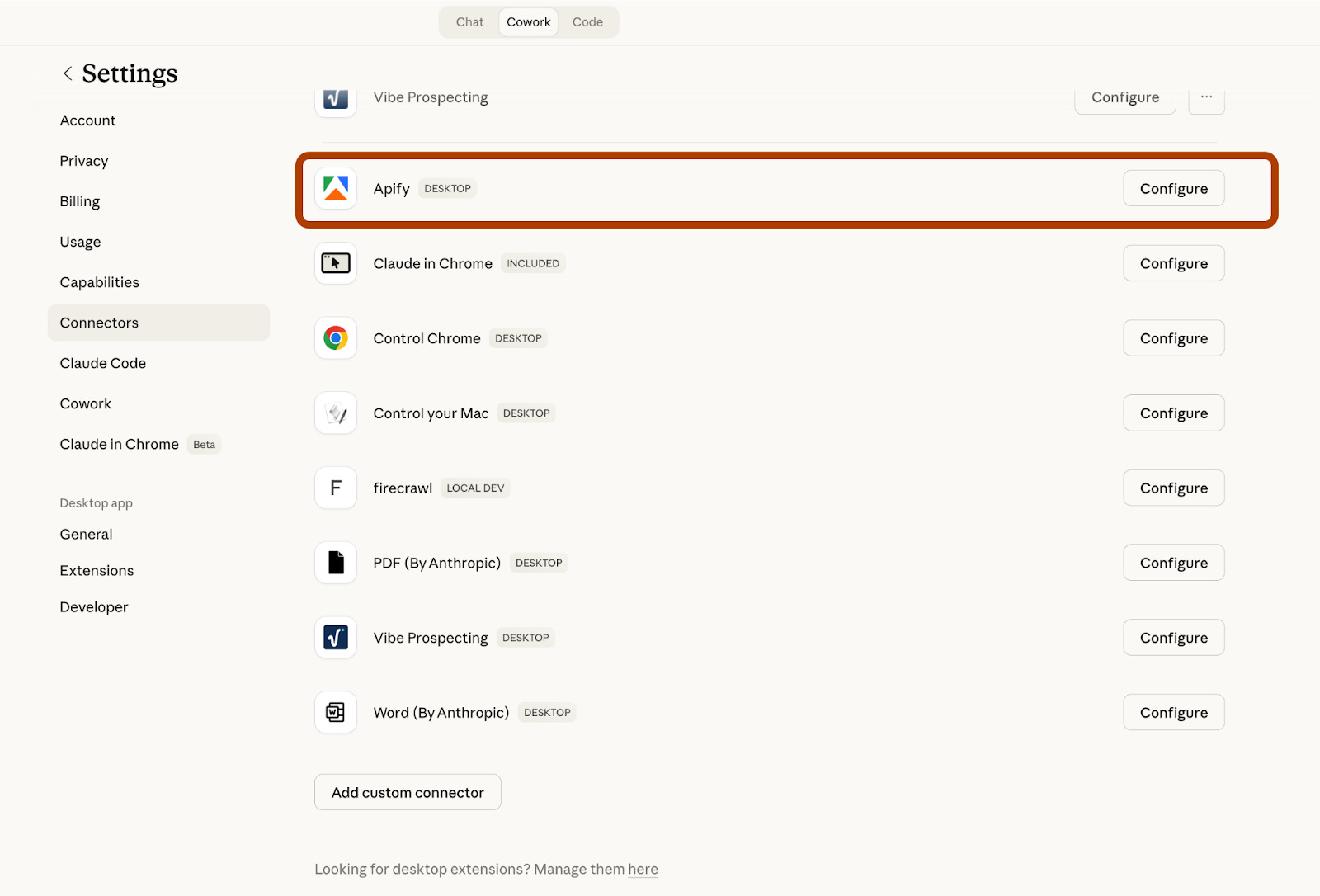
Step 5: Paste your Apify token here.
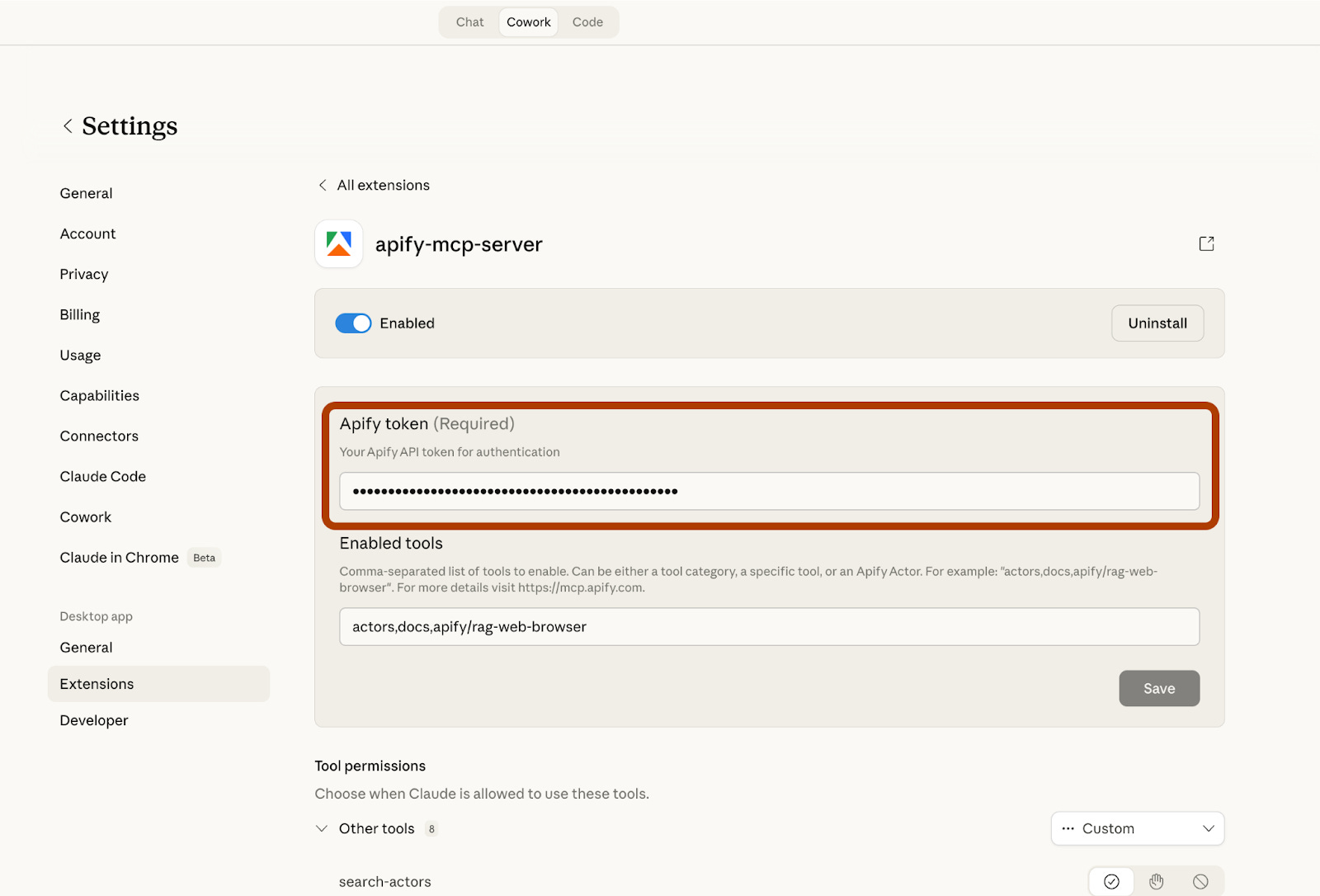
And now, you are ready.
Use Case 1: Reddit Trend Tracker
As a content creator, the hardest question is always the same: what does my audience actually care about right now? You could guess. Or you could just ask Reddit.
Reddit is one of the most honest places on the internet. People share what they are genuinely struggling with, what excites them, and what they want to learn. The problem is sifting through thousands of posts manually. That is where Apify comes in.
With this use case, you give Claude Cowork one simple instruction. It connects to Apify, runs the Reddit Scraper, pulls the top 20 posts from any subreddit, and comes back with a structured content intelligence report. The whole thing takes under 2 minutes.
Let’s visit the ChatGPTPromptGenius subreddit and track trending prompts.
Here is the prompt we’ll use.
Go to Apify and run the Reddit Scraper actor(https://apify.com/harshmaur/reddit-scraper) for the subreddit r/[SUBREDDIT].
Scrape the top 20 posts from the last 7 days.
Once you have the results, summarize the top 5 trending topics in bullet points.
For each topic, write one sentence explaining why it matters to content creators.
I customized the subreddit: r/ChatGPTPromptGenius. After pasting the prompt, cowork has started working and talking with Reddit, through Apify.
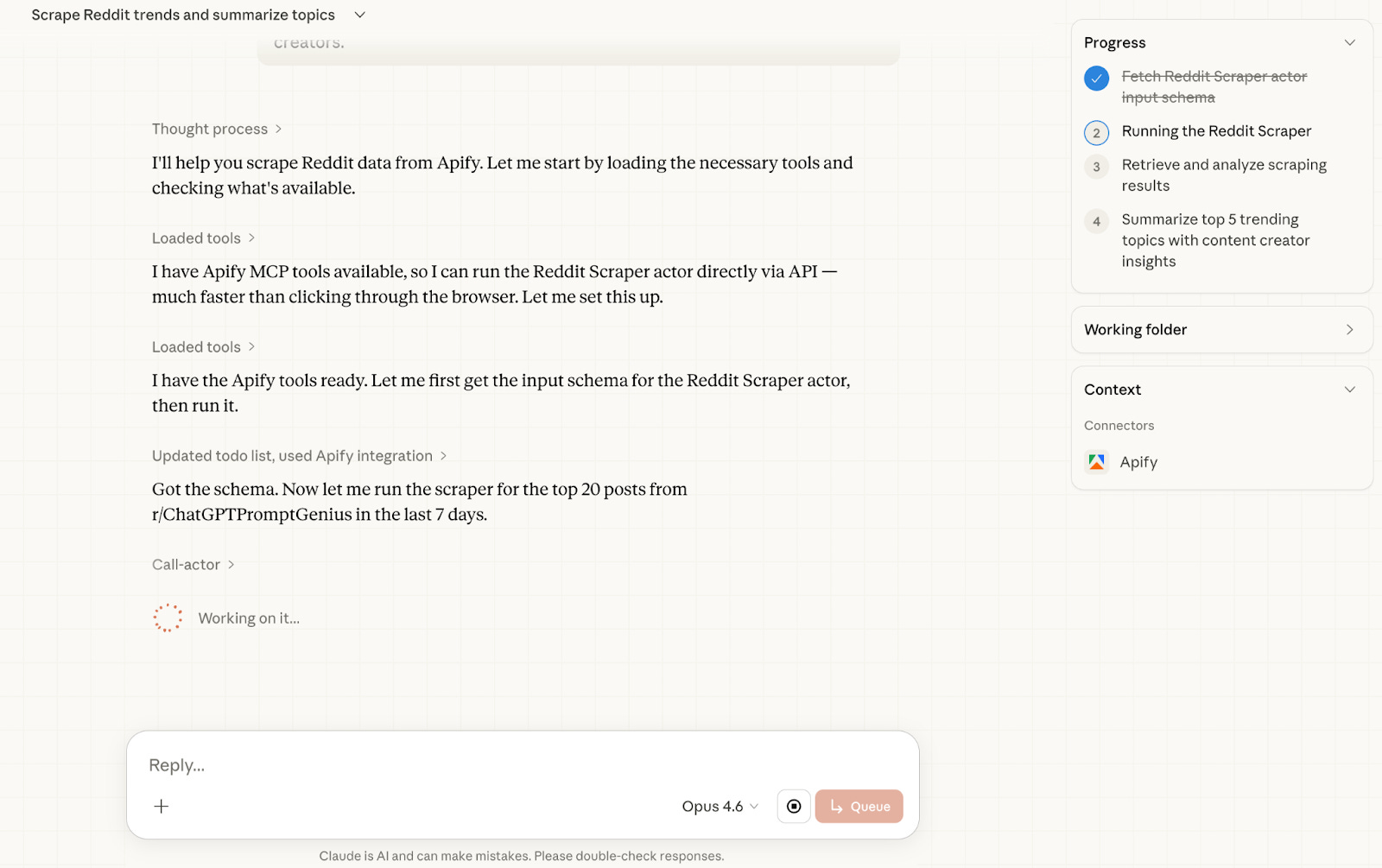
After a couple of minutes, your report is ready.
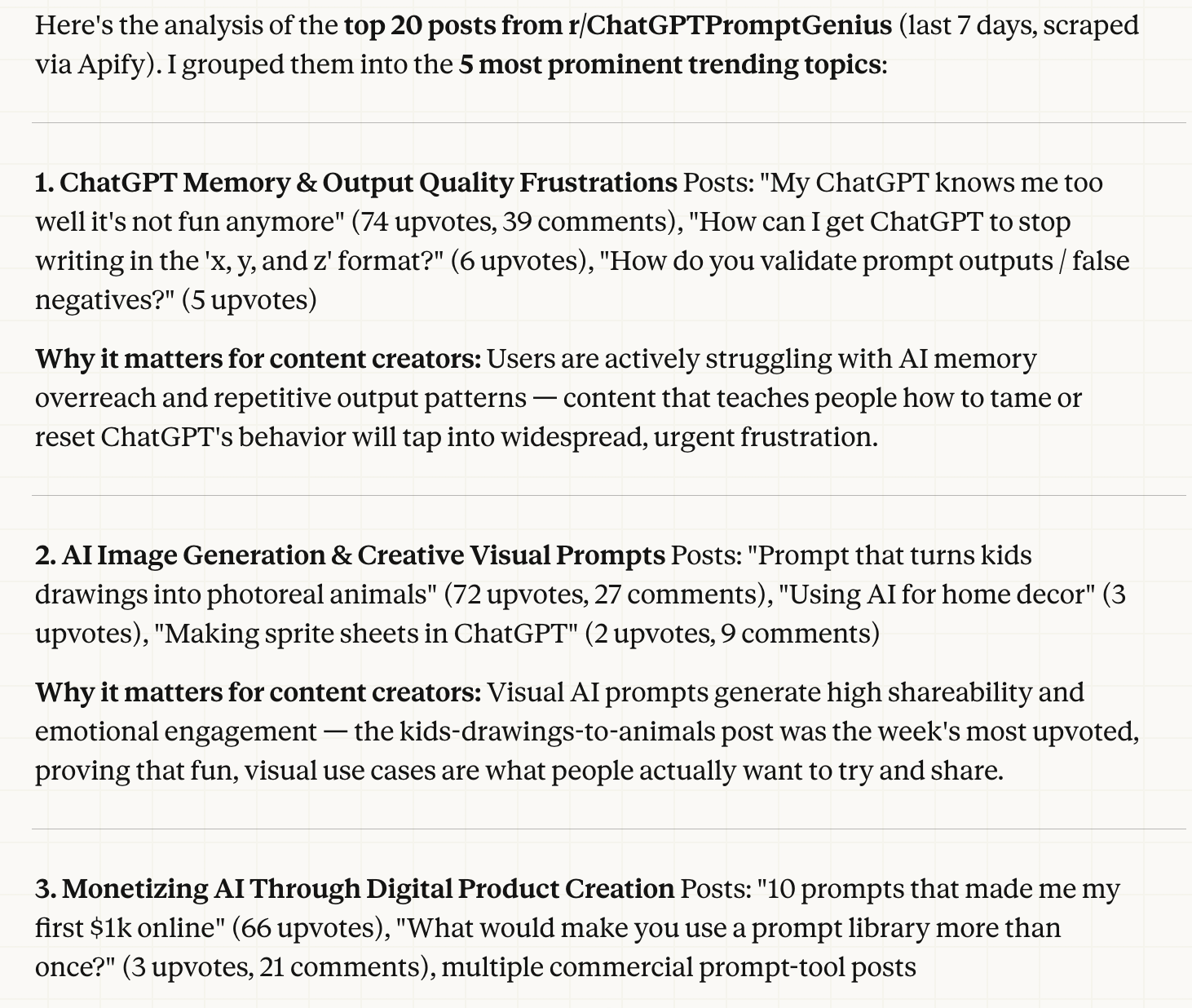
Here is the full report.
Next step: Adjust and improve one of these prompts for you, then build content around it.
Normally, you would visit Reddit, scan trending topics for 10–15 minutes.
Now, you did all of that with a single prompt.
Use Case 2: Google Maps Business Scraper
Every city has hundreds of local businesses with no website.
They show up on Google Maps, they have phone numbers, they have real customers and real reviews. But they are invisible online beyond that single listing.
For a freelancer, this is a goldmine. The problem is finding them and reaching out at scale.
This use case solves both problems in under 3 minutes.
Claude Cowork connects to Apify, scrapes Google Maps for a specific business type and city, filters out anyone who already has a website, and then writes a personalized outreach proposal for each remaining business.
Not a generic template. A proposal that references the business by name, mentions their rating, and explains exactly why a website would help them specifically.
Here’s the prompt.
Go to Apify and run the Google Maps Scraper actor (https://apify.com/compass/crawler-google-places)
Search for [BUSINESS TYPE] in [CITY].
Scrape 30 results.
Filter out any businesses that have a website listed.
For the remaining ones, write a short personalized outreach proposal
for each business explaining why they need a website and how it would help their business.
I customized it with business type: Restaurant and city: Paris.
After pasting the prompt, it scrapes restaurants from Google Maps, finds leads, and starts writing outreach proposals in Google Docs within 2 minutes.
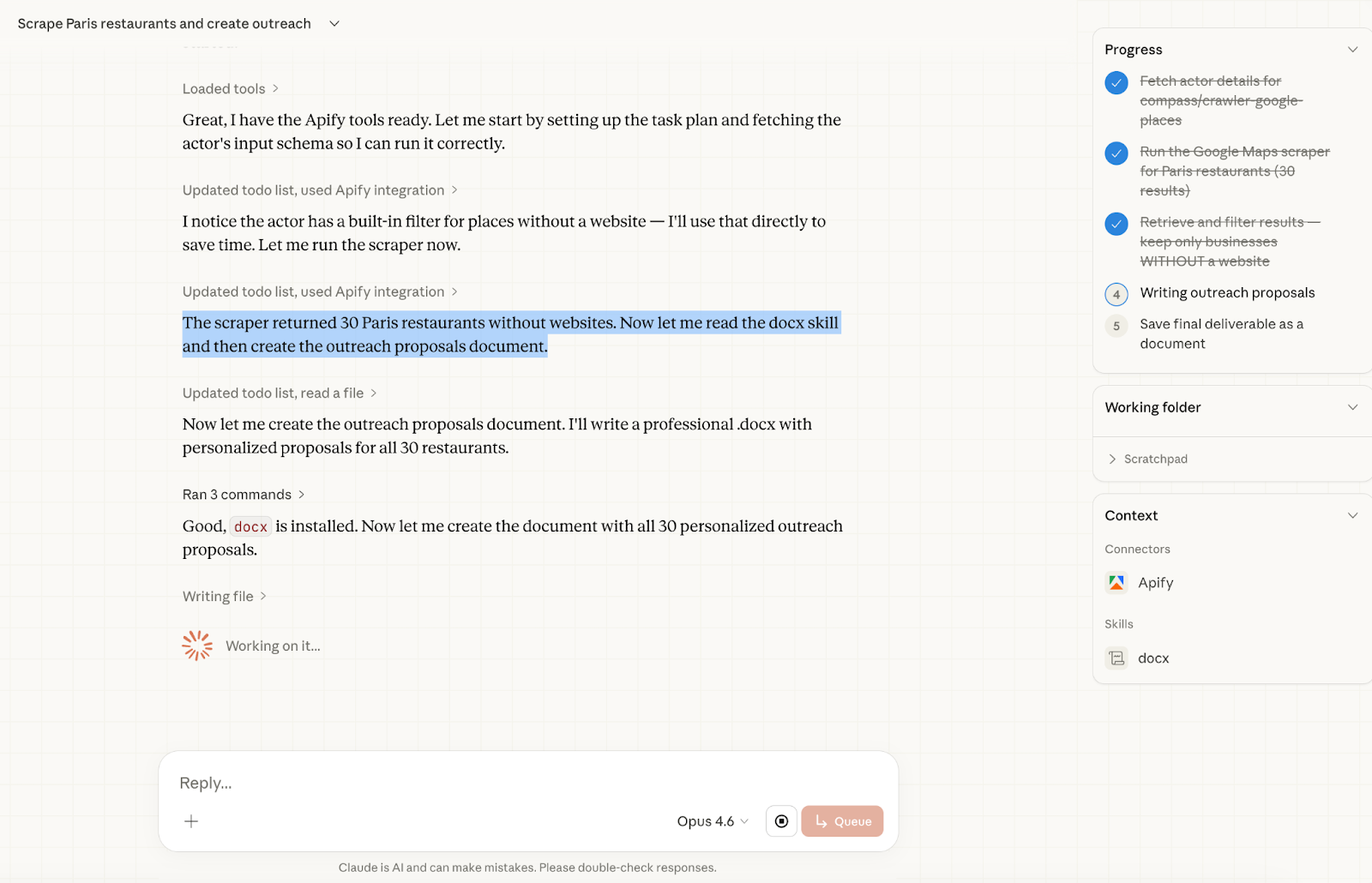
And it finished just 1 minute later.
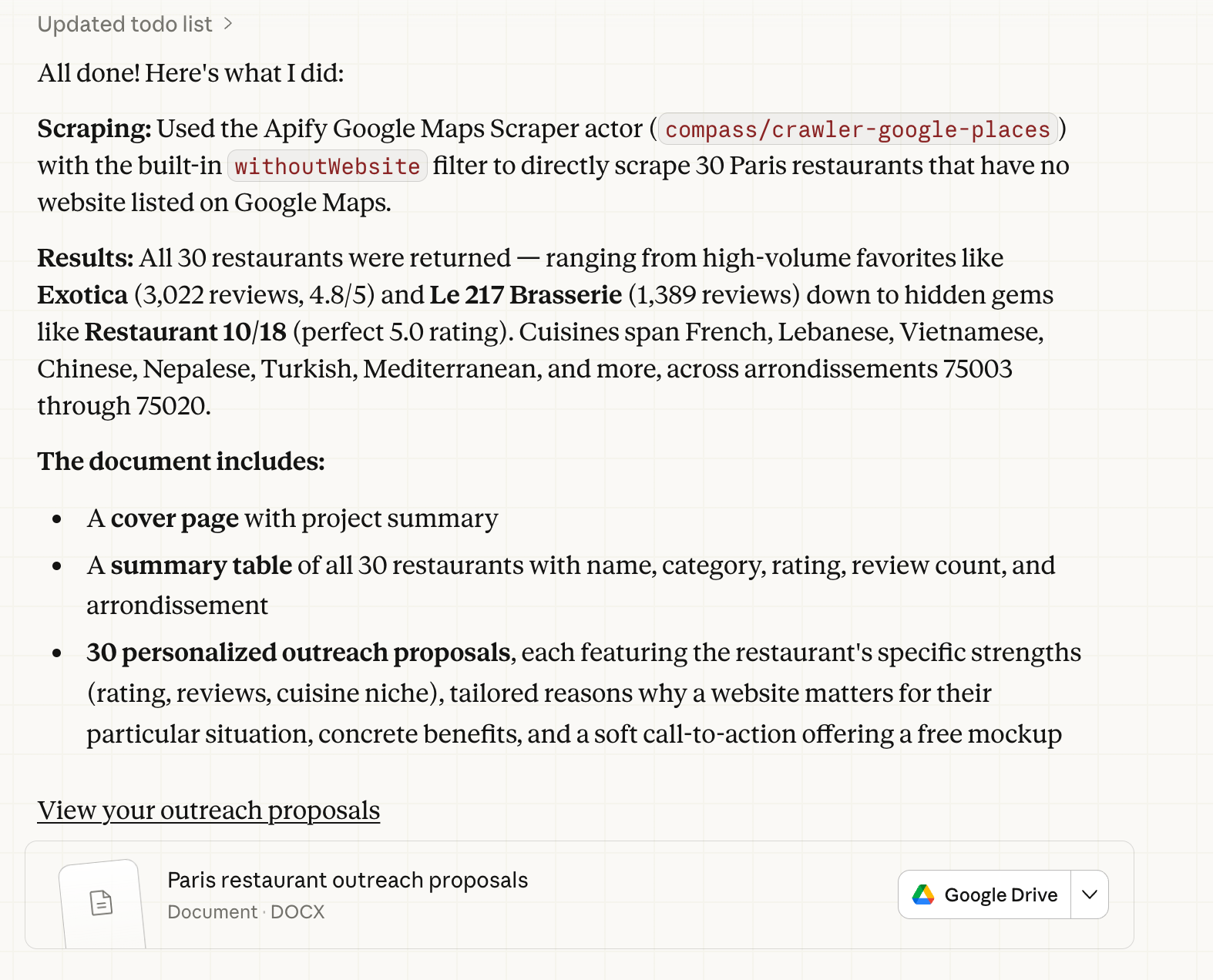
Claude scraped 30 Paris restaurants from Google Maps, identified the ones without a website, and started writing proposals directly inside Google Docs. The entire workflow finished in under 3 minutes.
Here is one of the proposals it generated:
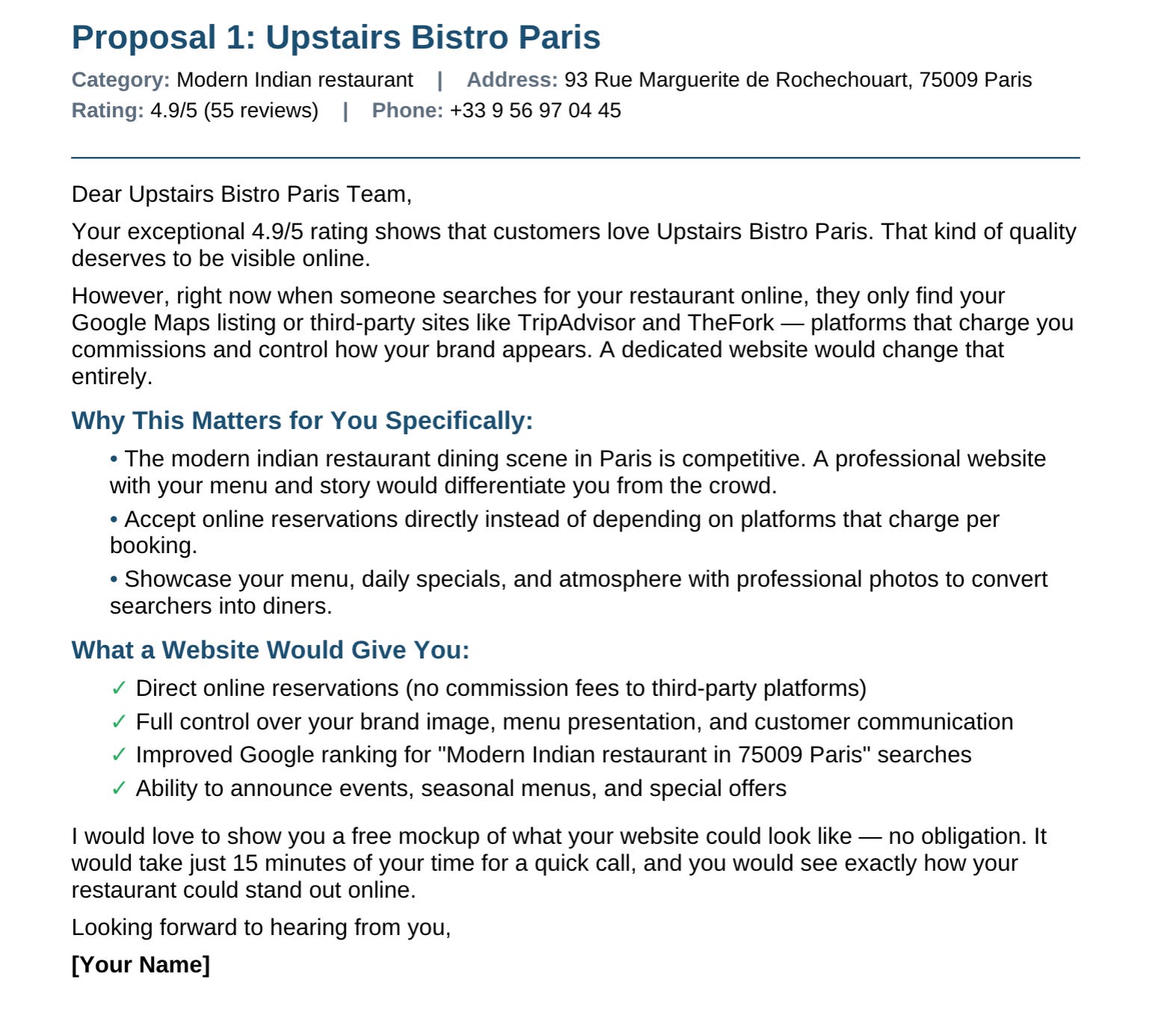
Here are all of them.
Notice what Claude did here. It did not write a generic cold email. It pulled the actual rating, referenced the specific platforms eating into the restaurant’s margins, and framed the pitch around their situation. Every proposal in the batch followed the same logic, customized for each business.
You can run this exact workflow for any city and any business type. Swap Paris restaurants for Istanbul hair salons or London dental clinics. The prompt stays the same. The leads change every time.
Next Step: Use a lead generation agent to find the contact details of these restaurants and send the emails. Who knows, they might reply, and this time you could build their website with Claude Code.
Use Case 3: Meta Ad Library Spy
Before you spend a single dollar on ads, you should know what is already working in your market. Meta’s Ad Library is a public database of every active ad running on Facebook and Instagram. The problem is that browsing it manually is slow and gives you no structure. You end up with a list of ads but no insight.
This use case fixes that. Claude Cowork scrapes your competitor’s active ads through Apify, then analyzes them for CTA patterns, messaging strategy, and sentiment.
You get a full intelligence report in minutes.
Here’s the prompt.
Go to Apify and run the Meta Ad Library Scraper actor. Search for ads related to [KEYWORD/COMPETITOR] in [COUNTRY]. Scrape the last 20 active ads.
Analyze the results and give me a breakdown of the most common CTA types, recurring messaging patterns, and overall sentiment. Then suggest 3 ad angles I could use based on what is working for competitors.
I customized it with Competitor: Alex Harmozi and Country: United States.
And after pasting the prompt, it started working.
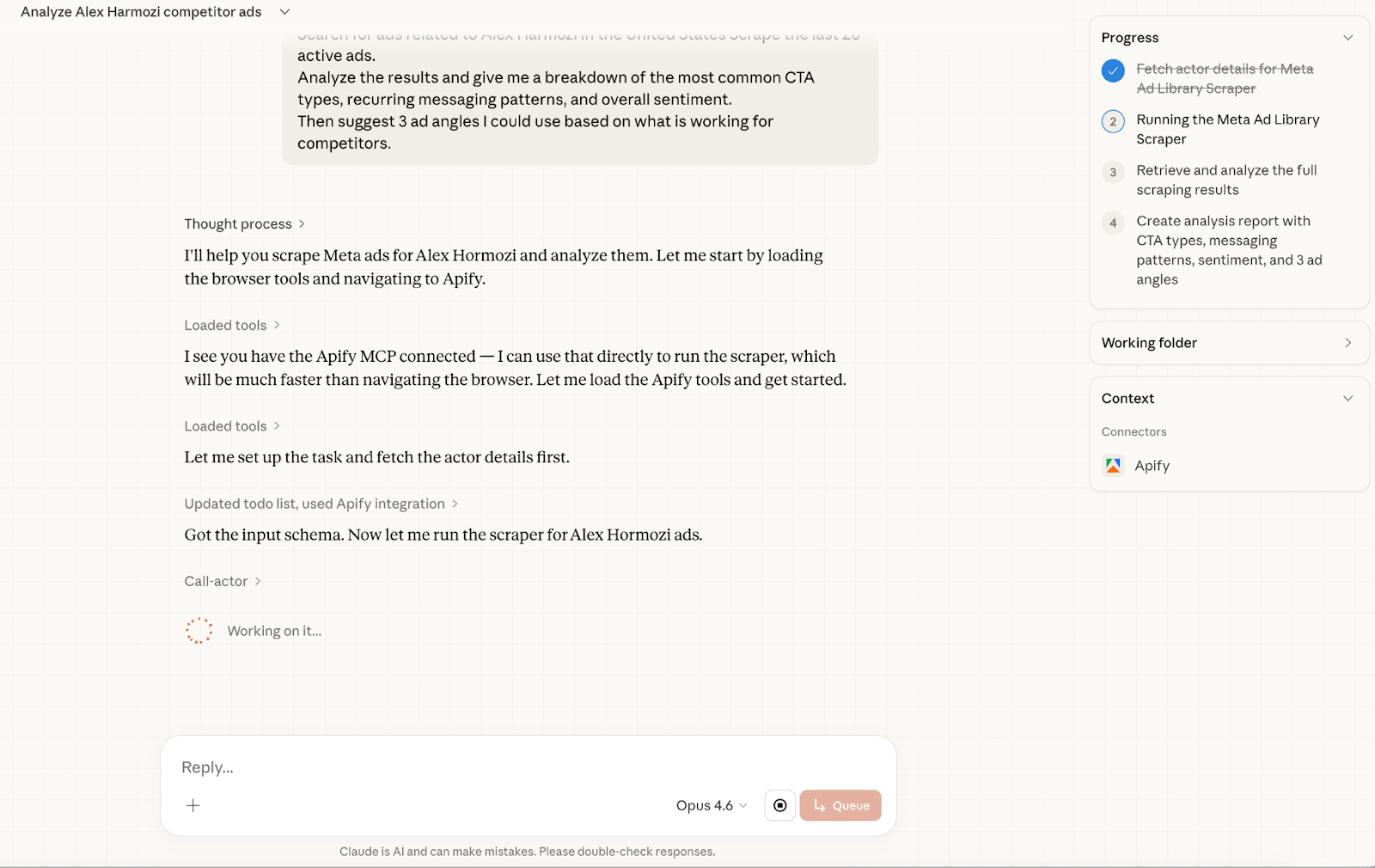
And it finished.
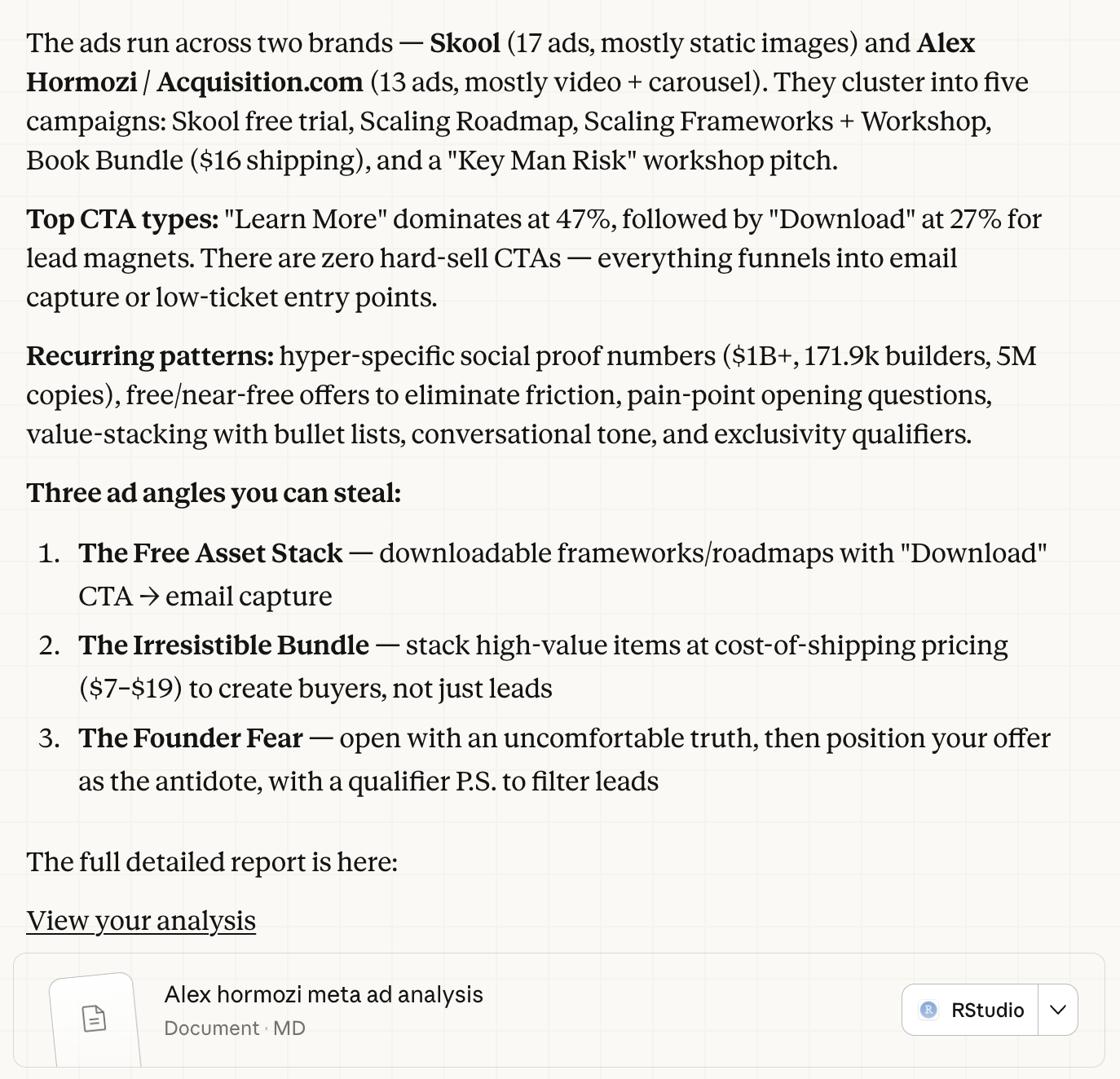
Here is the full report.
Claude scraped 30 active ads across two brands:
Skool and Acquisition.com.
Both reference Hormozi directly, so they both appeared in the results.
And created a full report.
Next Step: Turn it into a skill that writes Meta ads in the style of Alex Hormozi. Or go further, scrape your competitors’ profiles and build one powerful skill that lets you write like any competitor whenever you want.
Don’t forget to subscribe to LearnAIWithMe, a newsletter focused on practical AI tutorials for people who’d rather replace than be replaced by AI.
Here are some of Gencay’s best posts:
With a paid API scriping is trivial, apify is not the best solution here. How do it free?