

Click here to get my FREE Claude course (20+ lessons)
A year ago, there were barely any guides or video tutorials for Claude.
Today it’s the opposite. You open Google and find dozens of guides and Claude video courses. You watch ten minutes of one, feel a little lost, and close the tab.
A week later, you’re exactly where you started.
I’ve been there, so I did the digging for you. I went through more than 20 free courses and threw out the noise. Then I sorted what’s left by the way you actually like to learn.
Here are the best Claude courses.
If you like step-by-step guides
If you’re the kind of person who likes to read, follow along, and do it yourself at your own pace, this one’s for you.
The course is split in 3 levels, so you don’t drown trying to learn everything at once. Think of it like a video game: you finish level 1 before you unlock level 2.
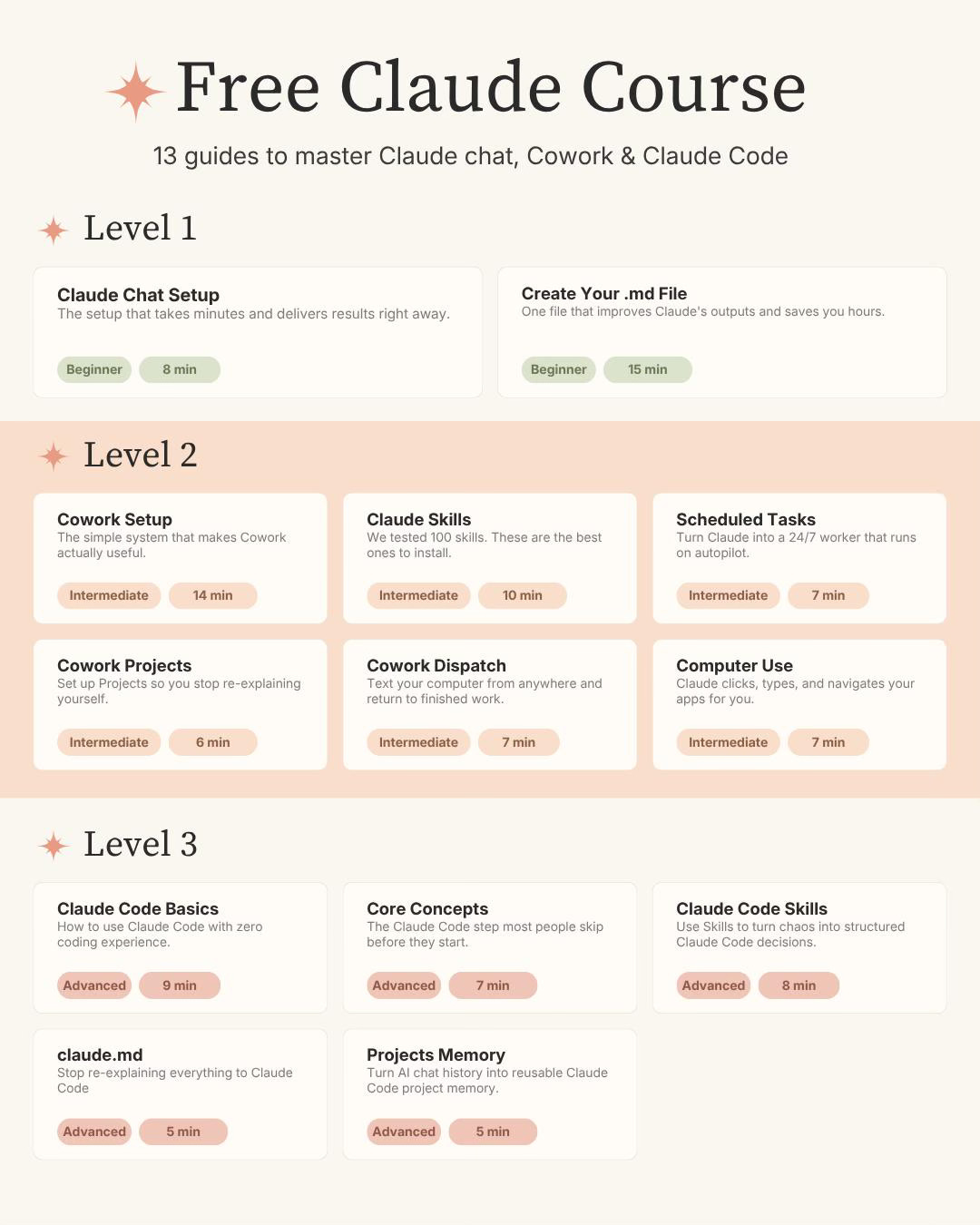
Here’s what the levels are about:
Level 1: Claude chat
This is the regular Claude you talk to, the one that looks a lot like ChatGPT.
Most people stop here and never get past the chatbot stage.
You’ll learn Claude features, how to set it up properly, and how to create a simple file that tells Claude who you are and how you work, so you stop re-explaining yourself every single time.
Once you do that, you’re already ahead of most users who just open a blank chat and start typing.
Level 2: Claude Cowork
This is where Claude stops talking and starts doing.
Cowork lives in the desktop app. The big difference: ChatGPT gives you text you have to copy and paste somewhere else, while Cowork creates the actual files for you (the document, the spreadsheet, the styling, all of it).
In level 2, you’ll learn how to set up Cowork, build your first skill, run tasks from your phone, turn Claude into something close to a 24/7 employee and more! For most non-technical people, this is the level that changes how you work.
Level 3: Claude Code
Claude Code is Claude Cowork on steroids.
They made Cowork to break the “I’m afraid of coding” barrier. But once you start hitting Cowork’s limits, Claude Code is how you break through them. And no, you don’t need to know how to code (the name scares people off, that’s all).
Level 3 covers why Claude Code is worth it, what to learn first, how skills work, claude.md and more. For this particular level, I haven’t covered everything yet, so you’ll need to take the Claude Code course below for a deep dive.
You don’t have to reach Level 3 to get a ton of value. But if you want to break Cowork’s limits, this is the door.
How to get my free Claude course
If you’re not a subscriber, click here to get my free Claude course (or leave your email below). After you subscribe, you’ll get a welcome email with the link to the course.
If you’re already a subscriber (and can’t find the welcome email), DM “free“ on Instagram, and I’ll send you the link (you could leave a comment here, but I don’t get notifications, so I might lose your message)
P.S. Levels 1, 2, and 3 are free for everyone, but some guides I publish weekly are exclusive to paid subscribers. Support us by becoming a paid subscriber.
If you like video tutorials
Some people learn better by watching someone do it on screen.
Here are three free YouTube courses I’d actually recommend. Each one covers a different piece of the Claude puzzle.
Claude Cowork 60 Minute Masterclass (Sabrina Ramonov)
If you only watch one video, make it this one.
If you want one video to understand Cowork, this is it. Sabrina sets up the Claude desktop app from scratch, then runs five real use cases live: organizing a messy files folder, building an email assistant, creating on-brand content, and automating social media. It pairs perfectly with my Level 2 above.
Watch it, then go build something.
Key timestamps:
00:42 Download and install Claude Desktop + interface tour
02:10 Chat mode vs Cowork mode vs Claude Code (the difference that confuses everyone)
09:48 Skills explained (reusable AI playbooks)
19:00 Use case: organizing a messy local files folder
30:28 Use case: a personal email assistant with Gmail and Calendar
39:05 Use case: creating on-brand marketing content
Watch it here:
Claude Code Full Course, 4 Hours (Nick Saraev)
This one is for people who want to go all in. This is an end-to-end beginner course that takes you from installing Claude Code all the way to shipping (and selling) a real project. Nick covers setup, using the CLAUDE.md file as your project’s brain, building your first web app, then the power-user stuff: skills, sub-agents, and git worktrees to run hours of work in minutes.
Save this one for after you’re comfortable with Levels 1 and 2.
What it covers:
03:44 Setting up and installing Claude Code
24:01 Building your first web app with Claude Code
30:29 Using the CLAUDE.md file as your project brain
54:42 Advanced features (hooks, slash commands, the .claude directory)
2:35:29 Creating skills to work faster
3:11:08 Sub-agents and agent teams (Claude working in parallel)
Watch it here:
Bonus: Claude Design 2 Hour Course (Nate Herk)
Claude can also design. This 2-hour course takes you from zero to shipping real work with Claude Design, the kind of thing you’d normally use a tool like Canva for. Nate builds a full brand called Tally from scratch, so you watch one project come together start to finish.
If you create visuals, slides, or websites for work, this is worth the watch.
What it covers:
00:00 What Claude Design actually is
11:33 Creating the design system
19:50 Building a pitch deck
40:45 Building a high-fidelity website
57:51 A mobile app prototype
1:42:01 Pushing the site live with GitHub and Vercel
Watch it here:
If you want courses straight from Anthropic
Here’s something a lot of people don’t know: Anthropic, the company that makes Claude, has its own free academy with certified courses taught by the people who actually built Claude.
They’re free and you can get a certificate for LinkedIn.
→ Link to Anthropic courses: anthropic.skilljar.com
Here are the best courses they offer:
Claude 101
If you take only one course off this entire list, take this one.
Claude 101 covers features such as projects, artifacts, skills, connectors, enterprise search, and research mode. These are the features that turn Claude from a chatbot you talk to into something you build real workflows inside. It’s broken into short modules, with use-case breakdowns by role at the end (marketers, writers, analysts, operations). Takes about 1 to 2 hours.
AI Fluency: Framework and Foundations
This course is a way of thinking about how to work with AI effectively and responsibly.
The whole thing is built around four ideas they call the four D’s:
Delegation: knowing when to hand a task to AI and when to do it yourself
Description: clearly telling the AI what you actually want
Discernment: judging whether the output is any good before you use it
Diligence: the responsibility you still carry even when AI did the work
If you manage a team or you’re the person deciding how AI gets used at your company, this course will shift how you think about it more than any feature tutorial.
The AI Fluency spin-offs: Educators, students, teaching
Anthropic took that same fluency framework and made three more versions for specific groups:
AI Fluency for Educators: for teachers and anyone designing courses, applied to curriculum design and assessments
AI Fluency for Students: the framework reframed around studying, learning, and career planning
Teaching AI Fluency: for people whose actual job is teaching AI fluency to others, like trainers and L&D teams
The advanced track
Here are some courses recommended for those who want to build with Claude
Claude Code 101: how Claude’s command-line tool fits into a daily coding workflow
Claude Code in Action: it’s 15 short lectures on real development tasks — navigating a codebase you’ve never seen, planning a feature before writing it, etc
Introduction to MCP: how to connect Claude to your own tools, files, and databases
One more thing
You don’t need 20 courses.
You need the right one for where you are right now.
And if you want a course that keeps updating, subscribe to Artificial Corner 👇 I release new Claude guides every week.
Join my newsletter with 60K+ people to master AI in 2026
You perfectly described most people's frustration with courses then went ahead and did the exact same thing that everybody does. Where are the courses? I signed up and nothing came through about courses? Why are the courses just not right here where they are easy to access? You then say "or if you like this then go here" then "or do this"! Stop lying and saying you're going to make it simple and easy and then not do the very thing you say you're gonna do!
Excellent list of practical courses from experts!