


I’ve been using ChatGPT to learn a new language, and the results were amazing!
What’s my secret? I didn’t use ChatGPT just for grammar questions or homework cheating. I used it to increase my exposure to the language through reading, speaking, listening, and writing practice.
Reading: In the past, I had to wait until I reached a B1/B2 level to start reading in a foreign language. With ChatGPT, I started reading even as a beginner.
Writing: I created a super prompt to make ChatGPT correct your text like your teacher would (with strikethroughs and text insertions) while preserving your meaning and voice
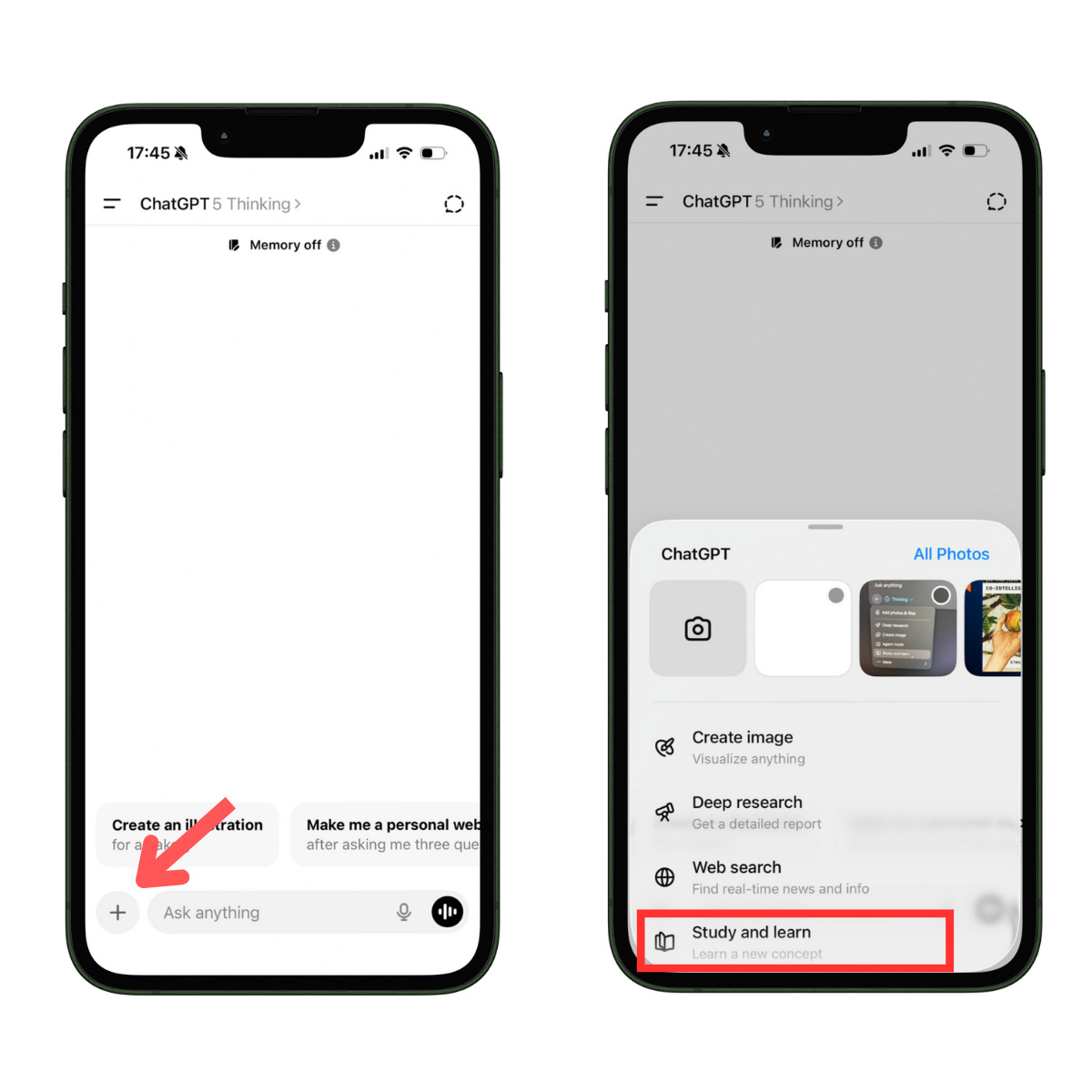
Study mode: This is a feature that helps you use ChatGPT for less homework cheating and more learning that sticks
I also created a space within ChatGPT dedicated to language learning. There, ChatGPT acts as a language tutor and follows any preferences I set. This setup creates a language environment that doesn’t interfere with your other uses for ChatGPT (work, school, etc). In this article,
I’ll use Spanish as the target language, but you can apply everything to any language.
First Things First: Create a Language Project
In this guide, we’ll learn how to make ChatGPT correct our mistakes, speak with the accent we want, and more.
There are different ways to do this:
You start a new chat and give the instructions
You change ChatGPT’s behavior in Settings → Personalization (it applies to all chats)
You change ChatGPT’s behavior within a project (it applies to chats within the project)
Option 1 is very repetitive, and option 2 will mess up other ChatGPT chats.
Option 3 is perfect because we’ll create a space just for learning a language without affecting the rest of our chats.
Here’s how to create a project.
First, on the left sidebar, go to projects and click on “New Projects.“ Give your project a name and then click on “Create project.” I’ll name mine “Language Project“
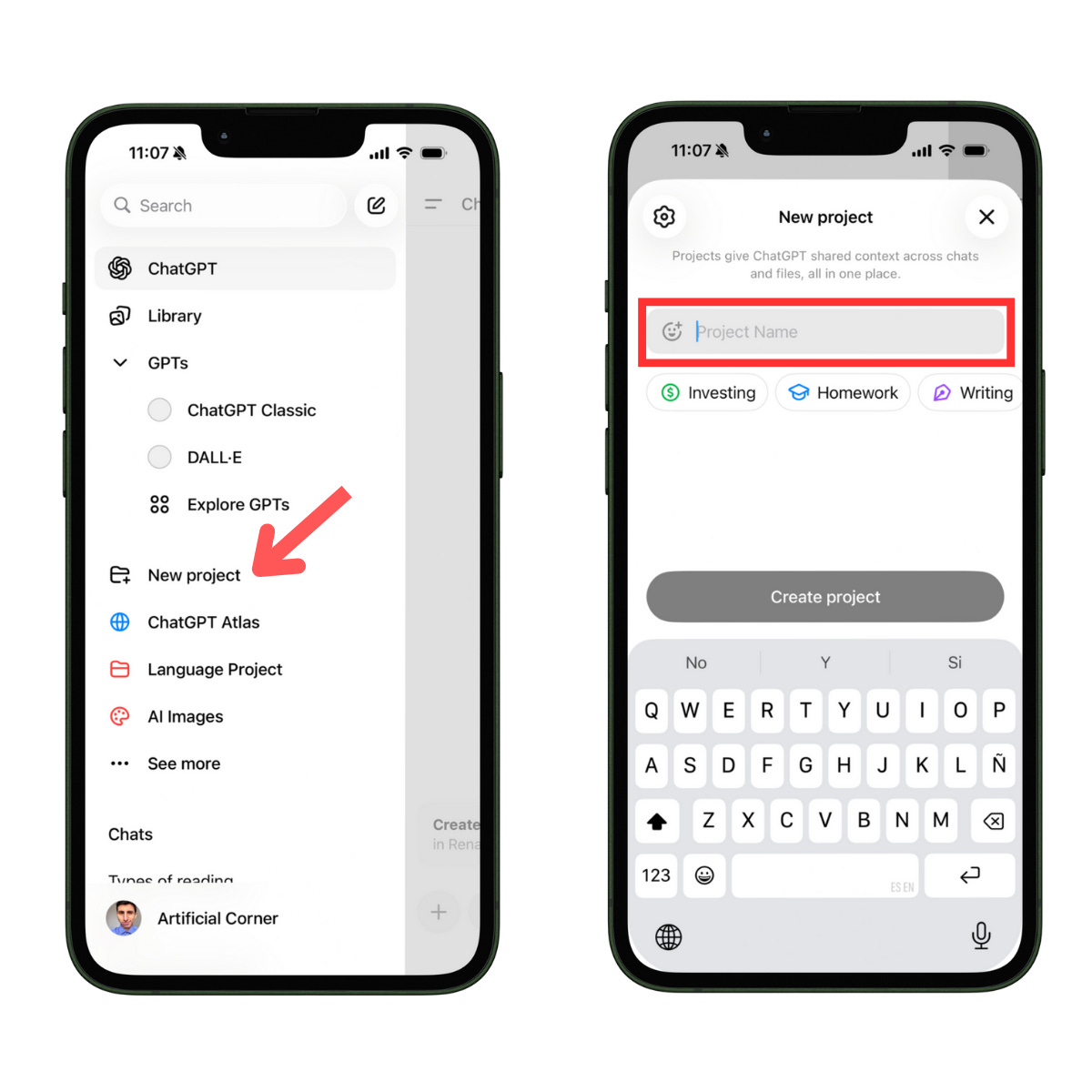
The best part of a project is that we can change how ChatGPT behaves by default within that project. To do so, click on the three dots (upper-right corner) and select “Edit instructions.”

Reading Sessions with AI
If you like reading and are learning a foreign language, you should try reading with ChatGPT (even if you’re still a beginner).
Here’s how to do it:
First, open ChatGPT and tap on voice mode:

Then say this:
I’m going to read a book in [language] and you have to translate what I say to English
Pick up a book in your target language and follow these steps:
Read a paragraph or a bit of dialogue
Pause for a moment
ChatGPT will provide a translation
And then repeat! While you listen to the translation, follow along carefully with your eyes, trying to memorize new words and expressions.
Why does this work?
If you’re a beginner, you’ll get used to speaking words in a foreign language quickly (how to pronounce and write them)
If you have an intermediate or advanced level, after every reading session, you can build a list of new words to improve your vocabulary.
To make this more efficient, paste this into our project’s instructions:
I’m going to read a book in [language] and you have to translate it to English. Whenever I come across a new word, I’ll share it with you and you have to save it, so we can build a vocabulary table later
Notes:
To avoid confusing ChatGPT with different instructions, you can create one project for speaking and another for reading
If you have an advanced level, you won’t need ChatGPT to translate everything you say. You can turn on voice mode only when you find a new word. You could also keep it on all the time and if you don’t find new words, just say: “Don’t translate this part. Let’s continue.”
Writing
If you go to language school, you probably have writing tasks once in a while. In case you want to improve your writing skills, you can use ChatGPT to correct your text just like your teacher would: with strikethroughs and text insertions. That’s a good way to improve our writing because we learn from our mistakes.
Here’s a prompt I use to improve my writing (works best in Claude, which is another AI tool).
Context: I’m a non-native [your language] speaker writing [emails/stories/essays] in [target language]
Task: Lightly edit while preserving my meaning and voice
The text to proofread is in the Word file attached
Instructions:
Fix grammar, spelling, punctuation, and awkward phrasing
Punctuation preferences: Replace em-dashes (“—”) and semicolon (“;”) with a dot (”.”) to start a new sentence, or a comma (”,”) to continue the sentence.
Word choice: Replace uncommon/odd words with common phrasing; add idiomatic expressions only when they improve clarity and tone
Conciseness: Remove redundancy and tighten long sentences without losing nuance. Prefer simple words over fancy ones
Tone & voice: Keep my intent and personality. Do not introduce new facts or change claims
Numbers & units: Use symbols instead of words. For example, don’t say 45 percent, say 45%
Do not: add content I didn’t write, invent citations, or change factual claims.
Output format:
A) Clean copy (final, ready to publish).
B) Change log with bullets explaining notable edits (rewordings, deletions, tone shifts)
C) Diffs: Show a diff with deletions (strikethrough) and bold insertions. They should be in red
The input is a Word file with the original text (you could simply copy and paste your text), and the outputs are three files. The diffs file is the most important because it has the corrections.
ChatGPT Study Mode: Less homework cheating, more learning that lasts
If we don’t use AI properly, it can weaken our critical thinking. When using AI for learning a subject, avoid:
Turning every question into “give me the answer” (ask for hints instead)
Copy-pasting answers without understanding them
By default, ChatGPT provides answers to your language questions. However, if you turn on “study mode,” ChatGPT will offer step-by-step guidance for solving your exercises instead of quick answers.
Say you have these Spanish exercises:
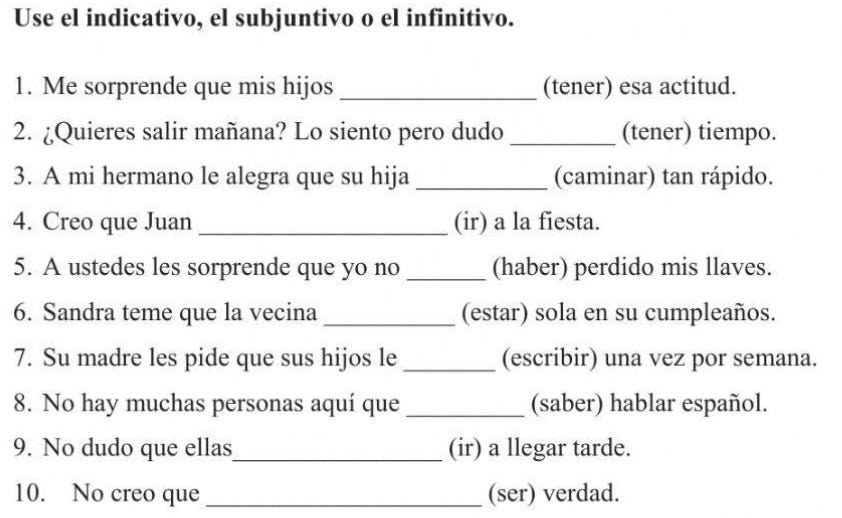
Let’s turn on study mode
Once study mode is enabled, even if you ask ChatGPT to solve your language exercises, it won’t give you quick answers, but step-by-step guidance for solving your exercises.
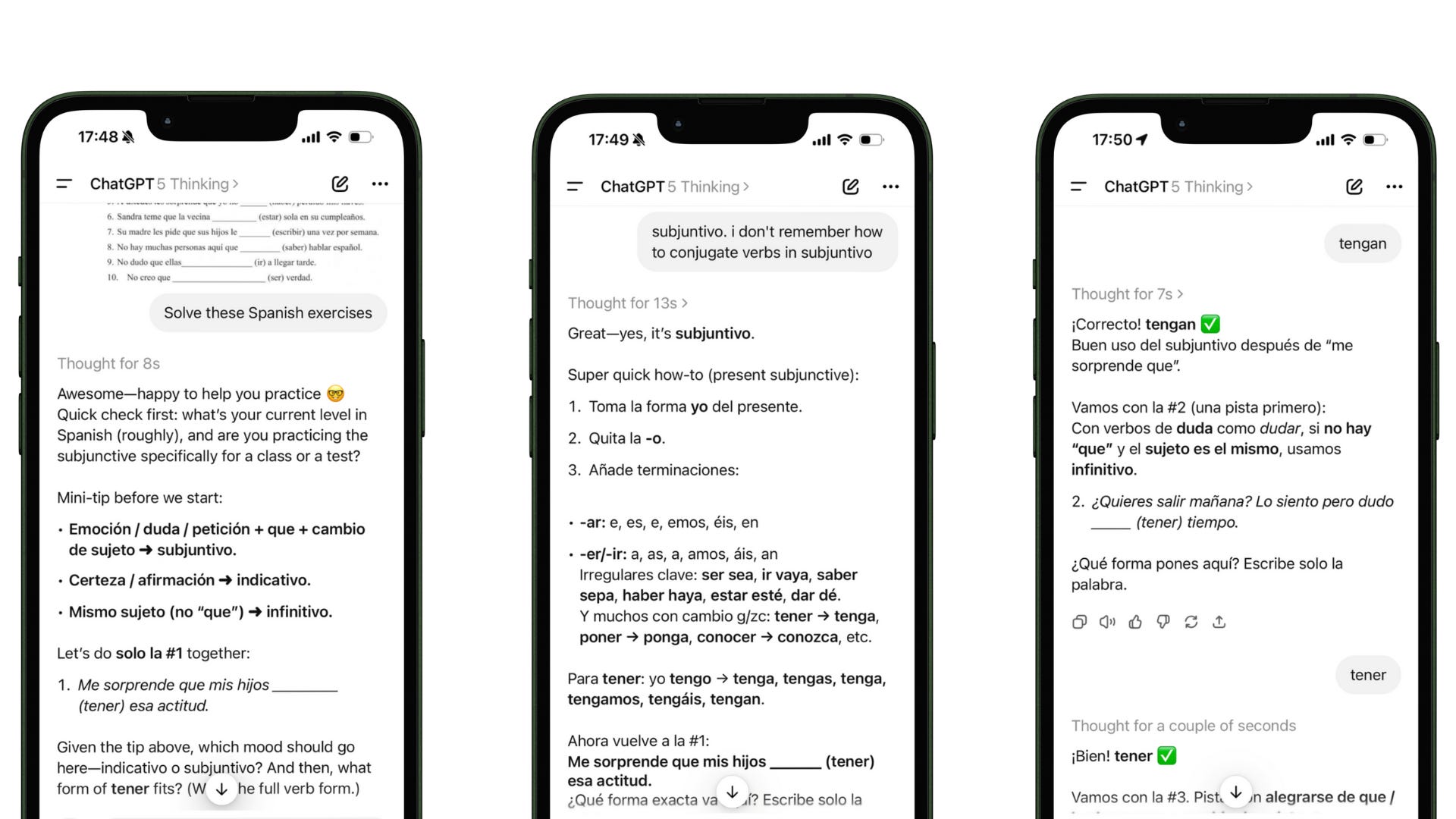
Note: When giving answers in a foreign language, sometimes ChatGPT replies in that language. To make sure it’ll always reply in English, add the instructions “always reply in English “ either to the first prompt or the project’s instructions
If you have any questions, let me know in the comments!
This is absolutely genius! You’ve turned ChatGPT into a full-fledged language tutor by combining reading, speaking, listening, and writing practice in one structured workflow. The idea of using separate projects for each skill so settings don’t overlap is brilliant. It makes language learning both personalized and consistent, and the time savings are enormous. No need to switch between apps, teachers, or materials.
As a language teacher, I’m genuinely impressed and will be recommending your article to all my students.