

AI is disrupting language learning.
ChatGPT is the best for improving your speaking and writing
Gemini 3 is the best for improving your pronunciation
NotebookLM is the best for improving your listening and vocabulary
I speak four languages, so I’ll be the first to admit that becoming fluent isn’t easy. That said, if ChatGPT had existed many years ago, the process would’ve been much easier.
Here’s how ChatGPT has helped me learn languages
Quick note: The title uses “Spanish” as an example, but this applies to any language
#1 Use Voice Mode
If you want to learn a language in 2026, you should start speaking the language.
Open the ChatGPT app and tap on the button below to start voice mode.
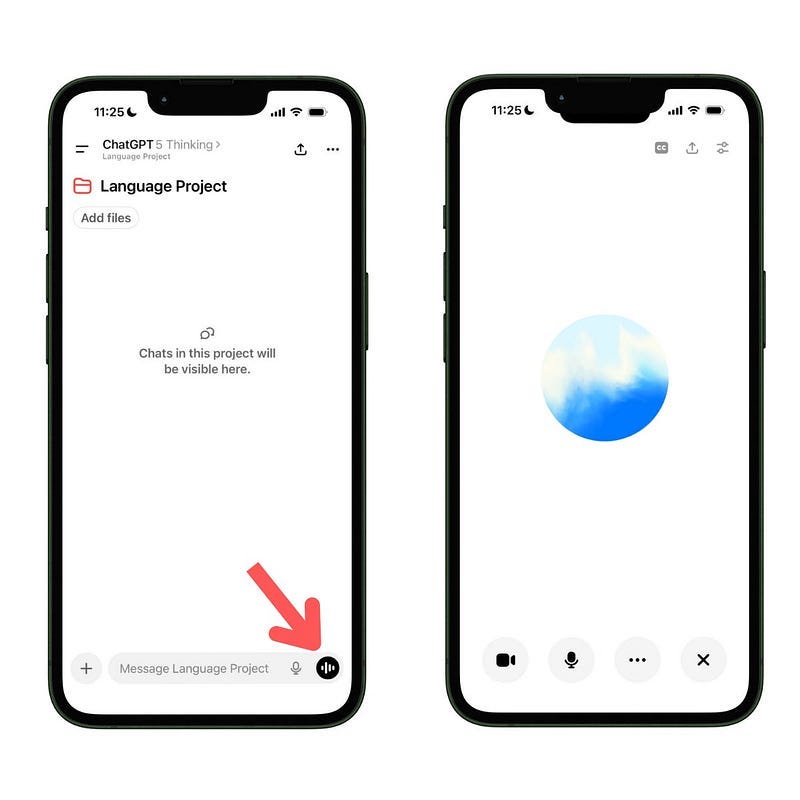
When using the phone, I prefer Voice Mode’s old look, where there’s a blue circle in the center and several buttons (if you don’t see it, go to Settings → turn on “separate mode”)
Here’s what each button does (and why they matter for language learning):
Blue circle: After a few seconds of silence, ChatGPT replies automatically. Press and hold the blue circle to speak without interruptions (release when you’re done talking)
CC: The CC button turns on captions. Highly recommended for language learners who have problems understanding the pronunciation of words
Camera: The camera button enables video call mode. In this mode, ChatGPT can see whatever you show through the camera, which enriches the conversation
Mic: Tap the mic button to mute or unmute your device’s microphone. Use it when you don’t want ChatGPT to hear you or any sounds around you
Here are some prompts you can use for language practice when you’re in voice mode:
For beginners:
I’m learning [target language] and I want to practice it.
Let’s talk about [topic]. In every response, provide your opinion and then ask me a question. Provide responses in 2 languages: [target language] and English
For intermediate and advanced learners
You’re a [language] teacher. Correct any grammar mistakes I make in [language]
Let’s talk about [topic] in [language]. In every response, provide your opinion and then ask me a question
👉 I’ve just released a 3-hour video course on how to learn any language faster with AI. By becoming a paid subscriber, you can get free access
#2 Fix your mistakes
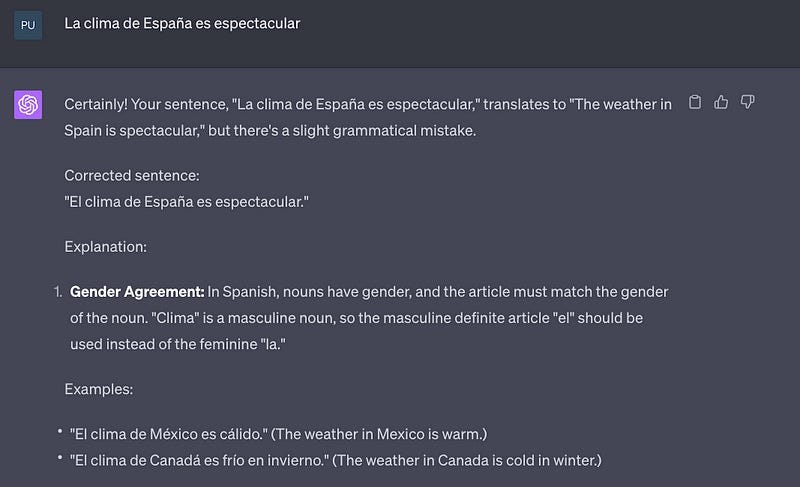
The most basic, yet useful way to use ChatGPT to learn a language is using it as a language tutor that corrects your mistakes, provides an explanation for the correction provided, and gives examples.
Here’s the prompt I’ve been using for this task.
Act as a language tutor. I’ll provide you sentences in [language] and you’ll correct them so it’s gramatically correct and the formality is neutral. You also need to provide an explanation to the correction provided and give examples.
After running this prompt, just give ChatGPT a sentence to analyze, and it’ll provide feedback.
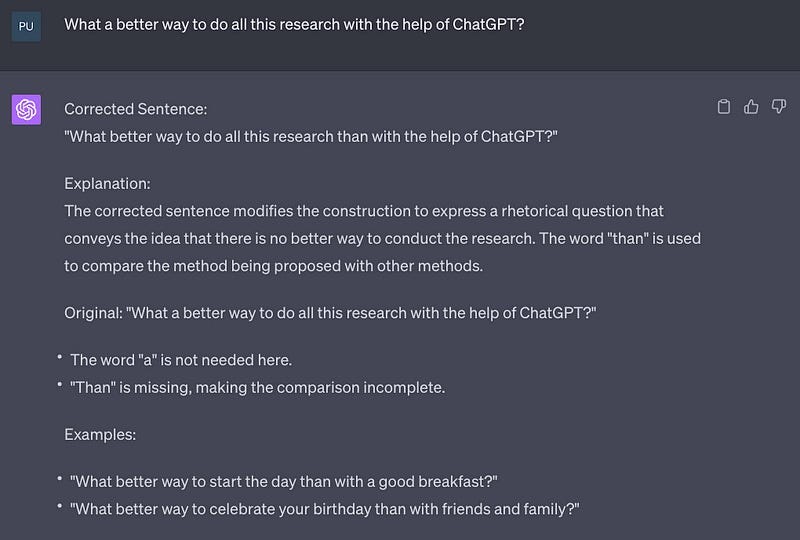
I can’t tell how many times I made the grammar mistake above. Grammarly helped me correct it, but it didn’t give an explanation or examples, so I ended up forgetting about the correction.
I’ve tried the prompt with different languages I speak, and it’s as helpful as with English.
#3 Improve your language skills
Although ChatGPT isn’t the best for improving your pronunciation (it can’t hear your recordings), you can still use it to know how to pronounce words with this prompt:
Give me phonetic breakdowns of these [language] sentences, with tips to sound natural
If you click on the “Read aloud” button (inside the 3 dots), you can also listen to ChatGPT reading responses in fluent Spanish, French, or whatever language the response is in.
By the way, instead of using Google Translate, I use this prompt
Translate the sentence I give you from [your language] to [target language]. Aim for natural, idiomatic usage. If the sentence is ambiguous, give the 2 most likely translations with a one-line note.
Context (optional): [describe the context in which you heard the phrase]
Sentence: [text]
And when I want to learn formal and informal vocabulary, I use these prompts:
Act as a language tutor. I’ll provide you expressions that native [language] speakers use in informal [language] and you have to convert the expression into neutral speech and also formal speech
4. Increase your vocabulary
I developed a prompt to learn new words and memorize them. The prompt does the following:
It gives definition, examples, and meaning in the given context
It builds a database of new words learned
It creates a story using the vocabulary (good for memorization)
Here’s the prompt (just paste it in ChatGPT and press enter)
Act as a language tutor. I’m going to give you new words I’m learning to increase my vocabulary. For each new word, I’ll give you context. You have to write the meaning of the word, provide 3 examples of how to use the word and explain the meaning of the word in the given context.
Only when I type the words “Table Time” you have to build the table below.
Column 0 (Word): New word
Column 1 (Type): Classify the word as a verb, noun, idiom, phrasal verb, etc based on the sentence I gave
Column 2 (Meaning): Write the meaning of the word
Column 3, 4, 5 (Example 1, 2 and 3): examples of how to use that new word
Column 6 (Family): Provide the word familyEvery day I’ll give you new words. You have to update the table every time I give you a new word. Finally, when I tell you “Story Time” you have to create a small story using all the new words you added to the table.
Say “yes” if you understood all this
Run the prompt once, then continue in the same chat whenever you discover new words
When I read books and find a new word, I give the word and the sentence (context) to ChatGPT
After a few days, you’ll build a database of new words. To see it, just type “Table Time”
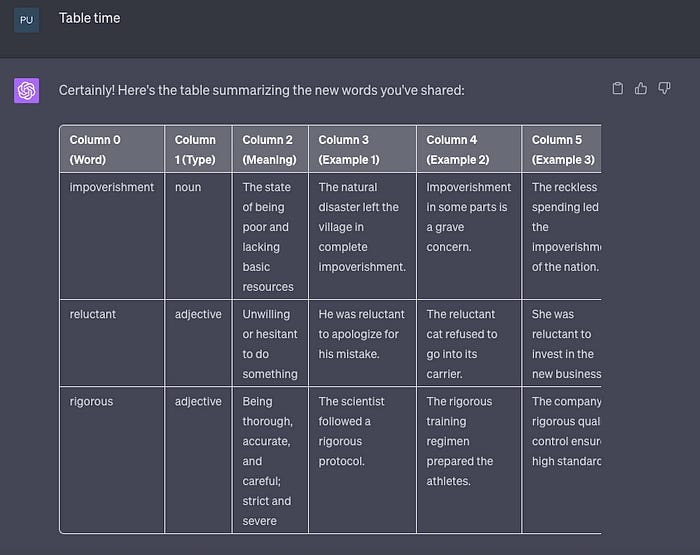
To memorize the new words, type “Story time.” ChatGPT will create a story using some words from the table
An absolutely amazing post. I have saved this because I'm going to try and use Gemini to teach me French over the next 12 months. Wish me luck.
great post. i love ai’s ability to increase vocabulary so easily and in a way to remember :)