


Ends tomorrow: join for $150 a year, and keep that price for as long as you stay. Paid members get my full video course, my members-only Claude skills, and my Claude video series for beginners. The offer ends Friday, November 20, at 11:59pm ET. On Saturday, the price goes up to $250 a year.
Get the offer: artificialcorner.com/bf26
You’ve probably tried to learn a language before, and it went like this.
You have a trip to Mexico in a few months, or a new job where half the team speaks Spanish. You download an app, keep a streak for a few weeks, and learn to say that the cat drinks milk.
Then somebody asks you a real question, and nothing comes out.
The app never knew what you needed Spanish for. It never noticed your mistakes either. A good tutor notices. A good tutor is also expensive, and isn’t around at 7 am.
Diana Dovgopol had this exact problem: an internship in Barcelona, and no Spanish.
Instead of opening an app, she used Claude and NotebookLM (now Gemini Notebook) to learn Spanish faster.
The result was a tutor that logs every mistake made and builds each lesson from them, set where you’ll really use the language. On your study days, the lesson and its notebook arrive on their own.
I turned that tutor into a skill, so you can build one for any language.
In this guide, you’ll learn:
How Claude and NotebookLM split the work of a language tutor
The prompt that finds your real level in ten questions
How to turn your deadline into a week-by-week plan
How to start lesson one, with a notebook Claude builds for you
How to practice out loud and get your mistakes back
The skill that builds every new lesson from your mistakes
Two things before we start:
1. Save this guide, and run the level test from it tonight.
2. Send it to a friend who has a 30-day Duolingo streak and still can’t order a coffee.
PS: This newsletter grows mostly from people like you sharing it. Every share helps me keep writing guides like this one.
How Claude and NotebookLM split the work
Here’s how the two tools split the job:
Claude is the teacher: it tests your level, writes the plan and every lesson, talks with you, and corrects you.
NotebookLM is the homework: it turns each lesson into a podcast, flashcards, a quiz and a short video you can use on the bus.
The first half is active learning, and the second is passive. You speak with Claude. You listen and review in NotebookLM.
Each lesson follows the same four steps:
Lesson → practice → feedback → next lesson
Everything you get wrong in the practice and in the quizzes goes into the next lesson. Most people skip that last step, because somebody has to collect the mistakes first. Later in this guide, a Claude skill collects them for you.
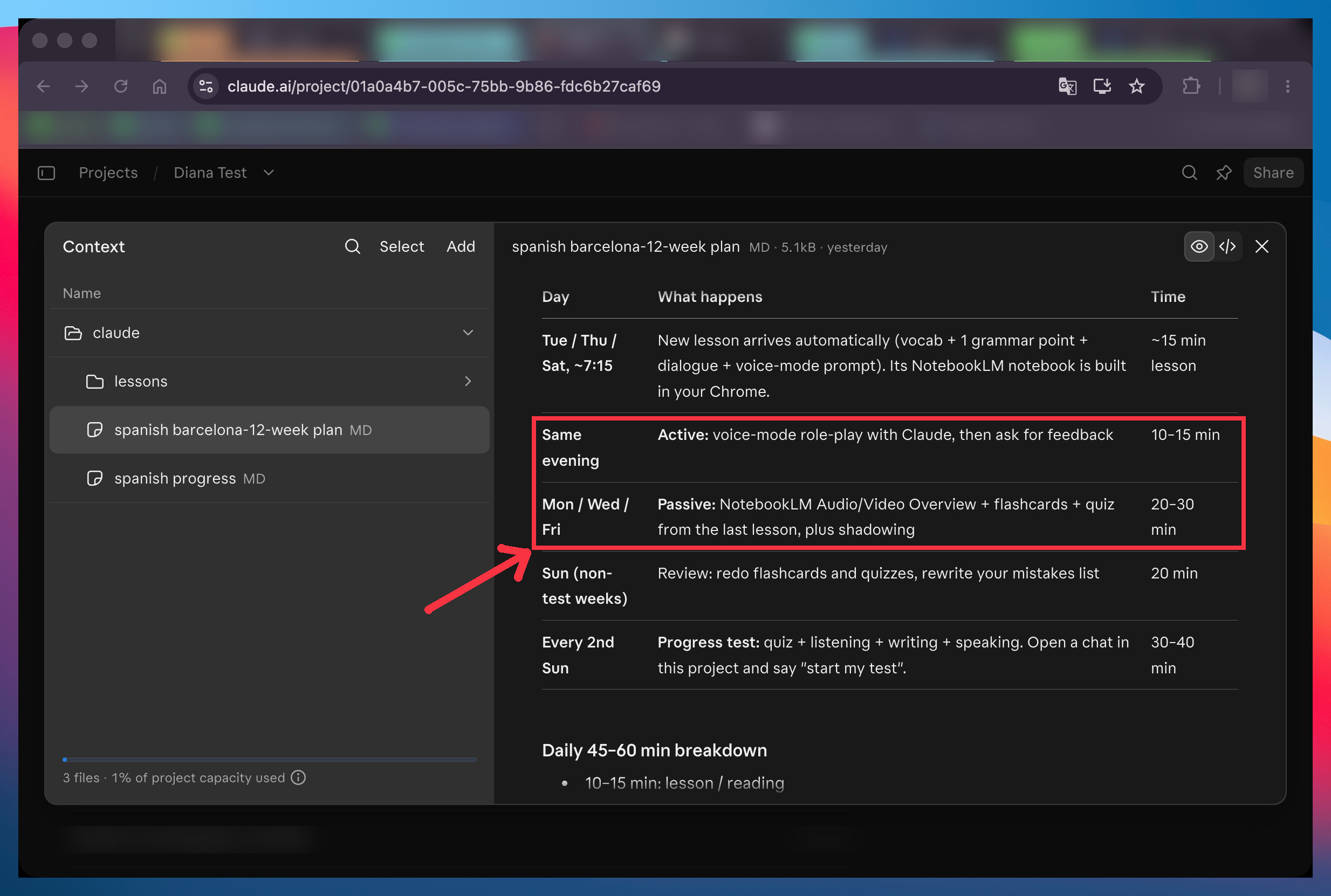
Here’s the weekly schedule Claude wrote into Diana’s plan:
Find your real level in ten questions
Most people guess their level. “Some basics” can mean two words or two years.
Let Claude find out instead. It gives you a ten-question quiz, with an “I don’t know” option on every question so a lucky guess doesn’t count.
One prompt runs the whole test, and it takes a few minutes. Fill in the brackets:
I’m learning [language] for [why you need it] in [how much time you have]. Before you teach me anything, test my level. Give me a 10-question multiple-choice quiz that goes from the easiest question to the hardest, with an “I don’t know” option on every question. Then ask me to write 3 or 4 sentences about myself in [language]. At the end, tell me my level from A0 (total beginner) to B2 and what you based it on.
Want a sharper read? Change the 10 questions to 20 in the prompt.
Claude builds the quiz right in the chat:
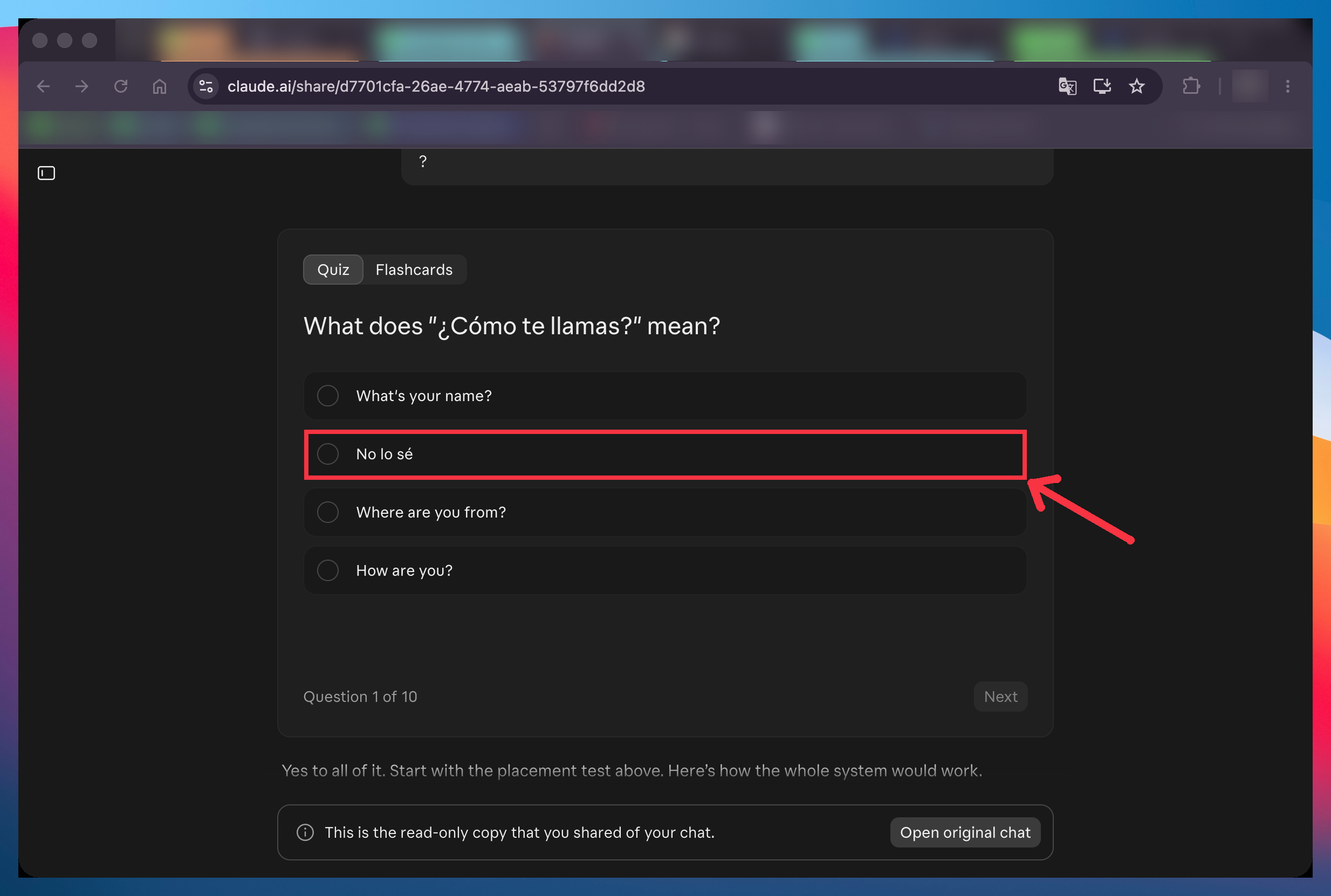
Diana got two right at most. Claude placed her at A0, a total beginner.
Turn your deadline into a week-by-week plan
A level alone doesn’t tell you what to study on Monday.
Give Claude your deadline, and it plans backwards from it: one topic per lesson, ordered from surviving the first day to the reason you’re learning.
Diana got a 12-week plan with 36 topics, three a week, and a test every two weeks.
With this prompt, you’ll know what you study every week until the day you leave. Fill in the brackets:
Build me a plan to go from [your level] to [the level you need] in [number] weeks. I can study [minutes] a day, and I want [number] new lessons a week on [days]. One topic per lesson, ordered from daily life to [your goal: a trip, a job, an exam]. Add a progress test every two weeks. Tell me honestly what level is realistic by then. Save the plan as a file in this project.
Run this inside a Claude project. A project keeps your plan, your lessons and your chats in one place, so Claude can find all of them later.
Claude lays the plan out in the chat first:
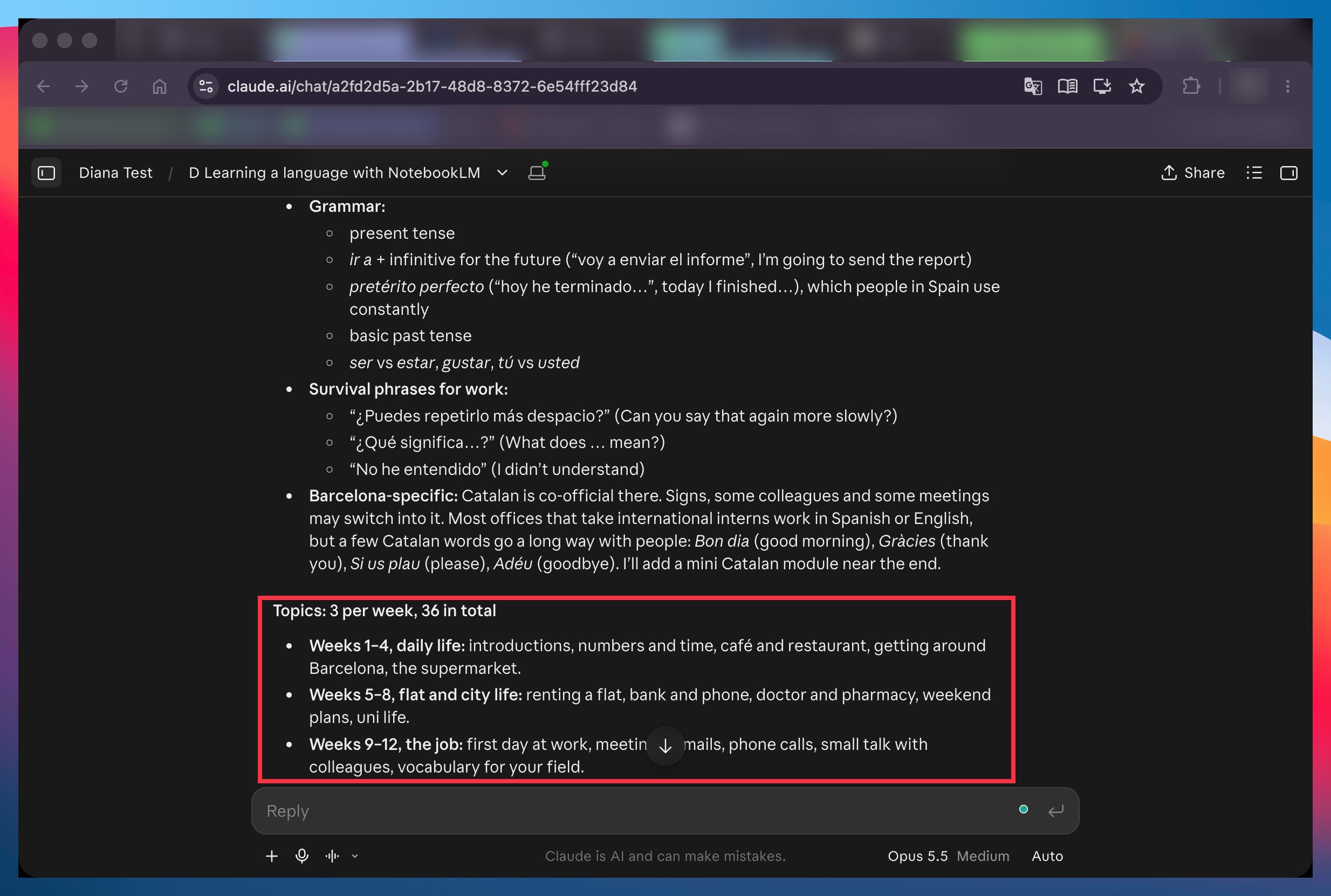
Then it saves the plan as a file, so it’s there every time you come back.
Start lesson one, with a notebook Claude builds for you
Each lesson is small: a dozen words, one grammar point, a short dialogue and five questions.
The dialogue is the part a textbook can’t give you, because it’s set where you’ll use the language. Diana’s first one is her first day in Barcelona, meeting a colleague called Marta.
Then Claude opens NotebookLM in your own Chrome and builds the notebook for that lesson, the way a teacher prepares your homework before class.
Here’s what you need first:
Open notebooklm.google.com in Chrome and sign in (your account might call it Gemini Notebook now, and it’s the same tool).
Turn on Claude in Chrome, which lets Claude use your browser like you would. In the Claude app, go to Settings → Capabilities. Check that Claude in Chrome is switched on, and that the default under Site permissions says Allow all sites (or just add
notebooklm.google.comandnotebook.google.comto your allowed sites).
This prompt gets you the lesson and its notebook in one go, so you never copy anything between the two tools. Fill in the brackets:
Write lesson [number] of my plan. Include a vocabulary table with how to say each word, one grammar point, a short dialogue set in [where you’ll use the language], 5 practice questions with answers, and a role-play prompt I can paste into a new chat. Then open NotebookLM in my Chrome, create a notebook called “[Language] [lesson number] – [topic]”, add the lesson as a source, and generate an Audio Overview, Flashcards, a Quiz and a Video Overview.
You can watch Claude work in Chrome. A few minutes later, the notebook has four study materials in it:
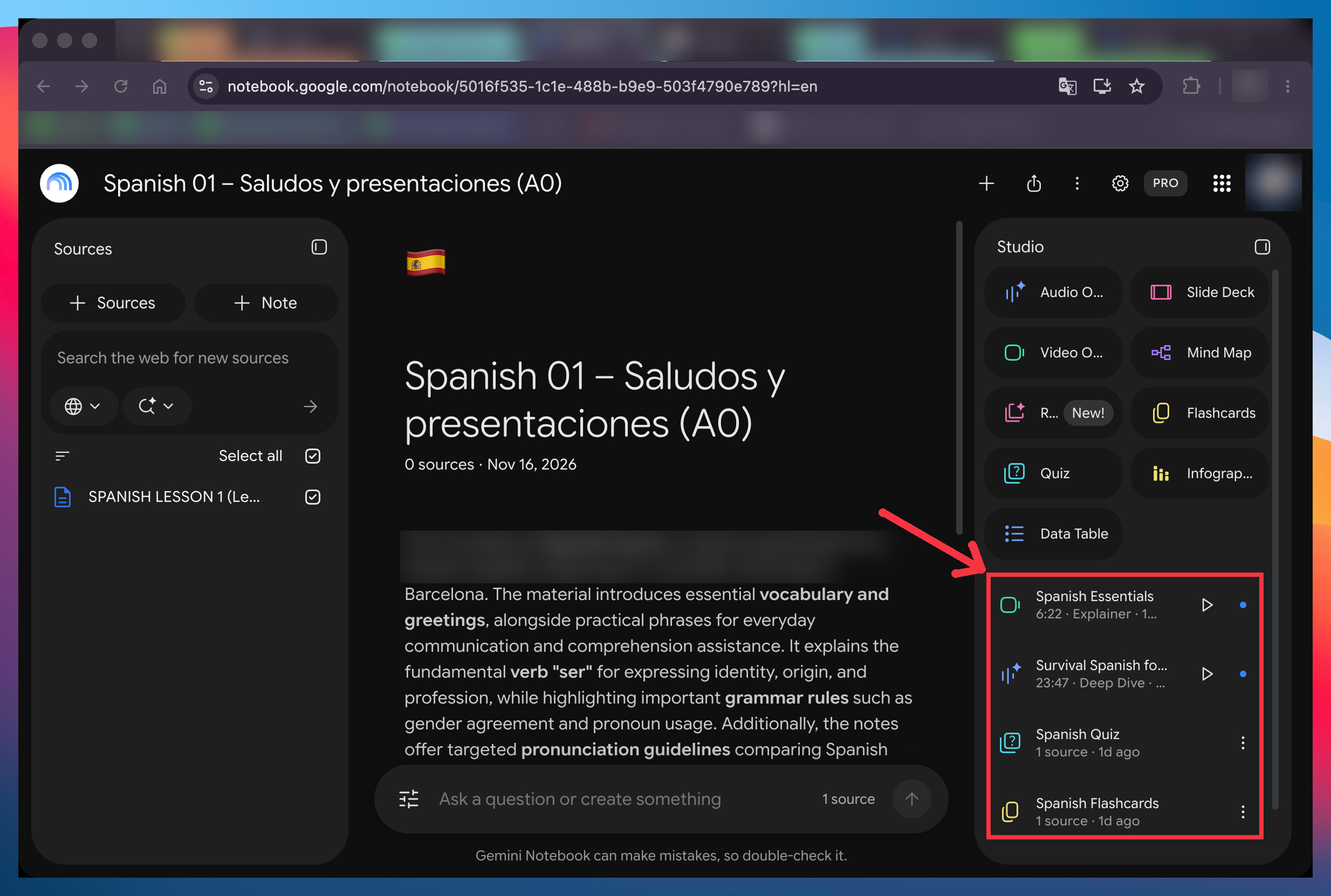
A full podcast in Spanish is too fast for a beginner. So for Diana, Claude asked for the audio in English, where the hosts say each Spanish phrase slowly, twice, and leave a pause for her to repeat it.
Those pauses are your pronunciation practice. You repeat every phrase out loud, right after the speaker.
Practice out loud, and get your mistakes back
Every lesson ends with a role-play prompt. You paste it into a new chat in the same project and start talking using voice mode. To use voice mode, open the chat in the Claude app and tap the sound-wave icon to the right of the message box. Then just talk.
This prompt turns Claude into the person you’ll really talk to, so you say every phrase ten times before you need it for real. Fill in the brackets:
You are [a person I’ll really meet: a colleague, a waiter, a landlord] in [city]. I’m a [level] learner of [language]. Practice lesson [number] with me: [the lesson’s topic and key phrases].
Speak slowly, one short question at a time. If I’m stuck, help me in English. When I say “feedback”, list my mistakes with corrections, and what I did well.
When you’re done, say “feedback”. Claude lists what you did well and what to fix:
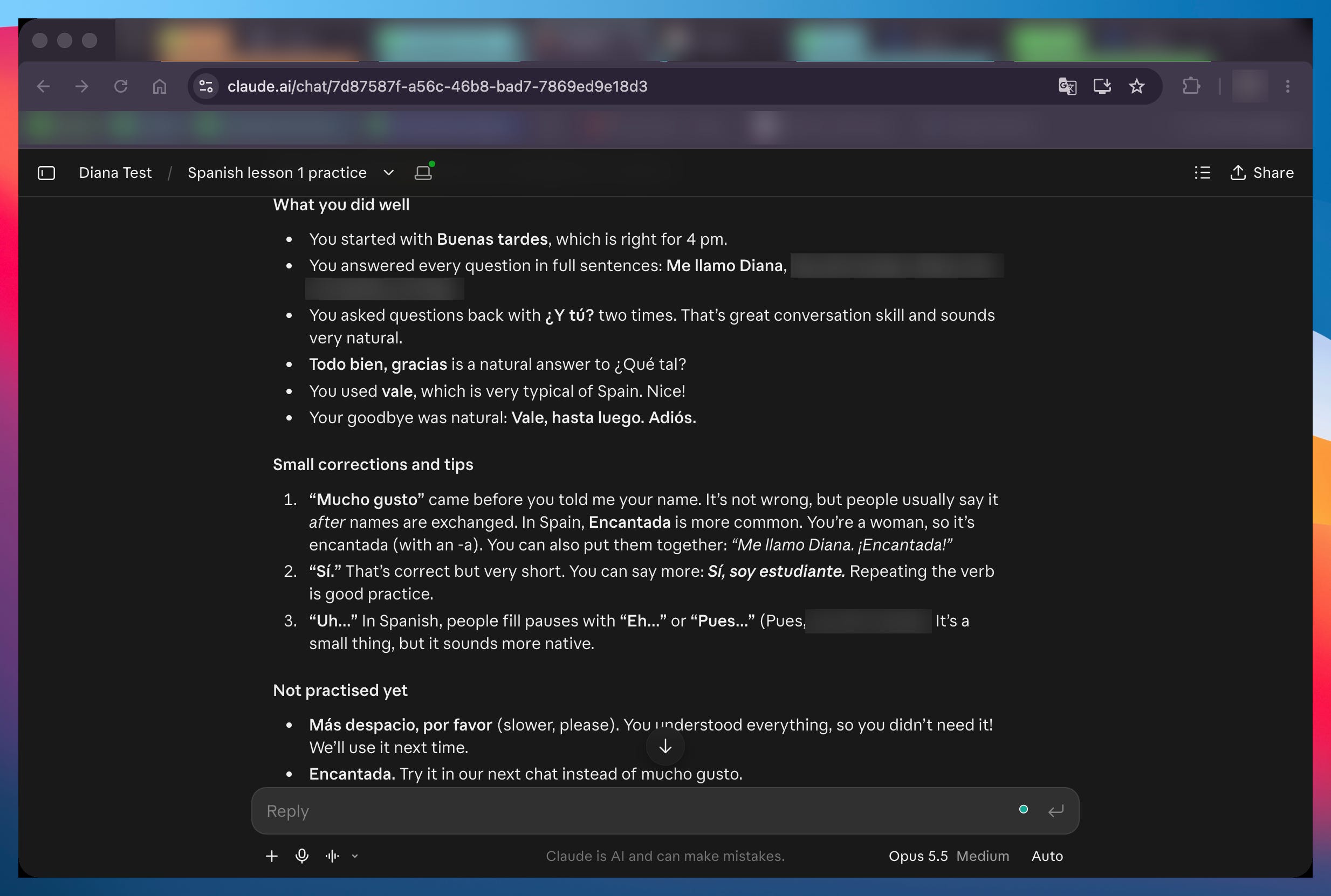
Voice mode is good for fluency and grammar, and weak on pronunciation (Claude says so itself). That’s what the audio in the notebook is for.
The skill that builds every new lesson from your mistakes
The four prompts above are enough to start: you’ll have your level, a plan, a first lesson and its notebook.
But each prompt starts from zero. Claude doesn’t know what you got wrong in yesterday’s quiz or in last week’s role-play, unless you find it and paste it in. Nobody keeps that up for months. So you make the same mistake in lesson nine that you made in lesson one, which is exactly what happens with an app.
The Language Tutor skill fixes that.
I built it from Diana’s real course, turned into steps Claude follows every time. Then we tested it on two more languages, French and German, at two different levels. It sets up your course once. After that, every lesson starts from what you got wrong in the last one.
The rest of this guide is for paid subscribers. It’s the exact skill, so you can start your own course tonight instead of building it from scratch.
Below the line:
The Language Tutor skill, for any language: You say “use the language-tutor skill to set up my language course”, and it runs the level test, builds the plan and writes lesson one. After that, you only ask it for the next lesson.
How Claude finds your mistakes on its own: Before each lesson, it reads your practice chats and your NotebookLM quiz results. Plus a log that follows each mistake until you stop making it.
A lesson ready every morning you pick: Choose your days once, and the lesson and its notebook are there when you sit down to study.
My full course, Learn Any Language Faster with AI: 14 lessons in my video course, from your first conversation to reading, vocabulary, pronunciation and speaking practice. It comes with your paid subscription.
Past this line, the skill is waiting.
Ends tomorrow: join for $150 a year, and keep that price for as long as you stay. The offer ends Friday, November 20, at 11:59pm ET. On Saturday, the price goes up to $250 a year.
Get the offer: artificialcorner.com/bf26