

Click here to get my FREE Claude course (20+ lessons)
You ask Claude for an email, and it sounds like AI.
You give it a task, and it guesses instead of asking.
You’re an hour into a chat, and it forgets what you said at the start.
Claude skills fix all of this and more.
A skill is a set of instructions Claude reads before it works, so it does a job your way every time. Most of the ones people share live on GitHub, which is like a giant free library of tools. You pick one, and Claude installs it for you.
The hard part is knowing which ones to install. There are thousands, and most are built for programmers.
I tried the most viral ones and kept the five that anyone can use.
In this guide, you’ll get:
How to quickly install a Claude skill
The 5 best viral Claude skills I’ve found
The skills I built for writing, presentations and job hunting
Two things before we start:
1. Save this guide, and install one skill from it this week.
2. Send it to a colleague who pastes the same instructions into every chat
PS: This newsletter grows mostly from people like you sharing it. Every share helps me keep writing guides like this one.
How to install a skill from GitHub
Most of the tools below work in regular Claude, the chat you already use. Only one needs Claude Code, because it installs a small program.
Here’s how to install a skill in regular Claude:
Open a new chat and paste the skill’s GitHub link with this message:
Install this skill: [link]
If the page has many skills, name the one you want.
Claude fetches the skill and shows you a card. Click Save.
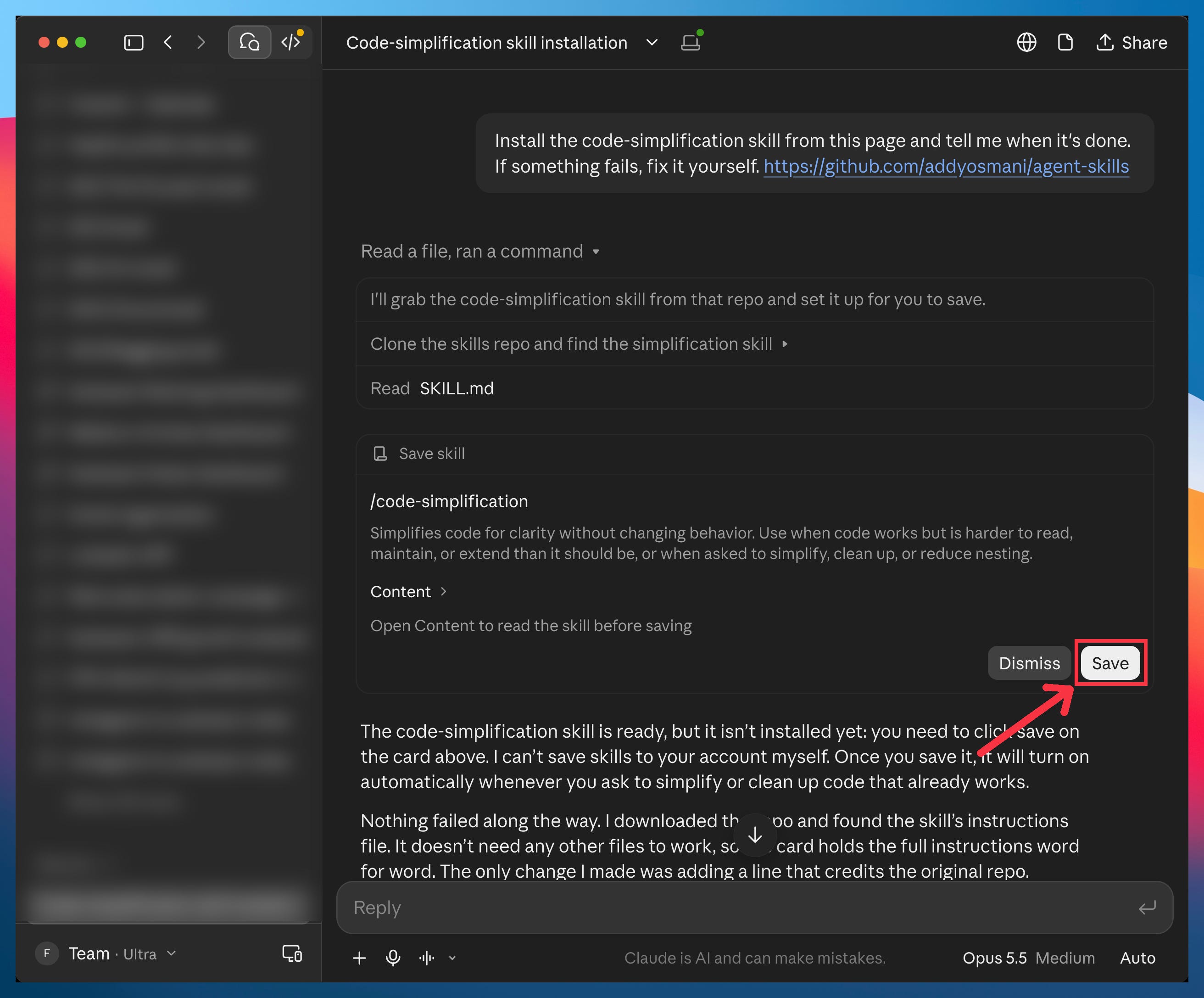
Start a new chat and ask for it by name: “Use the humanizer skill on this text.” Typing “/” in the message box also lists your skills.
One rule before you install anything: only use the tool’s official page, because the most viral tool below has copies on GitHub that look identical.
#1 Humanizer: Claude’s writing stops sounding like AI
Wikipedia’s editors keep a public guide to spotting AI-written text. Humanizer is that guide turned into a Claude skill.
It knows the tells: the sentence that sets up one idea only to knock it down for another, everything in groups of three, the hype words, the tidy little setups before every point. Paste in what Claude wrote (a cold email, a LinkedIn post, your website copy) and ask it to humanize it. It keeps what you said and removes what makes people scroll past.
Install it in regular Claude or in Claude Code (the </> icon at the top left of the Claude app, no terminal needed):
Regular Claude: Install this skill: github.com/blader/humanizer
Claude Code:
/plugin marketplace add blader/humanizer
/plugin install humanizer@humanizer
Then write this prompt:
Use the humanizer skill on this text: [paste the text]
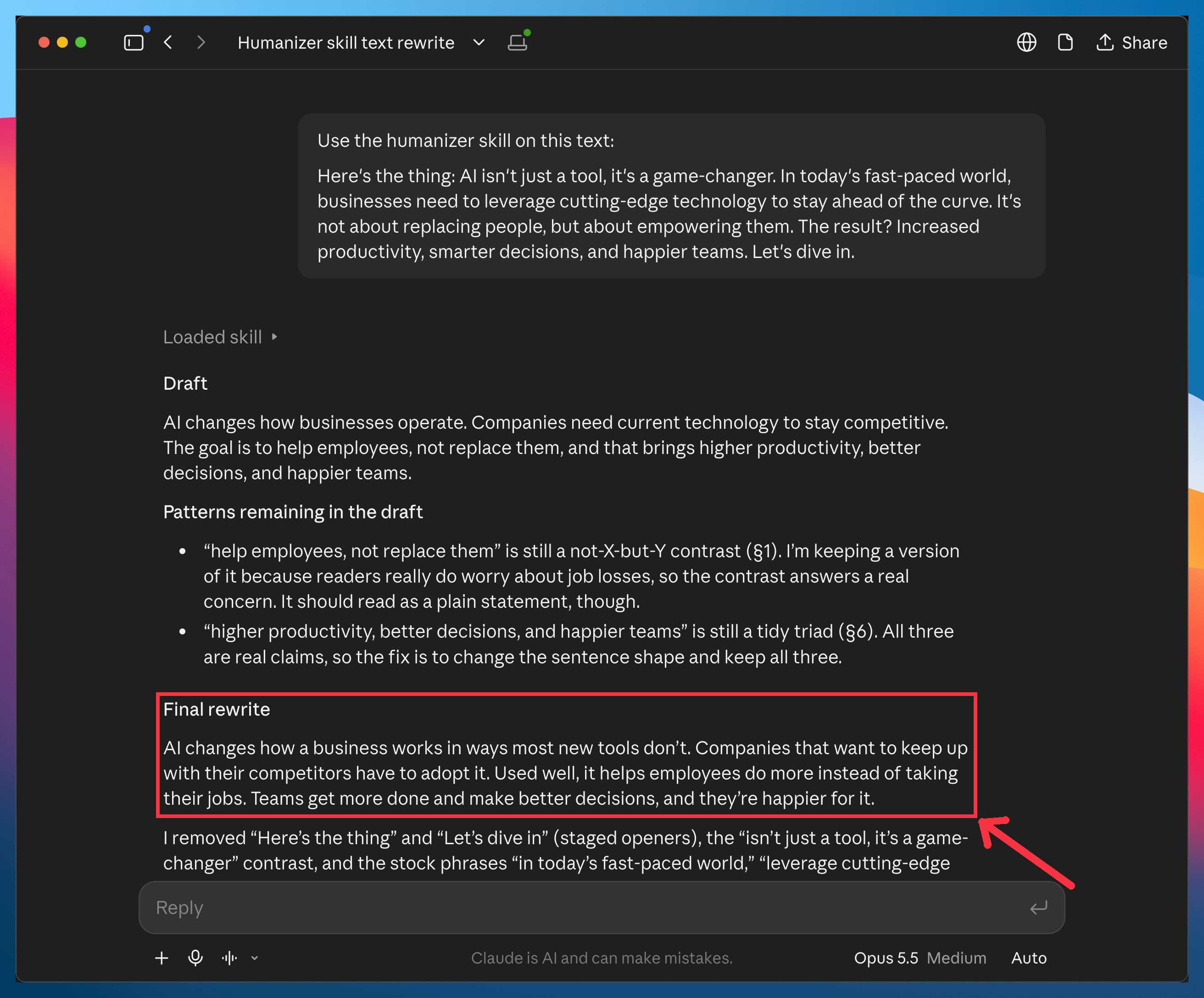
I’d banned that knock-down sentence from my own writing long before this skill existed, so I was curious whether it would catch what I catch. It does. In my test, it caught that sentence and the groups of three.
One thing it can’t do is make the text sound like you. If you want Claude to write in your voice, that’s the voice file I built for mine, and the two work well together.
#2-3 Grill Me & Handoff: Make Claude ask first, and never lose a long chat
This is the most-starred skill pack on GitHub.
Most of it is for engineers. Two skills are for everyone.
Grill Me makes Claude interview you before it starts working on anything.
Type /grill-me, describe what you want to do, and Claude asks you around twenty questions: why this, who it’s for, what’s out of scope, what happens when it fails. Without it, Claude guesses your answers and builds the wrong thing confidently.
Handoff moves a long conversation into a fresh chat without losing anything.
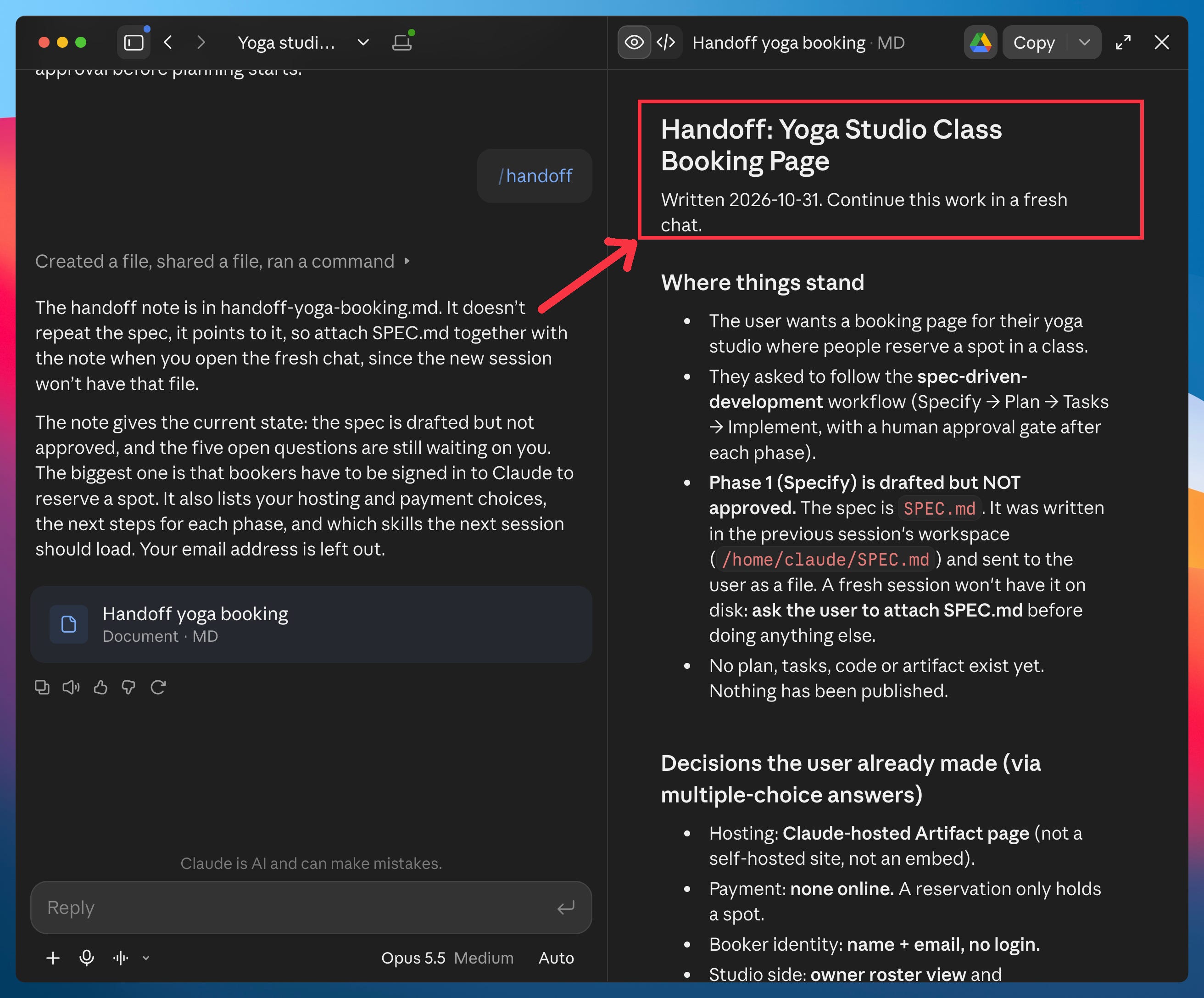
When a chat gets long, /handoff writes a short note with everything the next chat needs to continue. Open a fresh chat, paste the note, and you’re back where you were, with Claude’s memory wiped clean of the mess. It also works between computers, or from Claude to another AI.
Install them:
Install the grill-me, grilling and handoff skills from this page: github.com/mattpocock/skills
Before you start something:
/grill-me I want to [what you want to do].
When a chat gets long:
/handoff
Here’s an example:
#4 Agent Skills: the commands that make Claude plan before it builds
You’ve probably seen this one. You ask Claude to build something, it starts right away, and halfway through you realize there was no plan.
Agent Skills fixes it by making Claude write the plan into files first. It comes from Addy Osmani, a Google veteran who now works on Claude Code at Anthropic, and it gives you three commands:
/spec: Claude interviews you and writes down what you’re building, including the cases you’d forget (refunds, time zones, two people booking the same slot).
/plan: it breaks that into small tasks.
/build: it works through them one at a time, checking each one.
When a session gets messy, you open a fresh one and Claude picks up from the files, right where you left off. The spec is also something you can hand to a colleague before anything exists.
Install it:
Regular Claude: Install the spec-driven-development, planning-and-task-breakdown and incremental-implementation skills from this page: github.com/addyosmani/agent-skills
Claude Code:
/plugin marketplace add addyosmani/agent-skills
/plugin install agent-skills@addy-agent-skills
Then use them in order:
Use the spec skill. I want to build [what it is] for [who uses it].
Use the planning skill to break the spec into small tasks.
Use the build skill on the first task, then check it.
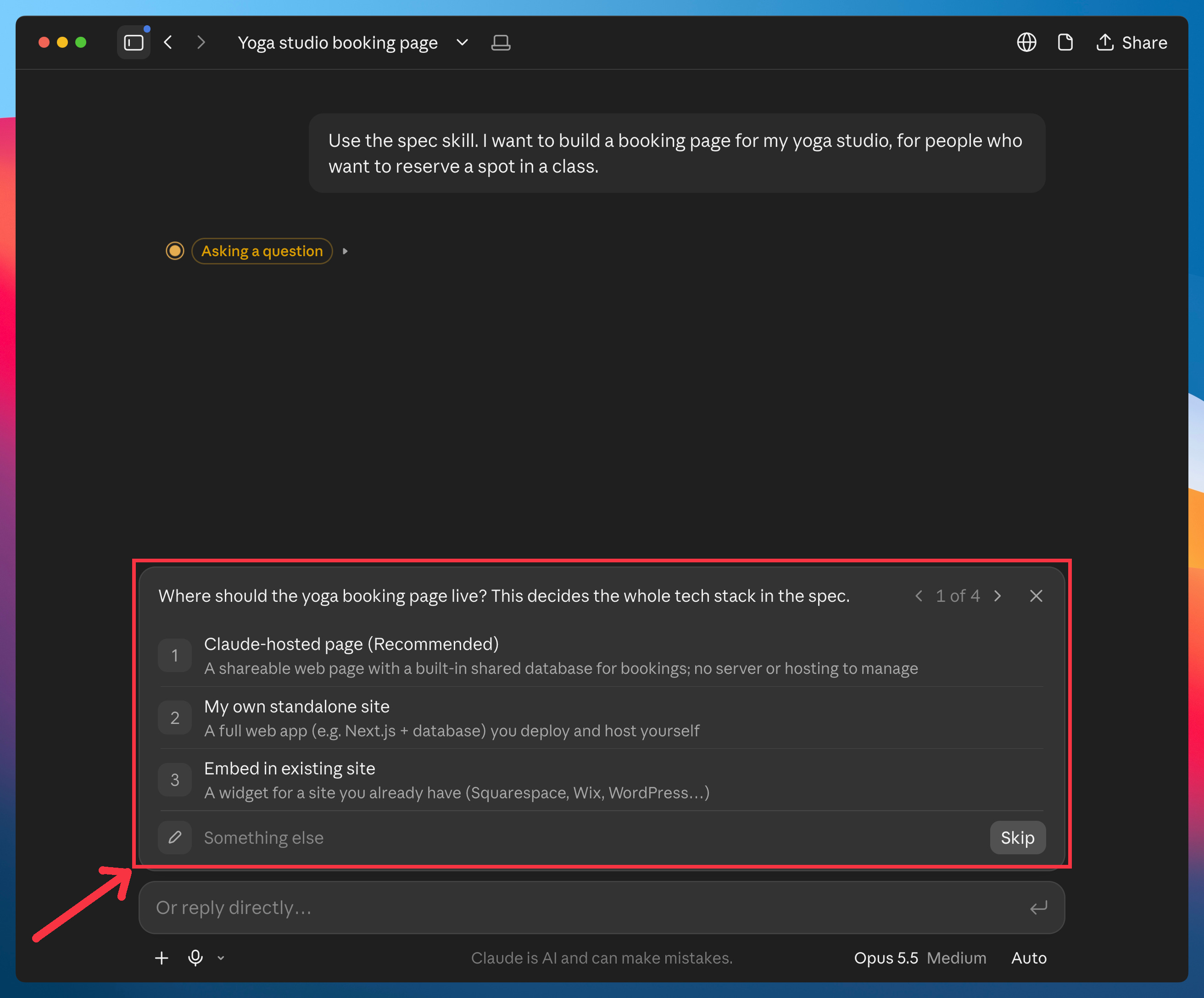
The spec skill interviews you with multiple-choice questions and writes the spec as a file in the chat:
#5 REA: Claude reverse-engineers any app on your computer
Think of the app you pay for every month just for one feature. Or the app that does one thing so well you wish your own tools did it too. To get that feature without the app, you first need to know how it works. But every app on your computer is a locked box.
REA (Reverse Engineer Anything) gives Claude the tools to open that box. It plugs professional analysis tools into Claude Code. You ask in plain English, “how does this app do X?”, and Claude reads the app’s files, works it out, and explains it back to you with proof.
This one is Claude Code only, because it installs a program. If you’ve never used it, my beginner’s guide walks you through it.
Open Claude Code and paste this:
Install REA from github.com/morluto/rea and tell me when it’s done. Run its health check and fix anything it complains about.
Claude installs it, runs the check (the project calls it “the doctor”), and fixes its own install if something is missing. When it’s done, close Claude Code and open it again, because Claude only loads new tools when it starts.
Then point it at something. A template you can fill in:
Use REA to study how [the app] handles [the feature you like]. Explain it in plain English, then build me a simple version of that feature for my own [project or app].
Here are a few examples:
Use REA to study how my dictation app cleans up what I say. Explain it in plain English, then build me a simple version of that feature for my own use.
Use REA to study how my PDF app fills in forms. Build me a simple version of that feature for my own use.
Use REA to study how my meeting notes app writes its summaries. Then build me a simple version of that feature for my own use.
REA can take a while, and it can look frozen along the way. That’s normal.
The best skills I built
You now have five skills other people built. Here are the best ones I’ve built:
Voice: interview questions that teach Claude how you write, so it sounds like you.
Pyramid Writer: rewrites your emails and messages with McKinsey’s framework
Winston Talk: prepares your next talk with the rules Patrick Winston taught at MIT for forty years.
Head Hunter: scores job posts against your CV and tells you which ones to apply to first.
👉 Paid subscribers get all of them on my perks page, plus a deep-dive guide every week and free access to my video courses.
If this guide was useful, join them
One more thing
Don’t install all five today. Pick one or two.
Humanizer if your writing sounds like AI. Grill Me if Claude keeps guessing. Handoff if your chats get too long. Agent Skills if you’re building something. REA if there’s an app you want to look inside.
Use them for a week. If they stick, come back for the next.
Join my newsletter with 90K+ people to master AI in 2026