


Click here to get my FREE Claude course (20+ lessons)
Diana Dovgopol, my student from the Claude beginner series, just finished her master's in Austria. She has no technical background, and she wanted to see if Claude could help with her job search. So she attached her CV and asked:
“Here’s my CV. Help me find a job”
It came back with only two employers near her.
That’s when most people decide Claude is bad at finding jobs. But Claude wasn’t the problem. A simple request like that only runs a web search, and the sites with the most jobs block it. So I told her to let Claude search in her own browser, just like she would. The same search found around 20 jobs.
So I turned the search into a skill that works in any city.
In this guide, you’ll learn:
What Claude does that a normal job search doesn’t
What you give Claude, and what you get back
Claude needs your browser to find jobs (try this prompt)
The job-search skill
How to run your first search (with a copy-paste template)
How to get new job postings every morning
Two things before we start:
1. Save this guide, and run the search once this week, even if you’re not looking for a job yet.
2. Send it to a friend who refreshes LinkedIn every morning and still finds nothing.
PS: This newsletter grows mostly from people like you sharing it. Every share helps me keep writing guides like this one.
What Claude does that a normal job search doesn’t
A normal job search gets you a list of job postings. You never see the jobs that weren’t on the site, and you still have to work out which ones you can actually take.
Here’s what Claude does for Diana (and you):
It searches the employers, not just the job boards
Many employers never post on job boards. Universities, hospitals, city councils and nonprofits often post only on their own website, under “Careers” or “Jobs”. Claude made a list of about 50 employers near Diana that hire people like her, and checked each one’s careers page.
It keeps only the jobs you’d actually take
Diana didn’t want sales jobs, physiotherapy jobs or anything below her minimum salary. Claude converted every salary to a yearly number (Austria pays 14 salaries a year, which confuses everyone) and left out every job that broke one of her rules. Then it ranked the rest:
A: fits everything
B: one thing missing, like a required qualification or a full-time contract
C: worth knowing about, but check first
It checks what you need before applying
Some jobs need a licence before you can do them, like a nurse or an electrician. Medical training therapy is one of them in Austria: you have to be on a government list. Claude found the official rules and asked Diana whether she was on it. She was, so it moved on.
What you give Claude, and what you get back
Here’s what you give it once:
Your CV or resume: a PDF or Word file.
Your city: and how far you’d travel (like 15 miles or 25 km, or another city).
The jobs you want: in order of priority.
Your minimum pay: per year.
And a few optional lines that save you from bad matches later: part-time or full-time, your languages and their level, your work permit, the jobs you never want to see, etc.
Then it does the work in this order:
Reads your CV and tells you what you’re qualified for, including job titles you didn’t think of
Checks whether your job needs a licence where you live
Lists the job boards and employers to search
Searches all of them in your browser
Removes closed jobs and anything that breaks your rules
Ranks what’s left and builds your tracker
It checks with you only once, after the first step, to make sure it read your CV right.
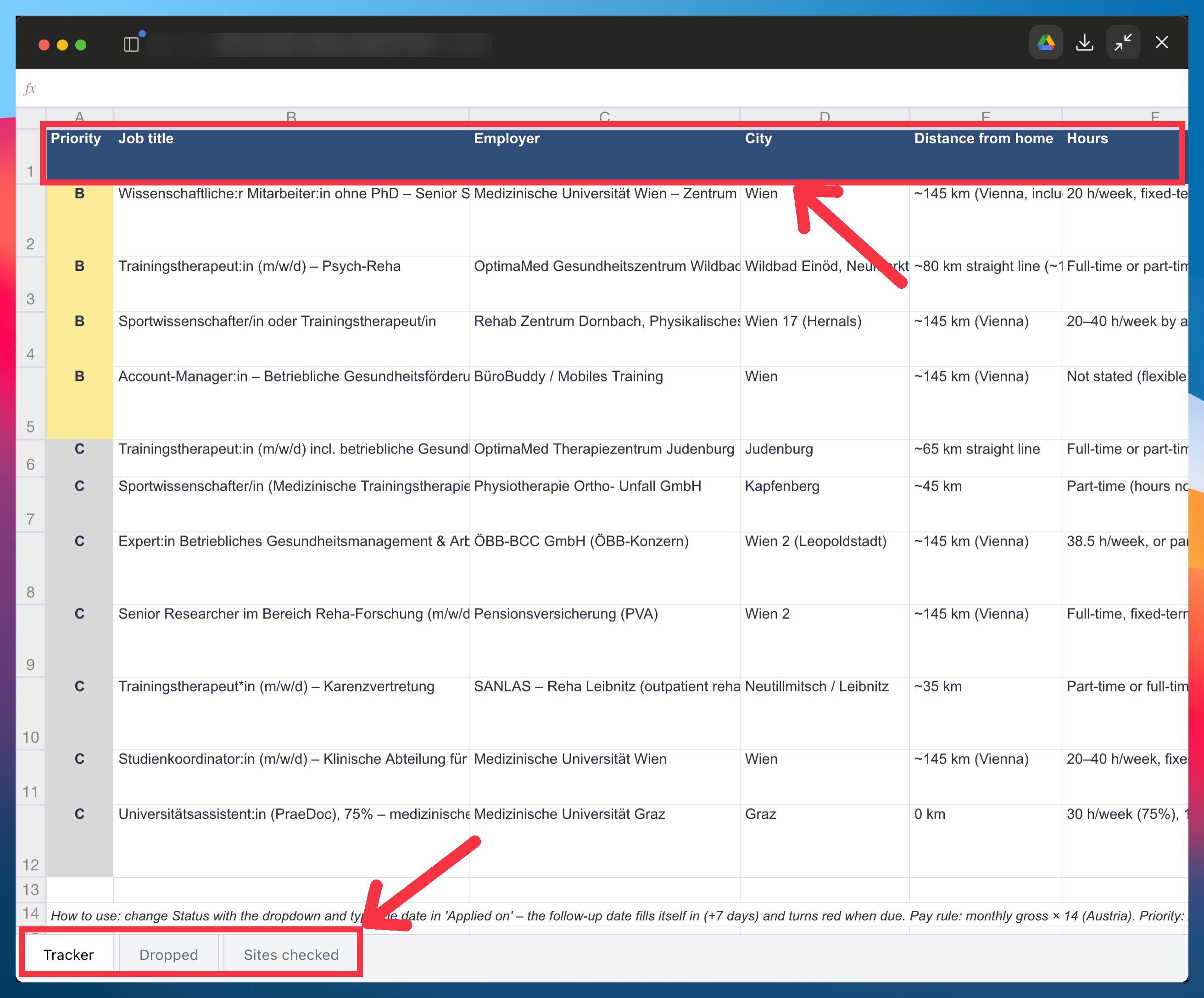
You get back a spreadsheet with three tabs:
Tracker: every open job with its priority, pay per year, deadline, what you’re missing, why it fits your CV, and a link. The status column and the follow-up date are there for when you start applying.
Dropped: every job Claude left out, and why (closed, pay too low, a job you excluded).
Sites checked: every site it searched, and whether it could open it.
Then, every time it runs, you get a short message with only the new jobs and the deadlines coming up.
It never applies, emails or fills in a form for you. It only reports.
Claude needs your browser to find jobs (try this prompt)
Type “help me find a job” into Claude and it runs a web search, the same way it did in Diana’s first chat.
For job postings, web search is weak. It reads what search engines saved days ago, and the sites with the most jobs, like LinkedIn and Indeed, refuse to open for it. Claude doesn’t always notice. It gets a few results, writes a nice summary, and moves on.
So you see a short list and decide Claude is bad at finding jobs. That’s where most people would stop. Diana got two employers in her first chat.
I told her to use Claude in Chrome instead. It’s Claude’s browser extension: Claude opens the job sites in your own Chrome and searches them like you would, typing in the search box and reading each posting. Sites that block web search open normally, because to them it’s just you.
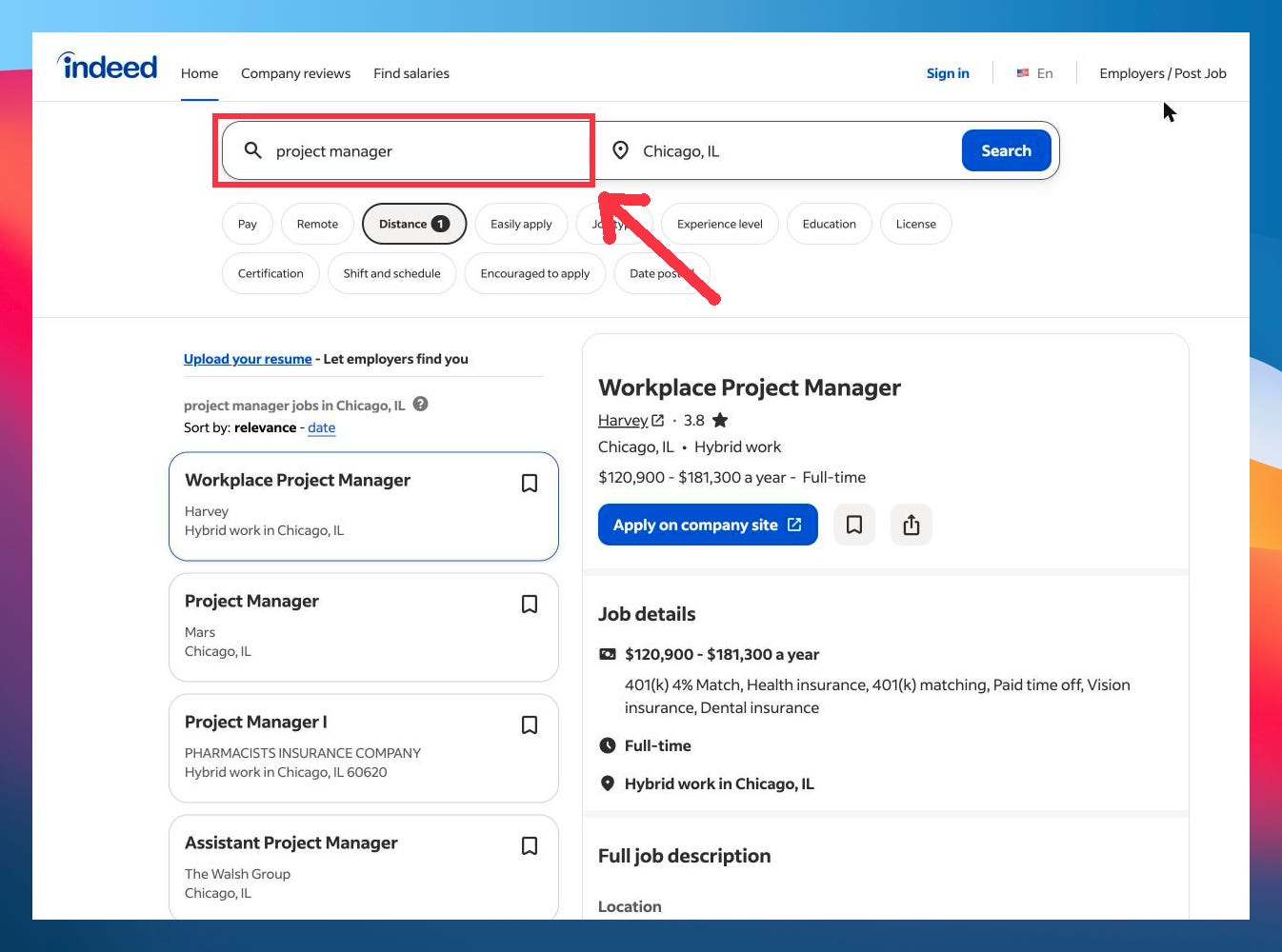
When I ran the same search with Chrome, Claude went from two employers to about 20 jobs.
Using Chrome has a catch: your computer has to be on, and Claude asks permission for every new website. I’ll show you how to handle both below.
Try it on your own resume
Here’s a small version of the search you can run today. It needs Claude in Chrome, which comes with any paid Claude plan. If you’ve never set it up, it takes two minutes. I showed every step in the first part of this mini-course.
Open a new chat, click Manual at the bottom right, and pick Auto, so Claude doesn’t ask before every step:
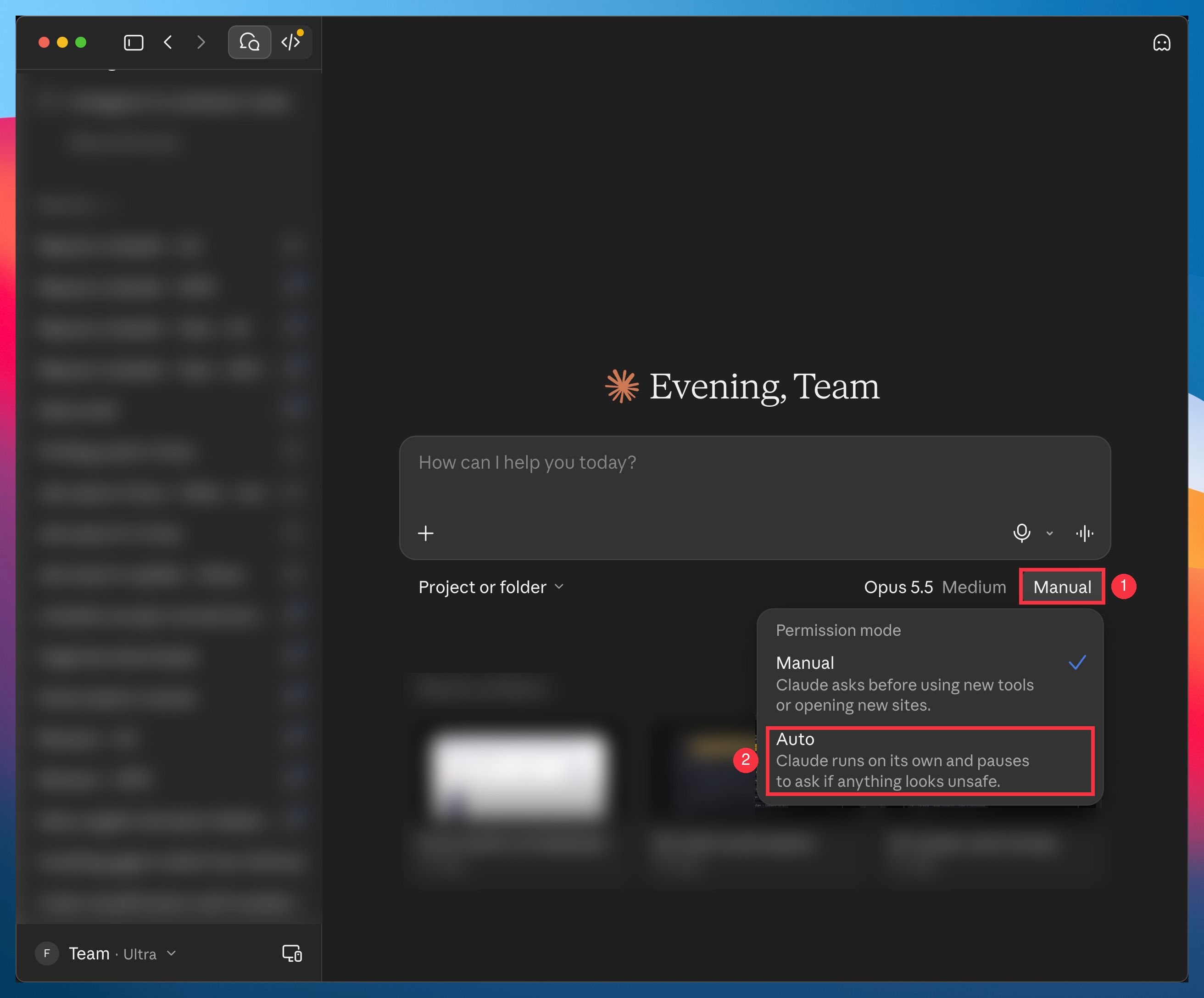
Then attach your CV, fill in your city, and send this:
I've attached my CV. I live in [city, country]. Do all the steps without stopping.

1. Tell me in five lines what I'm qualified for, including job titles I didn't list.
2. List 10 employers near me that hire people like me, most likely first.
3. Use Claude in Chrome, not web search, to check the biggest job site in my country and the first 3 employers. Search with job titles in the local language. For employers, start at their homepage and follow the jobs link.
4. Show me every job that's still open, with a link and the deadline if it has one.

If Chrome isn't connected, stop and tell me. If a page won't open, say so. Don't invent anything, and don't apply or fill in anything.
Claude in Chrome might still ask for permission once for each new website, even in Auto. Click Always allow for this website, and it won’t ask again for that site:
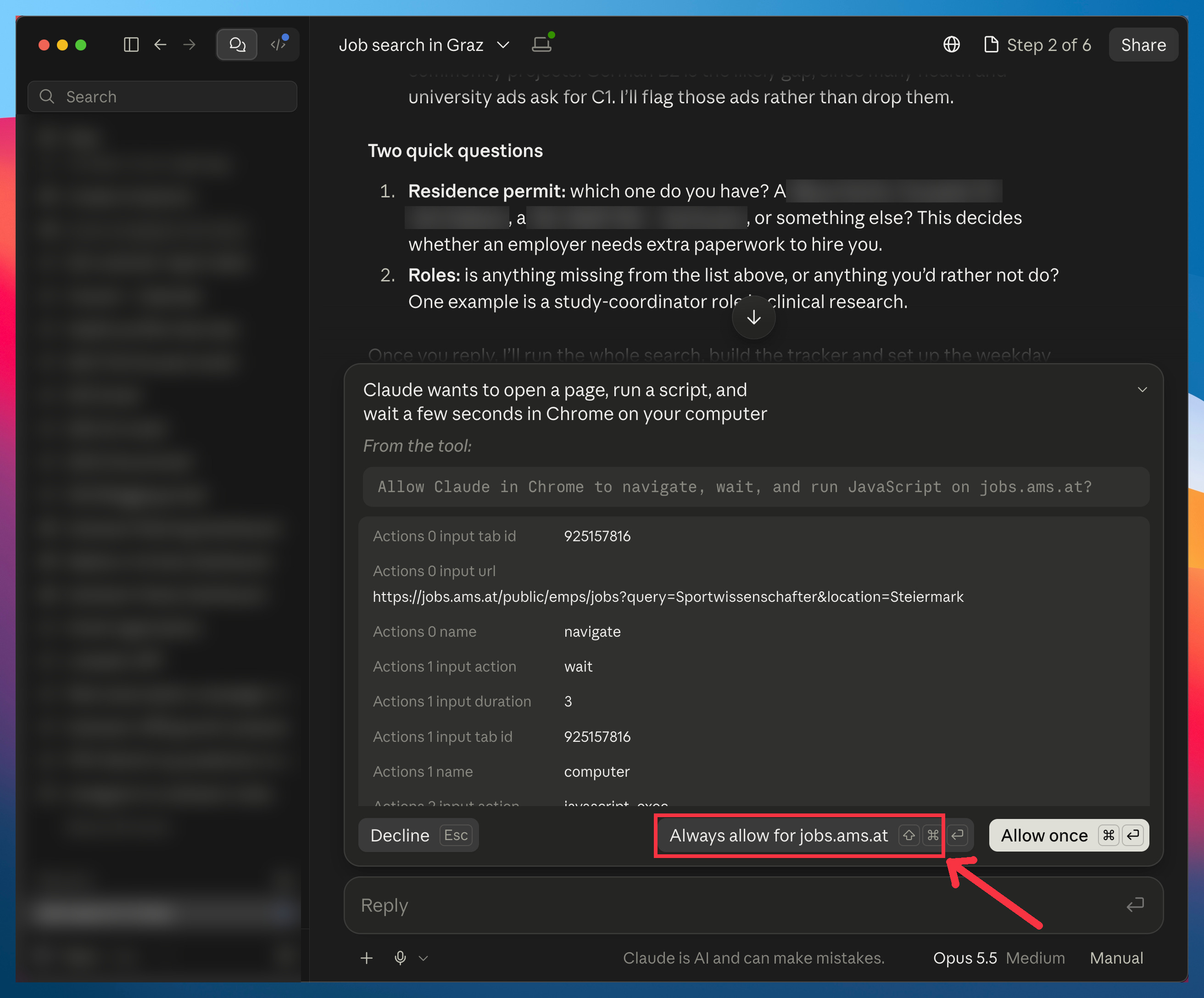
This prompt gives you a quick look at four sites. Tomorrow you’d have to paste it again, then sort through the same jobs to find what’s new.
The job-search skill does that for you. It checks every job site and employer near you, removes the jobs that break your rules, ranks what’s left, and sends you only the new jobs every morning.
The job-search skill
The skill is the full search, packed into one file you add to Claude once.
I built it from Diana’s search.
Then I ran it on her CV until it stopped missing jobs.
I’ll also show you how to make it send you new jobs every morning, without your computer turning into a permission-clicking machine.
The rest of this guide is for paid subscribers. It’s the exact skill and every setting I use, so you can run your own search tonight instead of building it from scratch.
Below the line:
The job-search skill, ready to install: Every click from the download to your first search.
A copy-paste settings template: Fill in your city, your jobs and your pay. It’s the only thing you type, and it keeps out the jobs you’d never take.
How to get only the new jobs every morning: Job alerts keep showing you the same postings. Yours checks your tracker first, so you see what’s new and which deadlines are coming up.
Who to contact before a job is even posted: Some of Diana’s best chances never appeared on any website. Here’s how to make Claude check those employers first.
Past this line, the skill is waiting: