

If you're a Claude-only user (or want to be), you've probably hit the usage limit more times than you'd like to admit.
I have too.
But here’s the thing: Claude doesn’t count messages. It counts tokens. Some chats eat through your limit 10x faster than others.
So I put together the best practices to stretch your Claude plan as far as it can go.
You don't have to follow all of them. Think of it like one of those iPhone tutorials to save battery. You could follow every tip, but you wouldn't have as much fun with it if you did.
Pick the ones that fit how you work. Even 2–3 of these will make a noticeable difference.
Click here to get my FREE Claude course (20+ lessons)
#1 Edit your prompt. Don’t send a follow-up
When Claude’s answer misses the mark, most people send another message like “no, I meant...” or “can you try again but...”
Every follow-up message adds to the conversation history.
Claude re-reads the entire conversation every single turn. So by message 10, you’re not just paying for message 10 — you’re paying for messages 1 through 9 all over again.
This adds up fast.
Instead of sending a new message, click the edit icon on your original message, fix the prompt, and regenerate. The old exchange gets replaced instead of added.
Here’s how to do it
Go to the prompt you wrote → click the pencil icon → rewrite your prompt → hit send. Claude regenerates as if the bad response never happened.

#2 Start fresh every 15–20 messages
Again, Claude re-reads your entire conversation history every single turn.
Your first message costs hundreds of tokens. By message 20, a simple question can cost thousands of tokens. The longer the chat, the more expensive every message becomes.
Long chats are expensive chats.
Start a new conversation every 15–20 messages.
If you need context from the old chat, ask Claude for a summary, copy it, and paste it into the new chat as your first message.
Here’s how to do it
When a conversation starts getting long → ask Claude: “Summarize everything we’ve discussed so far” → copy the summary → open a new chat → paste it as your first message → start fresh

You get fresh context without the bloated token cost.
#3 Combine multiple questions into one
Sending three separate messages means Claude loads the conversation context three separate times.
Batch your questions into a single message.
Instead of sending “Summarize this article,” then “List the main points as bullets,” then “Suggest a headline,” send all three at once.
Write one message like: “Summarize this article, list the main points as bullets, then suggest a headline.”
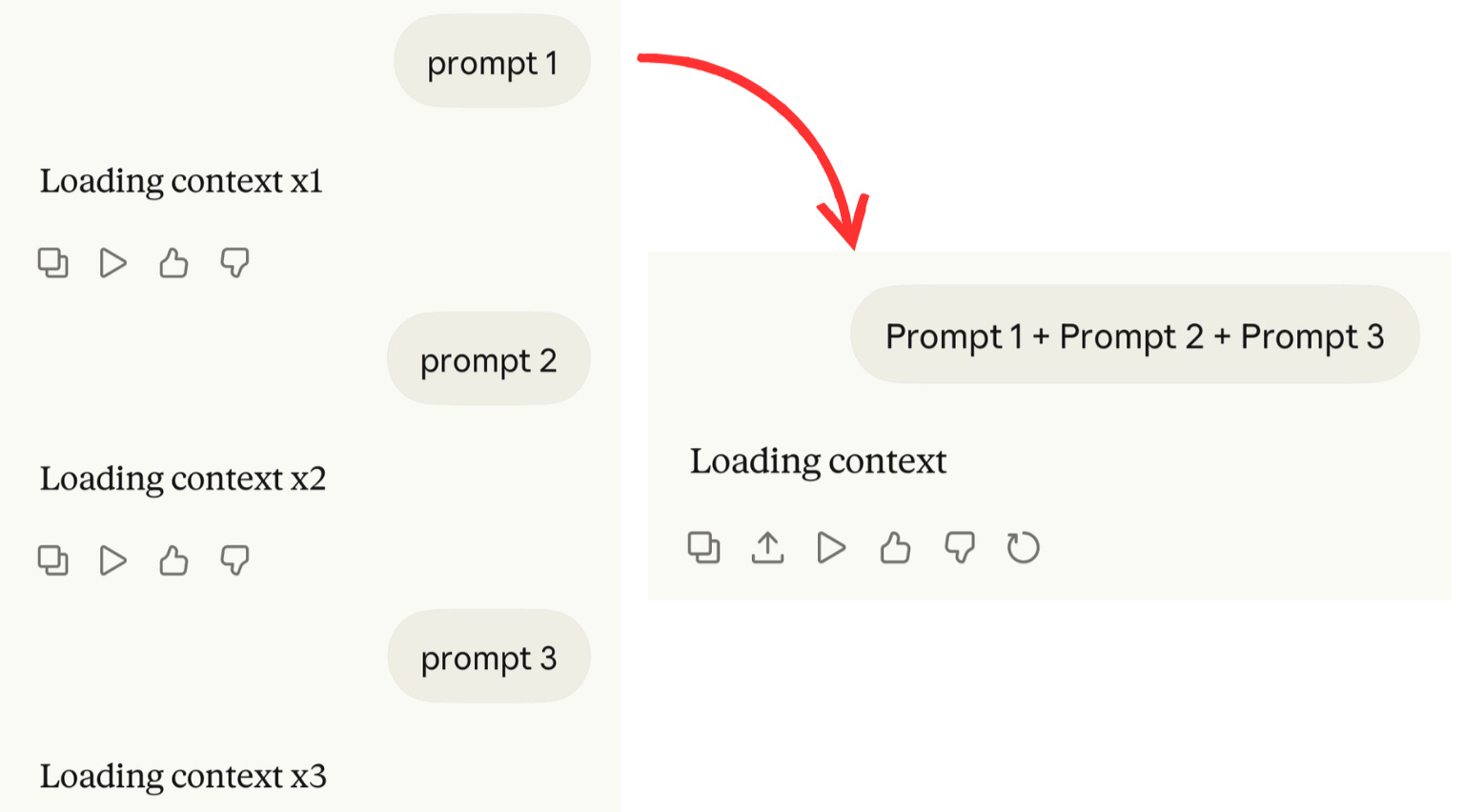
One message. Three answers. One context load.
By the way, the answers are often better when Claude sees the full picture.
#4 Upload recurring files to projects
If you’re uploading the same file in multiple chats, Claude is re-counting those tokens every single time.
The solution? Use Projects. Upload your files there once, and they get cached so they don’t re-cost you on each conversation.
This is a huge saver for anyone who works with long documents regularly.
Here’s how to do it
Go to the sidebar → click Projects → create a new Project → upload your recurring files there. Now every conversation inside that Project can reference those files without re-paying the token cost.
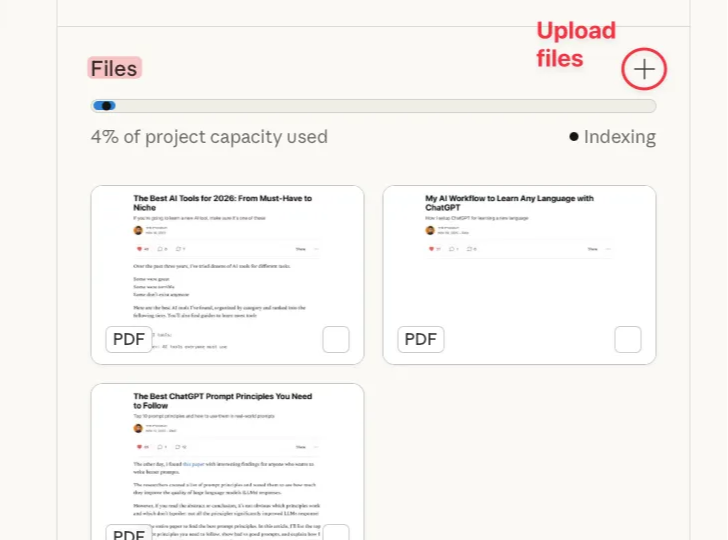
Upload once. Stop wasting tokens every time.
#5 Set up memory
Every conversation you start without context burns setup messages just re-explaining who you are and how you work.
“I’m a marketer, I write in a casual tone, I prefer short paragraphs...”
You’re spending tokens on the same intro over and over.
A simple way to fix this is to set up memory:
Settings → Memory → add things like your job, your writing style, your preferences.
A better approach is to create an .md file with context about you.
Read this guide to generate .md files with context: artificialcorner.com/p/md-file
Create it once. It runs forever.
#6 Turn off features you’re not using
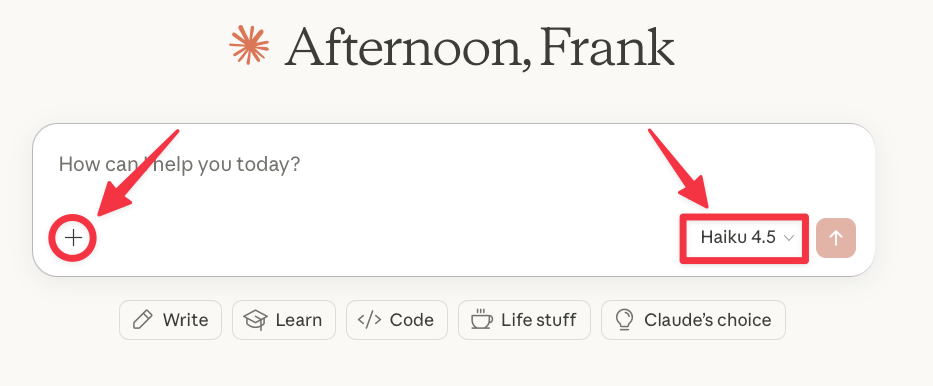
If you’re not using web search, research mode, connectors, and others, turn them off
They add tokens to responses even when you don’t need them.
Same goes for extended thinking. Leave it off by default and only switch it on when you want Claude to think longer for better responses.
Here’s how to turn them off
Click + → Turn off research, web search, or connectors
Click model selector → Turn off extended thinking
#7 Use Haiku for simple tasks
Most people use the same model for everything — whether they’re brainstorming ideas or doing deep research.
The bigger the model, the more tokens it costs per message.
Using the right model is the single highest-impact decision you can make.
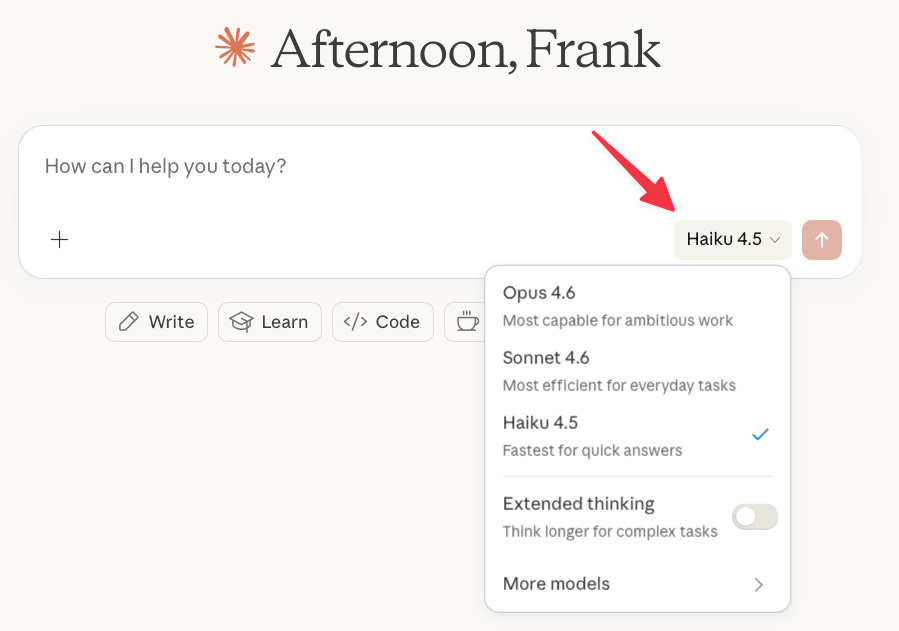
Use the right model for the job:
Haiku (very low cost) → Quick answers
Sonnet (medium cost) → Everyday tasks
Opus (high cost) → Complex tasks
Here’s how to switch models
Just click the model selector at the top of the chat and pick the right one for the task.
#8 Spread your work across the day
I used to sit down at 9 and power through everything in one session. By 11, I’d already hit Claude’s limit. Done for the day.
What I didn’t realize: Claude’s limit runs on a rolling 5-hour window. It doesn’t reset at midnight. Instead, your usage gradually falls off — messages you sent at 9 AM stop counting against you by 2 PM. So if you burn through everything in one burst, you’re leaving most of the day’s capacity on the table.
Split your work into 2–3 sessions per day, instead of 1.
Here’s what I do.
I do a session in the morning, another after lunch, and another in the evening. By the time I come back for each session, my earlier usage has already aged out of the window, and I’ve got a fresh allowance to work with.
Space them out so your rolling window resets between sessions.
Claude counts tokens, not messages. Now you know how to make every token count.
Some of these best practices were taken from Claude Support. For more, read this
Subscribe to get my FREE Claude course.
20+ lessons delivered straight to your inbox 👇
(Also quit Chat GPT today).
This is great, thank you! Do you have a quick example of haiku vs sonnet vs opus tasks? Quick answers vs everyday vs complex is a little high level for me (somewhat new to using AI frequently). Thanks!