


Hi!
I wrote today’s post in collaboration with Ilia Karelin. Ilia writes Prosper, a newsletter focused on practical AI workflows, systems, and frameworks for professionals who want to use AI more thoughtfully.
If you’re interested in building systems for working with AI, I highly recommend checking out Prosper.
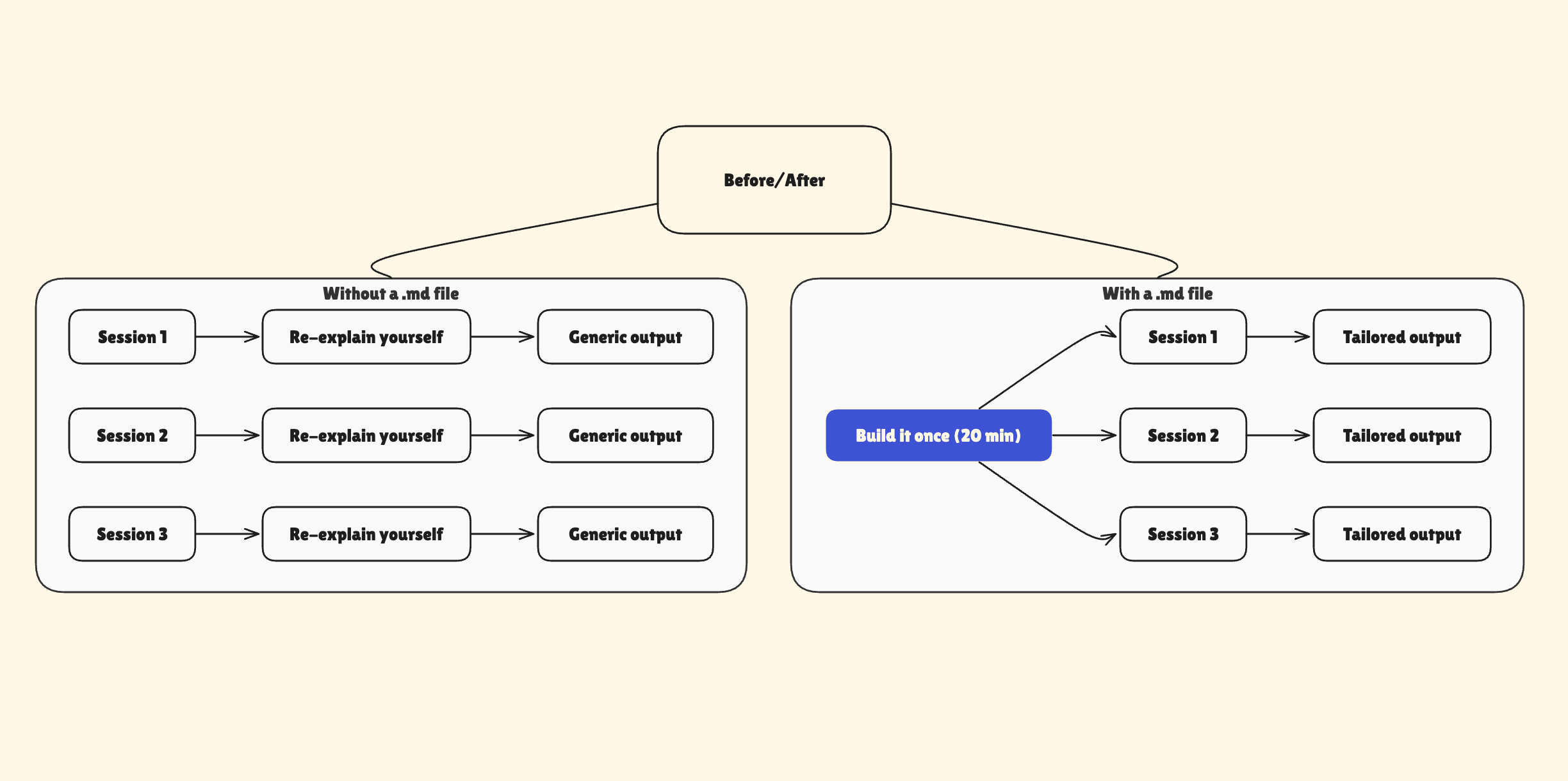
Picture this: you need help with your business, so you open Claude (or any other AI) and start the same way: “Hey, quick context: here is what my business does, this is what I need help with today … ”
Claude helps you out. But then the next time comes, and you’re doing it all over again: rewriting context, re-explaining your situation, updating what was discussed last time.
Every. Single. Time.
That used to take up a lot of my time until I started using .md files. Once I did, I stopped re-explaining myself from scratch.
An .md file is a simple text file that holds context about you, your work, or your projects. You create it once. You reuse it everywhere.
In this guide, you’ll learn:
How to create your own .md file
5 interview-style prompts that generate ready-to-use .md files for business context, writing voice, project work, content creation, and analysis
How to use your .md file in Cowork
You can upload .md files to Claude, ChatGPT, or any other AI, but I recommend using it on Claude Cowork. In the next section, we’ll see why.
Click here to get my FREE Claude course (20+ lessons)
Cowork makes .md files more powerful
In regular Claude chat, you paste a .md file into the conversation. Works fine, but you do it every time.
Cowork is different.
Drop a .md file into a folder and Claude reads it automatically whenever you work in that folder. Open the folder, Claude already knows the context. No pasting. No re-uploading.
Here’s what that looks like in practice.
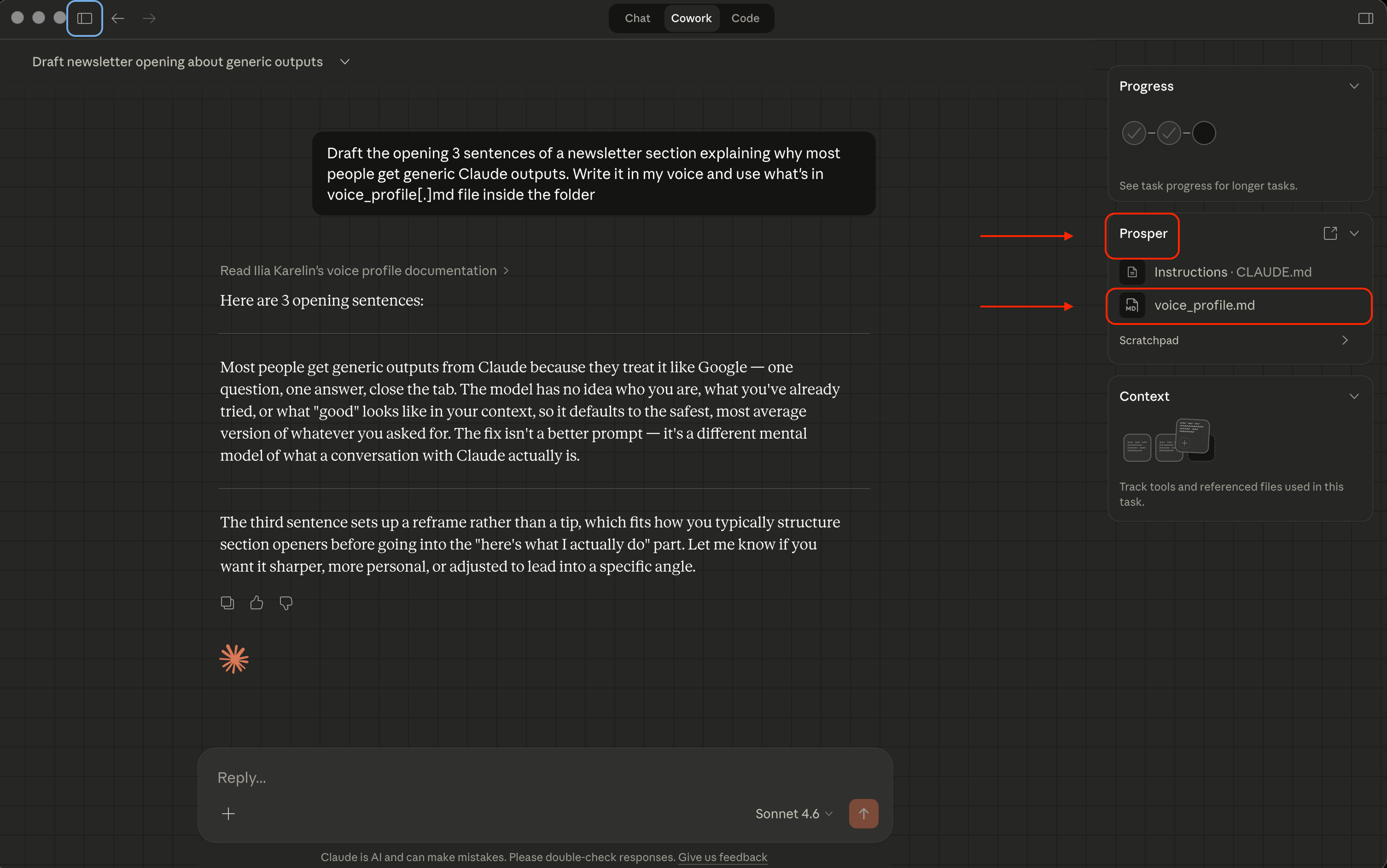
Ilia writes a newsletter called Prosper. His writing folder contains a voice profile with banned words, sentence patterns he avoids, positions he’d never take.

“When I open that folder in Cowork and ask for a draft, it doesn’t ask who I am. It reads the file and produces something that sounds like I wrote it on a Tuesday morning”
- Ilia Karelin
Same principle, any folder. Your client folder knows your delivery standards. Your research folder knows how you think about data.
Zero re-explaining. Claude starts already knowing your work.
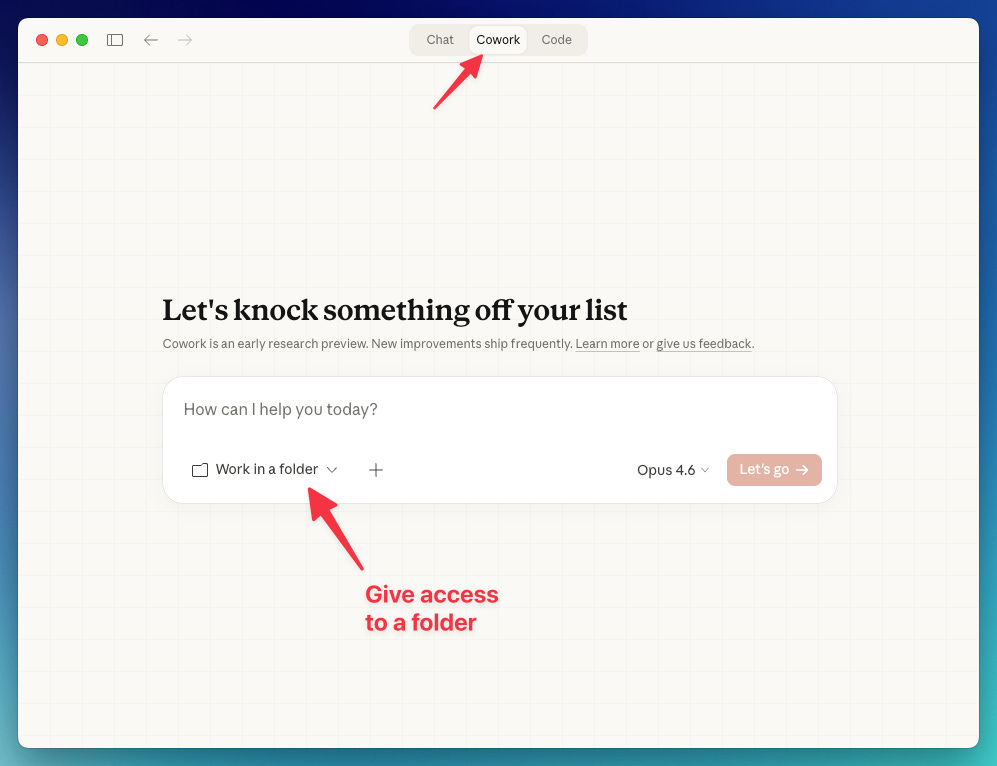
Here’s how to use Cowork:
Download Claude for desktop
Open the app and choose “Cowork“
Give access to the folder containing the .md file
In the next section, we’ll learn how to create an .md file. Once you connect the file to Cowork, it’ll have it as a reference for future responses.
📚 Claude Cowork - Complete Guide: artificialcorner.com/p/cowork
📚 Move from ChatGPT to Claude: artificialcorner.com/p/switch-to-claude
📚 Best Claude Setup: artificialcorner.com/p/claude-setup
How to create your .md file: the interview method
You don’t sit down and write the file completely from scratch. Claude interviews you and builds it from your answers.
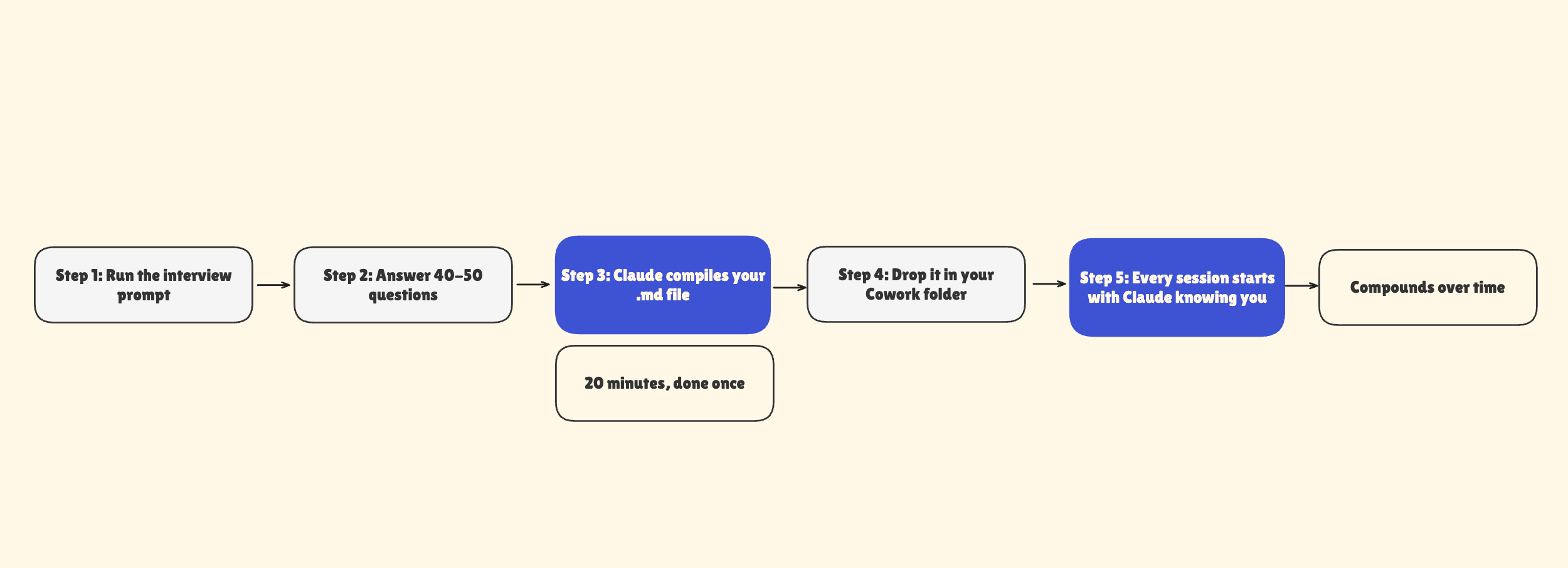
Instead of staring at a blank document trying to articulate how you work, you let Claude interview you, and we’re going to give it a starting point.
It asks the questions. You answer honestly. At the end, it hands you a finished file.
The insight that makes this work: your profile is mostly about what you “reject”, not what you prefer. What you never want to see. What you’d never say.
That’s where the real signal is - not “I like direct communication” but “I’d never send a bullet-pointed email to a client.”
Here’s the base prompt:
You are going to help me create a context file I can use with Claude Cowork.

Ask me questions one at a time to understand my work: who I am, what I do,
how I like things done, what I never want to see in outputs, and what
“good work” means to me specifically. Use AskUserQuestion for it.

Ask me 40-50 questions total. One at a time. Push back if my answer is
vague — ask for a specific example. When we’re done, compile everything
into a .md file I can save and use with Claude.
Claude takes it from there.
Note: For the examples below, I told Claude to ask me 3 questions and then compile a first draft of the file. In practice, 40-50 questions produce a much richer profile — but this is a good way to see what you’re building toward before committing to the full interview. You can always run it again or ask Claude to update the file with more details later.
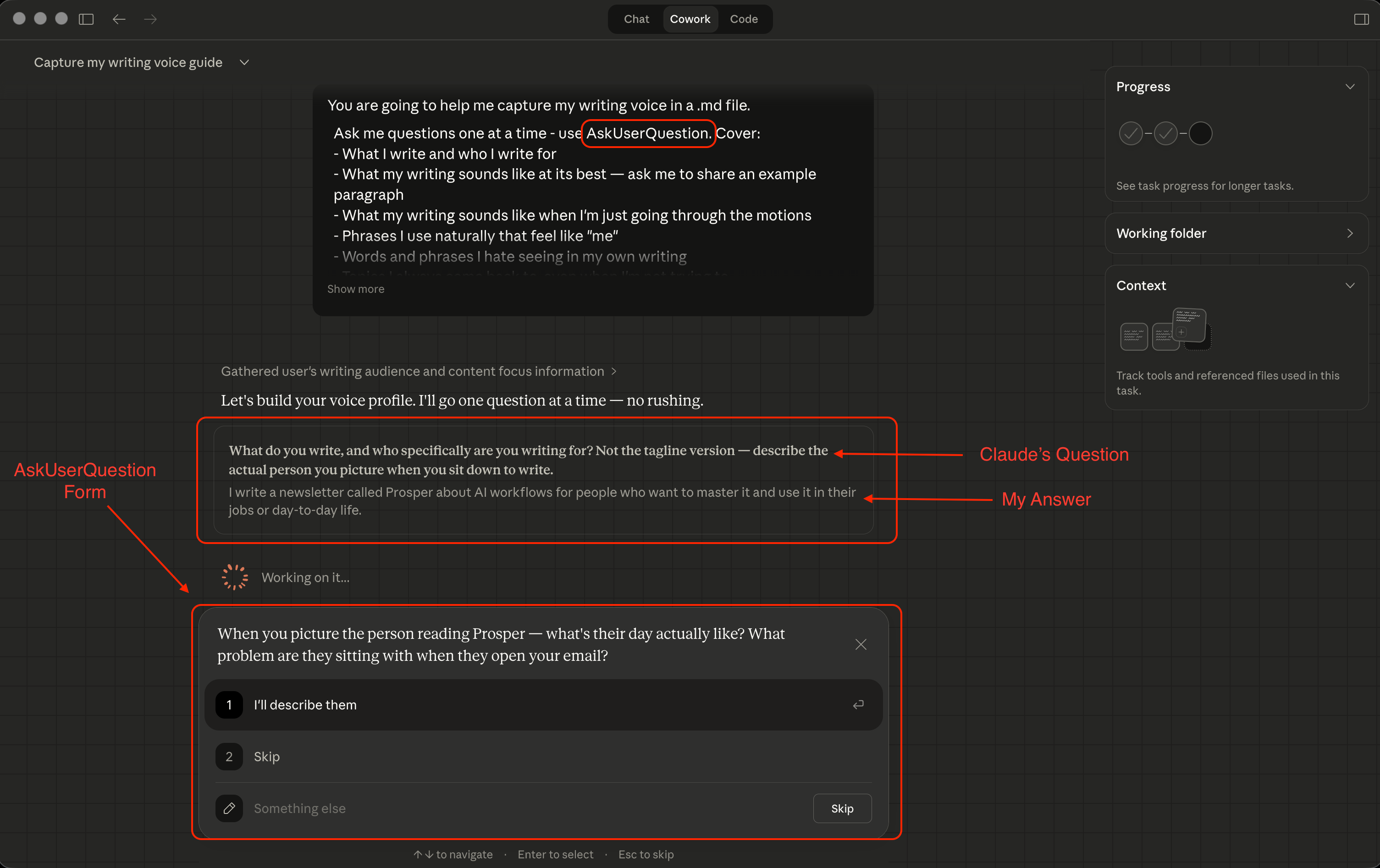
The key is answering specifically. “I want professional outputs” is useless. “I want outputs that sound like they came from a CFO - direct, numbers-first, no filler” gives Claude something it can actually apply.
In the previous prompt, we used AskUserQuestion to collect your preferences through preset options, but short multiple-choice answers only scratch the surface. Claude works best when it has rich, detailed context about you
For a more tailored experience, choose one of the five role-specific prompts below and answer as thoroughly as you can. The more detailed and thoughtful your responses, the more context Claude will have to work with.
📚 Claude - The Setup Most People Never Do

5 interview prompts that generate ready-to-use .md files
1. Business context
For owners, freelancers, and consultants who want Claude to help with anything business-related: client calls, contractor briefings, meeting prep, proposals.
You are going to help me create a business context .md file for Claude Cowork.

Ask me questions one at a time. Cover:

- What my business does - what I sell, who I serve, what problems I solve

- How I describe my business in my own words (not my website version)

- My team structure - employees, freelancers, partners, and who does what

- My biggest recurring challenges: meetings I dread, tasks I repeat, decisions I struggle with

- My communication style - how I write emails, how I run meetings, what I sound like

- My financial setup - how I track money, who I report to, what I need to know for accounting

- My non-negotiables - things I never want Claude to suggest or assume about my work

- What a great output actually looks like for me, with a specific example

Ask 40-50 questions. One at a time.

Interview rules:
- Push back on vague answers. If I say something generic, ask for a specific example.
- Call out contradictions. If something conflicts with an earlier answer, flag it.
- Don’t accept “I don’t know.” Reframe the question or approach it differently.
- Go deeper on interesting threads. If something unusual comes up, follow it before moving on.
- Ask for real samples - actual emails, documents, or decisions. Descriptions mean less than examples.
- Don’t validate my answers. No “great point” or “that’s interesting.” Just ask the next question or push deeper.
- If my answer sounds like how I wish I worked rather than how I actually work, call it out. Ask me for proof.
- If my answer could describe anyone in my profession, flag it. Ask what’s specific to me.

When we’re done, compile everything into a .md file with clear section headers.
Include the specific examples alongside the rules — they’re what make the file useful.
With this one, you will definitely see your prep time that used to take 20 minutes of re-explaining, now takes 2.
2. Writer’s voice
For newsletter writers, bloggers, and anyone who creates written content and wants Claude to draft in their actual voice — not a polished AI version of it.
You are going to help me capture my writing voice in a .md file.

Ask me questions one at a time. Cover:

- What I write and who I write for

- What my writing sounds like at its best — ask me to share an example paragraph

- What my writing sounds like when I’m just going through the motions

- Phrases I use naturally that feel like “me”

- Words and phrases I hate seeing in my own writing

- Topics I always come back to, even when I’m not trying to

- What I refuse to write about, or positions I’d never take

- My formatting instincts: long or short paragraphs? headers or prose? lists or sentences?

- Writers I admire — and specifically what I’d steal from each one

- What feedback I keep getting on my writing

- What feedback I keep ignoring, and why

Ask 40-50 questions. One at a time.

Interview rules:
- Push back on vague answers. If I say “I like directness,” ask me what that looks like in a specific paragraph.
- Call out contradictions. If something conflicts with an earlier answer, flag it.
- Don’t accept “I don’t know.” Reframe the question or approach it differently.
- Go deeper on interesting threads. If something unusual comes up, follow it before moving on.
- Ask for real samples — actual paragraphs I’ve written, sentences I’d never publish. Descriptions of style mean less than examples of it.
- Don’t validate my answers. No “great point” or “that’s interesting.” Just ask the next question or push deeper.
- If my answer sounds like the writer I wish I were rather than the writer I actually am, call it out. Ask me for proof.
- If my answer could describe any writer in my space, flag it. Ask what’s specific to me.

When we’re done, compile everything into a .md file with clear section headers.
Include the specific examples alongside the rules — they’re what make the file useful.
That’s the one I have in the folder I work in. Adjectives like “direct, warm, conversational” mean nothing to Claude. You end up with actual rules - hard nos, specific examples, the exact phrases you’d never use - the kind of guardrails that make Claude’s drafts sound like yours.
The rule that makes this work: 80% of a good voice profile is about what you reject. What sounds wrong. What you’d never publish. That’s what separates your voice from everyone else’s.
3. Client and project work
For consultants, agencies, and project managers whose Cowork folders hold client deliverables, project notes, and anything where working-style context matters.
You are going to help me create a client work .md file for Claude Cowork.

Ask me questions one at a time. Cover:

- The type of work I do with clients — deliverables, services, projects

- How I onboard clients and what I need to know before I start

- My delivery standards — what “done” looks like, how I format deliverables,

 what I never send without reviewing myself

- How I communicate with clients — tone, frequency, what I always and never say

- My biggest recurring frustrations with client work

- What makes a project go well vs. badly — in specific terms, not general ones

- How I handle scope creep, missed deadlines, or difficult conversations

- Tools and systems I use (where projects live, how I track things)

- What I’d want a smart assistant to know before helping me with any client task

Ask 40-50 questions. One at a time.

Interview rules:
- Push back on vague answers. If I give a process-level answer, ask me for a real example from a recent project.
- Call out contradictions. If something conflicts with an earlier answer, flag it.
- Don’t accept “I don’t know.” Reframe the question or approach it differently.
- Go deeper on interesting threads. If something unusual comes up, follow it before moving on.
- Ask for real samples — actual client emails, deliverable excerpts, or project decisions. Descriptions mean less than examples.
- Don’t validate my answers. No “great point” or “that’s interesting.” Just ask the next question or push deeper.
- If my answer sounds like how I wish I handled clients rather than how I actually do, call it out. Ask me for proof.
- If my answer could describe any consultant or PM, flag it. Ask what’s specific to me.

When we’re done, compile everything into a .md file with clear section headers.
Include the specific examples alongside the rules — they’re what make the file useful.
Drop this file into a client folder and Claude stops being a blank-slate assistant.
It knows your delivery standards, how you talk to clients, and what you’d never send without reviewing. One file, reused across every project.
4. Content creator
For YouTubers, podcasters, and social media creators who want Claude to help with ideation, scripting, and repurposing - in a way that actually fits their content.
You are going to help me capture my content identity in a .md file.

Ask me questions one at a time. Cover:

- What kind of content I make and where I publish it

- Who my audience is — not who I think they are, but what they actually respond to

- My content pillars: the 3-5 topics I return to again and again

- My on-camera or on-mic personality vs. my off-camera personality

- Content I’m most proud of and why it worked

- Content I’ve made that flopped — and what I think went wrong

- Content trends I refuse to follow even if they’d probably perform

- My production constraints: time, team size, tools I have access to

- The 3 creators I admire most and specifically what I’d take from each one

- What I want people to feel or do after consuming my content

- What I’d never make, even if someone paid me to

Ask 40-50 questions. One at a time.

Interview rules:
- Push back on vague answers. If I say “I want to be authentic,” ask me what that looks like in a specific piece of content I’ve made.
- Call out contradictions. If something conflicts with an earlier answer, flag it.
- Don’t accept “I don’t know.” Reframe the question or approach it differently.
- Go deeper on interesting threads. If something unusual comes up, follow it before moving on.
- Ask for real samples — actual video scripts, post captions, or content decisions. Descriptions mean less than examples.
- Don’t validate my answers. No “great point” or “that’s interesting.” Just ask the next question or push deeper.
- If my answer sounds like the creator I wish I were rather than the creator I actually am, call it out. Ask me for proof.
- If my answer could describe any creator in my niche, flag it. Ask what’s specific to me.

When we’re done, compile everything into a .md file with clear section headers.
Include the specific examples alongside the rules — they’re what make the file useful.
Claude stops suggesting ideas that don’t fit your channel. Scripts stop sounding like they could belong to anyone.
When you repurpose a video into a thread or a newsletter, the thing that made the original work doesn’t get lost in translation.
5. Analyst and researcher
For data analysts, researchers, and strategists whose Cowork folders contain reports, datasets, and research notes where output format and analytical standards matter.
You are going to help me create an analyst context .md file for Claude Cowork.

Ask me questions one at a time. Cover:

- What I analyze and for whom — who reads my outputs and what they do with them

- How I define a good analysis — what questions it answers, what format it takes

- My output preferences: how I structure reports, what I always include, what I always cut

- The frameworks or mental models I use most, even informal ones

- What “rigorous” means to me — where I draw the line on confidence and evidence

- My biggest recurring frustrations with how analysis gets done or presented

- Tools and data sources I work with regularly

- What I want someone to do after reading my analysis: decide, act, question, understand?

- What I never want to see in an analysis output — vague language, unsupported claims,
specific phrases that signal lazy thinking

Ask 40-50 questions. One at a time.

Interview rules:
- Push back on vague answers. If I describe a preference, ask me for an example of when it mattered in real work.
- Call out contradictions. If something conflicts with an earlier answer, flag it.
- Don’t accept “I don’t know.” Reframe the question or approach it differently.
- Go deeper on interesting threads. If something unusual comes up, follow it before moving on.
- Ask for real samples — actual report excerpts, analysis decisions, or data interpretations. Descriptions mean less than examples.
- Don’t validate my answers. No “great point” or “that’s interesting.” Just ask the next question or push deeper.
- If my answer sounds like how I wish I analyzed rather than how I actually do, call it out. Ask me for proof.
- If my answer could describe any analyst in my field, flag it. Ask what’s specific to me.

When we’re done, compile everything into a .md file with clear section headers.
Include the specific examples alongside the rules — they’re what make the file useful.
No more “here are the findings” summaries that don’t match how you think or how your audience reads.
Outputs formatted and reasoned the way you’d do it yourself - because the file tells Claude exactly what that looks like.
Do This Now
Follow these steps:
Open the Claude app
Go to the Cowork tab.
Paste one prompt from the list above into Cowork
Answer every question.
When Claude pushes back and asks for specifics, give them. That’s where the file gets good. When it hands you the finished file, save it with a descriptive name - [voice_profile.md], [business_context.md], whatever fits what you built.
Drop the .md file in your most-used work folder and give Cowork access to that folder:
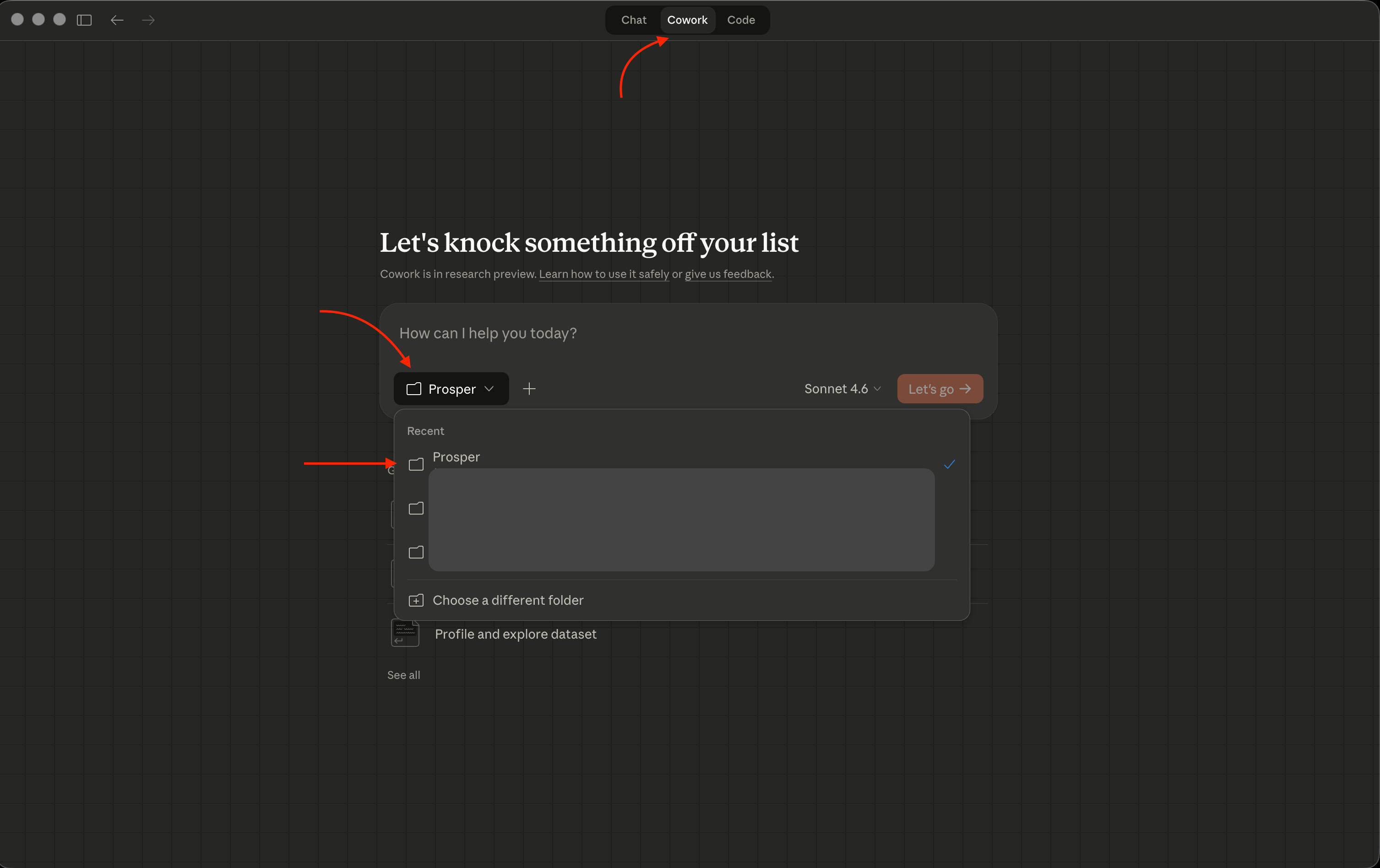
At the end of your first prompt, type this:
[your prompt]
Before you start, read [your filename].md first
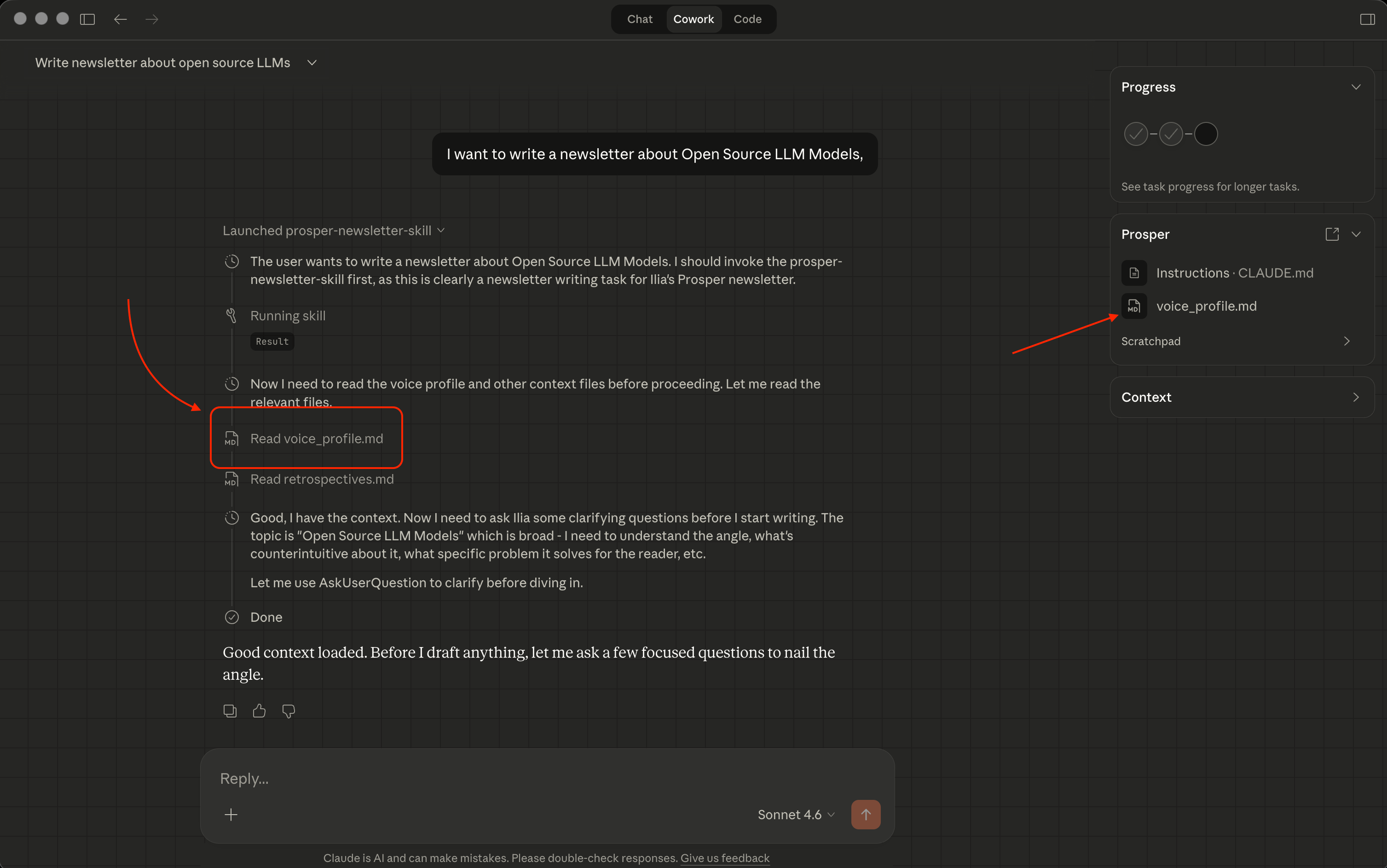
Here’s an example from just a couple of words I wrote in Cowork:
Done.
Every time you open that folder and give Cowork a task - prep a meeting, draft an email, analyze a dataset - it reads the context file before doing anything. It already knows who you are.
If you want to take this to the next level, use the scheduled tasks feature:
📚 Claude scheduled tasks: artificialcorner.com/p/claude-automates
Don’t forget to subscribe to Prosper, where you can find practical AI workflows, systems, and frameworks for professionals who want to use AI more thoughtfully.
Here are some of Ilia’s best posts:
Thank you so much for the opportunity, appreciate you!
I hope people will be able to apply this reading into their work and lives! Let me know what you guys think.
I’m using basic Claude to write an iOS app (not Cowork). I don’t have any experience writing Swift
code. Every new chat I’d have to get Claude back up to speed. Very frustrating and time consuming. Eventually it occurred to me to ask Claude to summarize all our sessions work at the end of each session. I feed that summary back in at the start of the next chat session and Claude’s immediately up to speed on project goals, history, work to be done. You just have to remember to ask for a new summary and save the file. It’s a game changer in time saved.