


Click here to get my FREE Claude course (20+ lessons)
I used to get mediocre results from Claude Cowork.
The tool wasn’t broken. My workspace was.
Most people open Cowork and do this: open a folder → write a prompt → hope for the best
Sometimes it works. A lot of times, it doesn’t.
And that’s not Cowork’s fault. Cowork is stepping into your workspace with zero context, no rules, and no clear way of working.
So it starts improvising.
It doesn’t know what tone to use.
It doesn’t know what it should never assume.
It doesn’t know what files it must always read.
That’s why so many people try it and walk away thinking it feels like just another chat … just with file access.
In this guide, we’ll fix that. I’ll show you a simple system that gets the most out of Cowork.
By the end of this guide, you’ll have:
A system that gives Cowork the context it needs to stop improvising
How to use this system with 3 real-world examples
How to prompt this system (spoiler: you’ll need short prompts — the system does the heavy lifting)
No coding. No complex setup. Just a structure that works.
Cowork doesn’t need more prompts. It needs a system
If you come from the chat world, this makes sense: write a better prompt, get a better result.
In Claude Cowork, that is no longer the main piece. The workspace is.
Because Cowork does not just work with what you type into a text box. It works with what it can read inside the folder you give it access to:
- your project files
- your working rules
- your context
- your preferred way of communicating
- your prior drafts
- your examples of success
You need to turn the way you work into a small, reusable system.
Here’s an overview of the system we’ll build:
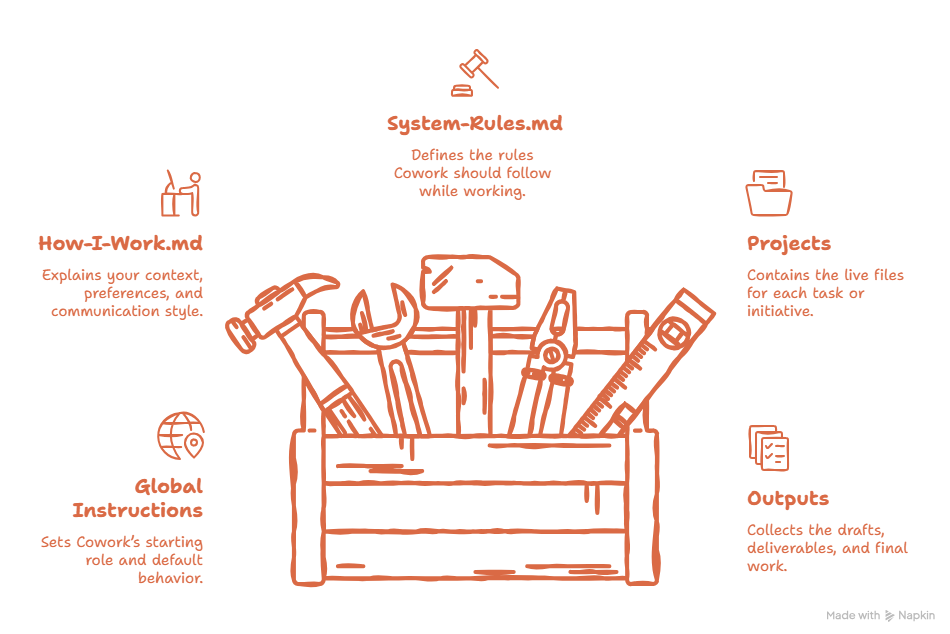
That jump looks small. It isn’t.
Because the moment your way of working lives in files, Cowork stops starting from zero every time. When that happens, the results stop feeling generic and start feeling like “this thing already knows how I work.”
Quick Cowork Recap: Installation
To use Cowork, you need to download Claude for desktop:
Go to claude.com/downloads → download Claude Desktop → install it → sign in
Once it's installed, select Cowork. That's it. You're in.
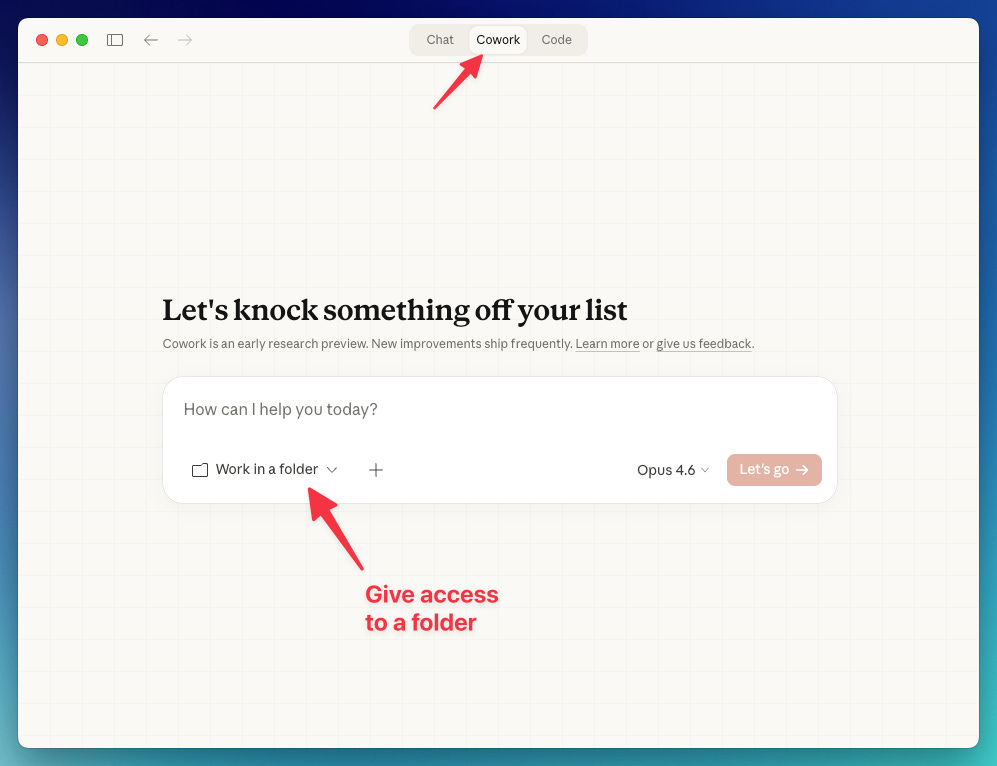
Quick setup: Add Global Instructions
Global instructions is where you set the default behavior Cowork should bring into every session. Do this:
Open profile menu → Settings → Cowork → Add your Global Instructions → Save
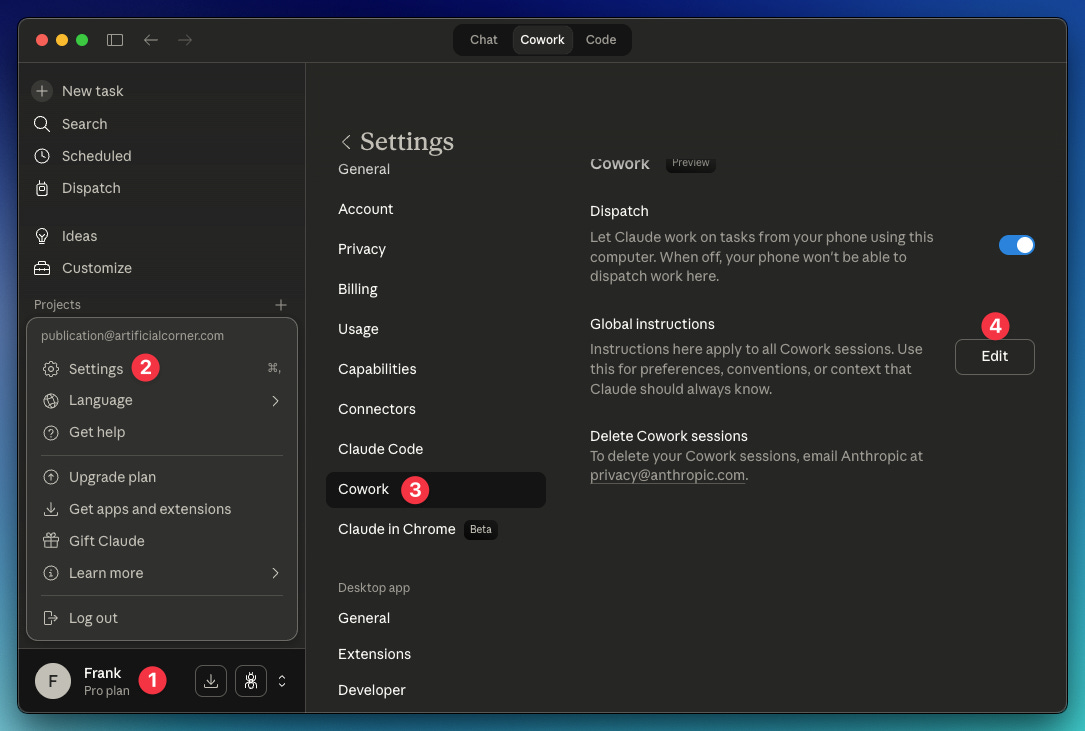
Copy these global instructions:
You are my working partner inside this workspace.

Start by reading:
1. context/HOW-I-WORK.md
2. system/SYSTEM-RULES.md
3. the relevant folder inside projects/

Do not execute immediately if the goal, audience, or output format is unclear.
Ask questions first when missing context could weaken the result.

Do not invent facts, decisions, dates, numbers, or approvals.
Make uncertainty visible.

Use the workspace files as the main source of truth.
Save final outputs in outputs/.
This gives Cowork a reliable starting behavior before the real context comes from the workspace.
The simple system I’d actually start with
I wanted to strip this down as much as possible.
I wouldn’t start with ten folders.
I wouldn’t start with an entire empty office.
I’d start with four. That’s it.
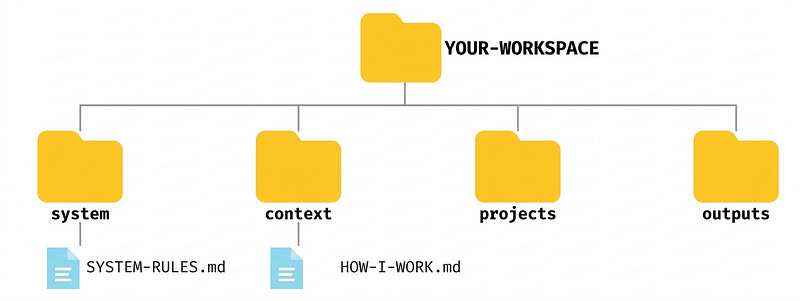
YOUR-WORKSPACE/
├── system/
├── context/
├── projects/
└── outputs/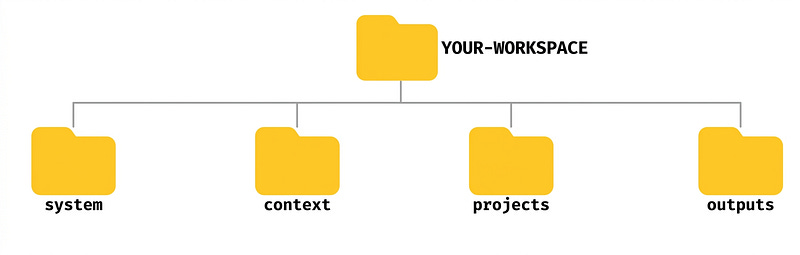
On your computer, it looks like this:

That’s already enough to get started.
system/ → stores the base rules (stays fairly stable)
context/ → stores the stable context (stays fairly stable)
projects/ → stores the active work (it changes by project)
outputs/ → stores what Cowork produces
A small structure that can grow without turning into a mess.
But a folder by itself doesn’t tell Cowork much. What makes the workspace useful are the files that explain Cowork how to work.
The files that bring the structure to life
Folders give Cowork a place to work. Files tell it how to work.
That’s why I’d start with just two:
context/HOW-I-WORK.mdsystem/SYSTEM-RULES.md
HOW-I-WORK.md captures who you are inside this workspace: how you work, how you think, how you communicate, and what kind of work you consider good.
SYSTEM-RULES.md defines how Cowork should behave: when it should ask before acting, what it shouldn’t assume, how to handle ambiguity, and what a strong result looks like.
What should live inside HOW-I-WORK.md? A simple version of this file could include:
what kind of work you do
who you do it for
how you think
how you communicate
what feels natural in your writing
what you dislike
which sources carry more weight when there’s a conflict
real examples when useful
What should live inside SYSTEM-RULES.md? A simple version of this file could include:
core operating principles
when Cowork should ask before acting
how it should behave during execution
how to handle ambiguity
what counts as a strong output
clear boundaries
a final review before delivery
The structure would look like this:
Up to this point, everything sounds simple.
Here’s the most important part: I wouldn’t write those files from scratch. Because the moment you do, you start guessing.
You describe the version of yourself you wish were true — not the version that actually shows up in day-to-day work.
That’s why I prefer a different approach: build both files through an interview.
A good interview helps extract things most people wouldn’t write well on their own:
how they actually work
how they actually write
what they value in a strong deliverable
what makes them distrust a weak one
what Cowork should never assume
what kind of help is genuinely useful to them
Then that interview generates the two files that support the entire system.
Copy the prompt below to generate HOW-I-WORK.md and SYSTEM-RULES.md
You’ll be asked about 50 questions, one at a time. Answer each one honestly and in detail for the best results.
You are my workspace interviewer.

Your job is to extract enough high-quality signal to help build 2 things for Claude Cowork:

1. context/HOW-I-WORK.md
2. system/SYSTEM-RULES.md

Your goal is not to interview me forever.
Your goal is to gather enough specific, real, usable information to generate those files well.

## Interview objective

You are helping define how Claude Cowork should work with me inside a reusable workspace.

That means you need to understand:

- what kind of work I do
- what I usually create
- who I create it for
- how I think
- how I write
- what I value in strong outputs
- what I dislike in weak outputs
- how I want Claude Cowork to behave
- what Claude should never assume
- when Claude should ask questions before executing

## Interview structure

You will conduct the interview in 3 blocks:

### Block A - Work context

Use this block to understand:

- what I do
- what kinds of deliverables I create
- who my audience is
- what those people value
- what sources matter most
- what this workspace should help me do

### Block B - Voice, style, and thinking

Use this block to understand:

- how I sound at my best
- how I sound when I am writing lazily or on autopilot
- the words, phrases, and structures that feel natural to me
- what I hate in writing
- how I organize ideas
- how I think through problems
- what I tend to notice, distrust, or emphasize
- examples of real writing that sound like me

### Block C - System behavior and rules

Use this block to understand:

- how I want Claude Cowork to behave
- when Claude should ask before acting
- what makes an output strong or weak for me
- what should never be assumed, invented, or finalized too quickly
- how uncertainty should be handled
- how conflicting information should be handled
- what kind of help is actually useful to me

## Interview rules

1. Ask one question at a time.
Wait for my response before moving on.

2. Do not ask a fixed number of questions.
Ask only as many as needed to build the files well, up to a maximum of 50 questions.

3. Push back on vague answers.
If I say something generic, ask for a specific example.

4. Ask for real evidence.
Whenever useful, ask for:
- a real paragraph I wrote
- a real sentence I like
- a real sentence I would never publish
- a real example of a good or bad output
- a real example of a decision, document, or deliverable

5. Call out contradictions.
If I say something that conflicts with an earlier answer, point it out and ask me to resolve it.

6. Distinguish reality from aspiration.
If I describe the person I wish I were instead of how I actually work, write, or decide, call it out and ask for proof.

7. Go deeper only when useful.
If an answer contains strong signal, follow it.
If not, move on.

8. Do not flatter me.
Do not say “great point,” “interesting,” or similar filler.
Just ask the next question or push deeper.

9. Optimize for usable specificity.
Do not collect abstract opinions if they will not help build the files.

10. Stop when you have enough signal.
Do not drag the interview longer than needed. Stop earlier if you already have enough strong signal to generate both files well.

## What you are building toward

At the end of the interview, you will generate 2 outputs:

### Output 1

context/HOW-I-WORK.md

This file should include:

- what kind of work I do
- what I create
- who I create for
- what my audience values
- how I think
- how I communicate
- what feels like me
- what I dislike
- what sources carry more weight
- real examples when useful

### Output 2

system/SYSTEM-RULES.md

This file should include:

- core operating principles
- when Claude should ask before executing
- how Claude should behave during execution
- how to handle ambiguity
- how to handle conflicting information
- what a strong output looks like
- what weak outputs get wrong
- collaboration preferences
- hard boundaries
- a final pre-delivery check

## Output requirements after the interview ends

When you judge that the interview is complete, generate both outputs in this exact format:

[context/HOW-I-WORK.md]
...

[system/SYSTEM-RULES.md]
...

After that, add this section only if needed:

[Missing or weak signal]
...

Do not generate the files before the interview is complete.

## How to begin

Start with Block A.
Ask me the first question.
Why does this approach actually work?
You’re extracting real info to build two files that will be reused again and again.
That’s the shift that matters.
No more files just for the sake of having more files. No more long prompts to compensate for missing context. Just a minimal structure, two well-built files, and a smarter way to give Cowork the context it needs.
How to apply this method: 3 real-world examples
The advantage of this structure is that it doesn’t depend on a single task.
It works for an article, report, presentation, research project, weekly brief, proposal, document synthesis, etc
The logic is always the same:
project folder + 2 core files + short prompt
That’s the pattern.
You don’t need to reinvent how you work for every task. You only need to change the content inside projects/ and give Cowork a short prompt to trigger it.
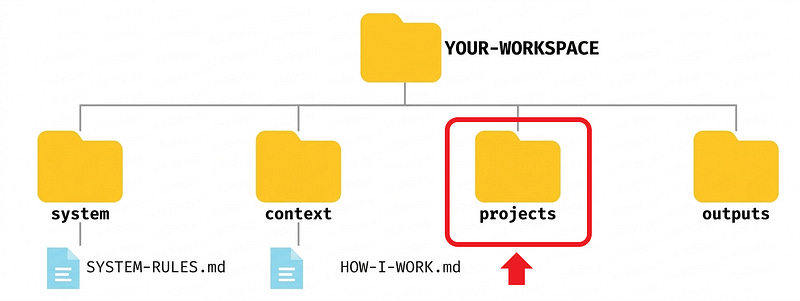
In other words:
system/SYSTEM-RULES.md stays fairly stable
context/HOW-I-WORK.md stays fairly stable
what changes each time lives inside projects/
The projects folder is where the specific work lives — the brief, notes, references, drafts, and any file tied to that particular task.
Click here to download all the folders and files used in the examples below
Example 1: Turn scattered notes into a decision brief
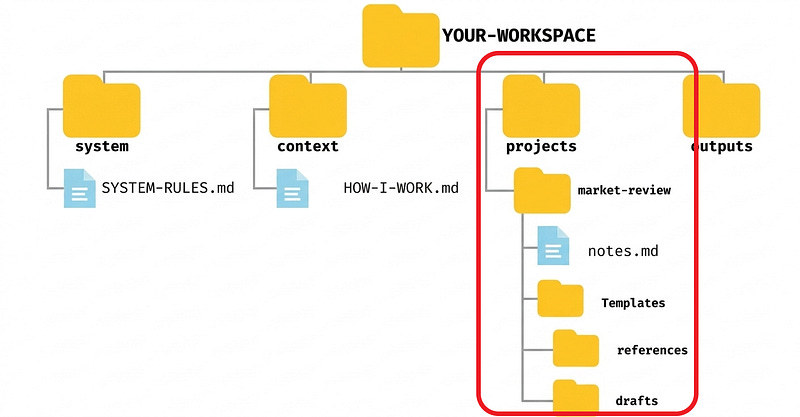
Inside projects/, you create this (it may vary by project):
projects/
└── market-review/
 ├── notes.md
 └── template/
 ├── references/
 └── drafts/
The system doesn’t change. The only new thing is the content inside market-review/
Notes.md could look like this:
# Market Review Notes

## Context
We are reviewing competitor moves from the last 30 days.

## Raw observations
- Competitor A launched a lower-priced offer
- Competitor B simplified onboarding
- Competitor C is publishing more case studies

## Risks noticed
- We may overreact to pricing changes
- We do not know yet if these moves are converting better

## What I need
Turn this into a decision brief for internal review.
references/ → previous presentations, competitor reports, benchmarks, internal documents, anything that helps interpret the notes
drafts/ → first version of the brief, a condensed version, a more executive version if you need one
The prompt could be as simple as:
Read the project folder first.
Then ask me questions before you execute.
I want a decision brief, not a generic summary.
Save the result in outputs/briefs/.
The method didn't change. Only the content did.
Here are the results:
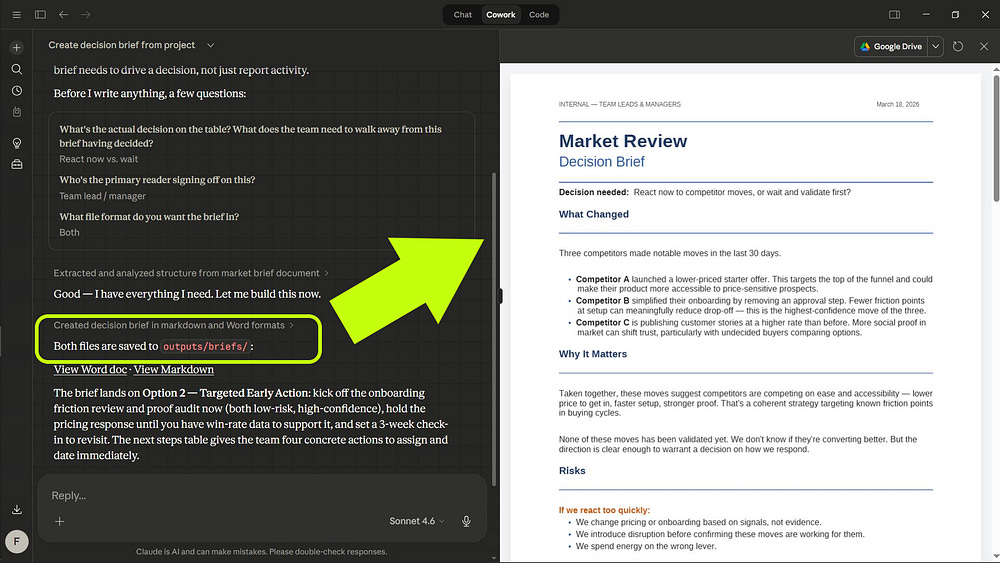
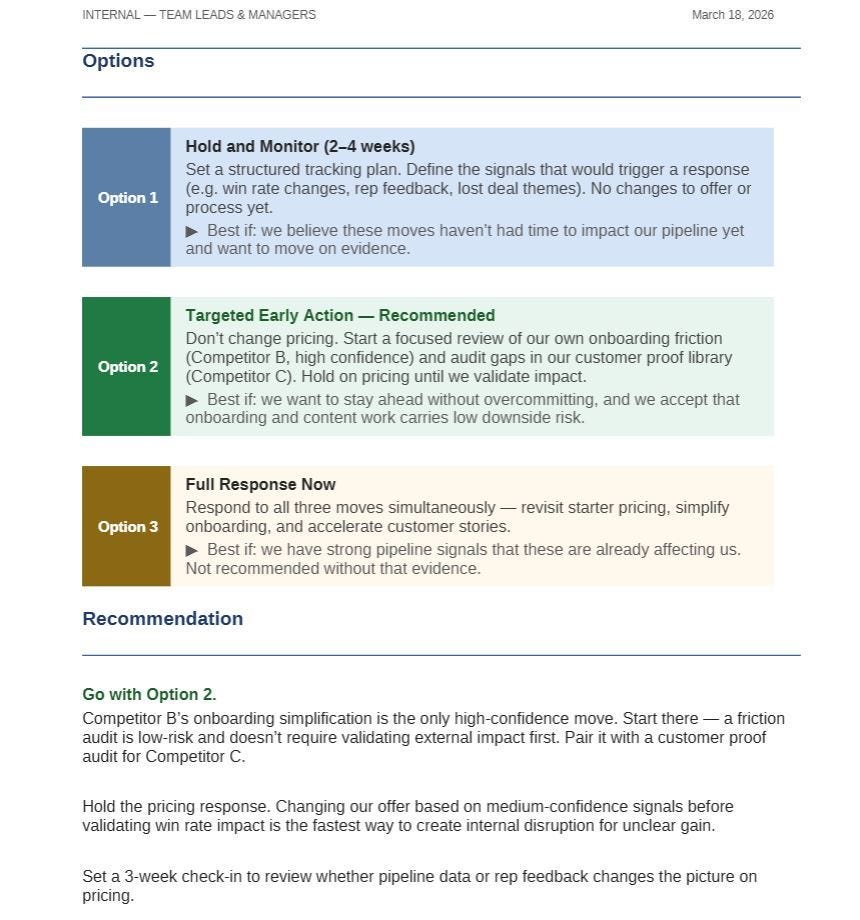
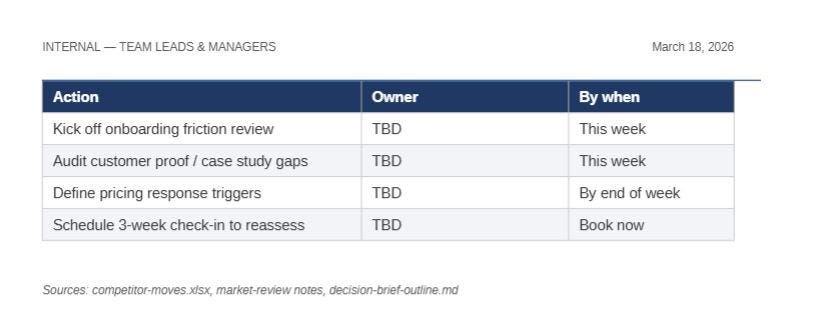
The brief grounds the decision, separates risks and options clearly, and ends with an actionable recommendation and concrete next steps.
Example 2: Build an executive report for a meeting
Now consider this case:
projects/
└── q3-review/
 ├── brief.md
 ├── notes.md
 └── template/
        ├── references/
        └── drafts/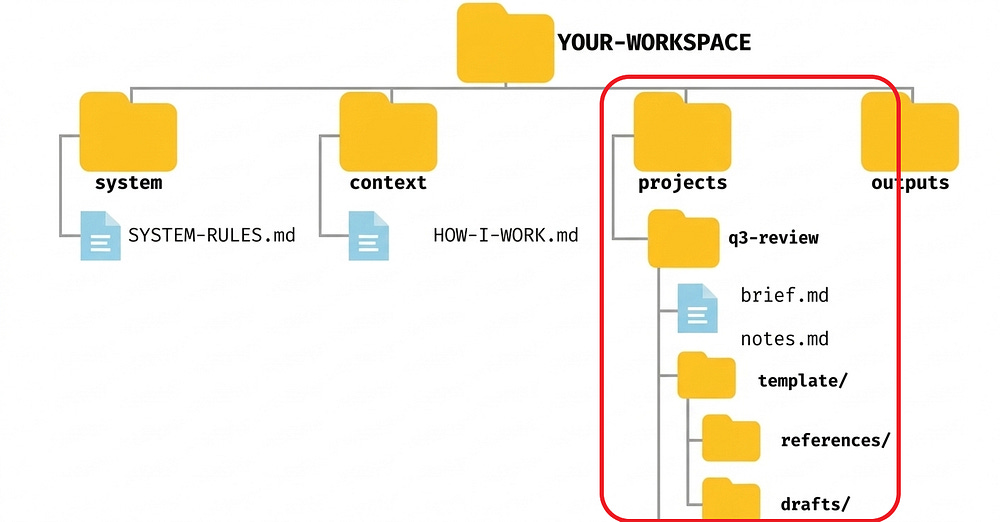
You're not working with scattered notes anymore. Now you have material for an executive report.
brief.md could look like this:
# Q3 Review Brief

## Goal
Prepare an executive report for the leadership meeting.

## Audience
Senior leadership team.

## What matters most
- What changed this quarter
- What risks need attention
- What decisions may be needed next

## Constraints
- Keep it concise
- No speculation without labeling it
- Focus on implications, not just activity
And notes.md could look like this:
# Q3 Review Notes

## Highlights
- Revenue held steady
- Customer retention improved slightly
- Two initiatives are behind schedule

## Open questions
- Whether resources need to be rebalanced
- Whether delays are operational or strategic
references/ → metrics, previous quarterly reports, financial documents, team summaries, older slides
drafts/ → first executive report, a shorter version, a risk-focused version, a structure ready to turn into a presentation
The prompt:
Go through the project folder first.
Use my quality standard and workspace context.
Ask me questions before you write.
Then create an executive report for review and save it in outputs/reports/
Here are the results:
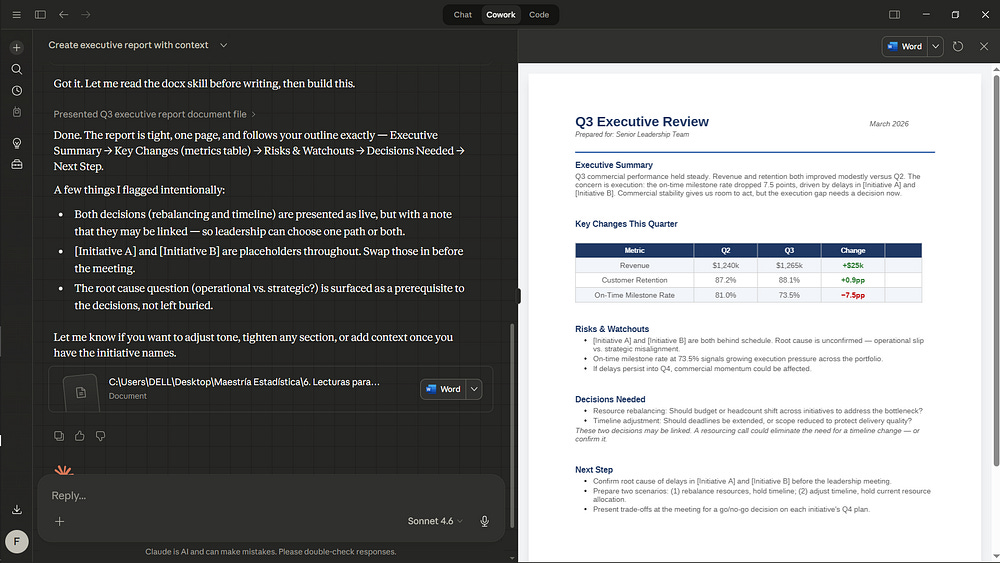
Cowork turned scattered context into a clear executive report with metrics, risks, and decisions ready for discussion.
Example 3: Draft a presentation without starting from zero
The folder could look like this:
projects/
└── strategy-update/
    ├── brief.md
    └── template/
        ├── references/
        └── drafts/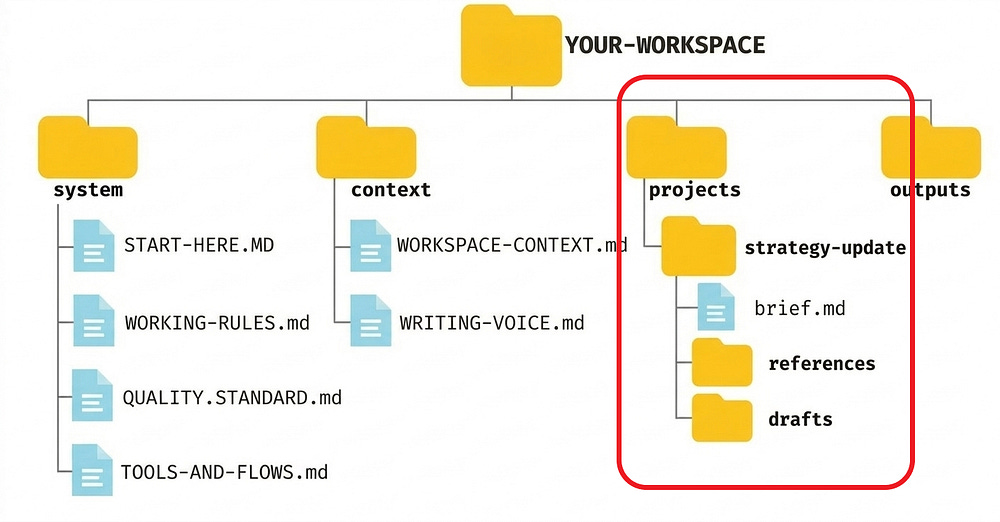
And brief.md could look like this:
# Strategy Update Brief

## Goal
Create a presentation outline for a strategy update meeting.

## Audience
Internal leadership and cross-functional leads.

## What the deck should do
- explain what changed
- show why it matters
- align people on next steps

## What I don't want
- slide titles with no message
- too much text
- generic consulting languagereferences/ → metrics, previous quarterly reports, financial documents, team summaries, older slides
drafts/ → first structure, a condensed version, a more risk-focused variant, an outline ready to turn into slides
The prompt:
Read the project folder first.
Then ask me questions before you execute.
I want a presentation outline with a strong flow, clear sections, and what each slide should do.
Save it in outputs/drafts/
Here are the results:
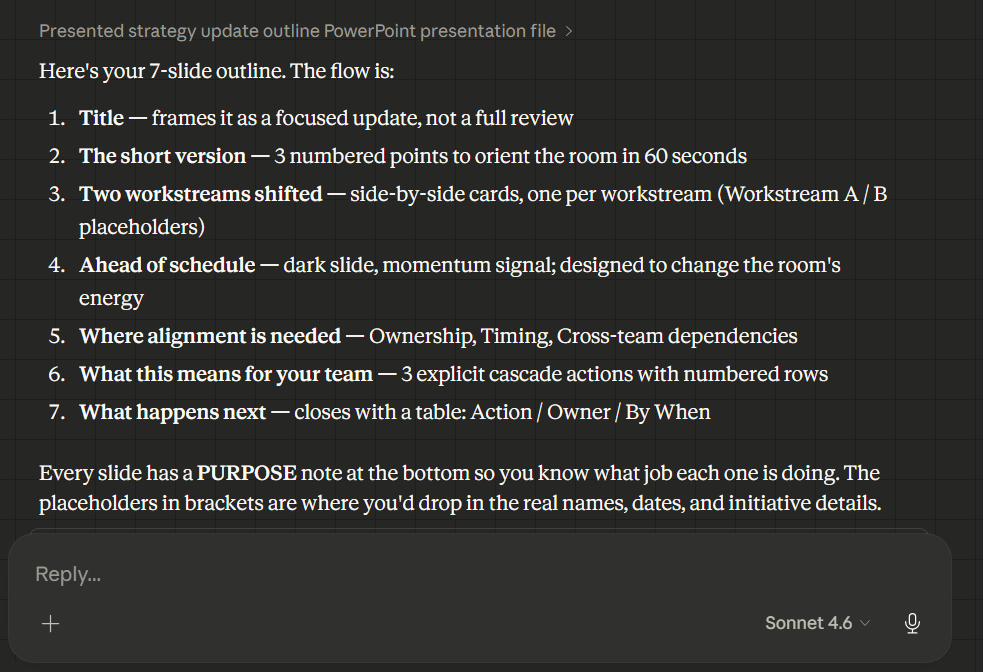
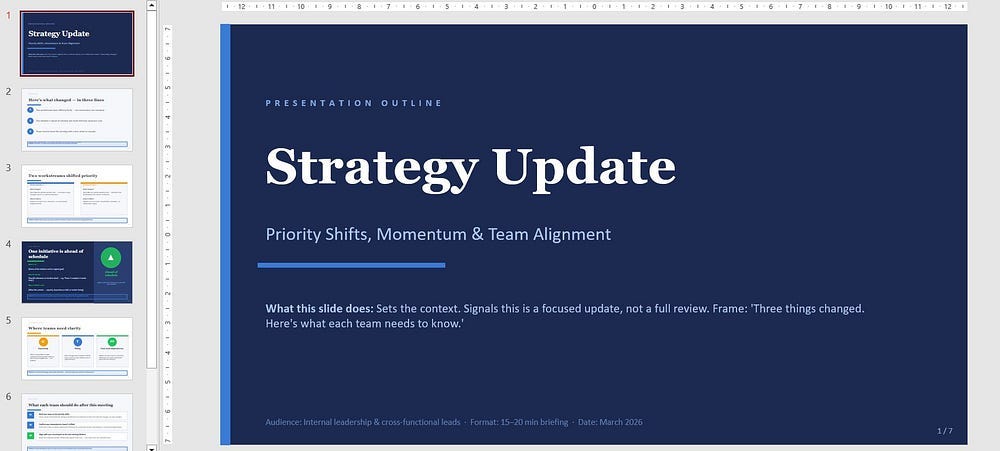
Cowork didn't just organize ideas. It turned a fuzzy strategic change into a presentation with a clear narrative.
How to prompt Cowork using this system
At this point, you already have everything you need to make Cowork work.
But there’s an important difference between a tidy workspace and one that actually saves you time: how you use it once it’s already up and running.
Here are my two favorite ways:
#1 Question-first flow
A question-first flow is just a way of using Cowork.
The logic:
Cowork reads the folder
then it asks you questions if context is missing
only after that does it build the deliverable
This is activated by how you give the instruction.
For example:
Read the project folder first.
Then ask me questions before you execute.
You already saw this in the examples:
In the first one, Cowork asked what the real decision was
In the second one, it asked about the initiatives and the decision that should come out of the meeting
In the third one, it asked about the workstreams, the next steps, and the format
That was question-first flow in action.
It makes sense to use it when:
the goal isn’t fully clear yet
the audience matters
the result has real impact
one bad assumption could ruin the deliverable
there are several possible outputs and you want Cowork to pick the right one
In other words, use it when you don’t want Cowork filling in the gaps on its own.
#2 Short prompts
A short prompt is simply a prompt that works well because the workspace already has context.
That point matters.
In an empty chat, a short prompt usually falls short. But in Cowork, if you already have:
system/
context/
projects/
outputs/
...the prompt no longer has to carry all the weight.
The context lives in the files. The prompt just activates the system.
For example:
Read the project folder first.
Then ask me questions before you execute.
Create the deliverable and save it in outputs/.
or
Use my HOW-I-WORK and SYSTEM-RULES files.
Then use the project folder to create a first draft in outputs/.
Short. It’s not magic. Your workspace is already doing the real work.
If you need to write a very long prompt just for Cowork to understand the basics, the problem usually isn’t the prompt. The problem is that your workspace isn’t carrying enough context yet.
How to grow the system without turning it into a mess
Once people understand this concept, they usually make one of two mistakes:
They stick with a structure that’s too thin
or they try to build a huge system from day one
You don’t want either one.
Here’s the core idea: start small and let the work tell you what’s missing.
Grow only when a pattern repeats.
Don’t create files because they might be useful someday. Create them when you notice something is already repeating and deserves its own file.
When it makes sense to expand system/
Cowork keeps making the same mistake over and over
you have rules that apply almost all the time
your quality standard is clearer now
you want to lock in a way of working that shouldn’t change from project to project
For example: if you notice Cowork keeps confusing a summary with a recommendation, that already deserves a more explicit rule inside SYSTEM-RULES.md or even a small new section.
When it makes sense to expand context/
your audience already deserves its own file
your writing style needs more precision
you want to separate references, tone, or source-of-truth rules
your way of working no longer fits inside a single file
The goal is context that’s clear and actually usable.
When it makes sense to expand projects/
a certain kind of work always uses the same files
a project needs more internal order
you want to better separate the brief, notes, references, and drafts
a recurring task already has its own logic
This is where most of the change happens anyway.
How to tell if the system is growing well
You’ll notice it because each new task needs:
less explanation
fewer corrections
fewer restarts
and delivers something more useful on the first pass
If that’s happening, the system is growing well. If not, you’re just accumulating structure.
Subscribe to get my FREE Claude course.
20+ lessons delivered straight to your inbox 👇
This is great. I do a range of things so I set context and plans within folders themselves, I can copy the folder rewrite once I set good systems.
Why not kickstart your own agent? Claude cowork is great, different MCPs here and there.
I believe all bottlenecks come with development of MCPs