

Click here to get my FREE Claude course (20+ lessons)
In 2025, I started moving some projects from ChatGPT to Claude and Gemini
And I’m not alone.
ChatGPT has lost traffic share from 86.7% to 64.5% in the past 12 months!
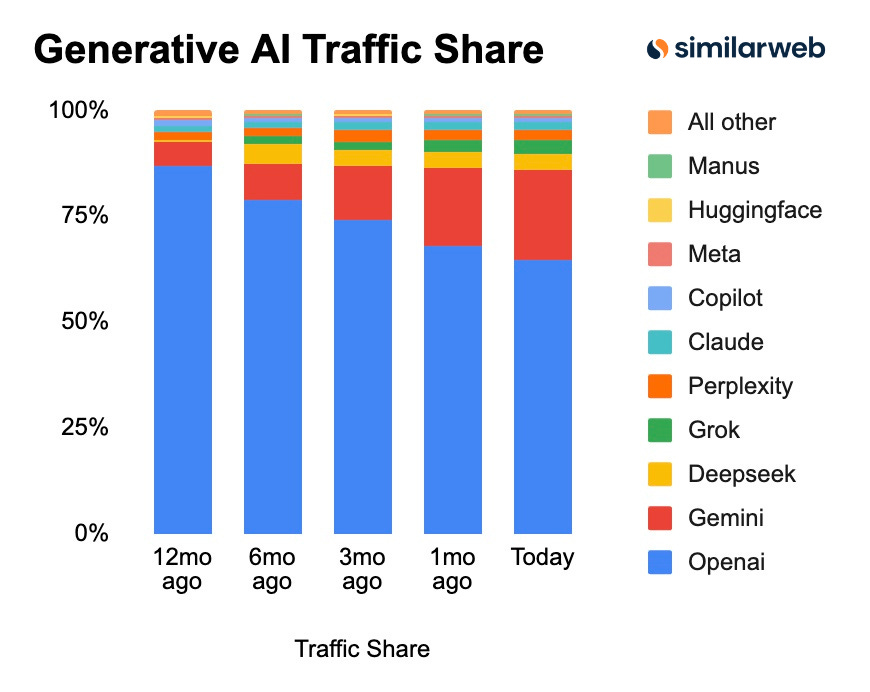
I don’t think people are ditching ChatGPT completely (I haven’t!).
Top AI users are just realizing that other tools like Gemini and Claude are better than ChatGPT in some areas.
In this guide, I’ll share the best AI models for different use cases. By the end, you’ll discover why people are switching to other AI tools. Here’s a quick summary:
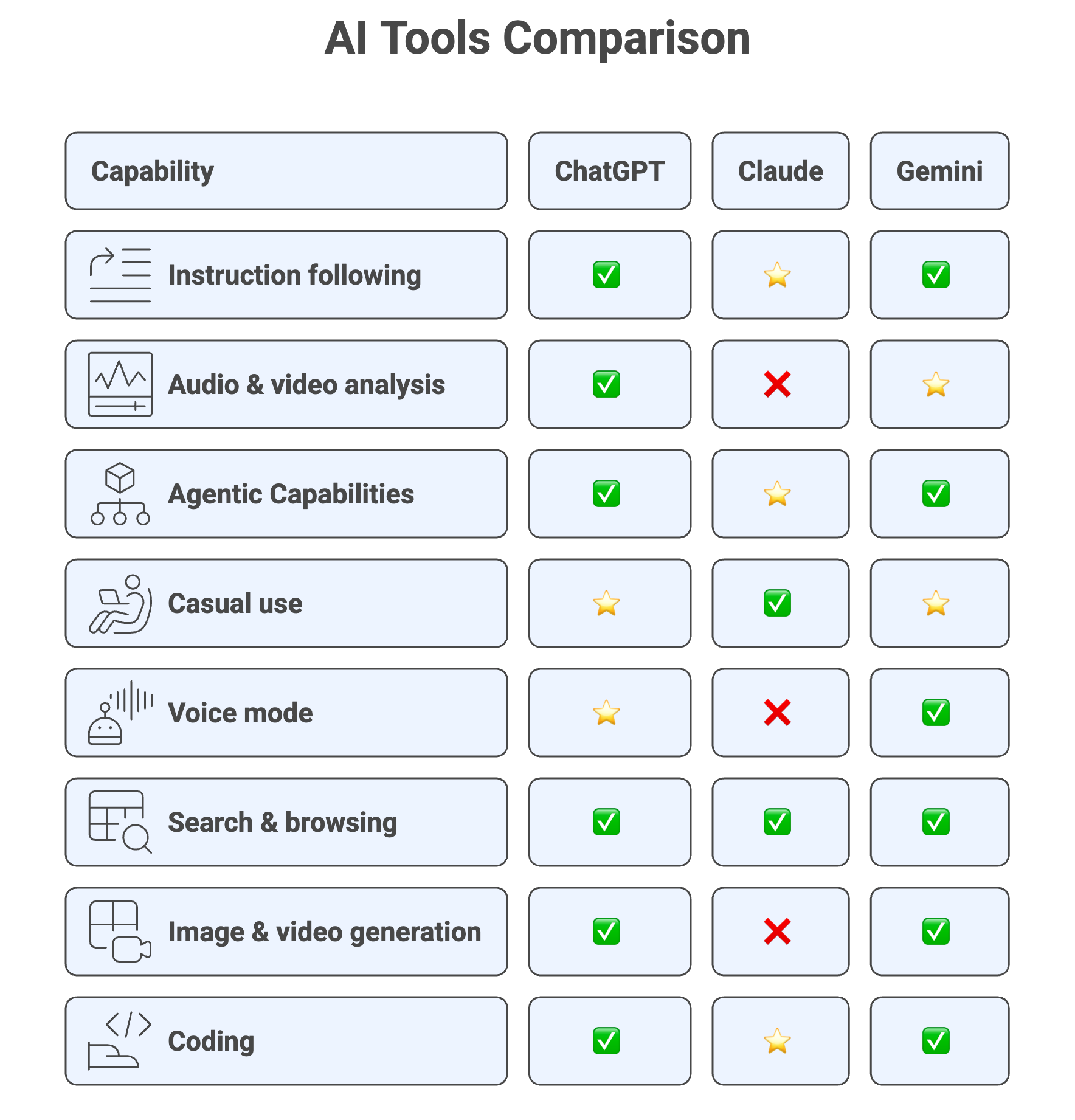
Legend: Best = ⭐, Good = ✅, No = ❌
Instruction following
I’ve tried my best prompts on ChatGPT, Claude, and Gemini.
Claude is the tool that best follows my instructions (even after the GPT-5.2 and Gemini 3 releases). It follows every detail, even in long prompts.
For example, I have a prompt that proofreads my guides and also shows the changes. The deletions should be in red (strikethrough) and insertions in blue. Here’s a comparison between Claude and ChatGPT.

Claude properly highlighted the deletions and text insertions, while ChatGPT got it wrong
I also asked for a “light edit while preserving my meaning and voice.“ Claude followed my instructions, while in some cases ChatGPT completely changed my sentences
This is just one prompt example. I have many other prompts where Claude is way better than ChatGPT and Gemini at instruction following.
Audio and video analysis
In my experience, Gemini 3 is the best at audio and video analysis.
I gave Gemini a video of me doing exercises in the gym, and it provided feedback based on what it could see in the video. I also gave Gemini an audio recording of me speaking English (I’m not a native English speaker), and it gave me feedback on my pronunciation and areas I need to improve.
ChatGPT performs well in video analysis (just slower than Gemini), but it doesn’t work for audio analysis. I uploaded audio recordings and asked for transcription and analysis, and got “I can’t listen to the audio or run a proper speech-recognition model.“
This might change with future updates, though
Agentic capabilities
For this point, I’ll evaluate the agents these tools offer for controlling your browser and computer folders.
ChatGPT, Claude, and Gemini all have an agent mode that lets them control your browser on your behalf. They’re good at browsing, booking, and buying things for you. That said, I don’t think they’re completely reliable. They’re sometimes slow, and they get stuck on a step of your task. Sometimes they’re also clumsy when clicking buttons
That said, when they work, they’re a beast! Here’s a demo of the Claude Chrome extension that controls your browser, shared by Emily Lambert via X.
In case you want to try them, turn on agent mode in ChatGPT or Gemini, or download the Claude extension.
On the other hand, Claude Cowork is the only option that is able to perform actions on your computer’s folder (desktop, downloads, etc). It can browse, handle files, and generate deliverables. Here’s an example:
For me, Claude is the winner here. It offers agentic capabilities on both the browser and the computer’s folders
Casual use
Right now, Claude is my favorite AI tool, but I don’t get to use it as often as I’d like to.
Why? Because I hit the daily limit very often.
That rarely happens when I use ChatGPT or Gemini. Here are the daily limits for ChatGPT Plus, Claude Pro, and Gemini Pro
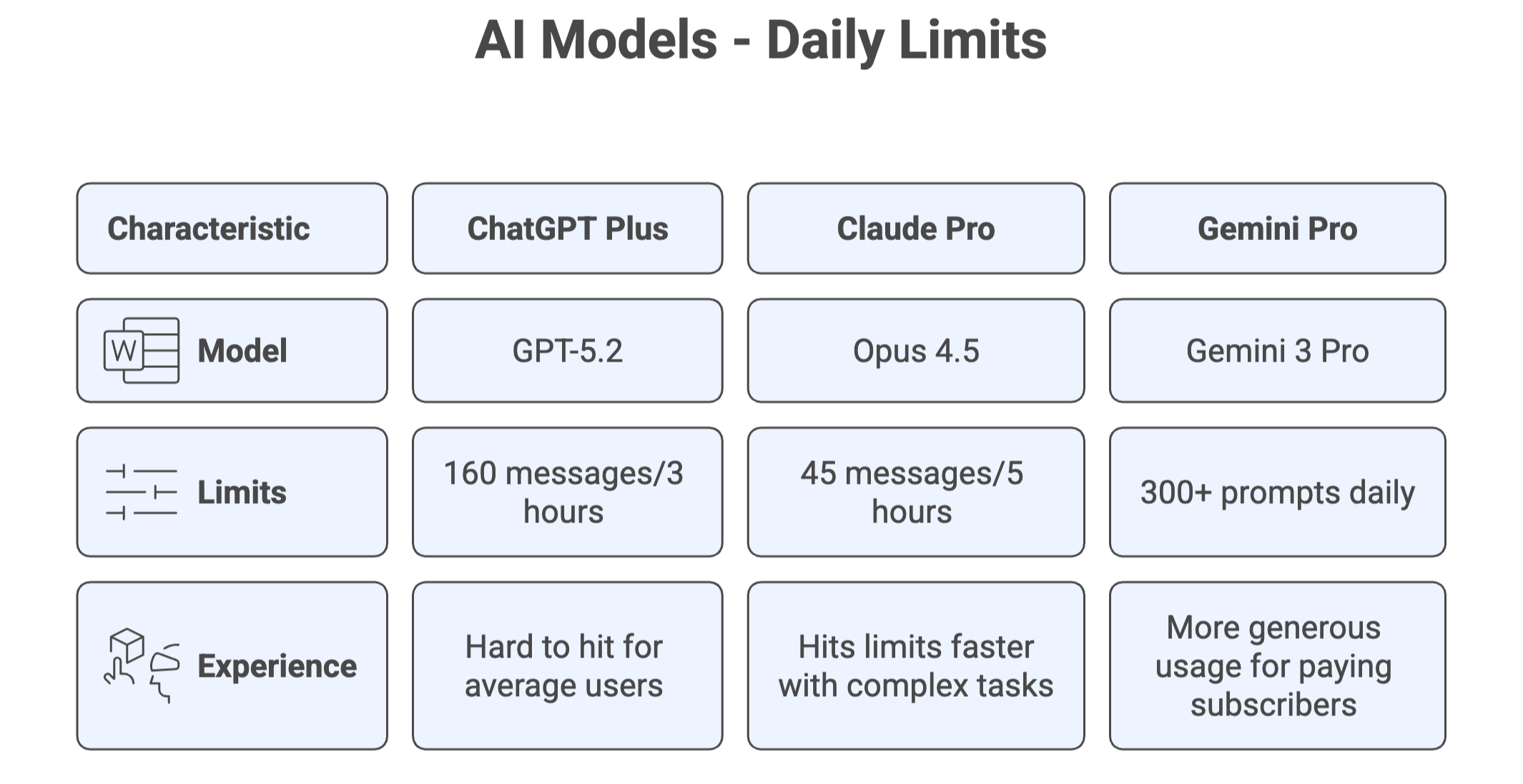
Although I prefer using Claude, ChatGPT, and Gemini are better alternatives for everyday use because they offer higher daily usage limits.
Voice mode
I use Voice Mode a lot in my everyday life. ChatGPT’s Voice Mode is by far the best.
Talking with Gemini feels robotic. It feels like you’re talking to an AI.
Talking with ChatGPT feels less robotic. It has a natural voice flow and personality.
One of the things I use Voice Mode for is to practice foreign languages. It feels like having a language exchange with another person! ChatGPT Voice Mode understands the prompt instructions I give it, like how I want language feedback or how to keep the conversation going (Gemini fails to do this)
Here’s a quick recording where ChatGPT fixes my Spanish. In the audio, ChatGPT corrects me when I say “el pasto carbonara“
Web search & browsing
ChatGPT, Gemini, and Claude offer a similar experience for web searching and browsing. I’ll use ChatGPT as an example because it’s the one I use the most for this.
ChatGPT’s web search feature is like having someone do a quick Google search for you and then hand you a summary. It’s great for getting quick information on recent events or anything beyond its knowledge cut-off. If you need deeper research, ChatGPT also offers a deep research feature that takes 5-30 minutes to create a report based on your request.
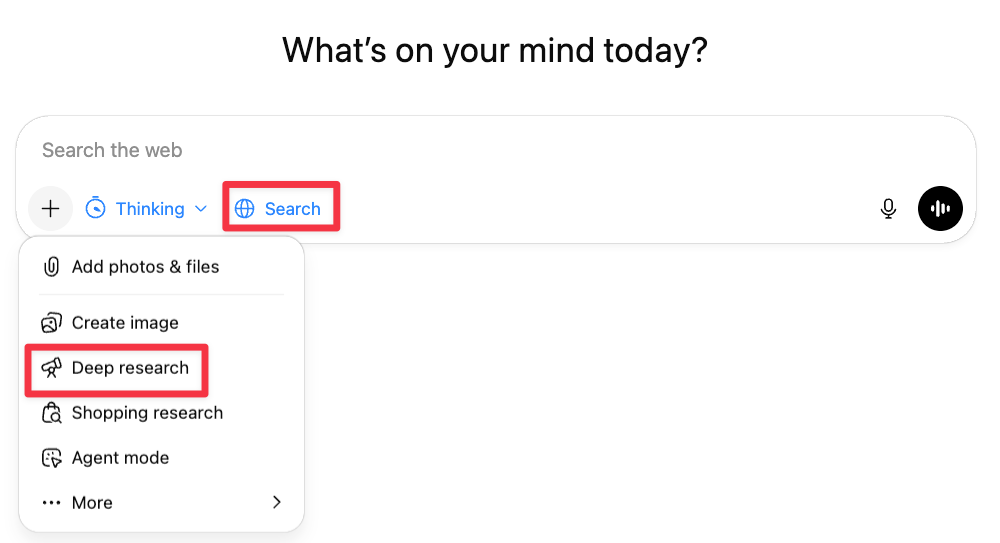
Also, I’ve been using ChatGPT Atlas to do even more.
Atlas offers a ChatGPT sidebar that lets you chat directly with the page you’re on. You can ask questions, get links, build a dataset, and more, even from sites that are behind paywalls (if you’re logged in to the site).
That’s something you can’t do with the standard search features in ChatGPT or Gemini. Atlas also offers an agent mode that can perform web actions on your behalf, such as clicks, scrolls, and more. Gemini users can get this feature by turning on “agent mode” (Google AI Ultra subscription is needed), while Claude users need to download a Chrome extension.
Image / Video generation
Overall, the best AI tool for image generation is Gemini’s Nano Banana. Here are some reasons why:
It has a good prompt understanding
It offers consistent characters
Good aesthetics, graphic design, etc
That said, ChatGPT’s image generation is not far from Nano Banana. In fact, I have some prompts that work best on ChatGPT.
Overall, I use NanoBanana for creating infographics, turning ideas into professional-quality visuals, and blending multiple images, while I leave the rest to ChatGPT.
When it comes to video generation, Sora 2 and Veo 3 are at the same level. I tried different prompts, and sometimes Sora generates better videos, but other times Veo 3 is much better. Here’s a comparison made by TechByMarkandey via X
👉 Nano Banana Pro: Complete Guide
👉 Sora 2: Prompting Guide for better videos
Bonus: Coding
To be completely transparent, I haven’t been using AI for coding in 2025 as much as in previous years.
That said, six months ago, Peter Yang found that Claude is the best at coding, while Gemini is the most cost-effective.
I doubt things have changed over the past few months, especially considering the recent popularity of Claude Code, which is a fantastic tool not only for programmers but for anyone who isn’t afraid to interact with the computer’s terminal.
Subscribe to get my FREE Claude course delivered straight to your inbox 👇
Helpful article - thanks. For what its worth I have the following observations - 1. GPT (Pro) still outperforms the others when used for deep non coding applications. 2. However, after 3 plus yrs of 100% GPT I now use GPT 50% and Google stack of Gemini Pro + NotebookLM + Antigravity IDE. I often use GPT as the product manager / specifier for AG IDE. 3. The most important development I use are 2 custom GPT's - one to rewrite my prompts into optimal form and then a second one that acts as a red team to critique the prompts and then cycle back through the first prompt optimizer. This is sometime a bit laboured but for impt work the quality of the prompts and thus their output is 100% better. To build the prompt optimizers I simply used deep research to get the latest and best ideas for my profile of use and then had GPT Pro build the custom GPT spec. For lesser work I often prompt "pls optimize these requirements and give me the best prompt" - and you get a 50% plus better result. "Meta prompting" is the key in my view.
For ChatGPT, it’s essential to add an instruct file for Do’s and Don’ts when things don’t come out the way that you need.
GPT is an excellent tool