

Since ChatGPT was released, I’ve taken many courses to master AI
I took courses from Udemy, Coursera, Google, and more.
I put together a 15-week learning plan using the best resources I found, so you can start 2026 off on the right foot.
By the end of this post, you’ll know:
The 15-week course to master AI in 2026 (for non-technical people)
When to pay for AI education (and when not to)
How to join our private community (where you can get advice from me)
1. The 15-week course to master AI in 2026
The learning plan is split into two parts
Part 1: Master ChatGPT (Week 1 - 6)
My ChatGPT video course covers the first 6 weeks of the learning plan
👉 Get the video course for free here
The first sections of the course contain what every ChatGPT user should know
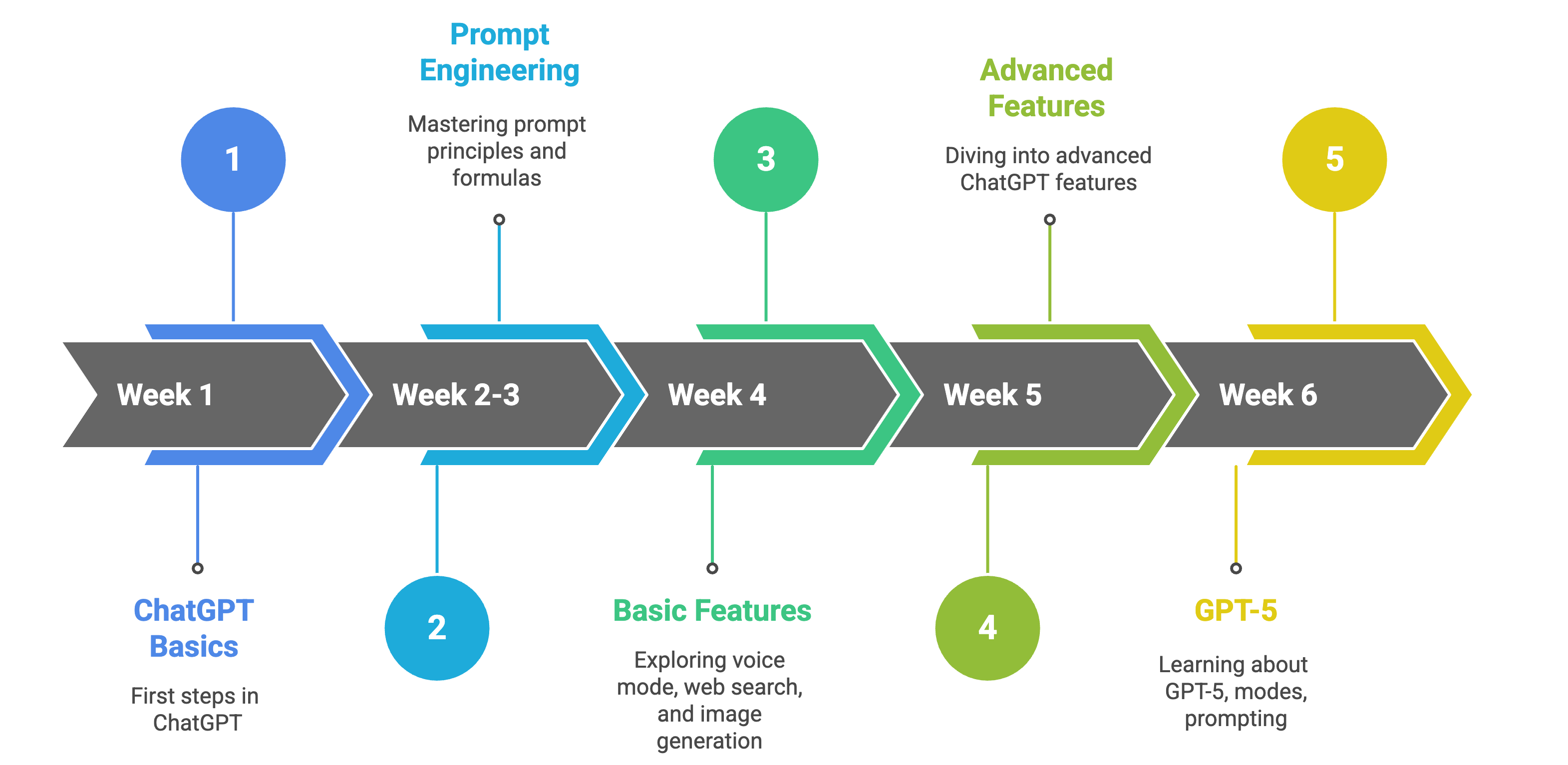
AI advances quickly, so I’ve added a list of guides and resources below to keep you updated (they’re a great complement to the video course). I’ll add more as ChatGPT rolls out new updates in 2026
Week 1: The very basics of ChatGPT
OpenAI has a free academy. Good for those completely new to ChatGPT
First ChatGPT Steps: Start your first conversation, ChatGPT models, use cases
Basic Prompts: ChatGPT prompts for any work role
How to Write a Prompt: Simple steps for writing a good prompt and extra tips
Setup ChatGPT: How to set up ChatGPT to stop getting generic responses
Week 2-3: How to write good prompts
The guides below are all about writing prompts that generate better responses
Prompt Principles: Top 10 prompt principles and when to use them
Prompt Formula: A recipe that you can follow when writing prompts
Prompt Engineering: Four techniques used in prompt engineering.
Week 4-5: ChatGPT Features
Basic features:
Voice Mode: Speak with ChatGPT instead of typing
Web Search: A nice replacement to Google search
Image generation & Projects: Create AI images and organize your chats
Study Mode: Use AI to help you learn instead of getting solutions right away
The best advanced features
Deep Research: Let ChatGPT autonomously search and gather information from dozens of sites and create a report for you
ChatGPT Agent: ChatGPT can take web actions on your behalf (go to sites, click buttons, scrolls, etc) and complete multi-step tasks from start to finish
Atlas: A nice replacement to Google Chrome
Week 6: GPT-5
GPT-5 modes: Learn when to use auto, instant, thinking and pro mode
GPT-5 Prompting: Basic and advanced prompting techniques for GPT-5
Optimize your prompts with GPT-5: How to optimize your prompts with ChatGPT
Part 2: Master AI (Week 8-15)
Once you know the foundations of ChatGPT, you have to: increase your AI literacy, know when to use other tools over ChatGPT, and learn how to use AI in your field.
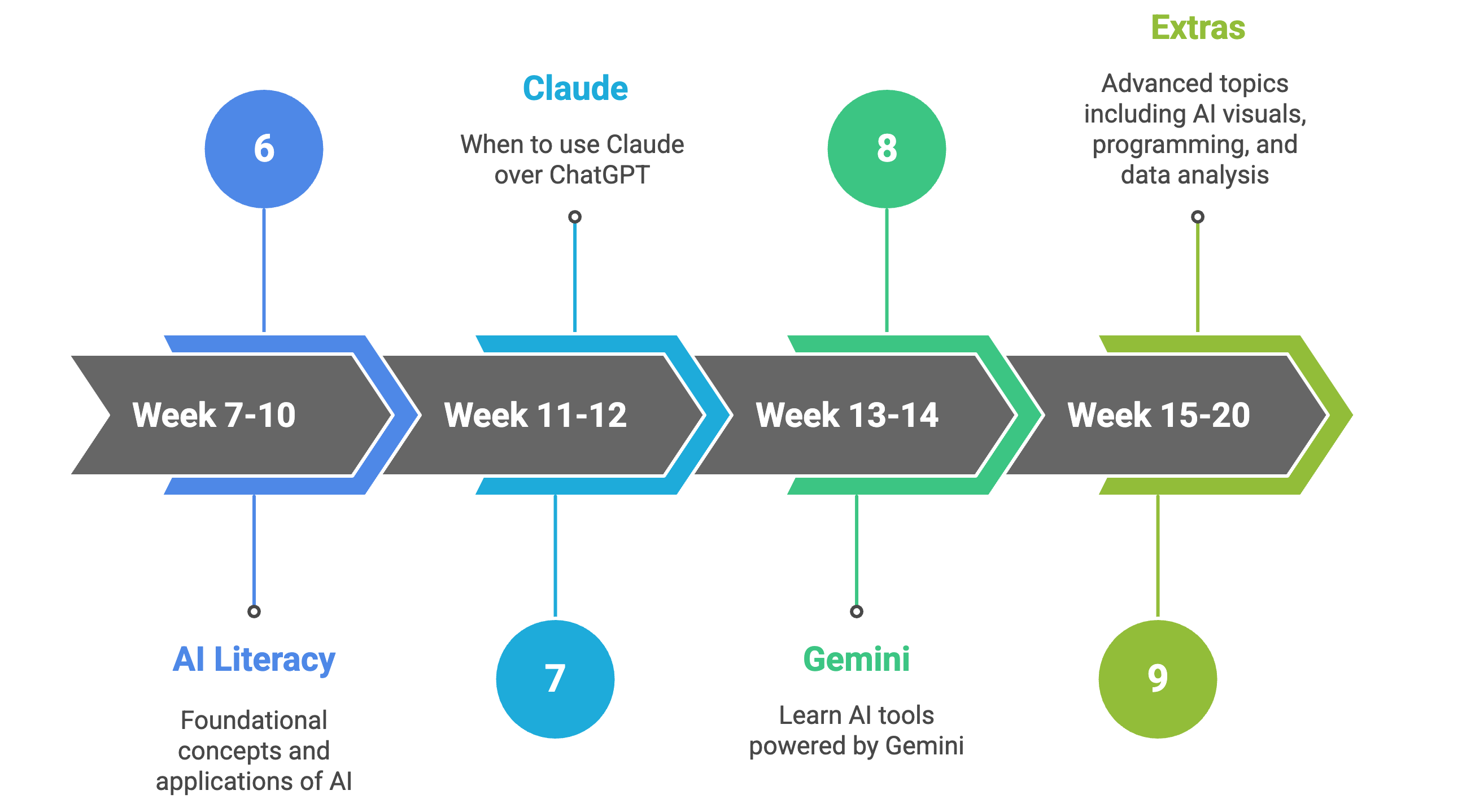
AI literacy (Week 7-14)
AI literacy means knowing enough about AI to use it smartly. This includes: what AI can and can’t do, how to ask good questions, what data/privacy risks exist, when you should not rely on AI, etc
To start developing your AI literacy, pick one of the resources below:
AI courses for professionals
IBM AI for Everyone: Master the Basics: Learn what AI is by understanding its applications and key concepts (includes a free certificate)
Google Generative AI Course: Intro level course. It covers what Generative AI is, how it is used, and how it differs from traditional machine learning methods (check my notes here)
AI & Career Empowerment: It has two parts: AI in Business (AI literacy, marketing, supply chain, etc) and Career Empowerment (job search in the age of AI, being your own startup, and more). It includes a free certificate
HP’s AI for Business Professionals: A beginner-friendly course for professionals who want to leverage AI for enhanced productivity, decision-making, and career growth (includes a free certificate)
Google’s Generative AI Leader: It covers fundamentals of generative AI, Google Cloud’s gen AI offerings, techniques to improve gen AI model output and business strategies for a successful gen AI solution (the course is free, but to get the certificate, you need to pay a fee)
Google Prompting Essentials Specialization: Learn from Google experts how to use AI effectively by writing clear and specific prompts (check my notes here)
AI guides for professionals
Best AI Books: Book selection to learn AI for professionals, leaders and executives
AI as a thinking partner: The one AI skill worth mastering (it never goes obsolete)
LLM Data Privacy Ranking: Incogni report on the privacy ranking of AI platforms
AI Fluency: How to collaborate with AI effectively, efficiently, ethically and safely
Perplexity at work: A guide to working smarter with AI
Resources only for technical people
IBM Artificial Intelligence Fundamentals: Natural Language Processing, Computer Vision, Machine Learning, and Deep Learning (includes a free certificate)
How AI Works: Anthropic’s “Tracing Thoughts in Language Models” study (here’s my summary)
How ChatGPT Works: An explanation of how ChatGPT works based on OpenAI’s paper
Remember: This is only a starting point. Building AI literacy should be an ongoing, never-ending process
Week 11-12: Learn Claude
Only one tool has earned a permanent spot alongside ChatGPT in my core workflow: Claude. I don’t use it as a replacement for ChatGPT, but as a complement
Claude Basics: Learn Claude artifacts, projects, skills, and more
When to use Claude over ChatGPT: Why I switched from ChatGPT to Claude
Use cases: Browse practical examples across research, writing, analysis, etc
Claude Code for Non-Coders: Why you need Claude Code and how to use it
Week 13-14: Learn Gemini
Gemini stands out for the AI tools it powers, which enable features that ChatGPT and Claude don’t offer (or don’t match yet)
Gemini 3: An overview of what you can do with the new Gemini 3
Gemini Prompting: A quick-start handbook for effective prompts
NotebookLM Guide: A research tool that is grounded in your own documents (it hallucinates less than other tools)
Extras: Week 15 and beyond
From this point, you should learn things that are related to your field. Here are resources for some:
AI Images, Videos, and Visuals
Nano Banana Pro Guide: Learn how to use Google’s AI image generator
Sora 2 Guide / Veo 3 Guide: Learn how to create AI videos with OpenAI’s Sora 2 or Google’s Veo 3
How to Create Professional Visuals with AI: Learn how to create infographics, diagrams, and other visuals for your presentations
The Tech Behind AI
Machine Learning Algorithms Any AI Enthusiast Should Know - Part 1
Machine Learning Algorithms Any AI Enthusiast Should Know - Part 2
Programming & Data Analysis
How to Learn Python with AI: How I’d learn Python faster using AI
Vibe Coding for Beginners: A guide to vibe coding for beginners
How to Use AI with Excel: From generating functions to complete reports
In my ChatGPT video course, you’ll find a section for programmers and analysts.
2. When to pay for AI education (and when not to)
When I was at university (and had no money), I used to search for free resources all over the internet. Here’s what I learned:
95% of what you want to learn is available for free. The real problem is that it takes a lot of time to find resources that are actually good
The remaining 5% is too new or specialized to ever make it into free resources
Artificial Corner has hundreds of paid subscribers. They have access to:
In-depth video courses (worth $200)
Our private community, where you can get advice from other professionals and me
My complete guides, with step-by-step videos, copy-and-paste prompts, AI workflows and more
If you don’t have the means, learn from what’s free out there (it’ll just take more time)
If you want to get a job or get proof of what you learned, pay for a course certificate
If you’re a busy professional or want to master AI faster, become a paid subscriber👇