


Over the past few years, ChatGPT updates have left many guides outdated.
Models and prompting techniques have evolved
OpenAI added and removed some ChatGPT features
GPT-5 was introduced, changing how ChatGPT works
In this guide, I’ll show a clear path to go from beginner to pro in ChatGPT, updated for 2025. Each stage of this path will contain a basic track with the basic stuff that every ChatGPT user should know, as well as an advanced track focused on power features, techniques, and tools to make the most out of ChatGPT.
Stage 1: Learn how to write prompts
Prompting is how we communicate with AI. Writing good prompts is essential for anyone working with AI tools. ChatGPT has many features and modes, but they won’t matter if you don’t know how to write good prompts.
The basic prompt: Task + Context
There’s a ChatGPT prompt formula to get better responses. However, if I were learning prompting again, I wouldn’t start with the formula. Why? The complete formula is valuable for advanced work, but for most everyday tasks, it’s overkill.
Using all elements from the formula will slow you down and waste time. Most of the time, you’ll only need two elements: task + context
Task: What you want ChatGPT to do
Context: The extra details the model needs to deliver a more tailored response
Here’s a prompt example:
I’m a 75kg man who wants to gain 5kg of muscle in 1 year. Build a 1-year training program to follow. I don’t have previous experience and I can train 4–5 days per week (60–75 min per session)
In the example, the task is to build a 1-year training program, while the context is the person’s information and background to create a personalized program.
The basic prompt should be enough for most everyday tasks. That said, when we do more complex tasks, we’ll need to use more elements from the formula.
Advanced track: The complete prompt formula + Prompt principles
The prompt formula I use has four extra elements:
Examplar: A short sample response that shows the structure to emulate
Persona: Who ChatGPT should “be” while answering (aka role)
Format: The required structure and presentation (tables, length, etc)
Tone: The voice and vibe the response should adopt (friendly, formal, etc)
When you feel that task and context aren’t enough to get a good response, add one of these extra elements to your prompt.
For example, if I were a personal trainer, the basic prompt would be a good start to build a program for a few clients. However, as my client base grew, I’d need a more robust, reusable prompt I could apply across clients.
In the guide below, I transform our basic prompt into a more robust one by using every element of the formula.
📚 Prompt formula Example: Examples, when to use it, and when not
📚 Prompt formula (explained)
In addition to the formula, follow the 10 prompt principles below to get better responses
Stage 2: Essential and advanced features
Since ChatGPT was released, OpenAI has added a lot of features to improve the way we work with it. Some are essential, while others are more domain-specific. Most features can be accessed via the + button.
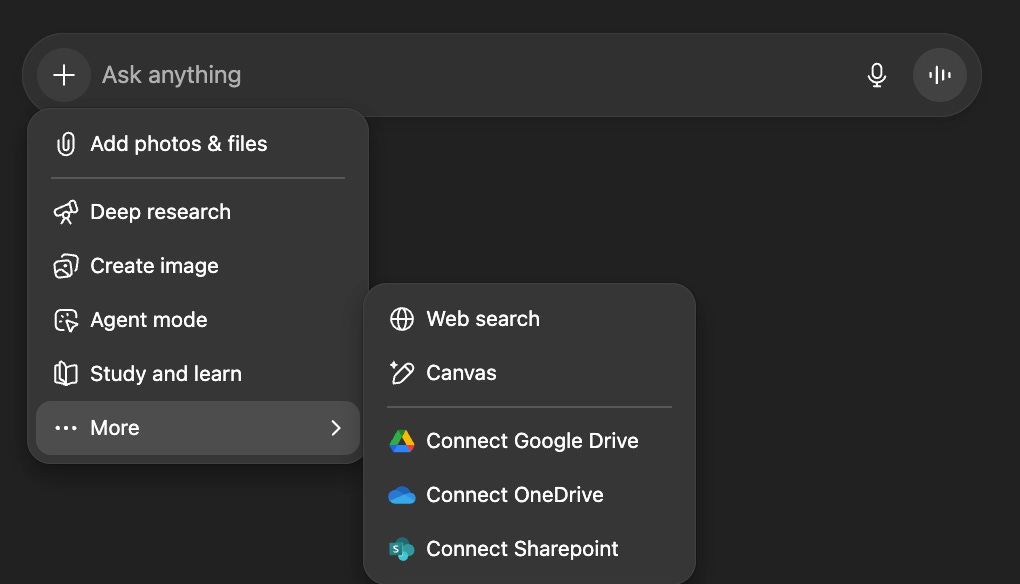
Here are the features that every ChatGPT user should know:
Web Search : ChatGPT’s training data goes up to June 2024. Web search can help you get answers to questions that involve events after that date
File Uploads: You can upload files such as PDFs, Excel spreadsheets, Word documents, and presentations to ChatGPT
Projects: You can create folders to better organize your chats
Temporary chats: Great for one-off questions, helping you avoid clutter in your chat list
Voice mode: You can speak to ChatGPT instead of typing. Very useful when you’re on the phone
The rest of the features are more advanced and for specific use-cases. I’ll leave links to each guide I wrote:
Create Image: A beginner-friendly tool that creates images or edits existing ones from plain-English prompts (this tweak helps me get the most out of it)
Deep research: Spends several minutes searching the internet to build complete reports on topics that need evidence, comparisons, and step-by-step reasoning
ChatGPT agent: It can take actions on the web (visit sites, click buttons, scroll) and work toward a goal with minimal human input
Study mode: A learning-focused mode that explains answers at your level, breaks topics into steps, and tracks what you’ve mastered or need to review.
GPTs: Custom versions of ChatGPT you can configure with specific instructions, knowledge files, and tools to specialize in a topic or workflow
Personalization: Setting up custom instructions and memory lets ChatGPT know more about you and provides tailored responses
These features can also be used in the mobile app. In the guide below, I explain how I set up my iPhone to boost my ChatGPT productivity
📲 iPhone setup for ChaGPT: Features to boost productivity in ChatGPT
Stage 3: Learn how GPT-5 works
ChatGPT used to have a wide variety of models to choose from (o3, 4o, o4-mini, etc). They were consolidated into GPT-5, which has a system that decides whether to use its Chat or Thinking mode for your task. The issue with GPT-5 is that the system doesn’t always do a good job and might assign low reasoning to a task that needs deeper reasoning.
It’s best to avoid the default mode (aka auto) and choose manually the mode we need:
Instant: Gives fast answers without spending extra time on reasoning steps
Thinking: ChatGPT will think more carefully before answering. Responses take longer, but they’re more structured, detailed, and well thought out.
Pro: Research-grade intelligence for high-stakes tasks
Pro mode is only available to Pro subscribers. For 95% of people, instant and thinking (available to Plus subscribers) should be enough. For more details, check out my guides below.
📚 Complete guide on ChatGPT-5 modes: Who should use it, use-cases, weaknes
💡 ChatGPT Plus and Pro subscriptions: Worth it?
Advanced track
There are more advanced concepts you can learn to get better responses with GPT-5. Let’s start with those that can be applied in the ChatGPT web app:
Instruction following: Avoid contradictory instructions in your prompts. The model may get confused or waste time trying to reconcile the conflicts
Verbosity: It refers to the length and detail of ChatGPT’s responses. This is an API parameter introduced with GPT-5 and can be adapted to the ChatGPT app by explicitly setting a word limit in your prompt. Low verbosity is good for critical info and key takeaways, while high verbosity suits comprehensive, in-depth answers.
GPT-5 prompt optimizer: This is an advanced tool developed by OpenAI that gives feedback on your prompts. It can identify issues like contradictory instructions and more advanced stuff
The following parameters are specific to the API and Playground. While they are most valuable to developers, the underlying concepts remain relevant for ChatGPT users.
Reasoning effort: Not to be confused with the thinking modes in the ChatGPT app. This parameter controls how many reasoning tokens the model spends before replying
Agentic eagerness: This parameter controls whether the model is more proactive or not. More eagerness encourages model autonomy.
This was just a brief description. I cover in detail these five concepts in the guide below: