


There’s a reason some people get incredible results with Claude, while others don’t.
The difference lies in the core concepts.
For example, once you know what a “context window” is, you understand why Claude might sometimes forget what you told it twenty messages ago.
Tools like ChatGPT and Claude made AI accessible to anyone with an internet connection, which is great. However, there’s a big gap between using AI and understanding how AI works.
There are dozens of technical AI concepts floating around, but not all are worth your time. Here’s my curated list of concepts that genuinely matter for non-technical Claude and Claude Cowork users.
Click here to get my FREE Claude course (20+ lessons)
Prompt Engineering: Is it still relevant in 2026?
Prompt engineering is the skill of giving better instructions to AI so you get better results. The clearer you are about what you need, who it’s for, what format you want, and what tone you expect, the more useful the response will be.
Some months ago, Anthropic shared the anatomy of the perfect Claude prompt:
Things have changed a lot since they shared this, though (AI moves fast!)
Tools like Claude Cowork need less prompting (see here and here). That said, I still consider prompt engineering useful when working with Claude chat.
Tokenization: The reason why your Claude usage limits don’t last long
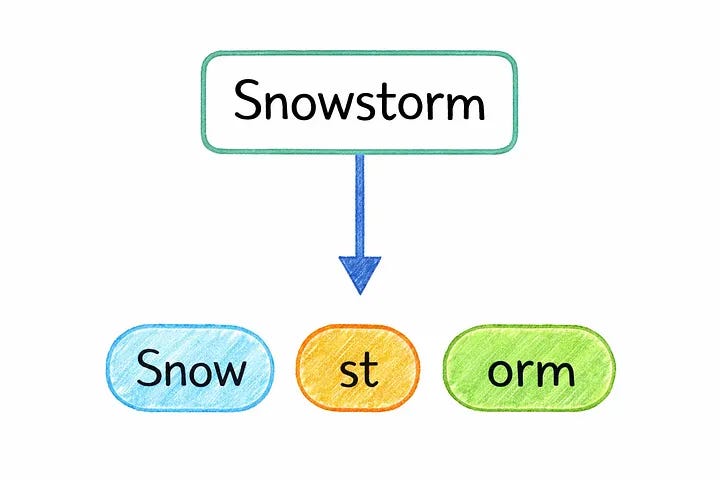
Before Claude can process what you write, it has to translate your text into something the model can understand.
That’s called tokenization.
Tokens are small units that can be a whole word, part of a word, a number, or even a punctuation mark. Token counts aren't universal. The same word can be split into 2, 3, or 4 pieces depending on the model.
Why not just use full words? Language is messy. New words, typos, slang, mixed languages... if the model had to store every possible word, the vocabulary would be impossible to manage. Tokens solve that: with a fixed set of building blocks, the model can understand words it’s never seen before by breaking them into familiar pieces.
Every message you send, every reply Claude gives, and the whole conversation history behind it all get counted in tokens. When Claude tells you you’ve hit the usage limit, it means you’ve used up your share of tokens.
📚 How I Stopped Hitting Claude’s Usage Limits
AI Models: Use the right model for your task
There’s more than one Claude model.
When you see names like “Claude Sonnet 4.6” or “Claude Haiku 4.5,” you’re looking at different versions of the same product. Opus is the most powerful. Sonnet balances speed and quality. Haiku is the fastest and most affordable.
Think of it like software subscription tiers: they all do essentially the same thing, but with different levels of power and cost. The same prompt might get you a good answer with Haiku and an excellent one with Opus. But using Opus for simple tasks is like using an excavator to plant a seed.
Here’s a comparison between Claude models:
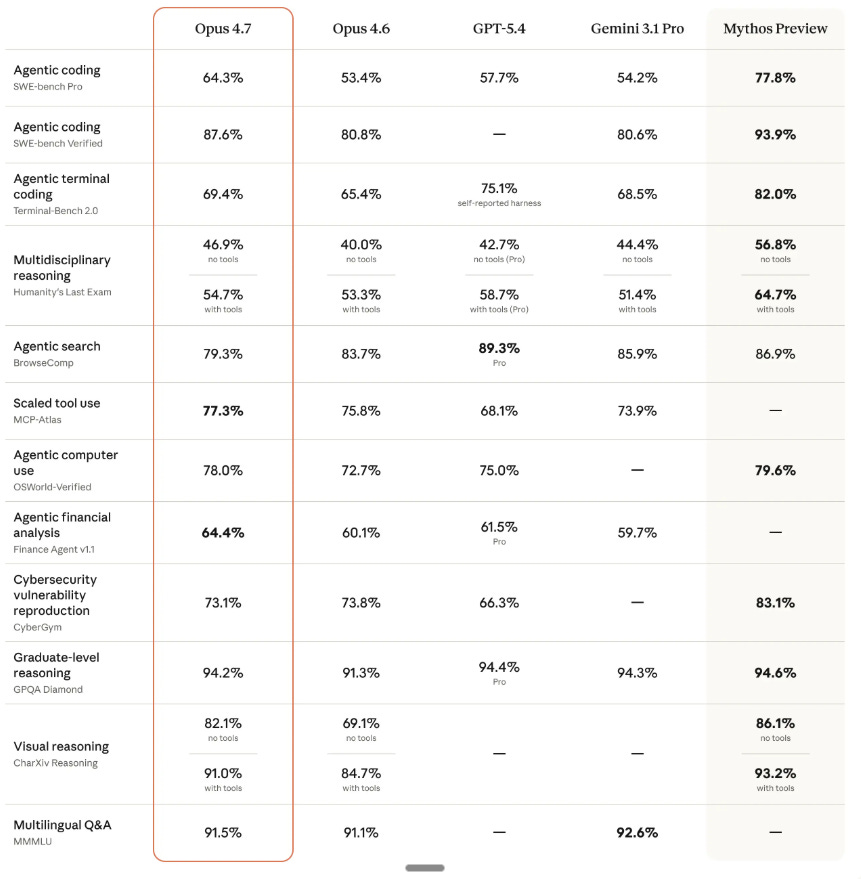
In case you're wondering what Mythos is, it's Anthropic's most powerful model — and the one they've chosen not to release publicly (it's only available to a handful of partners for security research).
Opus 4.7 is Anthropic’s most powerful model that you can actually get your hands on today.
📚 Claude Opus 4.7: What changed & how to get more out of it
.md file (markdown file)
An .md file is simply a text file.
Markdown gives you headings, code blocks, bold/italic text, and organized lists. This structure helps AI (and us) quickly find sections without having to read the entire file top to bottom.
Here’s what a simplified .md file looks like:
# Blog Post Instructions

## Structure
- Start with a personal story (1-2 sentences max)
- 3 tips only. No fluff. Each tip should have a real example.
- End with one clear takeaway the reader can apply today

## Writing Style
- Short paragraphs (2-3 sentences max)
- Use “you” more than “I”
- No corporate jargon. Write like you’re texting a smart friend.
- Never use: “In today’s world”, “Let’s dive in”, “Game-changer”

## Formatting
- No bullet points inside the body (use them only for lists of tools)
- Bold only the first sentence of each tip
- Total length: 800-1000 words
How are .md files relevant to Claude?
You can put context in an .md file, so you don’t have to repeat yourself again (for this, I use the interview method)
Your long prompts can be turned into an .md file using Claude skills. They can later be triggered when needed by Claude
Think of .md files as recipes: write the instructions once, and the AI follows them every time it runs the task.
Click here to get my FREE Claude course (20+ lessons)