

Click here to get my FREE Claude course (20+ lessons)
You asked AI to do serious work once.
Something you’d ask one of your best employees.
Sadly, the result was mediocre. Most people would think the tool failed them.
Here’s what actually happened: you compared a day-one intern to your best employee.
The fix isn’t a smarter model or a magic prompt. It’s a system that points AI at the parts that slow down your business.
I built an AI system for my business (mostly with Claude). Thanks to it, my small team handles work that would normally take twice as many people.
Below are the rules I follow to use AI in business:
You don’t need to become “an AI business”
Point AI at one real task (not your whole job)
Set aside a few hours for a meeting with AI (make it do the middle 80%)
Train AI like a new employee
How to write the instructions for your AI employee
After weeks, I finally cracked how to make Claude control my iPhone (and do tasks for me 24/7)
The full step-by-step guide drops next week — exclusive for paid subscribers. If you’re getting value from Claude, consider becoming a paid subscriber today (you’ll get full access to my best guides)👇
1. You don’t need to become “an AI business”
Nobody calls themselves an internet business anymore.
You just use the internet to sell, deliver, and talk to people, like everyone else.
AI is heading the exact same way. Your work doesn’t have to become an AI thing. You just need to use AI inside it.
The people quietly winning with AI right now aren’t running futuristic robot companies. They’re running boring, normal businesses (a local service, a small consultancy, a paid community) and using AI inside them to do more with a smaller team.
My team is a good example of this. Thanks to Claude, we can handle work that would've taken at least twice as many people.
But you shouldn’t only “use AI.” Many people now use AI.
This is becoming more like knowing how to use Word or Excel: useful, yes, but no longer impressive. The edge comes from how you use it and what you can actually produce with it.
This leads us to the next point.
2. Point AI at one real task (not your whole job)
I've been obsessed with AI since the ChatGPT release. So trust me — get one task done successfully with AI, and you'll want to hand everything off to it asap.
Don’t make that mistake!
Here’s a lesson I learned from Dan Martell.
First, ask yourself: Where is your work actually stuck?
Every workflow has a chain. For a business it looks something like:
Reach → Leads → Sales → Delivery → Retention
For your job, the chain might be:
Requests → Triage → Work → Delivery → Follow-up
Now ask yourself: if I 10x this task tomorrow, would my revenue actually go up?
The stage where the answer is a clear “yes” is your bottleneck. That’s where AI goes first. Not where AI looks coolest, where you’re stuck.
Here’s an example: I run a newsletter about AI (this one). There are dozens of tasks I could automate, but, believe it or not, generating articles with AI wasn’t at the top of my list. My bottleneck was reach, so I built automations to republish my free articles on other platforms and also adapt them into short posts for social media. Thanks to that, new readers found my newsletter and subscribed. Things have been great since then :)
Again, resist the urge to automate your entire job in one weekend. Start with one task.
If you don’t know where to start, write down what you actually do in a day and try this:
Here’s a list of my daily activities: [paste your list].
Which one of these can I use AI for, and which tool should I use? Walk me through it step by step.
For most tasks, Claude Cowork will be the solution.
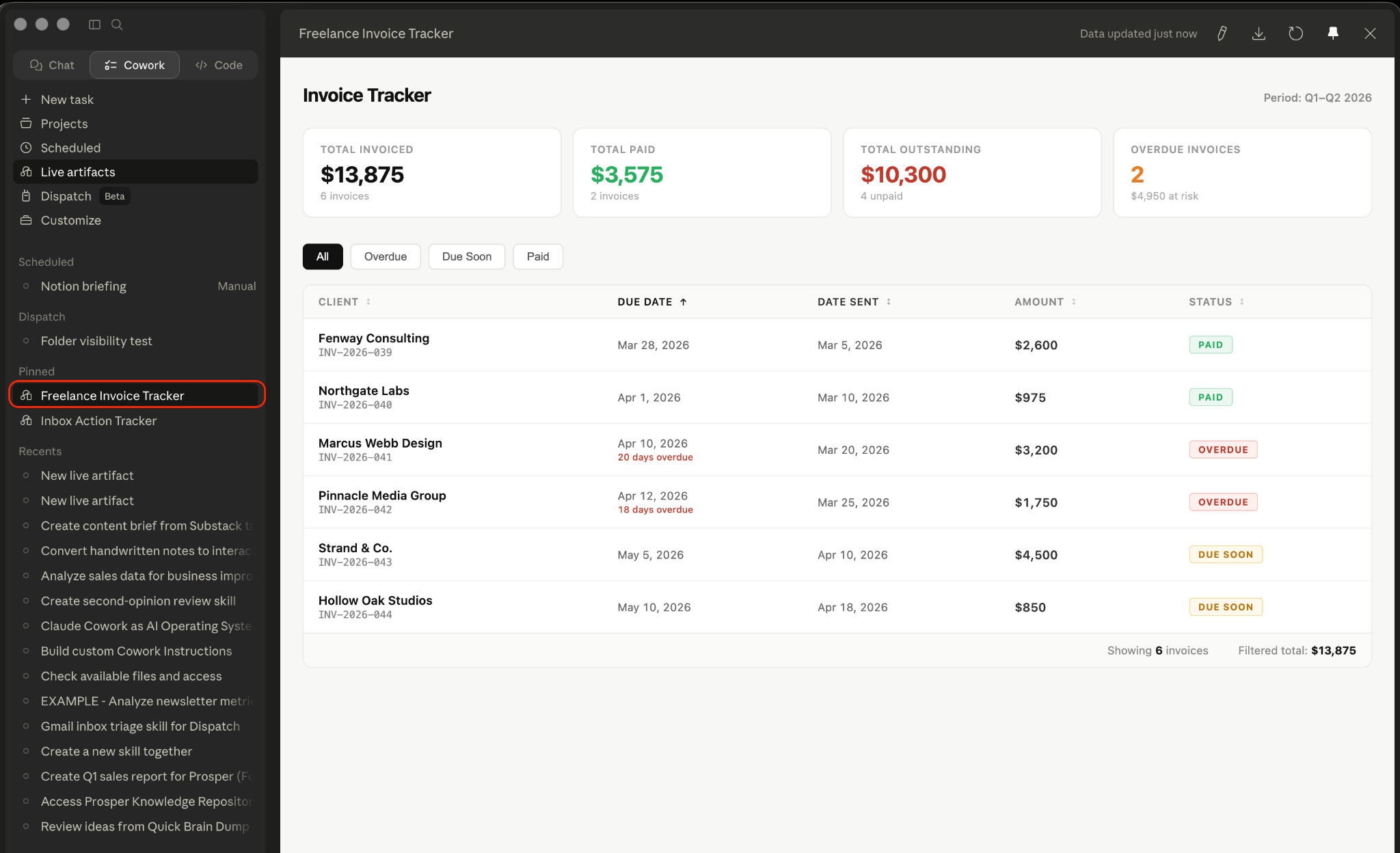
We’ve built ready-made automations with Cowork: an invoice tracker that scans your inbox and flags who hasn’t paid, a prompt that turns any meeting transcript into action items (with owners and deadlines), a downloads-folder organizer.
Copy, paste, done.
Here’s what the invoice tracker gives you after one run:
Click here to get my FREE Claude course (20+ lessons)
3. Set aside a few hours for a meeting with AI (make it do the middle 80%)
Whether you have a small or big team, remember this: You should be the first to automate your workflows with AI, not the last.
Why? Because you know the business more than anyone else. You might not be technical, but you can spot the bottleneck, define what success looks like, and what’s actually worth your team’s time
Once you’ve automated one of your own tasks, you understand how this stuff actually works, and explaining it to others becomes easy.
Also, you’re not being the boss who says “use AI” without ever having done it.
You’re leading by example.
I’ve done this myself. Every day, I set aside a few hours to spot what tasks can be automated with Claude. Once I know what to automate, I do this:
I ask Claude Cowork whether it can handle that task (and how)
I go back and forth with Claude until we’re on the same page
Once I’m happy with Claude’s plan, I tell it to execute it
I hit edge cases during execution. That’s fine. I don’t give up until the task is done
Once AI succeeds, I turn the chat into a skill or a scheduled task
You don’t have to do this every day (as I do). Set a few hours per week.
Protect it like a meeting with your most important client, because that’s what it is.
One warning before you automate everything that moves: some work should stay yours. Two things you shouldn’t use AI for:
making critical decisions
building relationships
That said, you can still automate everything around those two!
Usually, when we say “automation,” we picture autopilot mode (the tasks Claude runs while we’re sleeping), but, at least for me, automation can also mean collaboration mode (keeping a human in the loop).
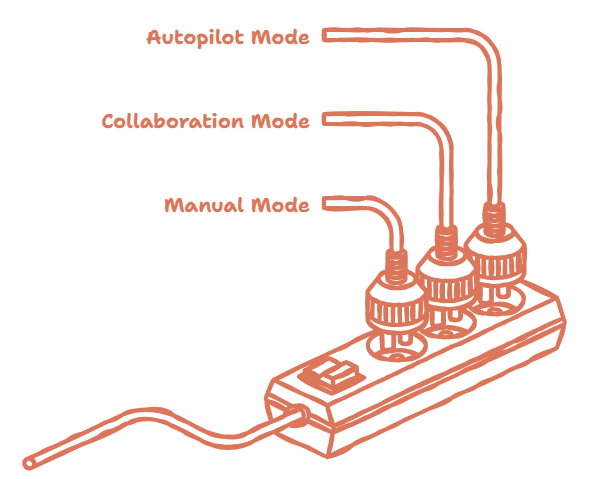
Collaboration mode follows the 10-80-10 rule.
The first 10% is yours: the ideas, the direction, and the definition of done. Talk to AI about what you’re trying to accomplish, give it your expertise, and agree on what a finished result looks like. This 10% is your building stage. It might seem small, but it's the foundation everything else rests on.
The middle 80% is AI’s: the execution. The drafting, building, formatting, organizing. The part that takes hours but doesn’t need your taste.
The final 10% is yours again: the review, the personal touch, the judgment call before it ships.
In practice, here’s how this works for my team: whenever a workflow needs human judgment, I assign one person to it. Sometimes I split an automation into two phases, so their phase-1 decisions improve the phase-2 output. Other times, they only weigh in at the very end, right before it reaches the client.
You stay the author. AI does the typing.
4. Train AI like a new employee
Rome wasn’t built in a day.
If you want to make the most out of AI, you should treat it like a new hire.
You don’t expect a new employee to perform as well as your top people on day one. You ramp them up. You give them context, feedback, and time to learn how you work.
AI is no different.
If you want AI to perform at its best, do what you did with your team on day one.
Give AI:
The way you work (guides, SOPs, etc)
The templates you use
and any document you’ll give to a new hire
The good news? AI learns faster. It can swallow a ton of information at once.
Over time, your SOPs will become Claude skills, and Claude will fill in your templates. With this, AI will be able to handle many of your tasks in one shot.
But don’t expect that to happen on day 1.
To get there, you’ll need time to learn from your own automation and connect the dots.
Here’s the setup I use to train Claude like a new employee.
I create a Claude project for every major task I have. Inside a project, I give access to a folder that contains my onboarding files (md files, templates, etc)
Here’s what this looks:
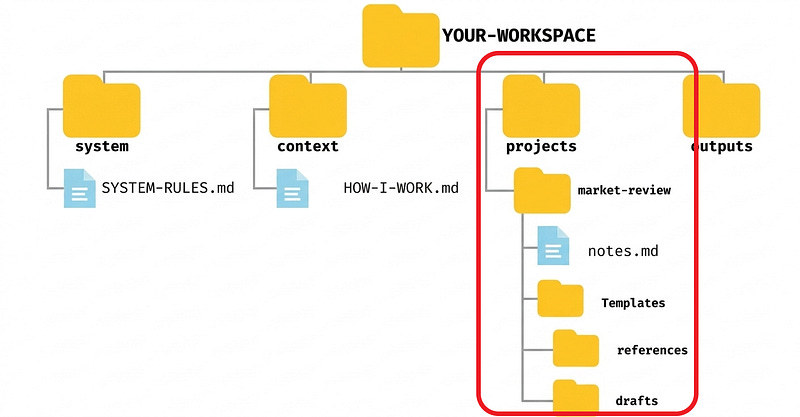
However, my workspace only looks like that at the end (after weeks of building).
Here’s my typical journey:
Day 1: Things are messy. I gather the files, but my workspace isn’t tidy
Week 1: The automation is done, but it’s still not the most optimal solution (doesn’t follow the best practices, not token-efficient, etc)
Month 1: I optimize the automation, starting from those that are critical
On day one, my AI employee can barely do a thing. By the end of week one, it’s getting real work done (sometimes in one shot), but it’s not yet at its peak. It’s only after weeks of trial and error and connecting the dots that I get its best version.
Why do I work like this?
When I build systems, I don’t care if it follows the best practices. My main goal is to build something that works reliably.
I know this isn’t the right way to do things. However, I prefer to occasionally fix a few things on the fly, rather than get stuck trying to make everything perfect from the start.
Is all this training worth it?
Of course! Just look at customer support.
AI answers questions straight from the help docs. When it gets one wrong, a human steps in, answers the customer, and then fixes the docs. Next time that question comes in, AI nails it.
Every fix makes the system permanently smarter.
Bonus: How to write the instructions for your AI employee
A new hire can’t read your mind. Neither can AI.
You need to break your tasks down into steps and translate your decisions and even your intuition into clear instructions.
Write them down, including your if-this-then-that branches (”if the client replies in under an hour, I prioritize them”).
You could ask Claude: “Which of these steps can an AI do without me?”
The answer will most likely involve steps that don’t need human judgment.
Pro tip: Instead of writing down the steps, record yourself explaining the task (what you're doing and why), then hand the transcript to AI. I do this with the iPhone's Voice Memos app, which generates a transcript automatically. I haven't tried video yet, since Claude can't watch videos. Google Gemini can, though, so I might give that a shot soon (or find a way to connect them)
One more thing
Right now, the distance between people who can hand real work to AI and people who poke at it like a toy is enormous. Everything in this guide is something you can start this week: pick one bottleneck, automate one task, write one context file.
One task. Start small. That’s the whole ask.
If you want the full path (from your first real prompt to systems that run themselves), consider becoming a paid subscriber. You’ll get every deep-dive guide I publish, and your future self, the one who stopped doing the boring 80%, says thanks.
Join my newsletter with 60K+ people to master AI in 2026
@frank the "bottleneck vs where ai looks coolest" line hit different, ngl. what made reach the obvious pick for you over delivery or retention?
To i have to upgrade to say thanks😉