


Click here to get my FREE Claude course (20+ lessons)
Claude does most of my work. It writes with me and automates the tasks I used to do by hand, some of them while I sleep.
But ask it for an image, and it can’t make one. Same for a video, or watching a clip you recorded. And it has nothing like NotebookLM, the notebooks that answer only from your own sources.
Gemini does all of that. And you probably have it already, free with your Google account.
So I stopped choosing between them. I connected them.
This guide comes in two parts. In the first, Diana walks you through what Gemini adds to Claude, one tool at a time.
In the second, I show you how I connected them. Claude now uses Gemini for me: Nano Banana for my images, Gemini notebooks for research, and more. I stay in Claude, and it calls Gemini when it needs to.
In this guide, you’ll learn:
What Claude can’t do (and Gemini can)
Gemini is actually 7 tools, and 5 of them do what Claude can’t
How I connected Claude to Gemini, so Claude can do what it couldn’t before
The one-time setup that connects them, and the use cases that make it worth it
What Claude can’t do
Claude is the best tool I know for writing, building and getting work done.
But there are a few things it can’t do:
It can’t make an image.
It can’t make a video.
It can’t make music.
It can’t watch a video (you can’t even upload one).
Gemini does all four. Here’s what you need:
Free: enough to get started.
Paid: more usage and video. Plans go from Plus ($4.99/month) to Pro ($19.99/month) and Ultra (from $100/month).
Start free, and move up when you hit a limit.
Gemini is actually 7 tools
Open gemini.google.com or the mobile app, and click the + in the chat box.
Almost everything in this section starts from that menu: your files at the top, then the tools that create images, videos, music and Canvas pages, and the rest under More tools.
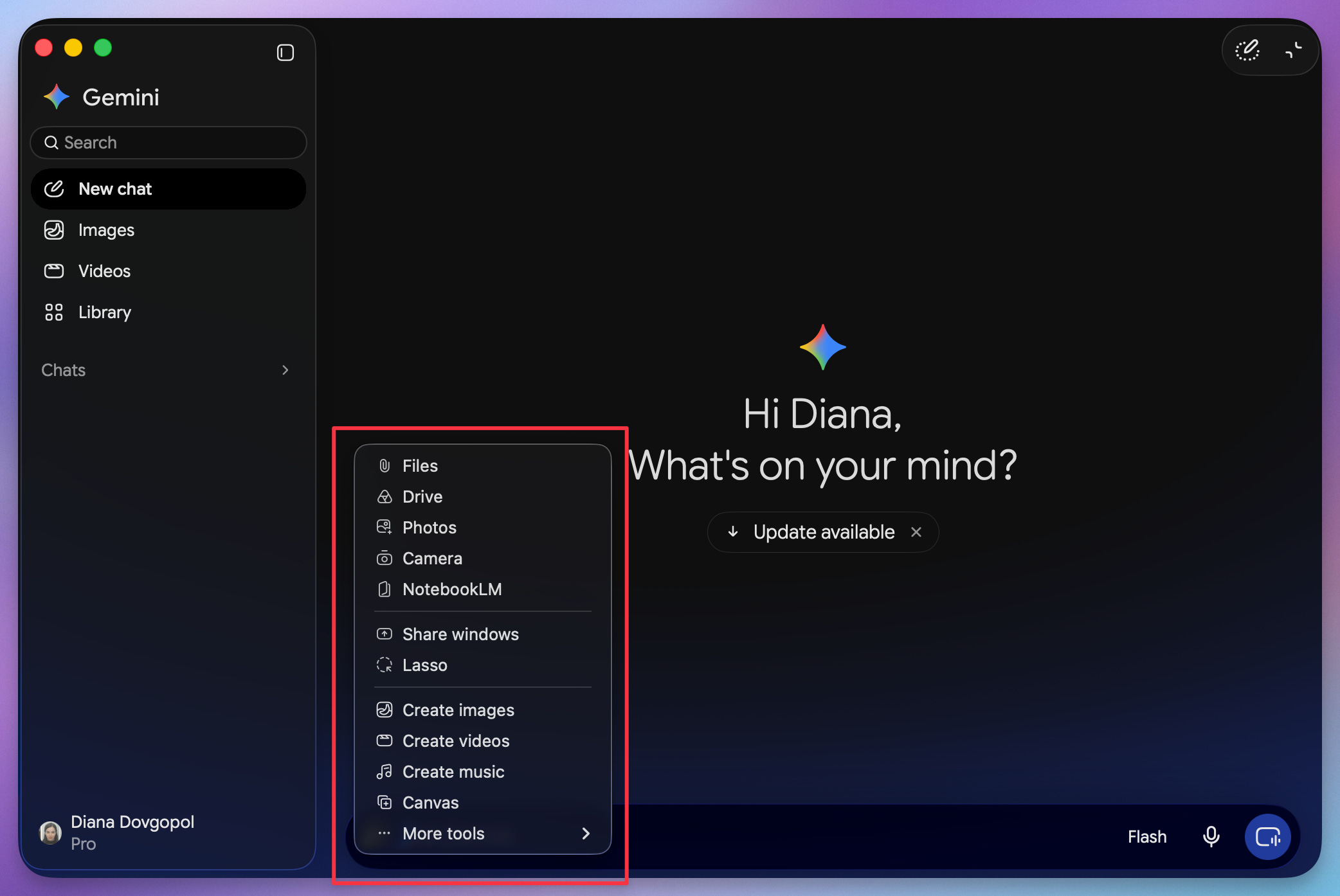
Five of them do what Claude can’t. Here they are:
1. Images with Nano Banana
Nano Banana is Google’s image model, and it’s built into the chat.
It’s good at:
Creating an image from a description
Editing an image you upload, in plain language: “Remove the text.” “Change the light to late afternoon.”
Keeping the same character or product consistent across images
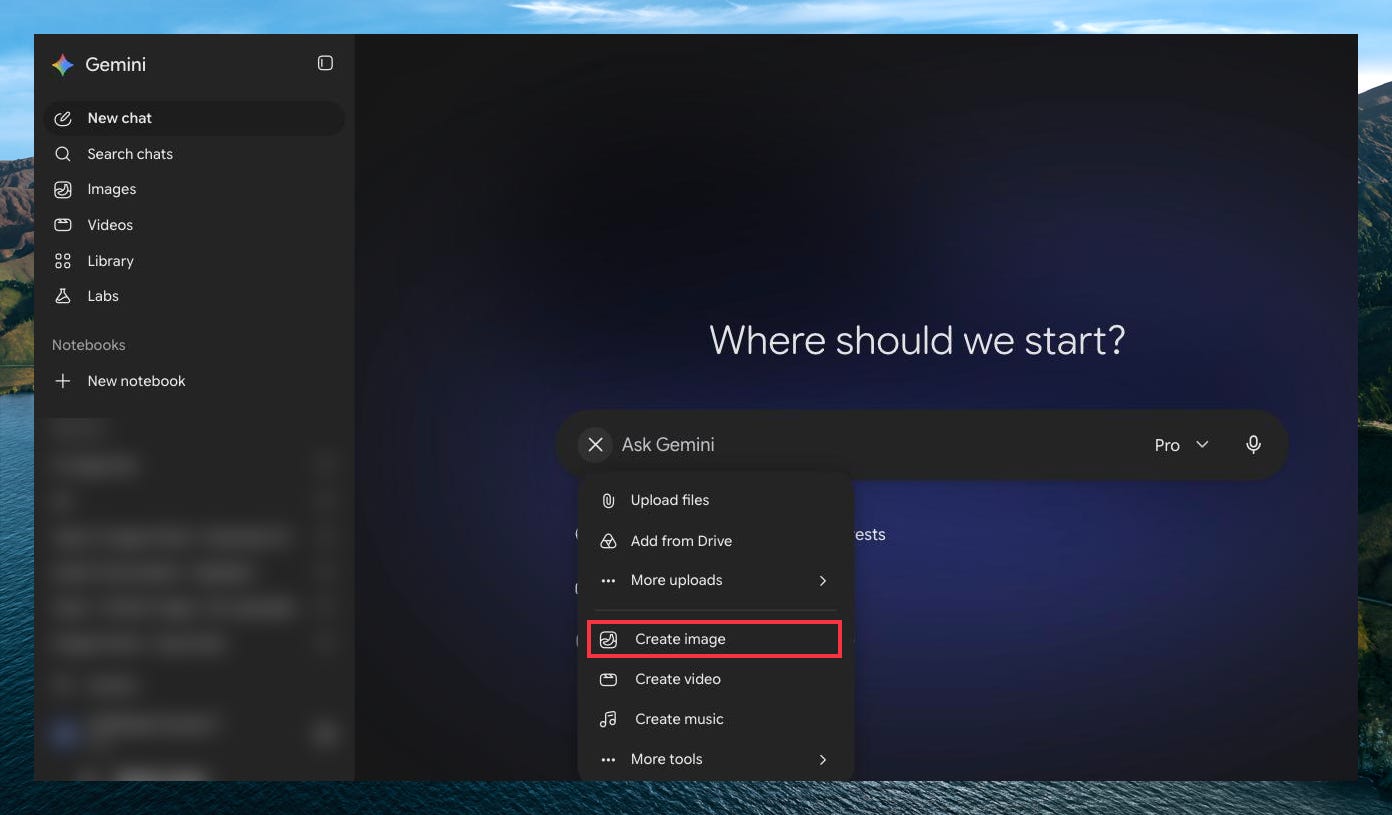
It’s useful beyond pretty pictures. Upload a photo of a real product and ask for it on a marble bathroom shelf in soft morning light, and you get a usable product shot. Or upload a screenshot of a landing page and ask for ten things that hurt conversions. It reads the layout as well as the words.
→ Here’s a complete guide about Nano Banana: Nano Banana vs. ChatGPT Images
For a quick image now and then, the app is all you need.
If you make images every week, it gets frustrating fast:
You get one image at a time.
You wait for every single one.
Every change is another round: ask, wait, check, ask again.
Keeping the same look across images is hard.
That’s why I don’t make mine in the app anymore. Claude makes them for me, four at a time, in the style of my past images. More about that later in this guide.
2. Video with Gemini Omni
Gemini Omni is the video model in the Gemini app now. It replaced Veo, so if you’ve read about Veo in Gemini, this is what you get instead.
Describe a scene, or give it up to 5 of your own photos, and it makes a 10-second video with sound. Then keep editing it by talking to it: “make it night,” “move the camera behind her.” When you like it, ask what happens next, and it extends the scene.
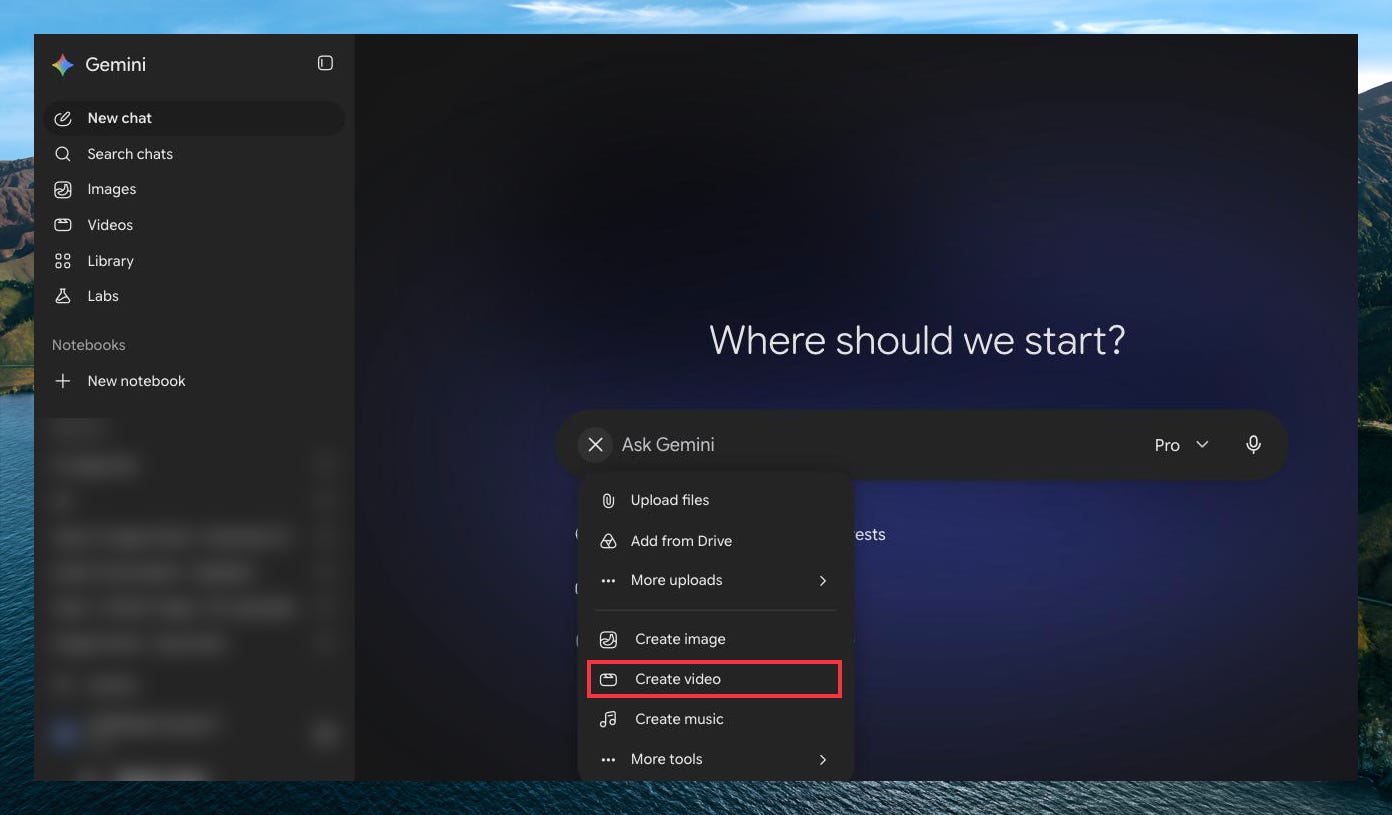
It’s on the Plus, Pro and Ultra plans.
3. Music with Lyria
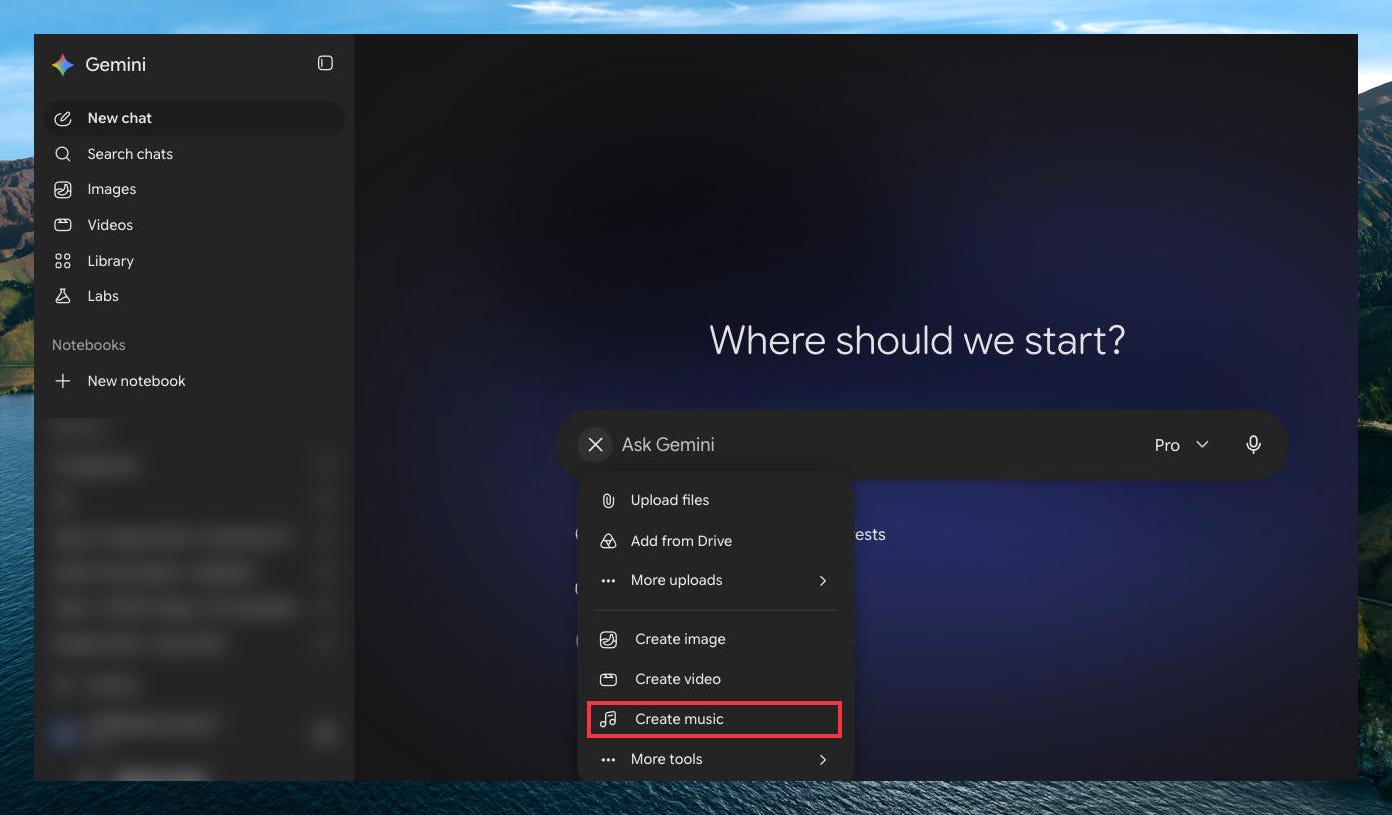
Describe a song, or start from a photo, and Lyria writes the lyrics and makes the track: up to 3 minutes, with vocals or instrumental only. Pick a genre, or mix a few.
Just click one “Create music” and then describe the track you want.
Here’s a prompt:
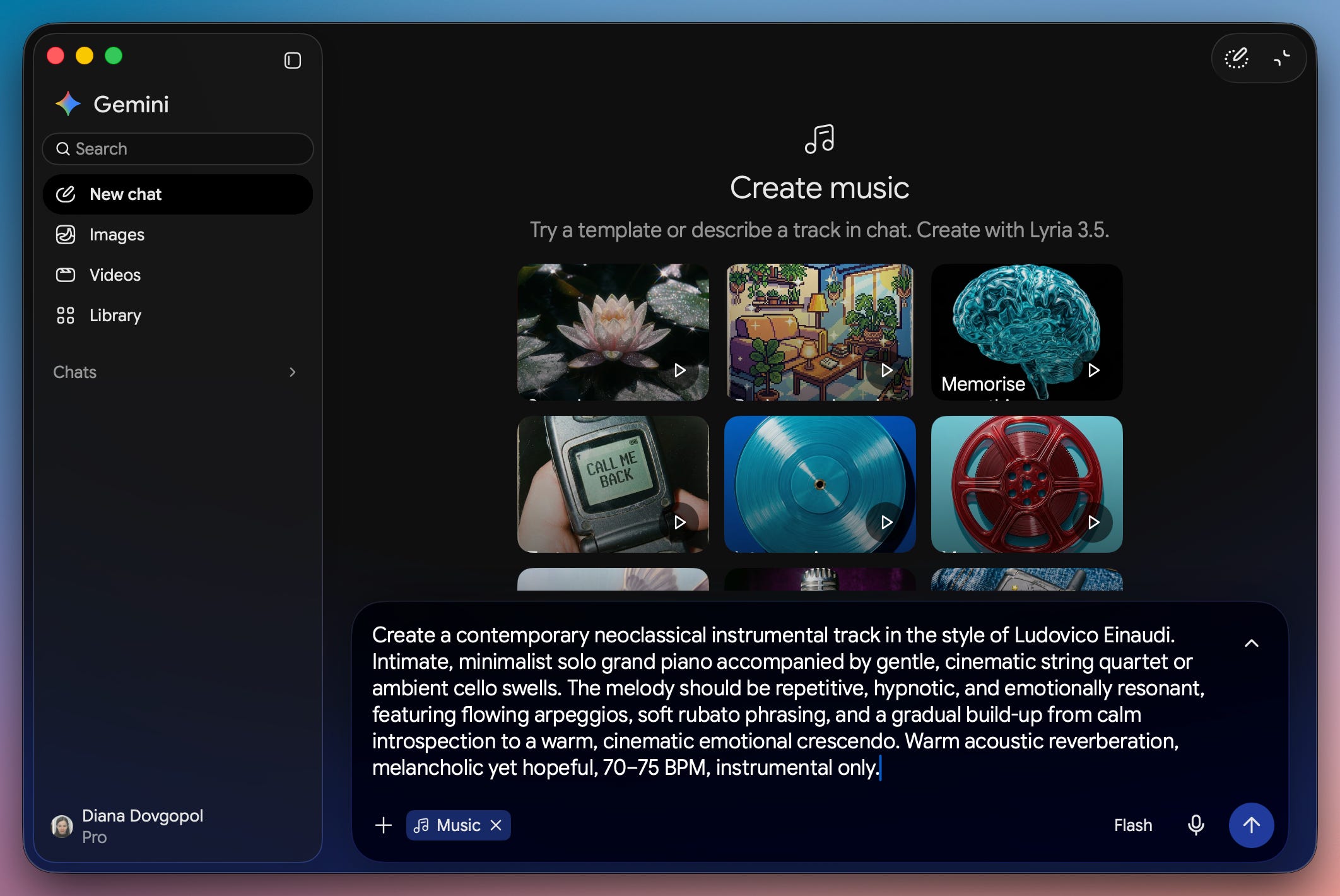
And here’s the track it made:
4. Gemini watches your videos
You can’t upload a video to Claude. Cowork can cut a video into still images and read those, but it sees the frames it picked, not the video.
Gemini watches your whole video, and that lets it do things most other tools still can’t:
Upload a recording of yourself doing an exercise and ask what your form gets wrong.
Upload a competitor’s video ad and ask how its first seconds hold attention.
Film yourself fixing something and ask for a written step-by-step guide from the footage.
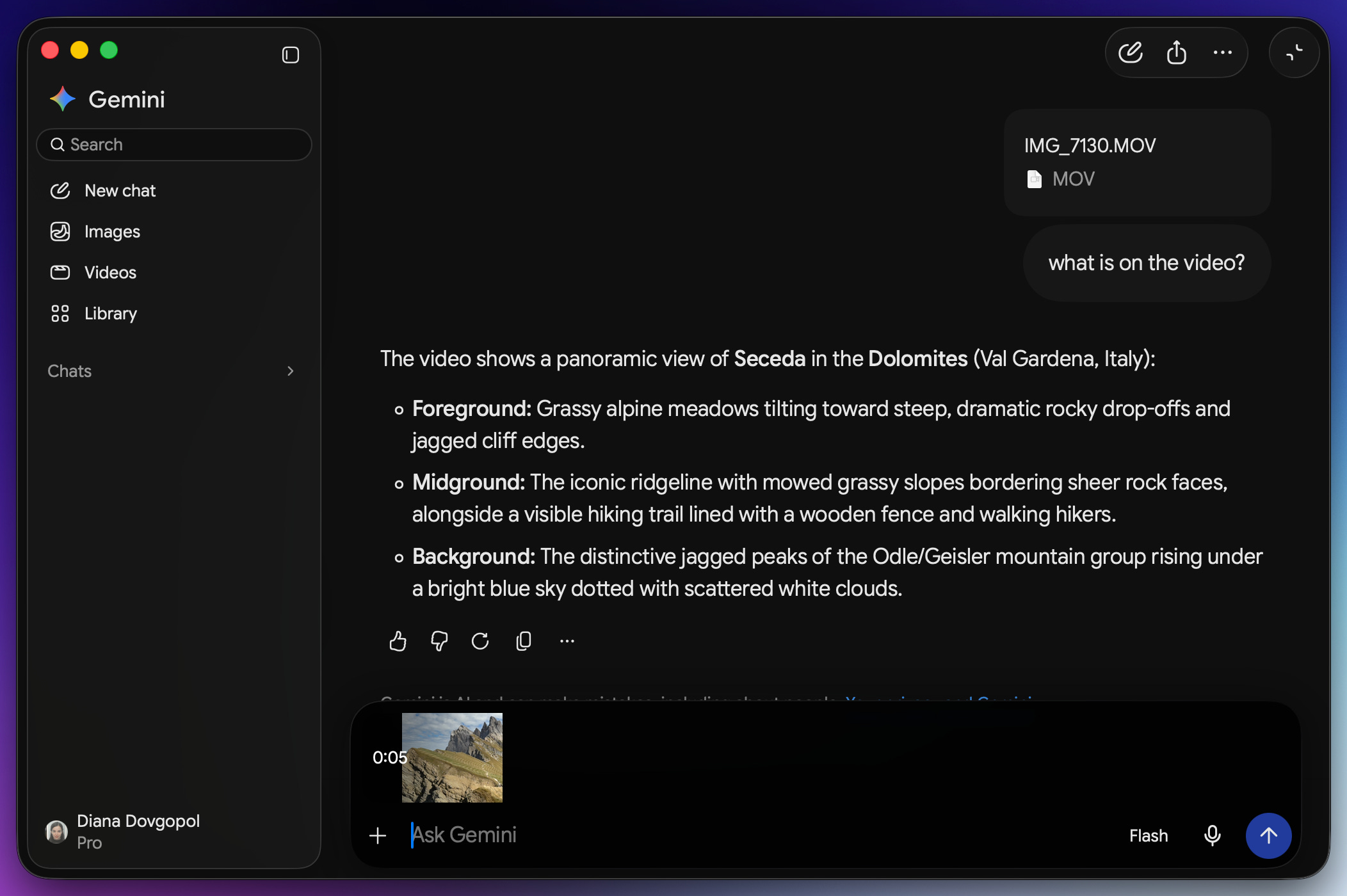
You can upload up to 5 minutes of video in total on the free plan, and up to an hour on the paid plans, with files up to 2 GB.
5. Gemini Notebook (formerly NotebookLM)
A “notebook” is a set of your own sources: documents, links, PDFs, anything you load. Gemini answers only from those sources and cites every claim.
That’s the point of it. A normal chat can mix your document with something it read online. A notebook only uses what you gave it.
You can also add notebooks as a source in a Gemini chat, and ask across two notebooks at once.
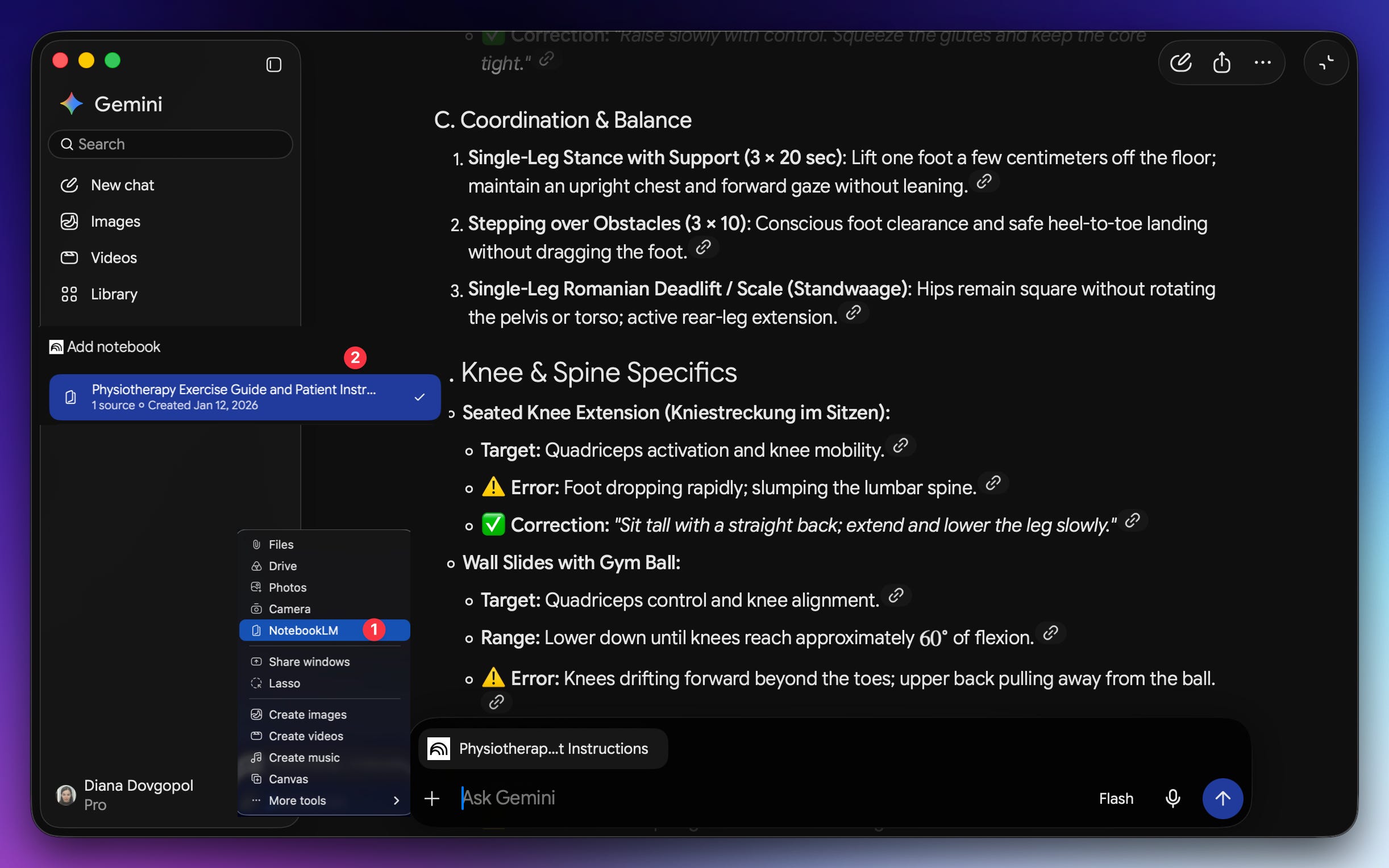
Try this: load everything for one project (contracts, briefs, client emails), then ask a question only your own files can answer, like “What payment terms did I already agree to here?” It points at the line instead of guessing.
→ Full guide: NotebookLM
You can also connect your notebooks to Claude, so Claude builds things from what’s in them. I’ll show you how later in this guide.
How I connected Claude to Gemini
Why not switch to Gemini, then? Because for writing that has to sound like me, building AI systems and automating work, Claude is still better.
So Claude stays where I work, and Gemini does what Claude can’t.
The rest of this guide is for paid subscribers. It’s the exact setup I use every week, with every prompt I paste, so you can copy it instead of building it from scratch.
Below the line:
Claude + Nano Banana: I used to make my images in the Gemini app, one at a time, waiting for each and asking again for every change. Now Claude reads my draft, picks the cover style that fits, and makes four at once. Plus the trick that keeps your face looking like you in the AI images.
Claude + Gemini’s eyes: Claude can’t watch a video, but Gemini can. Drop recordings in a folder, and Claude sends each one to Gemini and turns what comes back into notes, a step-by-step guide, or a list of what to fix.
Claude + NotebookLM: Claude reads your notebooks and turns what’s in them into reports, dashboards and small apps.
Past this line, the full setup is waiting:
There are two ways to connect Claude to Gemini, and this guide shows you both:
The API (reliable, costs a little): Google’s official way in. It takes ten minutes to set up, and you pay per use: about 7 cents an image, and under a cent for a short video. Use cases 1 and 2 below take this path: images and videos.
Unofficial tools (free, a bit less reliable): tools that sign in to Gemini as you and use the Gemini plan you already pay for, so there’s nothing extra to pay. The catch is that Google doesn’t support them, and they can break when Google changes its app. The free path below lists the tools for it, from notebooks to images.
If you’d rather pay a few cents for something that keeps working, start with the API. If you already pay for Claude and Gemini and don’t want a third bill, the free path is for you.
Get your Gemini API key
For Claude to use Gemini (Nano Banana for images, Flash for videos), it needs an API key: the back door apps use to talk to Google’s models. Your Gemini subscription doesn’t cover it. That plan is for the app, and the key is a separate product with its own billing.
The key comes from Google AI Studio:
Go to aistudio.google.com and sign in with your Google account.
Click API Keys, then Create API key.
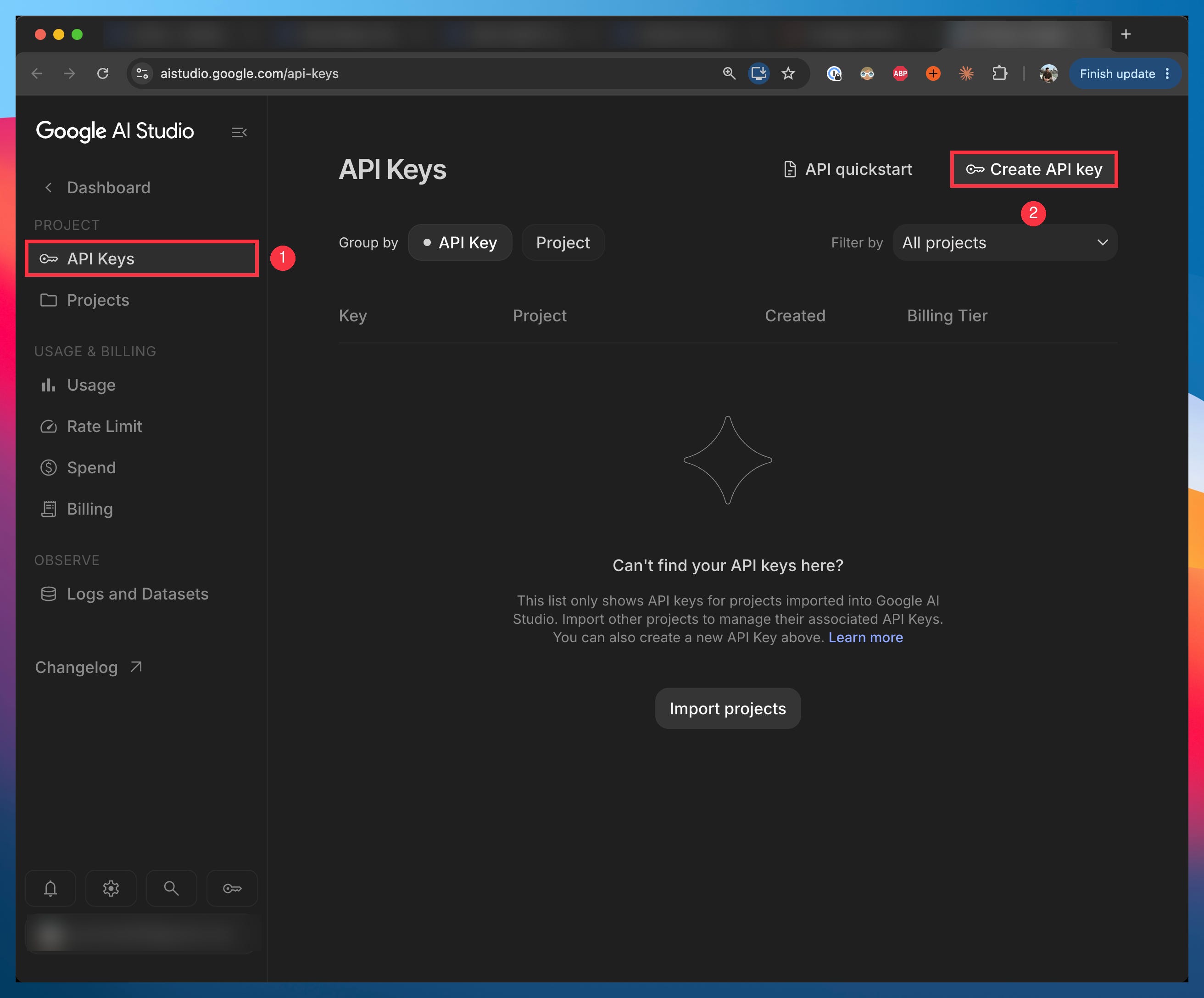
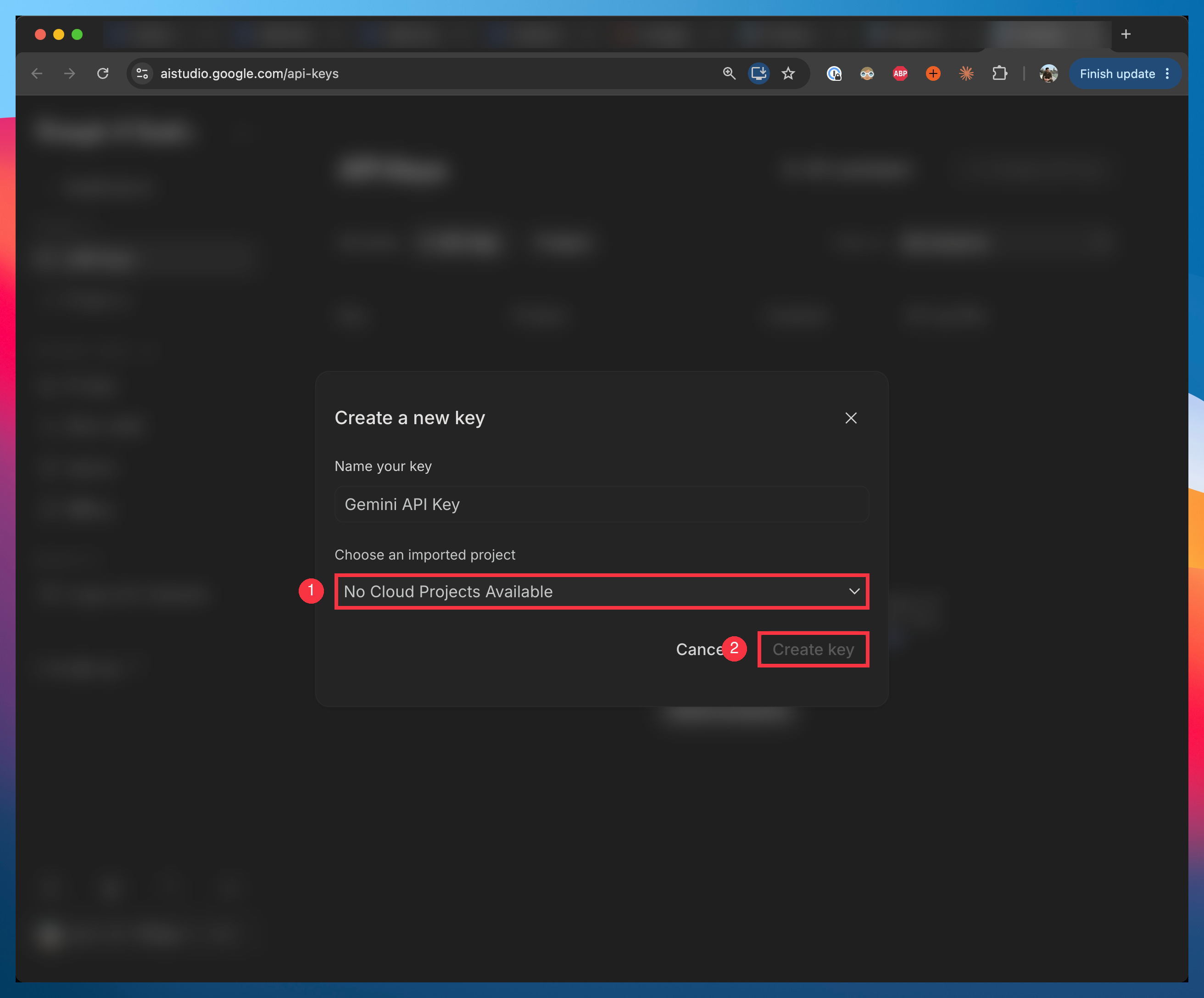
Name the key and choose a project. On a new account the list says “No Cloud Projects Available”: click Projects in the sidebar, create one, then come back.
Click Create key and copy the key.
Click Billing in the sidebar, then Set up billing. Image models need it.
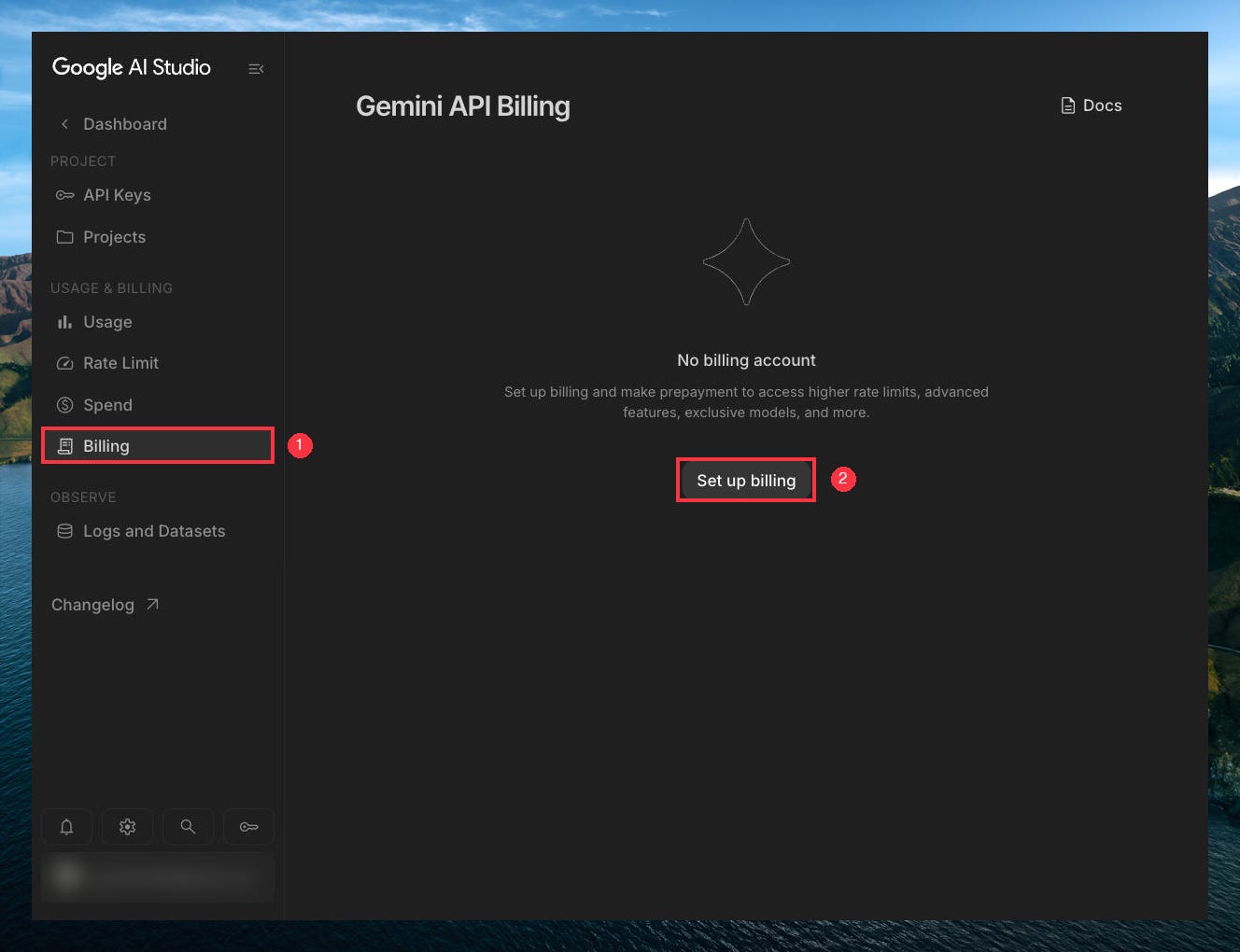
Google asks you to add credit before you start, $5 at least. Your images are paid from that credit, and when it runs out, image generation stops until you add more. So the credit is also your spending limit.
Add $5 to $10 and leave auto-reload off. At about 7 cents an image, $10 is about 140 images.
Now keep the key somewhere safe:
Create a folder called ai-images
Inside it, create a plain-text file called gemini-key.txt and paste the key as its only line
Never paste the key into a chat. Claude reads it from the file.
Use case 1: images with Nano Banana
One prompt, four images to choose from
Four options at once means one wait instead of four, and you pick the best one instead of asking again until you get it.
Here’s how to do it in Cowork:
Open the Claude desktop app and go to Cowork.
Choose the ai-images folder.
Paste this prompt:
In this folder, read my Gemini API key from gemini-key.txt and never show it on screen. Ask the gemini-3.1-flash-image model for 4 images at once, in 16:9, from this prompt: “A minimalist glass serum bottle on a wet marble surface in a sunlit bathroom, soft morning light, close-up, realistic photo.” Save them as a.jpg, b.jpg, c.jpg and d.jpg in a folder named output, then tell me what they cost.
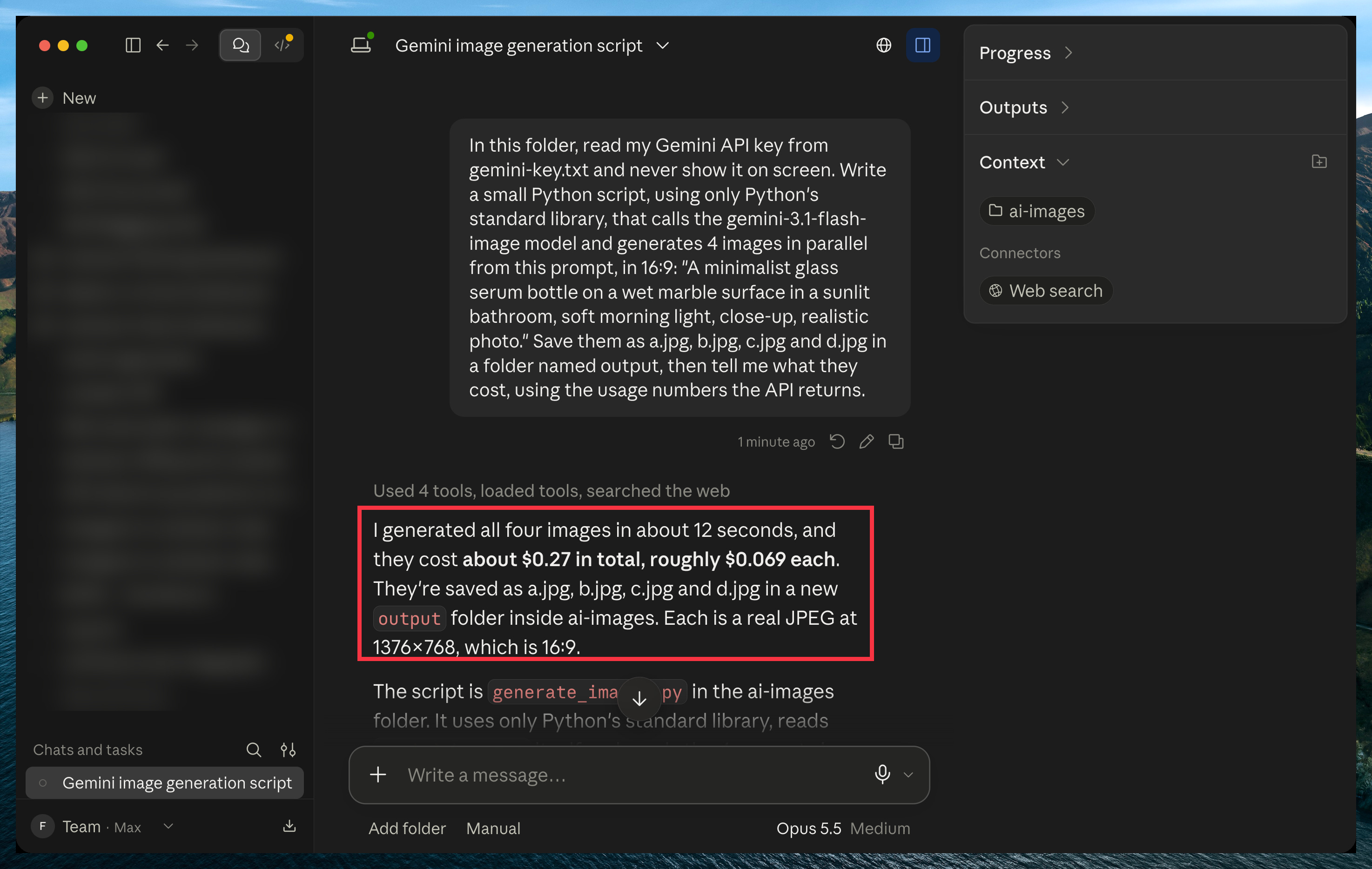
Claude writes a small program, runs it, and tells you what it cost, using Google’s own numbers. My four images cost 27 cents.

In Claude Code, it’s the same. Open the ai-images folder in the Code tab and paste the same prompt.
How I use Claude + Nano Banana
So far, the prompt was a generic bottle. The real win comes when you plug Gemini into the work you already do with Claude.
Mine is writing. When I finish a draft, Claude reads it, picks the cover style that fits it best, writes four different ideas in that style, and asks Nano Banana for all four at once. I don’t think about the cover anymore. I only pick one.

The styles are what make it work. My covers come in a few families: the complete-guide cover, an everyday object printed with the idea, an orange editorial illustration, and me in the scene.

I made the first covers of each family in the Gemini app (back then I didn’t know about this method), and it took a lot of tries to get each one right. Once I had a few I liked, I never had to start from zero again. They became the examples, and Claude sends them with every request, so every new cover looks like it belongs to its family.
Here’s how you can use the same idea in your own work:
Presentations: Claude reads your slide notes and makes one image per slide, all with the same look.
Product listings: Claude writes the description and makes product shots from one real photo.
Courses and workshops: one illustration per lesson, in one style from start to finish.
The trick is the same as mine: save a few examples of each style you like, and have Claude send them with every request.
Once you have a few images you like, attach three of them to a Cowork chat in your ai-images folder and paste this:
I’m attaching three example images for a style called [style name]. Save them in a styles/[style name] folder here, and write a short note next to them that describes the style: the colors, the light, how the main subject is drawn, and the image size. Then turn this into a skill called [style name]: whenever I ask for [style name] images, read the note, write four different ideas for what I’m working on, and ask the gemini-3.1-flash-image model for one image per idea, using my key from gemini-key.txt and sending the three example images with every request. Save the images in output and tell me what they cost.
After that, all you ask is: “Make four [style name] images for this draft.”
If your style has your face in it, the next part is for you.
Keep your face looking like you
This is where I lost a whole day.
I gave Gemini a photo of me as the sample. Sometimes the image it made looked like me. Sometimes it didn’t.
That’s because the model copies your face from the angle and distance in your photo. It doesn’t know what you look like from any other angle, so it invents it.
So when you ask for an image with your face in it, ask for the same head angle your sample photo has. Ask for a different angle, and you’ll get a face that isn’t quite yours. Everything else can change: the place, your hands, your posture, what floats next to you.
Here are four of mine, all with the head angle of my sample photo:

If you want a new angle, like you smiling at the camera, add a real photo of you at that angle first.
Here’s the sentence I add to every prompt with my face in it:
A real photograph of the person in the photo, shot with a 50mm lens. Their head is held exactly as in the photo: [upright], turned [slightly to the right] of the frame, eyes [calmly looking past the camera], mouth [closed]. They are seated close to the camera. Only the place, their hands and the props change.
The brackets show what my photo has. Replace them with what yours shows.
Use case 2: let Gemini watch your videos
Claude can’t watch a video. But it can hand one to Gemini, with the same key you already made.
You drop recordings in a folder. Claude sends each one to Gemini, Gemini watches it, and Claude turns what comes back into what you need.
Here’s what you can drop in:
A recorded meeting: the decisions, and who does what next.
A software demo or webinar: the steps it shows, written as a checklist you can follow.
A competitor’s video ad: how its first seconds hold attention.
Your own talk or reel: where you lose people, and what to cut.
Here’s how to do it:
Inside ai-images, create a folder called videos and drop one video in it.
Open Cowork and choose the ai-images folder.
Paste this prompt, and fill in the brackets:
In this folder, read my Gemini API key from gemini-key.txt and never show it on screen. Send each video in the videos folder to the gemini-3.8-flash model and ask: “Watch this video. [What you want from it: a summary, the steps it shows, what to fix]. Give the timestamp for each point.” Save each answer as a text file next to its video, then tell me what each one cost.
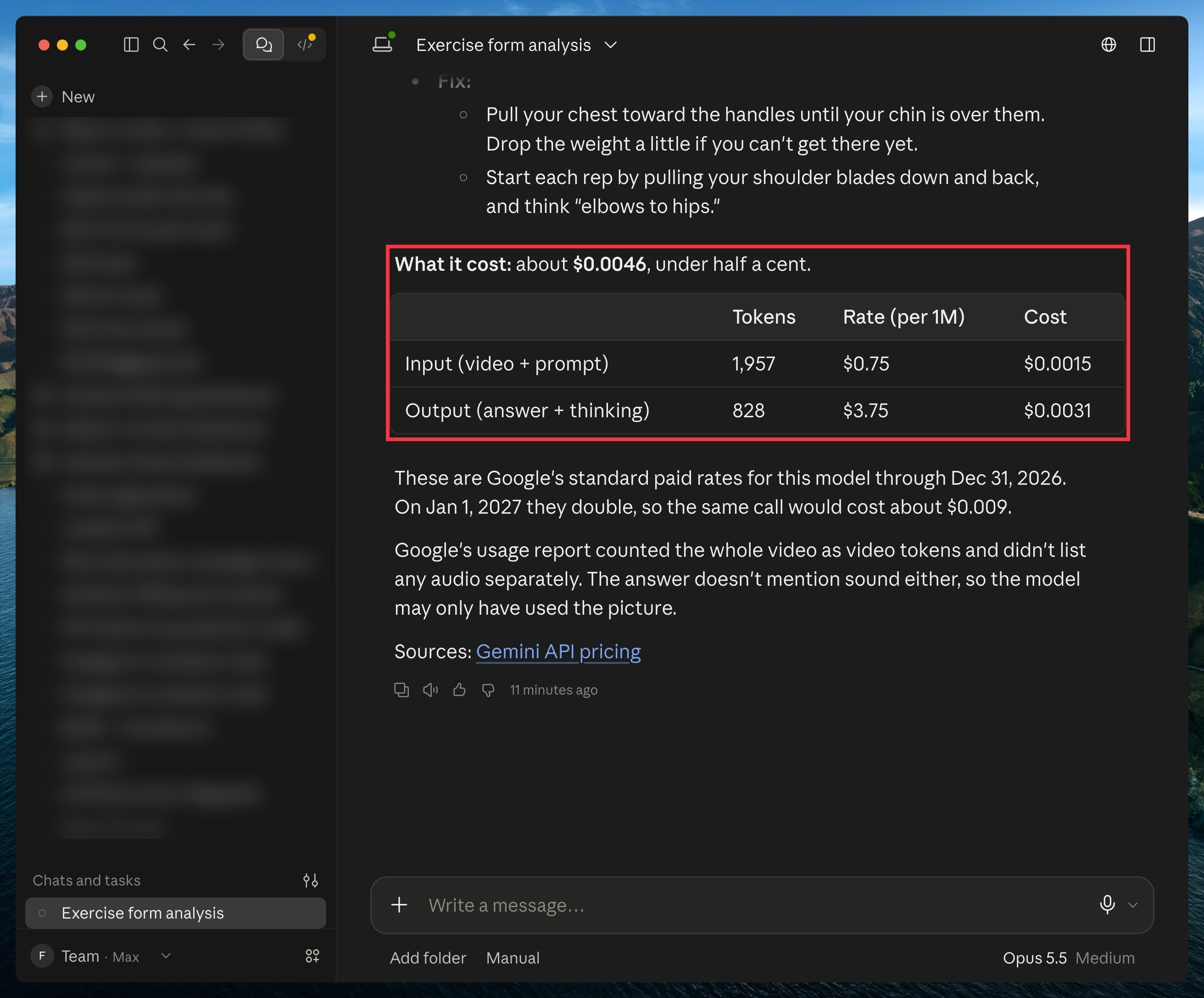
I tested it with a 21-second clip of my weighted pull-ups. Gemini named the exercise, then went through the set with timestamps.
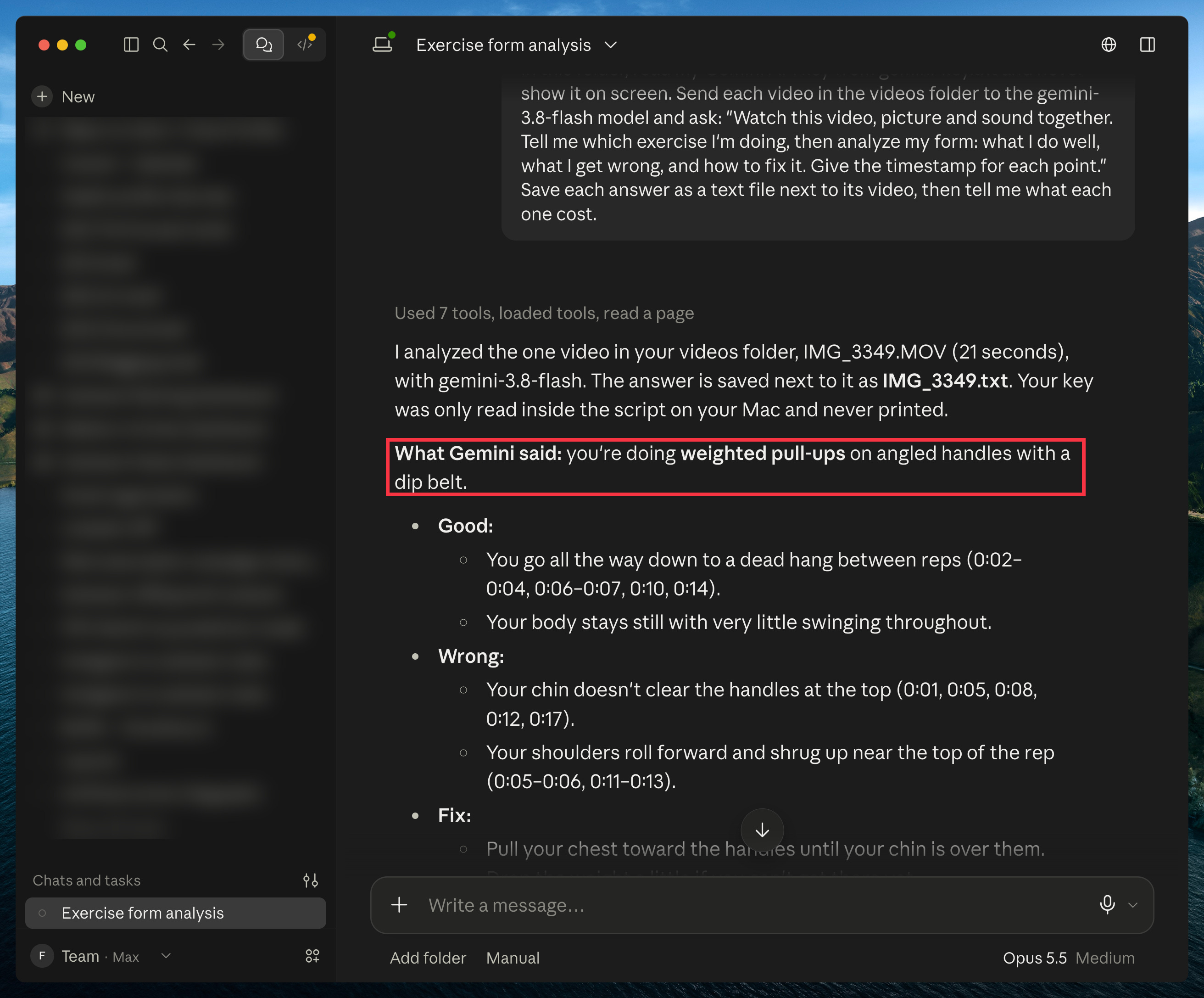
It cost under half a cent. Reading a video costs much less than creating an image.
The free path: connect Claude to Gemini without the API
Everything above goes through the API. The free path uses tools other people built that sign in to Gemini as you, so they run on the Gemini plan you already pay for.
Here are the ones worth knowing:
notebooklm-py: connects Claude to your Gemini notebooks. Claude reads them and turns what’s in them into reports, dashboards and small apps.
Gemini-API: gives Claude the Gemini app itself: chat, Nano Banana images and edits, and file uploads. It’s the most used tool of its kind, and you can ask Claude to set it up for you.
None of them is official. They can break when Google changes its app, and they sign in with your Google account.
If you want one of them step by step, I went deep on the notebooks one, with three use cases: Claude + NotebookLM (or the no-terminal version for Cowork).
One more thing
Your Claude skills work in Gemini too. Gemini skills use the same file as Claude skills (a SKILL.md file), so a skill you made or downloaded for Claude carries over.
If you don’t have any yet, I tested 100 Claude skills and picked the best ones.
Here’s how to add one to Gemini:
Download the skill (a .zip or SKILL.md file).
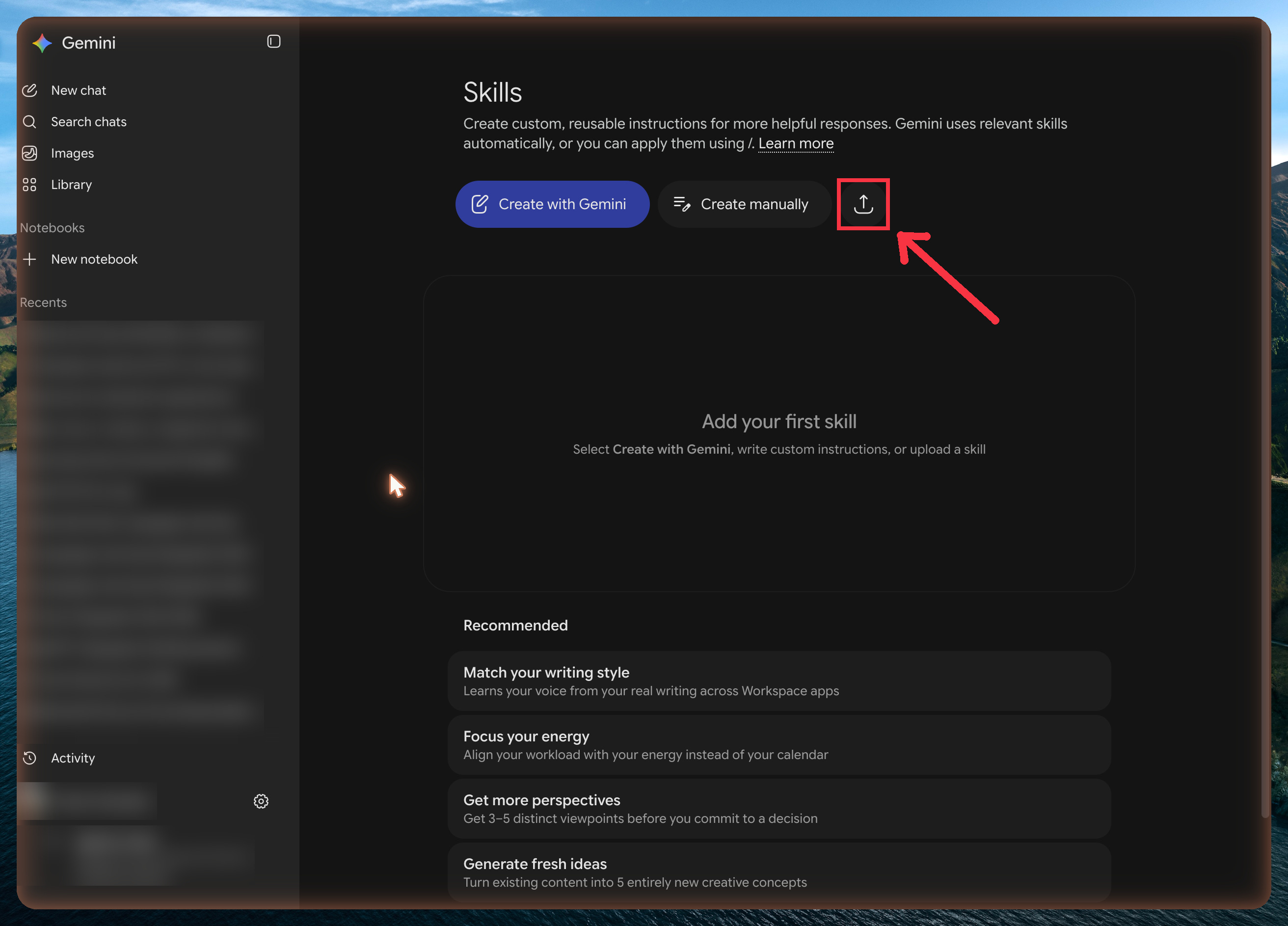
Open Settings (the gear at the bottom left) → Skills.
Click the upload icon next to “Create manually”.
Pick your file.
If you have any questions, let me know in the comments. I’ll be happy to help.
Join my newsletter with 80K+ people to master AI in 2026
Very informative, Thanks!